• Welcome to Photrio!
    Registration is fast and free. Join today to unlock search, see fewer ads, and access all forum features.
    Click here to sign up

Equal Energy vs. Wedge Spectrogram

Tree Farm

H
Tree Farm

  • 0
  • 0
  • 27
A long time ago...

A
A long time ago...

  • 0
  • 0
  • 72

Forum statistics

Threads
201,210
Messages
2,820,482
Members
100,589
Latest member
rando
Recent bookmarks
1

philpem

Member
Allowing Ads
Joined
Jun 7, 2010
Messages
35
Location
Leeds, UK
Format
35mm
Hi guys,

A few of you may remember my thread a couple of weeks ago about homebrewing a film processor... well, I've sidelined onto another project. A printer. Specifically, one that uses a laser to print onto photo paper, which is then developed in the normal way.

I know, I'm mad. :D

Anyway, I obviously need a source of photo paper. I'm leaning towards Ilford Multigrade IV because it's dead easy for me to get through work, and is fairly inexpensive. I've also been looking at Ilfospeed, but I'd have to order that (probably through Silverprint).

What I would like to know is -- what the peak sensitivity of the paper is (i.e. how much light of a certain wavelength is required to fog it to black), what that wavelength is, and how sensitive it is (relatively) at 405nm (the output wavelength of my laser).

For Ilfospeed this is fairly easy -- the wedge spectrogram would seem to imply that while the response peak is closer to green, the response at 405nm is close to the mean.

For MGIV, the only data presented is an Equal Energy chart with three curves plotted: 0.5, 1.0 and 1.5. X axis is wavelength, and Y appears to be relative response. What does this represent, and how does it compare to a wedge spectrogram?
Why the three different curves -- AIUI the spec sheet states that the data is given based on unfiltered light (i.e. no grading filters) so surely the response would be the same for all three tests?

I know I'm missing something here, but I'm not sure what... :confused:

Thanks,
Phil.
 

MattKing

Moderator
Moderator
Allowing Ads
Joined
Apr 24, 2005
Messages
54,717
Location
Delta, BC Canada
Format
Medium Format
I'd ask Ilford :smile:.

By the way, if you had included a reference to Ilford in the title to this thread, you might have received an answer from Ilford before you even asked them.
 

Kirk Keyes

Member
Allowing Ads
Joined
Jun 17, 2004
Messages
3,234
Location
Portland, OR
Format
4x5 Format
Looking at this:
http://www.ilfordphoto.com/Webfiles/20061301947381116.pdf
Ilfospeed RC seems to be pretty flat in response from 400 to 450 nm. I'd call that indigo to blue in response. So your 405 nm laser is right in there for maximizing spectral sensitivity.

The Equal Energy graph for MGIV RC:
http://www.ilfordphoto.com/Webfiles/2006130200232336.pdf
shows a similar situation as the Ilfospeed RC except it has extended sensitivity into the green, for the multigrade function of the paper. So maximum response is from 400-425 (indigo) and then it drops a bit through blue and then is nearly as responsive at 520-520 (green) and then looses response again.

My understanding is that the 3 "different" curves are the response of the paper at a given density and plotted against the "relative log sensitivity", which should be the amount of light exposure given to the paper.

So the lines are the amount of exposure needed to made a density of 0.5, 1.0, and 1.5 in the paper.

As to how much exposure at a given wavelength is needed for maximum black, it's impossible to say from the graphs given as the Ilfospeed RC plot gives no units for exposure, and while the MGIVRC does have "units", it's listed as "relative response" which does not help you...
 

Photo Engineer

Subscriber
Allowing Ads
Joined
Apr 19, 2005
Messages
29,018
Location
Rochester, NY
Format
Multi Format
If you look at the spectrogram of the Ilfospeed and wish to compare it to the MGIV, imagine that the MGIV has two curves like the Ilfospeed, one in the blue region and one in the near green region. The two curves overlap.

PE
 

Kirk Keyes

Member
Allowing Ads
Joined
Jun 17, 2004
Messages
3,234
Location
Portland, OR
Format
4x5 Format
Multigrade??? Do you have a blue laser also?

405 is close enough to a 'blue' laser. What he needs is a green laser to go with it to take advantage of Mulitgrade paper. Something from 500-520 nm would be fine.
 

Photo Engineer

Subscriber
Allowing Ads
Joined
Apr 19, 2005
Messages
29,018
Location
Rochester, NY
Format
Multi Format
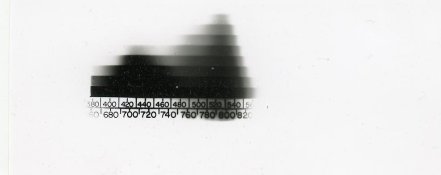
Ilford MGIV Spectrogram

Ok, I did this in my own lab with a spectrosensitometer.

2" exposure, Dektol 1:3, stop, fix and wash.

PE
 

Attachments

  • Ilford MGIV spectrogram.jpg
    Ilford MGIV spectrogram.jpg
    31.7 KB · Views: 155

Mustafa Umut Sarac

Member
Allowing Ads
Joined
Oct 29, 2006
Messages
4,866
Location
İstanbul
Format
35mm
Ron ,

May be you can think to inkjet 6 different developers on to the laser printed paper.

You can expose a paper chemically with 6 different chemicals also.

Your developers would be monobath and stop printing time difference.

Millions of variables could be added to photography also.

And you can print plastic transparent wet uv polymer droplets on to paper to add aberration

Mustafa Umut Sarac

Istanbul
 

Photo Engineer

Subscriber
Allowing Ads
Joined
Apr 19, 2005
Messages
29,018
Location
Rochester, NY
Format
Multi Format
Mustafa;

I understand, but to quote Friedman in "History of Color Photography"...

"When two colors are mixed together, the colors being in the form of light, a third color results. The eye cannot distinguish in the third color either of the originals. In this respect, the eye differs from all physical color analyzing apparatus, in which the light is dispersed into spectra."

So, six colors or not, the eye and analog B&W and color photography remain tricolor. But, I see your point and my color printer uses 6 inks!

PE
 
OP
OP
philpem

philpem

Member
Allowing Ads
Joined
Jun 7, 2010
Messages
35
Location
Leeds, UK
Format
35mm
I'd ask Ilford :smile:.

By the way, if you had included a reference to Ilford in the title to this thread, you might have received an answer from Ilford before you even asked them.

I contacted Ilford through the contact form on their website. No response :sad:
 
OP
OP
philpem

philpem

Member
Allowing Ads
Joined
Jun 7, 2010
Messages
35
Location
Leeds, UK
Format
35mm
405 is close enough to a 'blue' laser. What he needs is a green laser to go with it to take advantage of Mulitgrade paper. Something from 500-520 nm would be fine.

To be honest, I can't see the point in doing that -- all the contrast enhancement should be easy to do in software using a lookup table or "S-curve" contrast enhancement formula.

The additional effort would be monstrous -- you'd need two lasers (the 405 and the 500), a beam combiner, collimation and beam-shaping optics for both lasers... Frankly, I don't see the point. I really don't want to go down the route of building an entire Fuji Frontier clone; RA4 is nasty. I spend most of my time at work trying to get CP48 and CN16S stains off the machinery, I don't want to do it at home as well. At least Ilford Multigrade, Ilfostop (with indicator) and Rapid Fix are relatively clean to use... until you leave some in the threads of the "childproof" cap and it crystallises, thus sealing the cap quite firmly shut...
 

Ray Rogers

Member
Allowing Ads
Joined
Aug 27, 2005
Messages
1,543
Location
Earth
Format
Multi Format
philpem,

I would try to keep things simple and go with plain (single grade) paper.
OTOH, you may - depending upon your technical abilities and how professional you want to go...
already be walking down the path of over kill.

What I mean by this is that unless you are intending to take advantage of the multi-grade nature of the paper,
you may not really need to worry about the laser wavelength...

I have no expertise in this area, but I do know that it is pretty easy to expose b/w paper with laser light...
even it the laser wavelength falls outside of the papers sensitivity.
I don't have anything else to add to this except
before you think too much about it, just try it with what you have at hand.

I don't know what kind of laser (power rating) your are thinking of using...
but a "real" laser can really knock the socks off of photographic paper...
even a suposedly color blind one!

Ray
 

jp498

Member
Allowing Ads
Joined
Oct 5, 2009
Messages
1,525
Location
Owls Head ME
Format
Multi Format
While it appears a bunch of wavelengths will work, I would suggest picking a shorter wavelength (for more precise imaging) and using it as long as it falls within the sensitivity range. The fomapan 311 is also a good paper that is cheaper than the ilford mgiv if you have to pay for it.

Back in the early 90's I worked at a magazine and a newspaper. We used to put the final output straight from computer to film. We proofed it with a laser printer, then sent it to the film printer, I think made by linotype. Out of this came processed negatives of the pages the print shop would use. Something like this is something you'd want to study for practical inspiration of the mechanics. Of course these machines used halftones and were not continuous tone. Another system to study is dye sub printers, which are continuous tone, at least my little Canon selphy is. You just want the energy as light instead of heat going onto the photo paper instead of the transfer ribbon.
 

nworth

Member
Allowing Ads
Joined
Aug 27, 2005
Messages
2,228
Location
Los Alamos,
Format
Multi Format
Since your laser is monochromatic, a simple step wedge should give you the exposure information you need. I was wondering if you might be using some sort of scanning and feedback mechanism to control contrast. That was done some years ago with a line of enlargers that used a flying spot CRT as a source of light, and I think it is done with some of the newer laser photographic printers.
 

ic-racer

Member
Joined
Feb 25, 2007
Messages
16,693
Location
USA
Format
Multi Format
Oh, I see, you are doing contrast control in the pre-production.
 
OP
OP
philpem

philpem

Member
Allowing Ads
Joined
Jun 7, 2010
Messages
35
Location
Leeds, UK
Format
35mm
I would try to keep things simple and go with plain (single grade) paper.

Indeed, it's just that Multigrade IV is much easier to get hold of -- I can order it through work at "cost price". Ilfospeed I'd have to order through someone like Silverprint and would thus cost me a fair bit more.

My plan was to correct for density using a reflective densitometer -- expose the paper to "X" amount of light (the scanner timing is fixed, but the laser power can be varied) and measure the result. Once you know what Dmin and Dmax are and what the minimum amount of light required to get Dmax is, you do another set of patches (say 32 or 64) which cover the range from Dmin_pow to Dmax_pow. Lastly, you take the results of those 32 or 64 patches, plot them and find a curve fit that matches. Once you have the curve, you generate a lookup table (LUT) that converts an 8-bit greyscale value into a laser power setting.

Then printing an image is a "simple" case of reading the PNG/JPEG file, converting to greyscale, then applying the LUT.

I have no expertise in this area, but I do know that it is pretty easy to expose b/w paper with laser light...
even it the laser wavelength falls outside of the papers sensitivity.


I don't have anything else to add to this except
before you think too much about it, just try it with what you have at hand.
I don't have anything to hand -- that's the problem. I don't want to go buying a box of photo paper just to find that it's not suitable for what I want to do.

I don't know what kind of laser (power rating) your are thinking of using...
Either a Sony KES-400A (5mW 405nm) or a PHR-803T (which can supposedly go to 100mW for short periods). I'll probably be running them at around 5mW to start with, increasing if necessary.

They don't look very bright, but that's mainly because they're sitting right on the edge of the visual spectrum -- my Canon A710iS digi-compact picks them up REALLY well. Laser safety goggles are most definitely recommended.

The fomapan 311 is also a good paper that is cheaper than the ilford mgiv if you have to pay for it.

It's probably not much cheaper if you:
A) get a staff discount on MG-IV
B) have to pay postage on Foma 311

Back in the early 90's I worked at a magazine and a newspaper. We used to put the final output straight from computer to film. We proofed it with a laser printer, then sent it to the film printer, I think made by linotype.

There were similar machines made for photoplotting circuit board layouts, made by Gerber if memory serves. To this day, photoplotter data files for PCBs are still called "Gerber files".

Out of this came processed negatives of the pages the print shop would use. Something like this is something you'd want to study for practical inspiration of the mechanics. Of course these machines used halftones and were not continuous tone.

Same as the HP LaserJet II I'm basing this off of, then. The only real difference between continuous and halftone is that with one you're turning the laser on and off (and thus only need one bit per pixel) and with the other you're varying it continuously and need much more image data. Plus there's no point doing a continuous-tone image when your negatives and printing presses (I suspect you were using offset printing or a similar technology) can only do "dot here" or "no dot here".

Another system to study is dye sub printers, which are continuous tone, at least my little Canon selphy is. You just want the energy as light instead of heat going onto the photo paper instead of the transfer ribbon.

AIUI, Dyesub printers generally use Pulse Width Modulation (turn the heater on for X% of the time then leave it off for the rest of the time that line is visible). It's harder to do that with optical systems because of the speed at which they run :-/

I could always do multiple exposures, though -- though I doubt the increase in dynamic range would be worth it, especially with a decently powerful laser.

Since your laser is monochromatic, a simple step wedge should give you the exposure information you need.

Point taken. I've got a Stouffer 21-step wedge sitting in the cupboard (I use it for setting exposure for circuit board photoresist coatings), which should do nicely for that. I'll need to rig up some form of paper feeder and get the laser scanner going first, though :-/

I was wondering if you might be using some sort of scanning and feedback mechanism to control contrast. That was done some years ago with a line of enlargers that used a flying spot CRT as a source of light, and I think it is done with some of the newer laser photographic printers.

Well, I'm doing something similar to the way the Fuji "Condition Check" works. You print a greyscale (and in the case of the Frontier, a CMY too) pattern, then measure it on a densitometer. You find Dmin and Dmax, and figure out how a linear 'laser power' equates to the actual print density. Add any contrast enhancement you like, and salt and pepper to taste :smile:

Thanks,
Phil.
 

Kirk Keyes

Member
Allowing Ads
Joined
Jun 17, 2004
Messages
3,234
Location
Portland, OR
Format
4x5 Format
I don't have anything to hand -- that's the problem. I don't want to go buying a box of photo paper just to find that it's not suitable for what I want to do.

All photographic B&W papers are going to respond to light in the 375 to 450 nm range. As long as your laser is in that range, the paper will respond.
 

Kirk Keyes

Member
Allowing Ads
Joined
Jun 17, 2004
Messages
3,234
Location
Portland, OR
Format
4x5 Format
Send us a photo of the machine when you get it running. It would be cool to see.
 
OP
OP
philpem

philpem

Member
Allowing Ads
Joined
Jun 7, 2010
Messages
35
Location
Leeds, UK
Format
35mm
Send us a photo of the machine when you get it running. It would be cool to see.

I'll be sure to do that :smile:

At the moment I'm stuck in an argument with the processor board -- it won't talk to the memory chip properly. You can write something to RAM and then a couple of seconds later try and read it back, but what you get back is different to what was written. It's almost like a write-only memory (google "signetics write only memory", it's an old joke that got snuck into an old Signetics component data book) :smile:

Big problem after that is going to be the paper drive. I suspect I'll have to make up some custom paper guides for the thing... that'll be fun. But at least I'm not building the processor (yet) -- I'll be developing with trays to start with (I know where the dev trays are -- in the garage under the enlarger!) and when I get the printer working I'll see about getting a Durst Printo or similar. Or maybe modify a second-hand X-ray film processor (there seem to be a lot of them on ebay) to do prints? Hmmmm...

-Phil.
 
Photrio.com contains affiliate links to products. We may receive a commission for purchases made through these links.
To read our full affiliate disclosure statement please click Here.

PHOTRIO PARTNERS EQUALLY FUNDING OUR COMMUNITY:


Ilford ADOX Freestyle Photographic Stearman Press Weldon Color Lab Blue Moon Camera & Machine
Top Bottom