• Welcome to Photrio!
    Registration is fast and free. Join today to unlock search, see fewer ads, and access all forum features.
    Click here to sign up

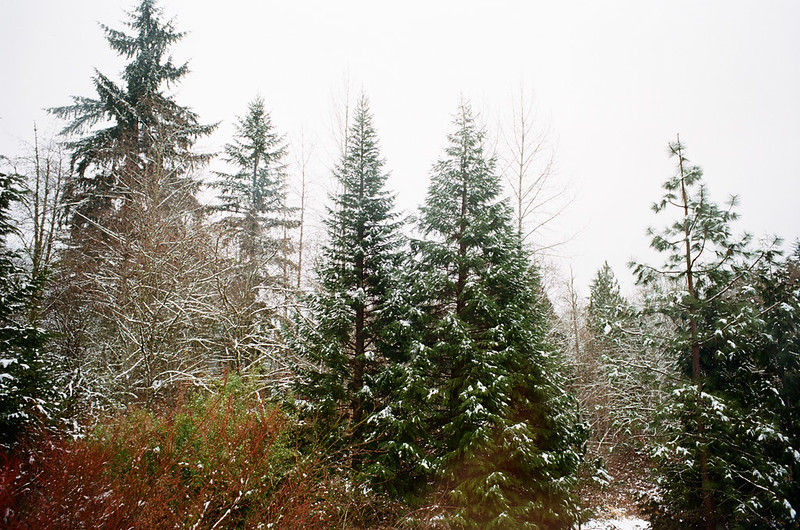
Ektar in overcast light samples please

Moment of Spin

A
Moment of Spin

  • 2
  • 0
  • 64
Bad patch

H
Bad patch

  • 1
  • 1
  • 42

Recent Classifieds

Forum statistics

Threads
203,101
Messages
2,849,858
Members
101,669
Latest member
JeremiahPeterson
Recent bookmarks
1
The scanning issues are analogous to wet printing. You've going to have trouble if you don't get the color temp balanced to begin with. And
the smaller the format, the higher the quality of scan you need to pick up the geometric changes in the curve slopes. Wrong forum to say why.
But it's a basic fact. ... and 90% of the complaints I hear about this film are due to either incorrect exposure or less than ideal scanning. But
that certainly doesn't mean it's an appropriate film for everyone or every subject. That's why we have choices.
 
And sure, you could wet print Ektar warm and fuzzy.

Not very useful if you rely on scanning, though.

My point was that scans are generally inferior to optical prints to judge films, so comments about films based on scans aren't very useful. I think that is very useful to know.
 
My point was that scans are generally inferior to optical prints to judge films, so comments about films based on scans aren't very useful. I think that is very useful to know.

Sure, this is a forum where a lot of people have access to darkrooms.

But I would say that, on the whole, most people who work with film today don't have darkrooms and therefore rely on scanning.

Scanning film has been described as something of a dark art, and it does require some practice. Colour negatives are the most difficult to get right.

But the point is that Kodak claims that Ektar is optimised for scanning. Anothet point is that many people are getting pale and bluish negatives with Ektar. I have absolutely no problem in creating good scans from B&W and colour negatives or slides.

But with Ektar, I have to spend ages on each exposure to get a fairly natural looking colour balance. That typical washed out cyan coloured sky is usually beyond repair though.

I'm not trying to question people who like Ektar but it is a fact that many people who have no problems with other colour negatives, have problems with Ektar. It is clearly related to the properties of the film, not on people botching Ektar when they know how to use every other film.
 
Image only resized. No other editing done. Ektar 100, rated at ASA 64, shot with a Nikon F2A and 28/3.5 Nikkor-H.


-J
 
I have the same experience scanning Ektar but have found that a non linear adjustment of the color curves, mainly the blue channel, will fix most of the color issues. I would guess this is a property of the film. I don't pretend to know what causes it but i do know how to color balance it and make it look good.

Second post in this thread on dpug shows what I do to fix the issue. http://www.dpug.org/forums/f6/can-anyone-tell-me-how-scan-pro-400h-ektar-successfully-3438/

Also, I agree completely with your view on scanning. To me it is necessarily an integral part of shooting film now, even if you print optically. If you intend to share your images online, you must scan. I find the ban against scanning discussions and the attitude toward scanning from some here a bit arrogant and naive considering scanning is how we have to share our images. It is, after all, scanning "film". And the better our scans look on Flickr and elsewhere the more it will promote film use and bring in new users.


Sure, this is a forum where a lot of people have access to darkrooms.

But I would say that, on the whole, most people who work with film today don't have darkrooms and therefore rely on scanning.

Scanning film has been described as something of a dark art, and it does require some practice. Colour negatives are the most difficult to get right.

But the point is that Kodak claims that Ektar is optimised for scanning. Anothet point is that many people are getting pale and bluish negatives with Ektar. I have absolutely no problem in creating good scans from B&W and colour negatives or slides.

But with Ektar, I have to spend ages on each exposure to get a fairly natural looking colour balance. That typical washed out cyan coloured sky is usually beyond repair though.

I'm not trying to question people who like Ektar but it is a fact that many people who have no problems with other colour negatives, have problems with Ektar. It is clearly related to the properties of the film, not on people botching Ektar when they know how to use every other film.
 
Last edited by a moderator:
Great post, Lamar. I agree wholeheartedly :smile:

Before I wrap up here, I have one final suggestion for the OP. It may sound crazy, but I really recommend it:

Try shooting bleak landscapes with Fuji Superia. I know it is cheap but it has some benefits.

In my experience, Superia has very good saturation and contrast. It does emphasise warm colours. At the same time you will get very clear blues, greens and whites. Good for landscapes :smile: In MF the grain won't be very prominent either.

I like the way it looks and I have had positive reactions to it. I think it's because it very much looks like people imagine that film photos should look like.
 
Last edited by a moderator:
To clarify, my comments have not been about darkroom printing instead of scanning, but simply that scans are not reliable to judge films.

Lamar's advice on going to DPUG to get better scans on Ektar is good. But I don't think it should be discussed here, even though many scan, as there is plenty of help elsewhere. Scanners surely need all the help they can get since it is not good for the film world to erroneously judge a film based on bad scans as many do.

Since the OP asked about Ektar I would suggest he try it first and learn to scan it well and not be deterred by the comments of others that might have been based on bad scans.
 
Sometimes I use a scan just like a proof sheet for 120 Ektar when I get it developed. It's a minor upcharge, and is a 50K scanner. I'd want true
drum scans for anything I intended to actually print. But I don't print digital at all. And most of my work is large format anyway. But I've run
enough scanning experiments to identify exactly where the misunderstanding about all this is, and I'd say that Lamar is on the right track
defining it too. Again, however, I'd assert that this film has to be correctly color balanced at the time of the shot, or not much you can do
afterwards will salvage what the blues do. ... In this case, singing the blues can become singing the blaahs. So I am getting tired of all kinds of
web whatever comparisons of sample images. Get to first base first. Then we can talk about how to correctly print it in the darkroom.
 
My scans from my first roll of Ektar 100. Last one does show the blue tendencies. (Same blue tendencies as seen with Ektachrome-X or Ektachrome E100G.)

That's why there was Ektachrome 100X, 400X, E100SW, and E100GX, all were a bit "warmed up".
 
Also why I never used any of those "X" Ektachromes. I wanted the option when to warm and when not too. Basically, an 81A was all there
was to it.
 
Great post, Lamar. I agree wholeheartedly :smile:

Before I wrap up here, I have one final suggestion for the OP. It may sound crazy, but I really recommend it:

Try shooting bleak landscapes with Fuji Superia. I know it is cheap but it has some benefits.

In my experience, Superia has very good saturation and contrast. It does emphasise warm colours. At the same time you will get very clear blues, greens and whites. Good for landscapes :smile: In MF the grain won't be very prominent either.

I like the way it looks and I have had positive reactions to it. I think it's because it very much looks like people imagine that film photos should look like.

Thanks for suggestion - not available in 120 format to the best of my knowledge however...
 
Superia and Ektar are completely different animals. Ektar is quite a bit more accurate in an objective sense. Superia just saturates certain
hues. Which one you prefer it up to you. Ektar is worth the extra effort... but there will be some extra effort to master it.
 
Thanks for suggestion - not available in 120 format to the best of my knowledge however...

There is some Superia available in 120 format, but it appears to have been recently discontinued, so stocks are dwindling . Here are a few places that currently have it:

http://www.mathersoflancashire.co.uk/prodDetail.html?intProductID=899&intCategoryID=57

http://www.discountfilmsdirect.co.uk/acatalog/copy_of_Fuji_Superia_400_120_roll_.html

http://www.amazon.co.uk/Fujifilm-Su...d=1394010143&sr=1-1&keywords=fuji+superia+120
 
Yeah, I have no trouble buying Supra in 120 format. It's a fun film to use.

Also, I have no problem using Ektar in the right lighting conditions but it tends to look bad in the type of light and weather where I live. Rather than using a warming filter which affects all colours and gives a light that never was, I like using the mote selectively warming Supra. Portra looks good too but it has less punch.

The results are closer to what I see and capturing the light is an important part of photography, I think.
 
Those scans were done with Nikon Scan. Best way I've found to scan Ektar 100 is with SilverFast with the NegaFix profile for Ektar 100. Until that was available, I had the darnedest time getting good color in scans, whether using Nikon Scan or SilverFast.
 
Photrio.com contains affiliate links to products. We may receive a commission for purchases made through these links.
To read our full affiliate disclosure statement please click Here.

PHOTRIO PARTNERS EQUALLY FUNDING OUR COMMUNITY:


Ilford ADOX Freestyle Photographic Stearman Press Weldon Color Lab Blue Moon Camera & Machine
Top Bottom