

• Welcome to Photrio!
    Registration is fast and free. Join today to unlock search, see fewer ads, and access all forum features.
    Click here to sign up

Dying developer causing issues with only some film stocks?

Tablao Flamenco

A
Tablao Flamenco

  • 0
  • 0
  • 0
Untitled

A
Untitled

  • 1
  • 2
  • 55

Forum statistics

Threads
204,325
Messages
2,867,159
Members
102,223
Latest member
jeffwiedner
Recent bookmarks
1

real_liiva

Member
Joined
Apr 2, 2023
Messages
35
Location
Riga, Latvia
Format
35mm
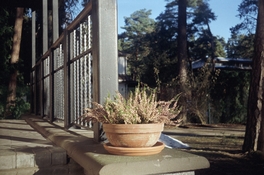
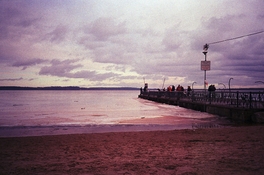
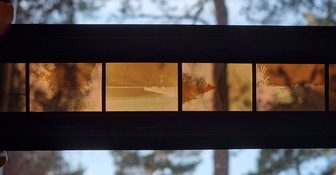
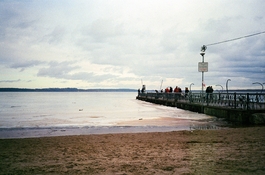
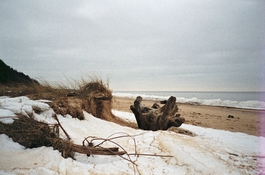
So recently i decided to use some pretty old and used cinestill c41 developer to develop a few rolls (adox color mission and ultramax). Loaded both rolls into one tank and developed them both at the same time. The color mission came out practically perfect, maybe a hair thin only but the scans on silverfast auto settings and agfa vista 400 negafix profile (i've found usually that or some other Agfa profile works best for CM200) came out fine, maybe just lacking a bit of shadow detail on a few shots. But the ultramax on the other hand, horrible pink shift and some sort of color crossover that was practically uncorrectable. Visually the negatives also looked thin but also a bit "green" (the negative images themselves, base was a good looking orange color, the film wasn't fogged or expired or anything.). Subsequently developed a test strip of a few shots on vision3 50D to test developer health and that came out somewhat good too, just an easily correctable slight warm shift which could easily be due to just the C41 cross process not old developer. Could dying developer really cause issues for only a specific film stock? Or was maybe that particular roll of ultramax wonky? All attached scans are pretty much what silverfast gave me with minimal adjustment, see their file names for which is which (although the Ultramax is obvious).
 

Attachments

  • color mission.jpg
    color mission.jpg
    1.3 MB · Views: 109
  • 50d.jpg
    50d.jpg
    909 KB · Views: 97
  • ultramax.jpg
    ultramax.jpg
    1.4 MB · Views: 100
  • ultramax_negs.jpg
    ultramax_negs.jpg
    203.9 KB · Views: 109
Your negatives look fairly normal insofar as it can be judged with the trees in the background etc. I think you're just expecting too much from the auto-color correction of your scanner/Vuescan. Scan your negatives as positive and then do the inversion + color correction manually and see what you get. I bet it'll work out just fine that way.

I see a lot of people making assumptions about the colors in their negatives based on what their scanner spits out. But there's no absolute reference when scanning color negative unless you somehow devise a profiled/calibrated workflow (which you haven't) and even then, the whole thing will be inherently pretty dodgy. If you want good color from your CN scans, you'll have to do the legwork yourself; in the end, there's no way around it. Even the 'best' auto-color correction tools (Negafix etc) produce highly varied outputs; you tell me which one is 'correct'!

There's any number of reasons why Vuescan might produce something totally outlandish once in a while and that doesn't necessarily mean your negatives or processing are to blame.

Don't believe what your scanner does. It's fiction.

PS: have you seen this: https://www.photrio.com/forum/threa...nikon-super-coolscan5000.204800/#post-2768760 Just one example of Vuescan going haywire without the actual film being at fault.
 
Your negatives look fairly normal insofar as it can be judged with the trees in the background etc. I think you're just expecting too much from the auto-color correction of your scanner/Vuescan. Scan your negatives as positive and then do the inversion + color correction manually and see what you get. I bet it'll work out just fine that way.

I see a lot of people making assumptions about the colors in their negatives based on what their scanner spits out. But there's no absolute reference when scanning color negative unless you somehow devise a profiled/calibrated workflow (which you haven't) and even then, the whole thing will be inherently pretty dodgy. If you want good color from your CN scans, you'll have to do the legwork yourself; in the end, there's no way around it. Even the 'best' auto-color correction tools (Negafix etc) produce highly varied outputs; you tell me which one is 'correct'!

There's any number of reasons why Vuescan might produce something totally outlandish once in a while and that doesn't necessarily mean your negatives or processing are to blame.

Don't believe what your scanner does. It's fiction.

PS: have you seen this: https://www.photrio.com/forum/threa...nikon-super-coolscan5000.204800/#post-2768760 Just one example of Vuescan going haywire without the actual film being at fault.

NLP can produce this result with tint cranked all the way to -40, but the image still looks "off" in some way, just looks like i've never seen ultramax look like before. Also Silverfast does fine with minimal corrections with all other ultramax negatives i have.
 

Attachments

  • Screenshot 2024-02-18 164152.jpg
    Screenshot 2024-02-18 164152.jpg
    1.3 MB · Views: 89
There's a known C-41 developer capacity (if being refused to exhaustion) difference between 200 and lower speed films and 400+. Z-131 will have an answer, but from recall it's about 20%. There's also a significant difference in replenishment rates between 200 and under and 400 and over.
 
Last edited:
Photrio.com contains affiliate links to products. We may receive a commission for purchases made through these links.
To read our full affiliate disclosure statement please click Here.

PHOTRIO PARTNERS EQUALLY FUNDING OUR COMMUNITY:


Ilford ADOX Freestyle Photographic Stearman Press Weldon Color Lab Blue Moon Camera & Machine
Top Bottom