• Welcome to Photrio!
    Registration is fast and free. Join today to unlock search, see fewer ads, and access all forum features.
    Click here to sign up

Does the Colorstar 3000 system work?

Recent Classifieds

Forum statistics

Threads
201,724
Messages
2,829,135
Members
100,915
Latest member
WyattRad
Recent bookmarks
0

losheng

Member
Allowing Ads
Joined
Apr 21, 2010
Messages
39
Format
35mm
Among the less satisfying chore in the darkroom I've found is making test strips. So I looked around and chanced upon the Colorstar 3000 system with the 600/601 probe. Does anyone has any experience with any of these automated systems that claimed to speed up the process of making test strips (or at least reduce the number of test strips to be made), or even suggesting the grade of paper to be used? I'm only interested in working with b/w prints in the darkroom, if that's of any relevance to the question.

(Ok, I know one of you would inevitably ask - "if all these automation works, why are _you_ needed in the darkroom". Let's just say even if these equipment don't need me, I would still like to take credits for the prints they made ...)
 

tlitody

Member
Allowing Ads
Joined
Apr 29, 2010
Messages
186
Format
35mm
Among the less satisfying chore in the darkroom I've found is making test strips. So I looked around and chanced upon the Colorstar 3000 system with the 600/601 probe. Does anyone has any experience with any of these automated systems that claimed to speed up the process of making test strips (or at least reduce the number of test strips to be made), or even suggesting the grade of paper to be used? I'm only interested in working with b/w prints in the darkroom, if that's of any relevance to the question.

(Ok, I know one of you would inevitably ask - "if all these automation works, why are _you_ needed in the darkroom". Let's just say even if these equipment don't need me, I would still like to take credits for the prints they made ...)

Don't know the answer. But the colourstar was very highly rated for colour printing as it made getting colour balance correct very easy. But that isn't what you are doing with B+W printing. You are aiming for contrast control so I'd suggesst there are better tools such as the following:

http://www.heilandelectronic.de/html/english/products/splitgrade_main.htm

the above unit requires a modification to your enlarger(which ever make) but will produce correct contrast and time, first time, and save you a lot of time. However "correct contrast" and "correct time" is very subjective. What it actually does is produce a correct and high quality work print from where you can tweak with burning and dodging to get to where you want to be so don't expect all your prints to magically be perfect first time. On the other hand, if all you are doing is producing quick proof prints it will do it first time.
And if your negatives are perfect in that subject lighting was perfect, then you may even get a few first time prints.

Hope you've got deep pockets...
 

pentaxuser

Member
Joined
May 9, 2005
Messages
20,327
Location
Daventry, No
Format
35mm
Frances Schultz of Hicks and Schultz fame wrote an article on the Colorstar 3000 in the Darkoom User Mag 1997 where she covers printing in colour from colour neg and transparencies and B&W. The web address is: http://www.xs4all.nl/~colors/info/franchromo.html.

The 3000 works very well for colour negs. I have never tried it for B&W but it looks quite sophisticated. I have never tried the RH designs set of analysers either but they are dedicated to B&W and have an excellent reputation.

I strongly suspect that the 3000 is a colour machine that make a good stab at B&W whereas the RH designs machine is a dedicated machine for B&W. It is also in current production unlike the Lici Colorstar and has a later development date.

If you know that colour will never be "your thing" then I think that you should research the RH Designs, the Heilandelectronic and the one produced by Nicholas Lindan as well to compare and contrast.

Lots of posts here on APUG concnerning all three types of analysers

Best of luck

pentaxuser
 

Nige

Member
Allowing Ads
Joined
Sep 8, 2002
Messages
2,327
Format
Multi Format
I use a Colorstar 2000 for B&W but I don't use it for contrast selection. I have it set so I 'spot' measure an area that I want to 'just have tone' (eg. sky, persons face) and it gets me at a good starting point. The method it uses to change the time (the big wheel that you rotate) can be a bit frustrating at times as it's highly sensitive and although 29.9secs might not be much different from 30secs, 4.9secs is different from 5secs. Sometimes it's hard to adjust to the exact one you want. No idea if that's just a trait of mine. I'v never really used it with the diffuser over the probe as the couple of times I did it seemed inconsistant but that could have been me!
 
OP
OP

losheng

Member
Allowing Ads
Joined
Apr 21, 2010
Messages
39
Format
35mm
Thank you guys for the information!

I looked at both RH Designs and the Heiland Spligrade, and both looks like the top-of-line choices for now - at least sales and support of new units are still available.

But now, I'd be happy to get a quick estimate of the initial exposure. From the descriptions, I wonder I might be able to get what I want with just a simple probe like the Ilford EM10? I figure I can just calibrate it to a mid-gray area, or the skin tone, and always use that as the starting point. The only thing I would be missing is setting the timer manually - which is not as bad as starting out testing the exposure from scratch.

For that matter, would I be able to use an incident light meter, like the Sekonic L-328 with the Reflect Light Filter, which has a more localized light reception area, to do the job?
 

Tom Kershaw

Subscriber
Allowing Ads
Joined
Jun 5, 2004
Messages
4,975
Location
Norfolk, United Kingdom
Format
Multi Format
I tend to either guess an exposure or run a test strip if I'm unsure of the [negative / paper / enlarger] combination. Filter packs for RA-4 printing can be assessed through systematic experimentation, e.g. try 0 cyan, 100 magenta, 100 yellow as a starting point if your enlarger head is calibrated across 200 units.

Tom
 

markbarendt

Member
Allowing Ads
Joined
May 18, 2008
Messages
9,422
Location
Beaverton, OR
Format
Multi Format
I recently started using the EM10 to set my black point when switching negs or changing my enlargement, it really works nice.
 

tlitody

Member
Allowing Ads
Joined
Apr 29, 2010
Messages
186
Format
35mm
em10 only works via adjusting enlarger head height and/or aperture. So if you get one, then I would suggest having a lens which has stepless aperture adjustment. But that forces you to change aperture to adjust and personally I don't think that is a good thing because usually one aperture is sharper than the rest so I usually have aperture fixed and adjust using time which the em10 can't measure or suggest.
So I don't think the em10 is a good metering system.
 

markbarendt

Member
Allowing Ads
Joined
May 18, 2008
Messages
9,422
Location
Beaverton, OR
Format
Multi Format
tlitody, you are essentially right, in that the EM10 does not provide the final exposure setting anyone may want, but having a well defined black point on my first proof is exactly where I want to be starting and the EM10 provides exactly that.

Personally, once I find the new exposure setting with my EM10, I just translate that to an equivalent exposure setting using the preferred f-stop.
 

tlitody

Member
Allowing Ads
Joined
Apr 29, 2010
Messages
186
Format
35mm
Thank you guys for the information!

I looked at both RH Designs and the Heiland Spligrade, and both looks like the top-of-line choices for now - at least sales and support of new units are still available.

But now, I'd be happy to get a quick estimate of the initial exposure. From the descriptions, I wonder I might be able to get what I want with just a simple probe like the Ilford EM10? I figure I can just calibrate it to a mid-gray area, or the skin tone, and always use that as the starting point. The only thing I would be missing is setting the timer manually - which is not as bad as starting out testing the exposure from scratch.

For that matter, would I be able to use an incident light meter, like the Sekonic L-328 with the Reflect Light Filter, which has a more localized light reception area, to do the job?

I don't think an incident meter would work very well at all. A spot meter could work but not with regular consistency.
The thing is this:
If you have nailed your film developing so that you get consistently good quality negs, then for any print size you should get work print print times which are similar. So if you are printing at G2 onto 8x10 paper with an aperture of say f8, all of your negatives will print with similar times if all the negs have are of similar contrast. So you don't really need one these meters at all to get to a decent work print. The problem arises when start printing crops which means adjusting head height. But there are formula for working out the adjustment to time so again you don't really need an enlarging meter.
However, when you are just starting out and learning you look for shortcuts by using a meter. IMO you are better advised to just practicse more because you will quickly get to point where you just know through experience roughly what the print time will be and your first test strip is actually a fine tuning test which you would have to do even if you had a meter. And you will learn a lot more than relying on a machine to do it for you.
If you print infrequently then it gets more difficult and a meter can help if you can remember what to do from 6 months ago when you last printed. If you print several times a week then a meter isn't necessary unless all you are doing is making proof prints quickly in which case a meter can save a lot of paper and time.
 

Mike Wilde

Member
Allowing Ads
Joined
Aug 10, 2006
Messages
2,903
Location
Misissauaga
Format
Multi Format
I use my colorstar 3000 for b&w work.

I put it into b&w mode, and set the speed of the channel to match the prior test results that I have marked on the paper envelope.

Put the analyser in denisitometer mode, and proced to zero it on the negative area with the slightest density, where you want some tone to appear in the blackness. Then meter the densest area in the negative where you want tone to appear in the highlights. This gives a logD number; Press up and down arrows at the same time and the display equates this to the contrast number of the paper needed to cover this range.

I proceed to meter the area where I want the slightest suggestion of tone in the print (after dry down if using a FB paper). The analyser determins a suitable exposure time. Adjust the aperture for a more suitable time duration to perform dodge/burn activites, if you think it will be required. one final stab at the anayser and the time is locked in.

Swing in the required filtration to suit the suggested grade, and the first print is a most suitable work print, and sometimes even a final print.

I also visually calibrate my papers using step wedge swatches to allow contrast to be changed while maintaning a constant effective paper speed on the lightest tone. This also speeds getting from the first work print to a final print.
 
OP
OP

losheng

Member
Allowing Ads
Joined
Apr 21, 2010
Messages
39
Format
35mm
Tlitody: thanks for the information and advice. I certainly don't do darkroom printing frequent enough to develop a good judgment of the exposure time, so I thought using some kind of meter will help to maximize the time I can set aside for the darkroom (two young kids certainly eat up all the time!).

With regards to EM-10, although it is calibrated at a fix exposure time - wouldn't the same exposure relationship between time and aperture still holds - ie. if the EM-10 suggests the exposure to be f2.8 at 15s, won't I be able to translate that to f4.0 at 30s, and f5.6 at 60s?
 

tlitody

Member
Allowing Ads
Joined
Apr 29, 2010
Messages
186
Format
35mm
you have to work out a time. It just measures brightness and the light goes on when the brightness matches a preset brightness. The numbers on its dial are not times. They are an arbitrary scale which doesn't relate to anything. So you have to make a print which is correct and then measure the brightness of a known density which on subsequent prints you adjust enlarger height or aperture to so the light comes on. You use the same time as your reference print.
Your idea that you can change time with a change in fstop is correct in theory. But you have several problems. Firstly apertures are not always exact on enlarger lenses and very importantly, you have to be sure you are metering an area of the negative with exact same density as your reference print. You simply can't do that reliably. That is why previous poster was only using it for a reference for black point. In other words it will only give you a ball park reading. Again, if your negs are consistent, then for a given enlargement size (with no cropping) then your start print times will be consistent. So once you have done a bit of printing you will know to do your first test strip at set times and that first test strip will fine tune your time.
By all means get an em10 and try it. They are cheap enough. Just don't expect it to give you good quality works prints first time every time. It won't.
 

markbarendt

Member
Allowing Ads
Joined
May 18, 2008
Messages
9,422
Location
Beaverton, OR
Format
Multi Format
With regards to EM-10, although it is calibrated at a fix exposure time - wouldn't the same exposure relationship between time and aperture still holds - ie. if the EM-10 suggests the exposure to be f2.8 at 15s, won't I be able to translate that to f4.0 at 30s, and f5.6 at 60s?

Yes.

The challenge is that the EM10 will suggest fractional settings, such as f2.8 and 1/3 or 1/2 at 15 seconds. That means that you will have to translate that to an equivalent, so maybe f2.8 at ~20 or 23 seconds, then translate that to the setting you really want.
 

tlitody

Member
Allowing Ads
Joined
Apr 29, 2010
Messages
186
Format
35mm
Yes.

The challenge is that the EM10 will suggest fractional settings, such as f2.8 and 1/3 or 1/2 at 15 seconds. That means that you will have to translate that to an equivalent, so maybe f2.8 at ~20 or 23 seconds, then translate that to the setting you really want.

Thats why I suggested in earlier post to use an enlarger lens with stepless aperture adjustment.
But personally I don't think an EM10 is a reliable exposure meter. Sure its accurate as saying this is the same brightness you set before. But that isn't all that's necessary. I still think you should use test strips. Test strips help with setting contrast too. The only way to get straight to a good work print is with a unit like heiland or one or two others. But even they aren't perfect.
 

tlitody

Member
Allowing Ads
Joined
Apr 29, 2010
Messages
186
Format
35mm
Finally, Mark Wilde says the 3000 works for him so if you have one available to you then go for it. Just be sure it has the black and white kit with it as I think that was an extra.
Failing that, then a cheaper option than the heiland is the RH Designs Zonemaster.

http://www.rhdesigns.co.uk/darkroom/html/zonemaster_ii.html

I have an original version of this which I no longer use for reasons explained above. Unfortunately I'm moving selling house and it has been packed with most of my other darkroom kit so I can't get to it or I would have offered it for sale.

edit: The black and white probe is the 601. The standard colour probe is the 600. The 600 works to a point with black and white but not the full range of VC paper.
 
Last edited by a moderator:

Astronomer

Member
Allowing Ads
Joined
Aug 18, 2010
Messages
2
Format
35mm
I purchased a second hand colorstar 3000 from Nova this year. it is the 8 channel version. Using the grey negative supplied a test stip was prepared using the initial values suggested. Following the instructions a density test was made and the autoprogram was CH R used to obtain new values. This is repeated to obtain the correct Log D= Log Y = LogC - .55 Despite repeating this several times I always ended up with a test strip that was blue/ grey and could not obtain the correct Log values. The temperature check always recorded a temperature within a degree of the right value.

Any ideas?
 

Mike Wilde

Member
Allowing Ads
Joined
Aug 10, 2006
Messages
2,903
Location
Misissauaga
Format
Multi Format
I suspect if you had Log D, Y and C values you had it set to colour (neg) settings. Do you have the manual? It is useful to explain what the buttoms do. The web addess with Frances's review is a better description at how to fly the thing. There are multiple negatives supplied; one for B&W film, one for C-41, and one for E-6. Which one did you use?

Also which process did you get blue greys? If RA-4 that can someties be a function of the film and paper pairing

For B&W you hold down the * button (I think - no manual at and right now where I am at) on power up , and then use the arrows to flip between pos, neg and bw, with pressing 'done' to lock in the setting. In B&W mode you meter with no filters in the light path.

We can discuss more once I have a few more answers.

If there is anyone with a colourstar 3000 that they no longer use, PM me a quote on what you want for it, and what is included.

They are able to be adapted to work on 220/240 or 110/120 by changing the jumper connections (soldering required). Then it is a matter of changing the plug and socket to suit where you are living. Mine was bought as NOS from Portugal on the *bay a few years ago, and this is what I did to it to make it work on 120. I print RA-4, and I shudder to think of doing it without the thing now. So I am in the market for a backup.

If you are in the market for a 120V B&W anaysler (might be adaptable to 220; I have not been inside it to figure out) that is also an integrating timer I have an underused working tube powered Melico analyser from the mid sixties that could be a candiate for a swap.

Using the Melico, you set the sensitivity to match the paper characteristics from prior calibration, then spot meter with no contrast filter in the light path, and adjust the aperture and or time adjusting dial until the glow tube indicator hits its minimum spread. ( if you ahd an old radio from the 50's and 60's you know what I mean here)

I usually calibrate it to balance on the first dense part of the neg that I want to have as a light grey tone in the print. Then pop in the contrast filter, and press the start button and you get a perfectly exposed time; but it does not read in seconds.

It can also be used to measure the contrast ratio in a negative between lightest tone and darkest tone in the print where detail is required, and thus give good staring point for an iniatl use of VC filters with MG paper.

Come to think about ti, the Colorstar also does this in B&W mode, but not as elegantly.
 

pentaxuser

Member
Joined
May 9, 2005
Messages
20,327
Location
Daventry, No
Format
35mm
Astronomer, Mike Wilde makes a very good point about using the right grey neg. You should have three for colour neg, transparency and B&W respectively.

However assuming you used the right neg then from what I remember you appear to have done the middle grey test correctly and having said that I too got what looked to me to be a blue greytest strip even when I got the right density reading. However the good news was that my prints subsequently seemed to be OK.

Frances Schultz in her article( well worth a read) makes no mention of only getting close to mid grey as you and I seem to have done so maybe (A) we did something wrong or (B) our interpretation of grey was different to Frances' and our blue/grey was her mid grey or (C) we had a combo of paper and chemicals which resulted in blue/grey as Mike seem to be suggesting can happen.

My chemicals at the time were Paterson( now no longer available as Paterson in the U.K.) and Fuji Cyrstal Archive paper. It is possible, indeed likely, that I got the last of the line in Patersom RA4 chems and maybe they had deteriorated to the extent of influencing the test but not enough to affect prints to my eyes. I just don't know

Unless your chems were freshly mixed when you ran the test, it might be worthwhile doing it again with fresh chems.

pentaxuser
 

Ed Sukach

Member
Allowing Ads
Joined
Nov 27, 2002
Messages
4,517
Location
Ipswich, Mas
Format
Medium Format
you have to work out a time. It just measures brightness and the light goes on when the brightness matches a preset brightness. The numbers on its dial are not times. They are an arbitrary scale which doesn't relate to anything.[\QUOTE]

Dial? What "dial"? I have three (3) ColorStar 3000s and every one has a digital readout - and yes, the built-it timer does read in seconds.

And ... "Only measures brightness and the light goes out ..."

??? Are you certain that you have a ColorStar 3000??
 

Tom Kershaw

Subscriber
Allowing Ads
Joined
Jun 5, 2004
Messages
4,975
Location
Norfolk, United Kingdom
Format
Multi Format
Having printed a grey card negative (Fuji Reala) today on Fuji Crystal Archive, then reading the grey area with a densitometer; I managed to get a more appropriate neutrality by "eyeballing" the print. With more time, I could probably achieve a better colour balance by using the reflection densitometer, but the point is that sometimes subjective assessments based on experience can work well.

Tom
 

dkonigs

Subscriber
Joined
Sep 17, 2009
Messages
387
Location
Mountain View, CA
Format
Multi Format
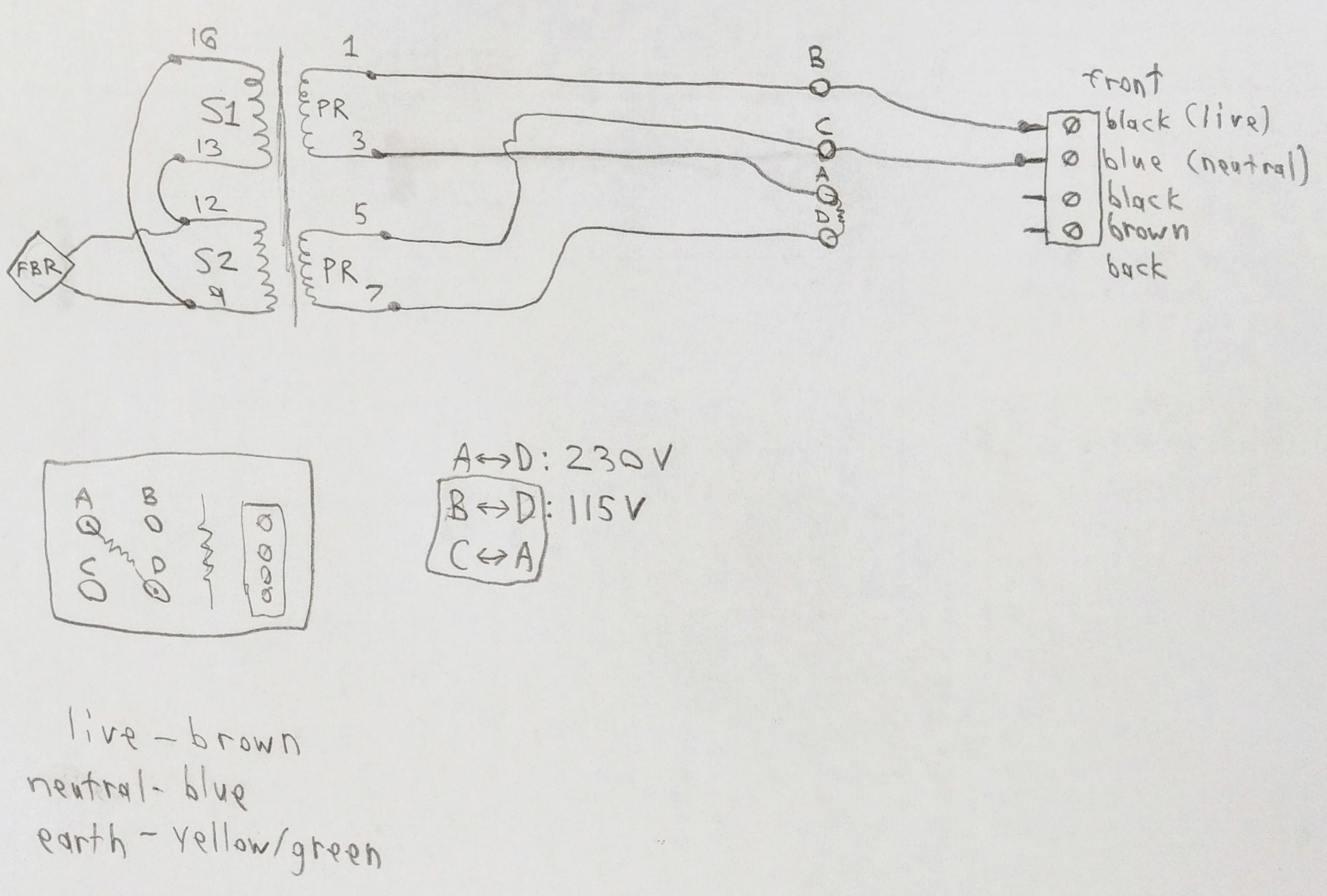
They are able to be adapted to work on 220/240 or 110/120 by changing the jumper connections (soldering required). Then it is a matter of changing the plug and socket to suit where you are living. Mine was bought as NOS from Portugal on the *bay a few years ago, and this is what I did to it to make it work on 120. I print RA-4, and I shudder to think of doing it without the thing now. So I am in the market for a backup.

Does anyone know exactly what one has to modify to change a Colorstar 3000 from 220/240V to 110/120V? I recently acquired a European model, and I'd like to do the conversion. I have it opened up, and I think I see where the jumper connections are, but I can't really be sure until I trace out all the power input circuitry. It would be quite nice if I could avoid having to do that.
 

John51

Member
Allowing Ads
Joined
May 18, 2014
Messages
797
Format
35mm
The EM10 would be useful if you can change the intensity of the light. Lets you keep the same aperture and time. Use a dimmer on a condensor enlarger and some colour heads have a nd dial.
 

dkonigs

Subscriber
Joined
Sep 17, 2009
Messages
387
Location
Mountain View, CA
Format
Multi Format
Just wanted to follow up and say that I managed to figure it out. The hard part was actually opening the thing up, and getting the circuit board out, without damaging or losing track of anything. I took lots of photos to aid me in putting it back together correctly after this.

Once I got the board out, it was just a matter of tracing the power input circuitry and seeing how to configure it for different input voltages. There's a spot on the board where there are four contacts that jumper the inputs to the transformer to the mains AC wiring. By changing this (and the plug), I was able to switch it from European to American voltage.

Attached is the diagram I created in the process of doing this:

eHRtkiH.jpg
 
Photrio.com contains affiliate links to products. We may receive a commission for purchases made through these links.
To read our full affiliate disclosure statement please click Here.

PHOTRIO PARTNERS EQUALLY FUNDING OUR COMMUNITY:


Ilford ADOX Freestyle Photographic Stearman Press Weldon Color Lab Blue Moon Camera & Machine
Top Bottom