


Digitized Negs Overexposed When reversed

Simpler Time

A
Simpler Time

  • 0
  • 0
  • 20
Rural Ohio

Rural Ohio

  • 3
  • 0
  • 30

Recent Classifieds

Forum statistics

Threads
201,053
Messages
2,818,311
Members
100,496
Latest member
Incredulousk
Recent bookmarks
0

Stephen Power

Member
Allowing Ads
Joined
Sep 4, 2020
Messages
116
Location
County Kerry, Ireland
Format
Multi Format
This is quite a tricky one to describe...I've been processing my own B/W film since the late 1970's and think I can spot a correctly exposed and developed negative.

The problem is that now I've started digitizing negs (via a Canon 5D III and light panel set-up - see photo) the reversed images are nearly always around 2 stops over exposed. I'm not sure if the issue is at the digitizing stage or if I don't actually know a correctly exposed negative when I see it.

It would be hard to show you what I can see on the negs without you standing in my studio, but any thoughts are welcome. The 3 photos below (scanned neg, reversed point curve and digitizing set-up) may help - or not. The neg looks slightly flatter in the photo than it does to my eye, but not much. In reality it has a good range of tones.
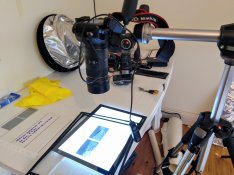
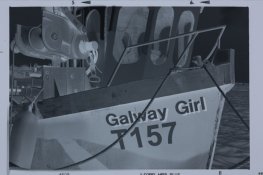
scanning set up.jpg _C0A7928.jpg _C0A7928-2.jpg
 

Billy Axeman

Member
Allowing Ads
Joined
Aug 18, 2017
Messages
523
Location
Netherlands
Format
Digital
What you could try first is to switch off all light in the room, prevent light entering from outside, and make a mask around the frame you are copying to block all light from the LED panel.
 
OP
OP
Stephen Power

Stephen Power

Member
Allowing Ads
Joined
Sep 4, 2020
Messages
116
Location
County Kerry, Ireland
Format
Multi Format
What you could try first is to switch off all light in the room, prevent light entering from outside, and make a mask around the frame you are copying to block all light from the LED panel.

Thanks, I've been avoiding using the mask, although I usually shoot the negs in darkness - the photo of the set up was in daylight just to make it easier. I'll see if the mask makes a difference.
 

Billy Axeman

Member
Allowing Ads
Joined
Aug 18, 2017
Messages
523
Location
Netherlands
Format
Digital
It is good practice to copy the film from the emulsion side to help preventing flare. You can flip the image in post.
 

removed account4

Subscriber
Allowing Ads
Joined
Jun 21, 2003
Messages
29,832
Format
Hybrid
Hi Stephen

Sorry for sounding goofy but ... if they are over exposed why don't you adjust your exposure? How are you metering ?
When I have done copywork ( with film or file ) I look at the polaroid (film) or test-exposure and adjust my finals accordingly. If you were exposing this film in the wild would you over expose it or would you adjust your exposures to get good negatives?

Goodluck with your project !
John
 

Chan Tran

Subscriber
Allowing Ads
Joined
May 10, 2006
Messages
7,132
Location
Sachse, TX
Format
35mm
It doesn't look overexposed to me. It looks like it has very low contrast and that is to be expected. You have to increase contrast in post processing because the printing paper you used to use has a lot of contrast. The slope of the negative versus real life is about 0.6 and the slope of the printing paper is about 1.8. It's a way to capture more of the dynamic range with negative materials by compression/expansion.
 
OP
OP
Stephen Power

Stephen Power

Member
Allowing Ads
Joined
Sep 4, 2020
Messages
116
Location
County Kerry, Ireland
Format
Multi Format
@jnantz Hi John. I've gone back over my OP to check that I've worded it correctly, and it looks OK to me. The negatives are not (to my eye) over-exposed. In fact, they look pretty 'robust' with a good range of tones. When I digitize them, they still look OK (see the digitized image of the neg). It's when I reverse the curve in Lightroom that they seem to gain at least a stop to two stops over exposure.

@Chan Tran If you mean the reversed image, they histogram is definitely showing over exposure (a gap on both ends and especially on the black tone side.) I'm not printing to paper yet, but the finished positive is below - with exposure and contrast adjustments. I just think that the reversed image should be closer to the negative. But do you think it's OK?

_C0A7929-Edit.jpg
 

nmp

Member
Allowing Ads
Joined
Jan 20, 2005
Messages
2,054
Location
Maryland USA
Format
35mm
The histogram of the negative is fairly well contained at the two extremes (no clipping at 0 and 255) as far as I can see. So you are not losing any data and tones. I would worry if you are blowing up any of the highlights after inversion, which you are not. In fact I would say the capture is perfect as it is as an input for subsequent tweaking to make it look right in post-process, as mentioned earlier.

:Niranjan.
 
OP
OP
Stephen Power

Stephen Power

Member
Allowing Ads
Joined
Sep 4, 2020
Messages
116
Location
County Kerry, Ireland
Format
Multi Format
The histogram of the negative is fairly well contained at the two extremes (no clipping at 0 and 255) as far as I can see. So you are not losing any data and tones. I would worry if you are blowing up any of the highlights after inversion, which you are not. In fact I would say the capture is perfect as it is as an input for subsequent tweaking to make it look right in post-process, as mentioned earlier. :Niranjan.

Thanks for that - much appreciated.
 

Billy Axeman

Member
Allowing Ads
Joined
Aug 18, 2017
Messages
523
Location
Netherlands
Format
Digital
Usually I only see a histogram without gaps left and right when there is sufficient contrast in sunny weather. Also digital cameras tend to underexpose a bit to prevent blowing highlights (also depends on your settings), so the histogram is seldom symmetrical.

I also do what John suggests, simply use exposure compensation. But you must first exclude possible shortcomings in the setup, and an open copy stand quickly introduces flare which reduces contrast (a narrow histogram).
 
OP
OP
Stephen Power

Stephen Power

Member
Allowing Ads
Joined
Sep 4, 2020
Messages
116
Location
County Kerry, Ireland
Format
Multi Format
Usually I only see a histogram without gaps left and right when there is sufficient contrast in sunny weather. Also digital cameras tend to underexpose a bit to prevent blowing highlights (also depends on your settings), so the histogram is seldom symmetrical.

I'm more confused by the minute. I've got several negs all taken on a bright sunny day, with wide clipping gaps on the histograms in Lightroom (see attached). But the negs seem to be correctly exposed (or close enough) in the camera.

I also do what John suggests, simply use exposure compensation. But you must first exclude possible shortcomings in the setup, and an open copy stand quickly introduces flare which reduces contrast (a narrow histogram).

I'm bracketing in the camera, to some extent, but with 8 shots on a roll, the most I'll risk is 2 shots per subject. I'll try the masking suggestion and see if that makes a big difference and come back to the thread with an update. Thanks again all.
screen shot 1.jpg screen shot 2.jpg screen shot 3.jpg
 

Billy Axeman

Member
Allowing Ads
Joined
Aug 18, 2017
Messages
523
Location
Netherlands
Format
Digital
Contrary what @nmp says, I actually see some clipping at both ends in the photo from post #10. But it depends on your preferences, personally I avoid any clipping at all.

The examples from post #14 are showing what you earlier said, reduced contrast and some asymmetry.
 

Wallendo

Subscriber
Allowing Ads
Joined
Mar 23, 2013
Messages
1,414
Location
North Carolina
Format
35mm
There seems to be a little confusion and cross-talk here.
Many people use the term "digital negative" to mean a printed "negative" to use with contact printing and at least one poster has interpreted it that way.
A photographed negative adds a whole new exposure to the workflow. Your issues are likely more related to your camera exposure. My recommendation is shoot in raw with an exposure selected to collect as much information as possible (the histogram function comes in handy). Shoot RAW if possible. Invert in Lightroom and then adjust the black and white points to expand the histogram. After that adjust "exposure" to get the image you want. Unlike scanner software, digital cameras in RAW mode do not expand the histogram to fill the whole range (they do generally modify the image when saving as JPEG, but I would rather work with RAW). Your workflow seems to be working well, it's just that your images will require some simple adjustments made in Lighroom.
 

nmp

Member
Allowing Ads
Joined
Jan 20, 2005
Messages
2,054
Location
Maryland USA
Format
35mm
Contrary what @nmp says, I actually see some clipping at both ends in the photo from post #10. But it depends on your preferences, personally I avoid any clipping at all.

The examples from post #14 are showing what you earlier said, reduced contrast and some asymmetry.

My observation was based on the original post #1 where there is no clipping either in the negative or in the inverted image. Looks like the OP over-compensated in boosting the contrast in edit (Post #10 picture) that does indeed show clipping on both sides.

(Wonder if he is using auto-level.)
 

Billy Axeman

Member
Allowing Ads
Joined
Aug 18, 2017
Messages
523
Location
Netherlands
Format
Digital
The point is that ideally you want a histogram that fully covers the range from 0-255, but that clearly depends on the lighting when the frame is shot. When you must compensate too much in post by stretching the histogram the tonality suffers and grain is emphasized.
 

nmp

Member
Allowing Ads
Joined
Jan 20, 2005
Messages
2,054
Location
Maryland USA
Format
35mm
The point is that ideally you want a histogram that fully covers the range from 0-255, but that clearly depends on the lighting when the frame is shot. When you must compensate too much in post by stretching the histogram the tonality suffers and grain is emphasized.

With the high DR of modern cameras, the histogram from a film will most likely not go end to end on the histogram. With lighting and exposure compensation, all that would happen is move the histogram up and down and not change the shape itself.
 

Billy Axeman

Member
Allowing Ads
Joined
Aug 18, 2017
Messages
523
Location
Netherlands
Format
Digital
With the high DR of modern cameras, the histogram from a film will most likely not go end to end on the histogram. With lighting and exposure compensation, all that would happen is move the histogram up and down and not change the shape itself.

I shoot with a 16Mp camera and preferably in sunny weather, perfect histograms. :smile:

If there is a gap at the low end you have no blacks, if there is a gap at the high end there are no highlights. So there is only one solution, try to get a perfect histogram on film which needs minimum post processing after scanning.

Edit: last alinea removed
 
Last edited:
OP
OP
Stephen Power

Stephen Power

Member
Allowing Ads
Joined
Sep 4, 2020
Messages
116
Location
County Kerry, Ireland
Format
Multi Format
Your issues are likely more related to your camera exposure. My recommendation is shoot in raw with an exposure selected to collect as much information as possible (the histogram function comes in handy). Shoot RAW if possible. Invert in Lightroom and then adjust the black and white points to expand the histogram. After that adjust "exposure" to get the image you want. Your workflow seems to be working well, it's just that your images will require some simple adjustments made in Lighroom.

I agree with you that the issue is at the DSLR end. I always shoot in Raw, but rarely use the histogram. Long story...but over 40 years of pro photography work, I got good at trusting my eye. But, I'll see if it helps.

Unlike scanner software, digital cameras in RAW mode do not expand the histogram to fill the whole range (they do generally modify the image when saving as JPEG, but I would rather work with RAW).

I'm not entirely following this point. I rarely have trouble getting exposures to fill the histogram (or close to it) with Raw files. Unless you are specifically referring to photographing negatives?
 
OP
OP
Stephen Power

Stephen Power

Member
Allowing Ads
Joined
Sep 4, 2020
Messages
116
Location
County Kerry, Ireland
Format
Multi Format
You are underexposing the neg when you copy it. You have to compensate for the density of the base.

Sometimes the simplest solutions are the best solutions. :smile: If I had a prize, you'd get it. This began occuring to me in the last hour or so, although my guess was I was over exposing the negs. But, I'll give them another stop or so. Thanks for the reply.
 
Photrio.com contains affiliate links to products. We may receive a commission for purchases made through these links.
To read our full affiliate disclosure statement please click Here.

PHOTRIO PARTNERS EQUALLY FUNDING OUR COMMUNITY:


Ilford ADOX Freestyle Photographic Stearman Press Weldon Color Lab Blue Moon Camera & Machine
Top Bottom
