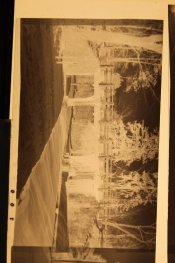
Digitized Negs Overexposed When reversed

Simpler Time

A
Simpler Time

  • 0
  • 0
  • 26
Rural Ohio

Rural Ohio

  • 3
  • 0
  • 31

Recent Classifieds

Forum statistics

Threads
201,053
Messages
2,818,318
Members
100,496
Latest member
Incredulousk
Recent bookmarks
0

MattKing

Moderator
Moderator
Allowing Ads
Joined
Apr 24, 2005
Messages
54,604
Location
Delta, BC Canada
Format
Medium Format
This thread highlights the fact that we need either a new nomenclature or a set of well defined, special purpose definitions to deal with the ever changing world of converting film negatives/slides into digital files.
Would it be possible to agree that the word "over-exposure" be restricted to initial "capture" in the original camera?
And for everything thereafter, we should use the words "too light", "too dark", "too contrasty", "too flat" or the like.
And "digital negative" be reserved for those printed out (usually) big negatives that come out of ink jet or laser printers and are used for contact printing.
To the OP:
If you are using a digital camera to do your "scanning" you can't reliably equate the appearance of the "scanned" negative on a digital display with a viewed film negative. The film negative is, as posted above, designed to be printed on to photographic paper, which has a built in contrast response that is very different than a digital monitor. So a good digital camera "scan" of a negative should look different than the negative scanned, until such a time as you have made the necessary post-processing changes.
Remember too that the "inversion" procedure has its own pre-sets built into it.
There is nothing automatic about the procedure you are undertaking. You can add automation of a sort by using pre-defined post processing adjustments, but you will need to design those yourself.
 
OP
OP
Stephen Power

Stephen Power

Member
Allowing Ads
Joined
Sep 4, 2020
Messages
116
Location
County Kerry, Ireland
Format
Multi Format
This thread highlights the fact that we need either a new nomenclature or a set of well defined, special purpose definitions to deal with the ever changing world of converting film negatives/slides into digital files.

If you are using a digital camera to do your "scanning" you can't reliably equate the appearance of the "scanned" negative on a digital display with a viewed film negative.

I agree about the use of specific nomenclature: For example, I didn't 'scan' the negatives, as that process needs a scanner. I 'digitized' or 're-photographed' the negatives. That's where I think the problem lies.
 

MattKing

Moderator
Moderator
Allowing Ads
Joined
Apr 24, 2005
Messages
54,604
Location
Delta, BC Canada
Format
Medium Format
I agree about the use of specific nomenclature: For example, I didn't 'scan' the negatives, as that process needs a scanner. I 'digitized' or 're-photographed' the negatives. That's where I think the problem lies.
Actually I am happy with "camera scanned" or "camera digitized". In fact, omitting the words "camera or DSLR" adds a whole bunch of clarity that is greatly needed.
Fax machines scan photographs. Most photocopiers scan photographs. Scans can be "one shot" or can be line by line.
 

Chan Tran

Subscriber
Allowing Ads
Joined
May 10, 2006
Messages
7,132
Location
Sachse, TX
Format
35mm
@jnantz Hi John. I've gone back over my OP to check that I've worded it correctly, and it looks OK to me. The negatives are not (to my eye) over-exposed. In fact, they look pretty 'robust' with a good range of tones. When I digitize them, they still look OK (see the digitized image of the neg). It's when I reverse the curve in Lightroom that they seem to gain at least a stop to two stops over exposure.

@Chan Tran If you mean the reversed image, they histogram is definitely showing over exposure (a gap on both ends and especially on the black tone side.) I'm not printing to paper yet, but the finished positive is below - with exposure and contrast adjustments. I just think that the reversed image should be closer to the negative. But do you think it's OK?

View attachment 256089

I think it's OK! Perhaps more contrast is better. The fact that the histogram didn't hit any border and it's closer to the right that is good. You have all the tonal values that was in the negative and you have less digital noise overall than if the histogram is centered. You just have to expand that range to what you like.
 

Wallendo

Subscriber
Allowing Ads
Joined
Mar 23, 2013
Messages
1,414
Location
North Carolina
Format
35mm
...

I'm not entirely following this point. I rarely have trouble getting exposures to fill the histogram (or close to it) with Raw files. Unless you are specifically referring to photographing negatives?

This is an issue with photographing negatives. When making actual digital photographs, you have a wide ranges of luminances within your image. When photographing black and white negatives, this large range of values is compressed into the film's range : white isn't really white and black isn't really black. The film actually captures a large range of values which work well with photographic paper. When photographing a negative, the camera is trying to record values below Dmin and above Dmax leading to a low contrast image.
 

Kino

Subscriber
Allowing Ads
Joined
Jan 20, 2006
Messages
7,899
Location
Orange, Virginia
Format
Multi Format
Invert the image. Go to curves. Drag the white point and black point on the histogram to just where the image data starts. Place a control point in the curve about 1/3 from the bottom of the black point and pull upwards and to the left slowly. If you have clipping of the highlights or blacks, play with the terminal end points of the curve.

Your digital camera encodes in arithmetic progression, while your negative is a log-based encoded image.You have to expand the midrange a bit via curves.
 
OP
OP
Stephen Power

Stephen Power

Member
Allowing Ads
Joined
Sep 4, 2020
Messages
116
Location
County Kerry, Ireland
Format
Multi Format
Actually I am happy with "camera scanned" or "camera digitized". In fact, omitting the words "camera or DSLR" adds a whole bunch of clarity that is greatly needed.
Fax machines scan photographs. Most photocopiers scan photographs. Scans can be "one shot" or can be line by line.

My understanding of the term 'scan' is that it involves movement of the scanning mechanism across an object (often from top to bottom), during which information is gathered. For example, 'to scan a document when reading quickly' or to 'have a CAT scan'. I presume film and document scanners work that way, but cameras don't.
 

nmp

Member
Allowing Ads
Joined
Jan 20, 2005
Messages
2,054
Location
Maryland USA
Format
35mm
This is an issue with photographing negatives. When making actual digital photographs, you have a wide ranges of luminances within your image. When photographing black and white negatives, this large range of values is compressed into the film's range : white isn't really white and black isn't really black. The film actually captures a large range of values which work well with photographic paper. When photographing a negative, the camera is trying to record values below Dmin and above Dmax leading to a low contrast image.

+1.

Agree wholeheartedly with everything you have said.
 

Kino

Subscriber
Allowing Ads
Joined
Jan 20, 2006
Messages
7,899
Location
Orange, Virginia
Format
Multi Format
Which is why you go into curves, reestablish your black and white points and then expand the mid-tones.

Very basic principal of scanning film images.
 
OP
OP
Stephen Power

Stephen Power

Member
Allowing Ads
Joined
Sep 4, 2020
Messages
116
Location
County Kerry, Ireland
Format
Multi Format
Which is why you go into curves, reestablish your black and white points and then expand the mid-tones. Very basic principal of scanning film images.

My point (and the point of the thread), is that I was (am) doing that already. Although I tend to do it with the histogram directly in LR or the Levels sliders in PS. What I was asking about was why there was so much clipping from what appear to be correctly exposed negs. My guess is that (as @Patrick Robert James suggested) I'm not exposing the negs correctly at the digitizing stage.
 

Kino

Subscriber
Allowing Ads
Joined
Jan 20, 2006
Messages
7,899
Location
Orange, Virginia
Format
Multi Format
If you have clear space on the left and right of the histogram, you're not clipping.
 

runswithsizzers

Subscriber
Joined
Jan 19, 2019
Messages
1,911
Location
SW Missouri, USA
Format
Multi Format
If your digital camera has Live View, and the ability to display a histogram in Live View, then look at the histogram while exposing the negative on the light table. I try to increase the exposure as much as I can until it just starts to clip on the right, then back off until there is no clipping. Actually, with my camera, a little clipping on the camera histogram does no harm, because the histogram represents the camera JPEG, and not the RAW. I almost never have any problem recovering highlights from the RAW, even when the camera histogram showed a small amount of clipping.

I don't believe I have ever camera-scanned a negative that did not fit on the digital camera histogram with room to spare on both ends. Transparencies, yes, but not negatives. Your inverted image (the third photo in the first post), looks similar to what I see at that stage, before making the necessary adjustments for levels and contrast.

I do recommend trying a mask on the light table to block ALL light, except behind the image. If you are using a modern, high quality lens with very good coatings, then it might not make that much difference, but otherwise I would expect your camera-scans to have some loss of contrast from the glare.
 

MattKing

Moderator
Moderator
Allowing Ads
Joined
Apr 24, 2005
Messages
54,604
Location
Delta, BC Canada
Format
Medium Format
My understanding of the term 'scan' is that it involves movement of the scanning mechanism across an object (often from top to bottom), during which information is gathered. For example, 'to scan a document when reading quickly' or to 'have a CAT scan'. I presume film and document scanners work that way, but cameras don't.
There are single shot scanners - some of the highest volume photocopiers work that way.
But more importantly, I don't see a lot of indication that the initial digital image you are seeing is clipped in any way.
You are simply ending up with a copy of an item that is designed by its nature to appear quite flat. You just need to add the contrast that the photographic paper has built in.
 

Kino

Subscriber
Allowing Ads
Joined
Jan 20, 2006
Messages
7,899
Location
Orange, Virginia
Format
Multi Format
You could develop to 1.0 gamma (unity) but the negatives would be hard to print. Come to think of it, probably hard to scan too...

A modern DSLR should have more than enough bit-depth to retain the tonal variance of a well developed negative IF saved in a non-lossy format, like a TIFF or a RAW file. You should be able to push the curve around quite a bit to recover your mid tones with good graduation.
 

Grandpa Ron

Member
Allowing Ads
Joined
Sep 4, 2018
Messages
114
Location
Northwest Indiana
Format
35mm
Steve,

Lots of info here but I think the common thread is, the answer is in the post processing. The trick is to not get overwhelmed.

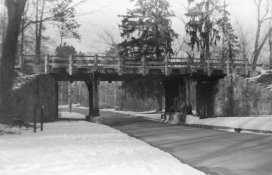
I modified my moms 1940 Asnco box camera to take 120 film. I did not have a way to enlarge the negatives, so I placed them on my 4x5 contact printer, dimmed the 7 watts bulb and shot the negatives with my Canon T6 on a tripod.

Now we are not talking fine art here, just seeing what mom's 80 year old camera could do.
The negative was shot at F5.6, 1/80 sec. 320 ISO at 55 mm.
The positive was post processed in Picasa, a simple PP program.

This was a simple set up to expedite processing some black and white negatives into usable photos. Given your b&w expertise and the high quality negatives and equipment available you. I expect you will be rivaling Ansel Adams shortly. :smile: :smile:

Good luck.

IMG_3855.JPG Ansco bridge.JPG
 
Photrio.com contains affiliate links to products. We may receive a commission for purchases made through these links.
To read our full affiliate disclosure statement please click Here.

PHOTRIO PARTNERS EQUALLY FUNDING OUR COMMUNITY:


Ilford ADOX Freestyle Photographic Stearman Press Weldon Color Lab Blue Moon Camera & Machine
Top Bottom