• Welcome to Photrio!
    Registration is fast and free. Join today to unlock search, see fewer ads, and access all forum features.
    Click here to sign up

Diffusing prints

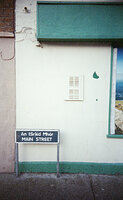
An tSráid Mhór

A
An tSráid Mhór

  • 0
  • 0
  • 16
IMG_1285.jpeg

D
IMG_1285.jpeg

  • 0
  • 0
  • 24

Forum statistics

Threads
203,124
Messages
2,850,180
Members
101,688
Latest member
linie4
Recent bookmarks
0

eddie

Member
Allowing Ads
Joined
Jul 24, 2005
Messages
3,250
Location
Northern Vir
Format
Multi Format
I have a few negatives which I'd like to give a more "ethereal" look. I've tried a few through tissue paper (so-so results) and vellum (terrible). I'd prefer an option that can be laid directly over the paper (or slightly raised above it), but I'm open to any ideas. Thanks.
 
I have this funky old device called a "Pictrol"... basically a diaphram with clear plastic blades that can be dialed in or out. It attaches either to the camera lens or enlarger lens. This controls the amount of diffusion given the image. You might be able to find one out there.. pretty fun little thing.
 
...but I'm open to any ideas.

Something to keep in mind here. It's the light that is always going to be diffused. So...

When you create the diffusion effect by placing the diffusing medium over the camera lens when creating the negative, you are causing the highlights (denser areas of the negative) to be softened.

When you try doing the same by placing the diffusing medium over the enlarging lens, you are now causing the shadows (denser areas of the print) to be softened.

Most viewers find the former effect to be often quite pleasing, but the latter effect to be somewhat strange.

Ken


Ken

 
Try some crinkled cellophane or for heavier effects, get some black Tulle from the fabic shop and put it into an embroidery hoop.
 
Try a light smear of petroleum jelly on a filter over the lens(either enlarging or preferably taking)will give a nice lok depending on the amount of schmutz on the lens.

Rick
 
Either pantyhose as Winger suggests (black), or try placing a plain plastic sleeve (you know, the ones you use for storing documents in) directly on top of the paper. Both work quite well. But as said, the diffusion of blacks into highlights does look strange and is, for some, an acquired taste. I like the ethereal effect, but warn you not to overdo it.
 
I've used a plastic baggie under the lens, about halfway btw lens and baseboard, for approx 1/4 to 1/2 the exposure time...beautiful effect with the right image.

You may have to go up a grade in contrast to keep the blacks where you want them.
 
Something to keep in mind here. It's the light that is always going to be diffused. So...

When you create the diffusion effect by placing the diffusing medium over the camera lens when creating the negative, you are causing the highlights (denser areas of the negative) to be softened.

When you try doing the same by placing the diffusing medium over the enlarging lens, you are now causing the shadows (denser areas of the print) to be softened.

Most viewers find the former effect to be often quite pleasing, but the latter effect to be somewhat strange.

Ken
Ken
Quite interesting, I never thought of it that way however, I see your point.

Any suggestions or just do it when taking the picture with the camera?
 
Quite interesting, I never thought of it that way however, I see your point.

Any suggestions or just do it when taking the picture with the camera?

Well, I suppose it's all in the eye of the beholder.

Highlights bleeding into shadows (the "glowing" effect) is what most people associate with diffusion. Shadows bleeding out into the highlights is... I dunno... kinda spooky?

I've always thought diffusing the negative to be more appropriate for backlit blondes with Farrah Fawcett haircuts on early Spring mornings. And diffused prints more appropriate for dark, brooding, Gotham City Batman-style portraits. But as always, YMMV. (Yikes! Mine certainly just did.)

To get the normally desired glowing effect, one would do it when taking the picture with the camera. I've heard that a very thin smear of petroleum jelly on a UV filter works wonders. And can be easily removed with a simple water rinse.

Ken
 
Here's a simple, adjustable and inexpensive diffuser that takes minutes to make. It's reusable and will probably never wear out. Take two pieces of 1/4th inch glass and bevel or tape the edges (bleeding fingers don't help the prints). Put a small amount of baby oil between them and smush them around to spread the oil. Focus the negative sharply and hold the diffuser under the lens moving or smushing until you get the desired degree of diffusion. You can also add or remove some of the oil as needed. Make a test print as usual to get the exposure time and see the diffusion effect. Once you have what you want it is repeatable as long as you don't move the pieces of glass around. There is no altering of the negative or lens and with a little practice you can diffuse only a section of a print as well.

http://www.jeffreyglasser.com/
 
When I was a callow youth and used to print portraits in the darkroom ( and lots of them I seem to remember ) we used to have the 'wrinkle glass' by the portrait enlarger....a piece of thin optical glass about 2.5" square with cloth tape on one edge so you did'nt cut yourself :

Now the technique :

1) Take middle finger
2) Rub up side of your nose
3) Rub finger on glass
4) Expose; Whilst moving the 'wrinkle' glass in a circular motion for 50% of the
exposure about 3" from the lens:
5) Result : Less wrinkley

6) For very wrinkley or zitty : Rub up each of nose instead of one side and repeat...

Works a treat :

And as you know darkroom cleanliness is paramount so : at the end of the week we used
to dip the 'wrinkle' glass in the fix tank, swill it around in the wash tank dry it on our lab
coat sleeve and put it back....job done, I'm sure Ansel Adams did the same....

Simon ILFORD Photo / HARMAN technology Limited :
 
Plastic sandwich bag moving a few inches over the paper.
Tree1.jpg
 
Am I the only one to notice the difference between shadows bleeding out into highlights (enlarger diffusion) versus highlights bleeding out into shadows (camera diffusion)? The two effects are very different. The former effect just jumps out to my eyes. And although YMMV, I find the enlarger diffusion effect to be... unsettling. Again, YMMV.

Ken
 
Am I the only one to notice the difference between shadows bleeding out into highlights (enlarger diffusion) versus highlights bleeding out into shadows (camera diffusion)? The two effects are very different. The former effect just jumps out to my eyes. And although YMMV, I find the enlarger diffusion effect to be... unsettling. Again, YMMV.

Ken

Yes, perhaps a little unsettling. Probably the reason why there is no 'vintage enlarger lens' market :smile:

The reason I choose to show that particular image is that I thought the black bleeding outward worked well, though I agree the effect is probably only suited to select subject matter.

One thing about the effect is that it is somewhat unique to the darkroom experience. It is not something the typical digicam user can reproduce.
 
get a box camera
and use its lens as an enlarger lens.
works well as a diffusing lens ...
you can make waterhouse stops too
have fun !
john
 
I have a few negatives which I'd like to give a more "ethereal" look. I've tried a few through tissue paper (so-so results) and vellum (terrible). I'd prefer an option that can be laid directly over the paper (or slightly raised above it), but I'm open to any ideas. Thanks.

Eddie, if you haven't already, let me suggest you take a look at Lee Frost's book, Simple Art of Black and White Photography. It has several suggested techniques and some very effective examples.
 
Long ago I used a Nikon soft filter immediately below the enlarger lens with great results. I still have several photos on my wall and they frequently elicit a positive response from viewers.
 
I've used the AN glass from a 6x6 slide frame for 1/3 to 2/3 of the exposure time. Best effect, IMO...
 
If you diffuse thru the camera lens the highlights bloom; if you diffuse the enlarging lens the shadows bloom. Or is it the other way around?:unsure:
 
Am I the only one to notice the difference between shadows bleeding out into highlights (enlarger diffusion) versus highlights bleeding out into shadows (camera diffusion)? The two effects are very different. The former effect just jumps out to my eyes. And although YMMV, I find the enlarger diffusion effect to be... unsettling. Again, YMMV.
Ken

As Ken points out the effect is different between camera and enlarger. Because of this you really need to decide which effect you want before you take the picture.
 
You can get both effects at an enlarger if you make an interpositive...

Also, I have used smaller format slides to make larger format negs, i.e. using 35mm Astia to make an enlarged neg on 5x7 tmax. You can get some interesting tones.
 
Photrio.com contains affiliate links to products. We may receive a commission for purchases made through these links.
To read our full affiliate disclosure statement please click Here.

PHOTRIO PARTNERS EQUALLY FUNDING OUR COMMUNITY:


Ilford ADOX Freestyle Photographic Stearman Press Weldon Color Lab Blue Moon Camera & Machine
Top Bottom

