

• Welcome to Photrio!
    Registration is fast and free. Join today to unlock search, see fewer ads, and access all forum features.
    Click here to sign up

different developers and specs on negatives

Recent Classifieds

Forum statistics

Threads
202,094
Messages
2,835,019
Members
101,111
Latest member
gil9002
Recent bookmarks
0

jbl

Member
Allowing Ads
Joined
Dec 4, 2009
Messages
93
Location
California,
Format
35mm RF
Hi,

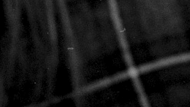
I have used HC-110, Rodinal and D-76 with Tri-X and have noticed that Rodinal and D-76 seem to produce more specs on the negatives. I'm attaching an example showing this. I don't believe this is dust because I air blow it before I scan and it's consistently worse with Rodinal and with D-76.

I don't have a problem with this, per se, but I was wondering what it is about the different developers which causes this to happen more.

Thanks!

-jbl
 

Attachments

  • Screen Shot 2011-12-17 at 10.54.45 PM.png
    Screen Shot 2011-12-17 at 10.54.45 PM.png
    39 KB · Views: 115
OP
OP
jbl

jbl

Member
Allowing Ads
Joined
Dec 4, 2009
Messages
93
Location
California,
Format
35mm RF
Why is it consistently better with HC-110 with an identical process except for the developer?

-jbl
 

MattKing

Moderator
Moderator
Joined
Apr 24, 2005
Messages
55,366
Location
Delta, BC Canada
Format
Medium Format
Just thinking out loud here ....

It is likely that the accutance and contrast achieved in your negatives varies between developers. And your scanning software may respond to those variations by adjusting its settings. Those responses may result in dust being more visible in the scans from the D76 and Rodinal negatives than the HC110 negatives.

If you were able to try optically printing your negatives, there would be a good chance that you would see similar amounts of dust on all your negatives, although usually you will see less dust when optically printing then when scanning (scanners are notorious for accentuating dust).

Hope this helps.
 

ic-racer

Member
Joined
Feb 25, 2007
Messages
16,751
Location
USA
Format
Multi Format
You really need to dry the negatives in a dust-free location. Dust that settles on the emulsion during drying is there for good.
Two other ways to minimize the effect in the prints are as follows:\
1) print with a diffusion light source
2) Make dense negatives. That way the ratio of dust-density to negative-density is more favorable. The dust will print darker and be less noticeable.
 

George Collier

Subscriber
Allowing Ads
Joined
Feb 23, 2005
Messages
1,374
Location
Richmond, VA
Format
Multi Format
Looks like dust to me also, developers don't generally leave "specs" that are individual like these look, unless you've got stuff floating around in it, and in any case should wash off long before you finish the film. (Hard to tell, though, your scan is really small).
Second the suggestion on drying. You can search this forum for drying suggestions, but an easy one is to use a bathroom, remove all of the cotton stuff first, including floor mats, etc. Run a hot shower just long enough to sense some humidity (this will hold down the static electricity in the room.) Then hang the roll inside the tub, or shower stall, slowly back out and close the door. Don't go in till you know it is dry (overnight should do it).
You might not be able to do this every time, but it might answer your question about the source of the problem.
You'll find many ideas on making a drying setup. Mostly it's about avoiding low humidity and keeping the dust down, including things like moving slowly to avoid giving off dust from yourself when handling the wet film. Also, your final rinse should be distilled water and Photoflo, or some such wetting agent, dipped after the film is removed from the reel.
I could go on, but there is mucho info on this forum.
 
Photrio.com contains affiliate links to products. We may receive a commission for purchases made through these links.
To read our full affiliate disclosure statement please click Here.

PHOTRIO PARTNERS EQUALLY FUNDING OUR COMMUNITY:


Ilford ADOX Freestyle Photographic Stearman Press Weldon Color Lab Blue Moon Camera & Machine
Top Bottom
