- Joined
- Sep 12, 2010
- Messages
- 148
- Format
- Medium Format
Hi everyone,
I have been struggling to find proper development time with PMK, but it prints so oddly that I’ve reach a point where I can’t figure out if I should develop more or less. The film I use is TX400 120 shot at 320, sometime 250.
The best result I’ve got so far was with development around 12 minutes (+/-30sec) @ 21°C for 1 :2 :100 (4,5ml part A + 9ml part B + 450ml H20). 30 sec inversion and then 2 inversion every 20sec. No after-bath. I make a 0,5 % acetic acid stop bath (a necessity for me to avoid streaks) and an alcaline fixer (berfix 2) for 4,5 minutes.
The recommended 14min was producing horribly long printing times of around 3 min at one stop down from full aperture for small 11x14 prints (the good images usually end up being printed on 20x24). My enlarger is a Durst M805 with condenser head and a semi-directed 150W opale light bulb.
11 minutes of development was starting to give me negs that I had to print almost exclusively with the G5 filter (Ilford). Hence time was still quite long… Printing with a G2 filter, times was quite normal but the prints looked very dull and lifeless.
At around 12 minute I get a sort of compromise. Base printing time is quite normal (less than 30 sec) but has to be made on G3,5 filter (quite high in my opinion) and burning-in times are really crazy and I have to use the G5 filter for about 1-2 minutes to avoid flat mid tones. Even the sky must be burn-in with a high filter so it’s not too dull.
So I’m really confused. Basically the contrast of my negatives tells me to develop for more, but if I do so, they become so thick that it’s almost impossible to print.
The main problem is darkening to mid tones while preserving good contrast and spark. It almost seems like the tone you get with PMK when you shot is how they are meant to print. If you try to alter that, you will need to burn-in like a mad man, and of course leave some tell-tell signs.
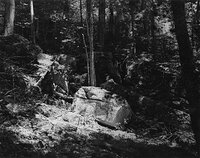
I’ve included an exemple. The first print comes easily on a 8X10 foma 112 paper at about 10 sec with G3,5, two stop down. And a few reasonable burning and dodging. But the image as such is uninteresting. I’ve made a quick and dirty photoshop of the image as it should print. I haven’t manage to get it right for now because of the long printing time. But according to my test stips, I should add alomost 2 minutes of G5 on the ground and about 1,5 minutes with a high grade (no defined yet) in the sky. AND THIS FOR AN 8X10 !!! It’s not a camera/lightmeter issue. The camera has been CLA by hasselblad and the spotmeter is brand new and it’s reading matches my older one.
Given this, how would you alter development to get printable negs ? In the mean time, I’m back to HC110, which is a shame since even though printing with my PMK negs is a nightmare, some results has been stunning, but it’s too frustating not to be able to print them on 20x24, unless I’d be willing to make 10 minutes long prints…
Any help from PMK experts would be greatly appreciated !
Thank you.
Vania


I have been struggling to find proper development time with PMK, but it prints so oddly that I’ve reach a point where I can’t figure out if I should develop more or less. The film I use is TX400 120 shot at 320, sometime 250.
The best result I’ve got so far was with development around 12 minutes (+/-30sec) @ 21°C for 1 :2 :100 (4,5ml part A + 9ml part B + 450ml H20). 30 sec inversion and then 2 inversion every 20sec. No after-bath. I make a 0,5 % acetic acid stop bath (a necessity for me to avoid streaks) and an alcaline fixer (berfix 2) for 4,5 minutes.
The recommended 14min was producing horribly long printing times of around 3 min at one stop down from full aperture for small 11x14 prints (the good images usually end up being printed on 20x24). My enlarger is a Durst M805 with condenser head and a semi-directed 150W opale light bulb.
11 minutes of development was starting to give me negs that I had to print almost exclusively with the G5 filter (Ilford). Hence time was still quite long… Printing with a G2 filter, times was quite normal but the prints looked very dull and lifeless.
At around 12 minute I get a sort of compromise. Base printing time is quite normal (less than 30 sec) but has to be made on G3,5 filter (quite high in my opinion) and burning-in times are really crazy and I have to use the G5 filter for about 1-2 minutes to avoid flat mid tones. Even the sky must be burn-in with a high filter so it’s not too dull.
So I’m really confused. Basically the contrast of my negatives tells me to develop for more, but if I do so, they become so thick that it’s almost impossible to print.
The main problem is darkening to mid tones while preserving good contrast and spark. It almost seems like the tone you get with PMK when you shot is how they are meant to print. If you try to alter that, you will need to burn-in like a mad man, and of course leave some tell-tell signs.
I’ve included an exemple. The first print comes easily on a 8X10 foma 112 paper at about 10 sec with G3,5, two stop down. And a few reasonable burning and dodging. But the image as such is uninteresting. I’ve made a quick and dirty photoshop of the image as it should print. I haven’t manage to get it right for now because of the long printing time. But according to my test stips, I should add alomost 2 minutes of G5 on the ground and about 1,5 minutes with a high grade (no defined yet) in the sky. AND THIS FOR AN 8X10 !!! It’s not a camera/lightmeter issue. The camera has been CLA by hasselblad and the spotmeter is brand new and it’s reading matches my older one.
Given this, how would you alter development to get printable negs ? In the mean time, I’m back to HC110, which is a shame since even though printing with my PMK negs is a nightmare, some results has been stunning, but it’s too frustating not to be able to print them on 20x24, unless I’d be willing to make 10 minutes long prints…
Any help from PMK experts would be greatly appreciated !
Thank you.
Vania
Last edited by a moderator: