Thanks for the help everyone!!
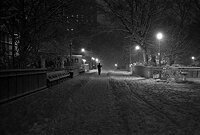
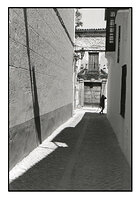
Thanks again Doremus! So I have a few practical questions right now. I did a series of almost anything indoors with window light, quite diffused, quick falloff in light. So subject contrast was not too big, but the background falls off quite quickly. Still had to print at grade 3-4-5 and sometimes I couldn't print because I underexposed and could not get deep blacks. So I don't know if that's a normal scene or low contrast scene. Which I can tell you is, probably the most brightest part in my scenes were the highlights on the skintones, so no zone 7,8,9. (see pictures as example also had to print these at grade 4 - these are scans that match the print). This is most of the time the type of light I worked with, diffuse window light with falloff But for that purpose I should have used a longer development time right?
Jesse,
If you are getting good results with this set-up, then there's nothing inherently wrong with printing with the #4 filter. That said, if you find that some of your negatives are to flat to print even at the highest contrast setting, than that's a sign that you're underdeveloping. If I were printing everything at the #4-5 settings, I'd increase development a bit to compensate. However, if you're doing other outdoor work with a greater lighting ratio, you may not want to change anything. Alternately, you could develop the rolls that were shot in one lighting situation differently from "normal" to compensate a bit.
The first image I had to print grade 4 to remove the shadow detail from the couch she was lying on.
The second image is just diffuse window light falling on the subject. Also had to print grade 4, probably because the development time was not enough. I had to do this for almost ALL my exhibition pictures, sometimes not, even though the negs looked the same in density.. and was kind of the same lightning..
If this is a low contrast scene (I don't know what you define for a normal contrast scene or high contrast scene) - then it's normal that I have to print higher grades right. But is it a good habit to change my dev time for MY habits? So to make it easier to print every time?
Basically I now switched to a lot to more fashion / hard contrast light like high sun or beauty dishes which cast hard shadows on the face and body. So it might be that these contrast scenes are high which would print better / easier with the same development time than I used for the pictures shown above. So is it a good habit to change the development time to what I currently do (I mostly do series in same light/type of light - so probably will be 1-2-3-4 years with the same type of lightning) sounds easier to adjust the dev time once and be able to print on grade 2 as a start... and change if necessary. Instead of starting at 2 and going higher and higher until you find it's okay.
So, let's define "normal" and other contrasts a bit before we get off on a tangent. Most consider "normal" to be an outdoor scene with sunlit and shaded areas, blue sky and some clouds to fill in the shadows a bit. No clouds and bright sun, especially on snow/sand or at high altitudes is a contrasty scene. Scenes with both indoor and outdoor components, or dense forests with dappled sunlight can be extremely contrasty. Conversely, soft lighting on cloudy days outdoors can be very flat if you don't include the sky (the sky can be very bright on cloudy days; if it's included in a shot the overall contrast can be quite high, but the local contrast in everything but the sky can be quite low at the same time). Light from a nearby window can be very soft in quality, but due to rapid fall-off, the entire scene can be pretty contrasty. However, from your description, I'd say you're working with a fairly soft lighting ration. Again, I wouldn't worry about printing with a #4 or #5 filter for soft subjects unless I ended up with lots of negatives that were very difficult to print because of low contrast. Then I'd increase my development time a bit. And again, if you've got lots of rolls of film with the same lighting on them, it wouldn't hurt to have a dedicated development time for them. We Zone System users develop differently for just about every scene, but that's with sheet film where each negative can be developed separately. For roll film with scenes with various lighting and contrast on them, finding a developing time that lets you print everything satisfactorily is the ticket.
Firstly, I never have issues with shadow detail, I do portraits and I never suffered from too few shadow detail ( unless I underexposed when I had too ). So I guess exposure isn't the problem here. Development time is, but let's say I found my development time (just an example) and I feel like I have too few shadow detail, so I expose a little more next time, do I have to compensate the dev time again for the exposure or just leave it unchanged?
Many thanks for helping again..
If you're getting good shadow detail at box speed, then stick with that. If you find you need more, you can always adjust later.
And, don't try to complicate things too much. If contrast is a problem, adjust your developing time. If shadow detail is a problem, adjust your exposure. That's really all there is to it in essence.
Best,
Doremus