
• Welcome to Photrio!
    Registration is fast and free. Join today to unlock search, see fewer ads, and access all forum features.
    Click here to sign up

Dark splotches on negatives

Babel

H
Babel

  • 1
  • 0
  • 19

Recent Classifieds

Forum statistics

Threads
201,875
Messages
2,831,594
Members
100,996
Latest member
sonora
Recent bookmarks
0

hoffy

Member
Allowing Ads
Joined
Jan 21, 2009
Messages
3,073
Location
Adelaide, Au
Format
Multi Format
I've been "looking"* at a few negatives recently and have come across a bit of a problem with a roll of Foma 100 that I developed recently. If I look at some of the darker area's of the negatives (I.E., that would print at near white), I have a whole bunch of spots that appear to be darker then the surrounding areas. At first I thought it was dust, but on closer inspection, they spots look to be in the emulsion. I then thought that it could possibly be air bells, but I would have thought that this would produce lighter spots on the negatives.

Any clues? Or could this be just another example of the quirkyness of Foma films.

The film process was 5(ish) minute pre-wash, Rodinal (1+50) for 9 minutes, 1 minute water stop, Fix bath 1 2.5 minutes, Fix bath 2 2.5 minutes, extended Ilford was (5 inversions then dump, 10, 20, 30 and finally 2x 40 inversions + dump). Final rinse was 15 drops of Photoflo in de-mineralised water.

Cheers


*Looking = scanning, but hey, I'm not supposed to mention that word here.
 

gone

Member
Allowing Ads
Joined
Jun 14, 2009
Messages
5,504
Location
gone
Format
Medium Format
"Looking = scanning, but hey, I'm not supposed to mention that word here"

I don't think its quite that draconian. Every single image that's on all the forums here, in all the galleries, etc has to be gotten up there somehow. Guess how? :}

Could you post a pic of the negatives? It's hard to say anything definitive w/o that.
 

Darkroom317

Member
Allowing Ads
Joined
Mar 2, 2009
Messages
653
Location
Mishawaka, IN
Format
Large Format
I had this exact problem a couple of years ago. It is why I stopped using their film. I hope you can get an answer this time.
 

Newt_on_Swings

Member
Allowing Ads
Joined
Mar 30, 2011
Messages
2,147
Location
NYC
Format
Multi Format
Did you check with with a Loupe on a light table? So many scanner related views of negatives come back as scanner dust, bad software settings, or poor focusing.

You are right air bells block development and will create an undeveloped spot. Hard to get unless you are not tapping after agitation with small tanks.

Without a magnified view of just the plain negative (not inverted) its hard to tell. On old or poorly stored film there is a chance of mold affecting it and can cause spotting. Also very rare. Do shoot another roll to compare.
 
OP
OP
hoffy

hoffy

Member
Allowing Ads
Joined
Jan 21, 2009
Messages
3,073
Location
Adelaide, Au
Format
Multi Format
Did you check with with a Loupe on a light table? So many scanner related views of negatives come back as scanner dust, bad software settings, or poor focusing.

You are right air bells block development and will create an undeveloped spot. Hard to get unless you are not tapping after agitation with small tanks.

Without a magnified view of just the plain negative (not inverted) its hard to tell. On old or poorly stored film there is a chance of mold affecting it and can cause spotting. Also very rare. Do shoot another roll to compare.

I did check it with what I use for a loupe (an old Minolta 50mm F2) and I could see the spots.

Here's another interesting thing about this roll. A couple of days later, I shot another roll - this was an experimental roll, so I could play with exposures, so I could work out how to process this roll. Both rolls were processed over the same weekend. While I haven't scanned this second roll, I can't as easily see the same issue. The other interesting thing about the roll with the spots is that I can't get the curl out of it, where's the second roll flattened out perfectly while drying.

As for Fungus - that could be a possibility. This roll has been in and out of the fridge on numerous occasions, but was in the wrapper until the day I loaded it.

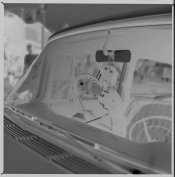
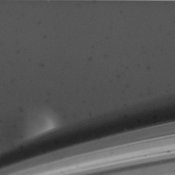
Anyhow, proof is in the pudding. Attached are two images. Image 1 is the full negative, image 2 is a 1:1 crop of the 1600 pix/inch scan, from just above the windscreen, clearly showing the dots.
 

Attachments

  • APUGTestScan-150209-0002.jpg
    APUGTestScan-150209-0002.jpg
    149.6 KB · Views: 149
  • MACROAPUGTestScan-150209-0002.jpg
    MACROAPUGTestScan-150209-0002.jpg
    99.2 KB · Views: 128

Newt_on_Swings

Member
Allowing Ads
Joined
Mar 30, 2011
Messages
2,147
Location
NYC
Format
Multi Format
Was this on all the images of the roll? Or just a the first frame or so? Another possibility is tiny bits of light coming through the paper. But it also looks a little like mold too. If you really want to know you can try bleaching the negative, you will loose the negative unless you make a copy. But if it's a leak the bleach (pot ferri) would remove the dots(if it was exposed silver). You can always try a stronger loupe, maybe even load it up into an enlarger and use a 20x microsight on the area.
 

Wallendo

Subscriber
Allowing Ads
Joined
Mar 23, 2013
Messages
1,419
Location
North Carolina
Format
35mm
I did check it with what I use for a loupe (an old Minolta 50mm F2) and I could see the spots.

Here's another interesting thing about this roll. A couple of days later, I shot another roll - this was an experimental roll, so I could play with exposures, so I could work out how to process this roll. Both rolls were processed over the same weekend. While I haven't scanned this second roll, I can't as easily see the same issue. The other interesting thing about the roll with the spots is that I can't get the curl out of it, where's the second roll flattened out perfectly while drying.

As for Fungus - that could be a possibility. This roll has been in and out of the fridge on numerous occasions, but was in the wrapper until the day I loaded it.

Anyhow, proof is in the pudding. Attached are two images. Image 1 is the full negative, image 2 is a 1:1 crop of the 1600 pix/inch scan, from just above the windscreen, clearly showing the dots.

Have you compared the expiration dates or lot numbers on the two rolls. If you are having curling issues with Foma, you must be using on older roll manufactured before they changed base material. Modern Foma, in my experience, has almost no curling.
 
OP
OP
hoffy

hoffy

Member
Allowing Ads
Joined
Jan 21, 2009
Messages
3,073
Location
Adelaide, Au
Format
Multi Format
Have you compared the expiration dates or lot numbers on the two rolls. If you are having curling issues with Foma, you must be using on older roll manufactured before they changed base material. Modern Foma, in my experience, has almost no curling.

Cheers for that! There may be hope yet.

Unfortunately, I don't have the packaging for the curly roll. I'll check what else I have in the fridge and see what the expiry dates are. Would this also apply to Foma 200?
 
OP
OP
hoffy

hoffy

Member
Allowing Ads
Joined
Jan 21, 2009
Messages
3,073
Location
Adelaide, Au
Format
Multi Format
Well, I had a look at the second roll (the flat one) of Foma that I mentioned in the first post. Clean as clean can be - absolutely one of the best exposed and clean rolls of Foma I have ever shot - maybe the dodgy one was process, maybe a different and older batch, who knows. I checked what stock I have and the Foma 100 has an expiry of 2016 (I have some 200 that has an expiry of this year on it).

I'll shoot the other rolls when I get a chance, but I will shoot in tandem. If they come up OK, I'll keep on with the stuff. I hate that it can be finicky, but sometimes the results are awesome.

Cheers
 
Photrio.com contains affiliate links to products. We may receive a commission for purchases made through these links.
To read our full affiliate disclosure statement please click Here.

PHOTRIO PARTNERS EQUALLY FUNDING OUR COMMUNITY:


Ilford ADOX Freestyle Photographic Stearman Press Weldon Color Lab Blue Moon Camera & Machine
Top Bottom