
• Welcome to Photrio!
    Registration is fast and free. Join today to unlock search, see fewer ads, and access all forum features.
    Click here to sign up

Dark room printing of slide film

Tied to the dock

D
Tied to the dock

  • 4
  • 0
  • 51
Running in the Snow

H
Running in the Snow

  • 1
  • 2
  • 61

Recent Classifieds

Forum statistics

Threads
203,081
Messages
2,849,590
Members
101,649
Latest member
fat-totoro-cat
Recent bookmarks
1

rowghani

Member
Allowing Ads
Joined
Jan 28, 2015
Messages
268
Format
Med. Format RF
I know cibachrome is gone and there is information out there but i'm finding it tough to go through all of it, but for positive to positive printing it seems making inter negs is the only way of doing this? Are there other processes out there?
 
There are a couple of recent threads on this subject already. But to recap, your options fall into one of three categories...

Internegatives
RA4 reversal
Hybrid
 
I know cibachrome is gone and there is information out there but i'm finding it tough to go through all of it, but for positive to positive printing it seems making inter negs is the only way of doing this? Are there other processes out there?

Check out the posts of Stephen Frizza, he claims great success with reversal processing of RA4 papers. Which sounds uplifting to me.
 
If a black and white print is acceptable you could try printing on Imago or Harman direct positive paper.
 
Buy yourself a Plustek 8200i film scanner. I've printed from color slides with all processes (liked Kodak paper the best) and will never go back. Depending where you live disposing of your color chemistry can be a P.I.A. and materials have become very expensive.
 
Scanning and digital printing is a very easy solution unless you are looking to enjoy the fun darkroom experience that most of us enjoy with black and white photography. I recently picked up an Epson scanner and scanned and printed some Kodachrome slides from the 1970's. I was very impressed with the results. Check out the scan of the attached photo of my parents taken at my wedding reception in 1978. I had this printed at a Meijer store (for under $1.00 for a 4 x 6 snapshot
img006.jpg
) and the print looks as good as a print from a color negative. Great detail.
 
Recently I was thumbing through "Beginner's Guide to Darkroom Techniques" by Ralph Hattersley. Haven't tried it myself but he goes into some detail (devotes an entire chapter) about making paper negatives from enlarged color slides projected emulsion side up onto RC paper. The paper negative is then contact printed to obtain a positive print. He claims prints can be made of the "very highest quality". Actually, will be trying it myself in the near future.
 
Scanning and digital printing is a very easy solution unless you are looking to enjoy the fun darkroom experience that most of us enjoy with black and white photography. I recently picked up an Epson scanner and scanned and printed some Kodachrome slides from the 1970's. I was very impressed with the results. Check out the scan of the attached photo of my parents taken at my wedding reception in 1978. I had this printed at a Meijer store (for under $1.00 for a 4 x 6 snapshotView attachment 171679 ) and the print looks as good as a print from a color negative. Great detail.

I much prefer a full analog approach, but, not now having a permanent darkroom (and not expecting to have one until I retire), I find that an approach of (mostly) home processing of films then scanning and printing is the most realistic and practical solution in a domestic environment. I also dabble a bit with alternative processes, but, to be honest, I don't think my interest in photography would have continued if we were still totally tied to darkrooms.
 
Recently I was thumbing through "Beginner's Guide to Darkroom Techniques" by Ralph Hattersley. Haven't tried it myself but he goes into some detail (devotes an entire chapter) about making paper negatives from enlarged color slides projected emulsion side up onto RC paper. The paper negative is then contact printed to obtain a positive print. He claims prints can be made of the "very highest quality". Actually, will be trying it myself in the near future.


Both the slide and the paper produce high contrast, so the paper being used twice, it seems, would produce contrast off the scale. If it was color paper, dye impurities would appear three times, as there is no masking, causing excessive color degradation. Can't see how it would produce high quality. If paper was b&w you could lower the contrast but some of the color spectrum would be missing.
 
Last edited:
I once spend a day in my darkroom doing exactly that after thinking about the internegative process a day before. Basically, RPC's assumptions are spot on. Contrast is very high, I had to work with the lowest grade possible on Ilford MG IV RC paper. Also, the coloration of the slide interacts with the contrast sensitivity of the multigrade paper, creating color-dependend local contrast differences, which adds to the fact that this process does not take care of a proper transition of colors to greyscale in the first place.

Lastly, despite placing a glass plate onto the "interneg-paper" and the target paper, the final image was soft compared to the interneg-paper. If it is just about the image and keeping it in the darkroom, this process can deliver. But it is way off what a proper negative print can look like in terms of sharpness and tones; it doesn't do justice to a well exposed and composed slide, too.

I still intent to try out b/w interneg film for reproducing color slides on b/w paper. b/w film can surely cope with the dynamic range at hand in this process and is easily developed in a short time. I still have some sheets of old AGFA APX 100 in 4x5 that I want to try out as an interneg for 6x7 slides.
 
Both the slide and the paper produce high contrast, so the paper being used twice, it seems, would produce contrast off the scale. If it was color paper, dye impurities would appear three times, as there is no masking, causing excessive color degradation. Can't see how it would produce high quality. If paper was b&w you could lower the contrast but some of the color spectrum would be missing.
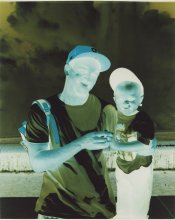
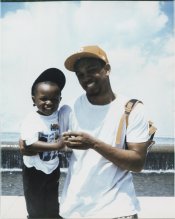
I spent some time today trying to make this work. A scan of the original transparency (Provia 100F) is shown as well as paper negative and positive. I worked a bit with the negative to lower the contrast -- preflashing brought up the shadows slightly. Even so, I find the contrast unsatisfactory. I could probably work with it some more (and admittedly it's a contrasty scene to begin with), but what put me off more than anything was the softness of the positive; I did use glass to keep the paper in good contact. Another problem is "Fujicolor Crystal Archive" appearing in all the shadows (back print on the paper negative).
0229-09.jpg img547.jpg img548.jpg
 
I never liked the results on Cibachrome and that's why I decided to shoot color negative if I want prints. If I were to print a slide I would scan it and then sending it out to a lab that print digital file on to RA-4 paper.
 
bvy, I'd say that given the known difficulties of printing from slides, your effort has produced a very good positive print so well done .If I managed as good a print from what is, as you say, a fairly contrasty scene in the first place then I'd consider this effort a success.

I'll take it that on the actual RA4 print there are clear signs of the paper's name but I have to say I cannot see it.

pentaxuser
 
I've been wondering, would any of the latent image bleaching techniques help with one of the chief limitations of this process, namely the high contrast, without resorting to changes in the native RA-4 chemistry, and, perhaps give more control over it too?
 
hey guys I'm fully aware of scanning and regularly use an Imacon to scan my slides. I was wondering about analog printing of slides but did get some answers on that topic so thank you.
 
bvy, I'd say that given the known difficulties of printing from slides, your effort has produced a very good positive print so well done .If I managed as good a print from what is, as you say, a fairly contrasty scene in the first place then I'd consider this effort a success.

I'll take it that on the actual RA4 print there are clear signs of the paper's name but I have to say I cannot see it.

pentaxuser

But I think this shows it would be better just to make an internegative on negative film. It would be a little more difficult, but much better quality due to lower contrast, masking (for color), and no softness due to the paper support.
 
There may be a good thread here on APUG about making internegatives from slides but most APUG threads are not intended to be instructional in the pure sense of the word.

Perhaps we need a good instructional post or post(s)to a link to such an instructional post. Any offers? Can I also ask that in such cases the contributors stick to adding only posts which help the student to add to his/her knowledge of how it is done.

Thanks

pentaxuser
 
Not color, but making b&w internegatives onto pan film is pretty straightforward and works very well. You can even use color filters, with effects exactly like you would when shooting B&W film in the field. Another bonus is that this is a good rescue method for underexposed slides.
 
The crux would be finding a good interneg color film,if that was desired. Kodak used to make some especially suited but it hass been out of production for some time now. :-/
 
IIRC PE has said that Kodak recommends Portra for making internegs. But there was some slight change they recommended in the processing. I don't recall exactly, but I think it was to pull it a bit.
 
bvy, I'd say that given the known difficulties of printing from slides, your effort has produced a very good positive print so well done .If I managed as good a print from what is, as you say, a fairly contrasty scene in the first place then I'd consider this effort a success.

I'll take it that on the actual RA4 print there are clear signs of the paper's name but I have to say I cannot see it.
Thanks. There might be potential, but there are a lot of "bugs" to work out -- and even then you'll have to be happy with something acceptable or "artsy" if you prefer. I think a clean reproduction that stands up against the slide itself is out of reach. Here I don't like all the blown highlights which suggests that I need a longer exposure time. I did make a few negatives of differing contrasts, and might try again. A heavier piece of glass might help with the sharpness.

You can see the back printing under the visor of the gentleman's cap and on his forehead. The challenge here is that the paper doesn't peel cleanly, so the pulpy residue appears like grain in the positive. One would need either to use a paper with no back printing, or find some way to mitigate the problem. I thought of painting the back of the paper with some sort of white glue/sealer (Mod Podge?) to restore an even white surface. But now it's getting messy...
 
IIRC PE has said that Kodak recommends Portra for making internegs. But there was some slight change they recommended in the processing. I don't recall exactly, but I think it was to pull it a bit.
Portra 160, overexpose slightly and pull at 2:45 or 3:00.

(there was a url link here which no longer exists)
 
Photrio.com contains affiliate links to products. We may receive a commission for purchases made through these links.
To read our full affiliate disclosure statement please click Here.

PHOTRIO PARTNERS EQUALLY FUNDING OUR COMMUNITY:


Ilford ADOX Freestyle Photographic Stearman Press Weldon Color Lab Blue Moon Camera & Machine
Top Bottom