• Welcome to Photrio!
    Registration is fast and free. Join today to unlock search, see fewer ads, and access all forum features.
    Click here to sign up

Contrast/ dodge, burn Masks for 35mm

Recent Classifieds

Forum statistics

Threads
203,179
Messages
2,851,012
Members
101,716
Latest member
Parartesan
Recent bookmarks
1

ericdan

Member
Allowing Ads
Joined
Feb 28, 2014
Messages
1,359
Location
Tokyo
Format
35mm RF
I have a few negatives that I just can’t get right. The sky has details on the negative but is completely blown out in the print because I’m trying to get detail on the church in the frame. the roof structure of this building is too complicated to burn or dodge around it without obvious halos.
I’m thinking of masking but only have a Leitz 1C and an LPL VCCE 120 enlarger.
do I need a 4x5 enlarger to use negatives masks?
 
Have you tried burning with the softest grade you have. Probably this hardly influences the darker tones.
regards,
Frank.
 
Have you tried burning with the softest grade you have. Probably this hardly influences the darker tones.
regards,
Frank.
no, not yet. I am trying to bring out the clouds in the sky. wouldn't the soft filter be worst at showing that?
 
In split grade printing the soft filter is used to bring detail in the high lights.
regards,
Frank
 
Preflashing might help as well.
 
One thing to remember is that the lower grades (00, 0, 1) will add density to the lighter (highlight) tones in the image before they start to have any noticeable effect on the midtones or shadows. There is a limit to how far you can push this before halos start to appear, but it can be very effective in bringing out highlight detail without changing the adjacent midtones. I will often cut out a rough dodging or burning mask to selectively burn the highlight area. Higher grades like 4 or 5 will add density to the shadows quickly, before any changes are seen in the highlights.
Another option to try is to pre-flash the paper to get closer to the density threshold for the highlights before exposing with the negative. This may help bring out some density in the sky without affecting the rest of the image.

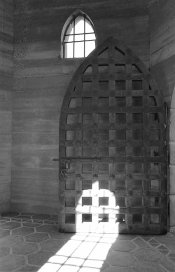
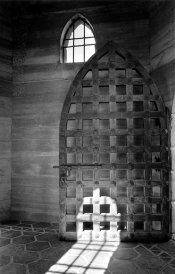
Here's an example I've used before, of the straight print at Grade #2 and the final print using multiple grades with burning and dodging. Base exposure ended up being at grade 4 or 4.5, but the biggest problem was that I lost all detail in the sunlit area at the bottom. I selectively burned in this area at Grade 0 to show some detail, but not look manipulated. Other areas of the print were burned in at Grade 3 to add density.

Scottys_Castle_door_STRAIGHT PRINT.jpg Scottys_Castle_door_sm.jpg
 
Dear Ericdan,

Any enlarger will do. While I use 4x5 sheets when making masks for 35mm, all I do is cut the mask to the same size, align them on a light board and hold them together with Scotch Magic Tape.

Good luck,

Neal Wydra
 
Whether or not masking with 35mm negatives will work for you may depend on how suitable the carrier in your enlarger is for it.
Registration of the negative and the mask can be the biggest challenge.
 
Photrio.com contains affiliate links to products. We may receive a commission for purchases made through these links.
To read our full affiliate disclosure statement please click Here.

PHOTRIO PARTNERS EQUALLY FUNDING OUR COMMUNITY:


Ilford ADOX Freestyle Photographic Stearman Press Weldon Color Lab Blue Moon Camera & Machine
Top Bottom