
• Welcome to Photrio!
    Registration is fast and free. Join today to unlock search, see fewer ads, and access all forum features.
    Click here to sign up

Color processing for that ever popular dreamy, pastel look question.

Recent Classifieds

Forum statistics

Threads
204,278
Messages
2,866,550
Members
102,207
Latest member
gustavocf
Recent bookmarks
0

IpseLux

Member
Joined
Apr 17, 2026
Messages
172
Location
East Tennessee
Format
35mm
It’s been decades since I did color printing. I remember it being very color sensitive, and quite a challenge to nail down proper color rendering.
All was done with trial and error, looking at prints thru filters.
I’m quite disappointed with my local lab work. And I’m trying to work out solutions to this.
One is to shoot slide film. Easy enough.
But at $25 a roll for E100, and the rarer opportunities that I shoot images where color is the protagonist, I’d like to attempt option two. Overexpose the image and ask for a treatment that is popular now, and that I assume they could do well.
Now I realize the best thing would be to ask them, instead of you all. But given the big mess up they’ve already committed in previous prints, I thought I’d get a second opinion, and one before my first, if that makes sense.
How does one achieve that dreamy pastel look with Fuji print film. Overexpose 1 or two stops?
And also, and most importantly, hence my question in this forum, what instructions must I give my lab for them to better print my images?
Correct me if I’m wrong, but is it process normally? Do I need to add reduce contrast at scanning? Or anything else.
Thank you before hand.
I’ve got a couple of rolls on two cameras. One I’m going to bracket, to see what’s going on with their printing. But the other I’d like to try as a whole, to get a sense of how it all looks with my normal shooting style.
Thanks again.
 
It’s been decades since I did color printing. I remember it being very color sensitive, and quite a challenge to nail down proper color rendering.
All was done with trial and error, looking at prints thru filters.
I’m quite disappointed with my local lab work. And I’m trying to work out solutions to this.
One is to shoot slide film. Easy enough.
But at $25 a roll for E100, and the rarer opportunities that I shoot images where color is the protagonist, I’d like to attempt option two. Overexpose the image and ask for a treatment that is popular now, and that I assume they could do well.
Now I realize the best thing would be to ask them, instead of you all. But given the big mess up they’ve already committed in previous prints, I thought I’d get a second opinion, and one before my first, if that makes sense.
How does one achieve that dreamy pastel look with Fuji print film. Overexpose 1 or two stops?
And also, and most importantly, hence my question in this forum, what instructions must I give my lab for them to better print my images?
Correct me if I’m wrong, but is it process normally? Do I need to add reduce contrast at scanning? Or anything else.
Thank you before hand.
I’ve got a couple of rolls on two cameras. One I’m going to bracket, to see what’s going on with their printing. But the other I’d like to try as a whole, to get a sense of how it all looks with my normal shooting style.
Thanks again.

Sorry, I misspoke. Not color sensitive, but temperature sensitive, compared to B&W. Temps had to be consistent and the range was tight.
 
I don't think most labs are giving you an RA4 we print at this point., everything is getting a digital pass, so you are probably better off just getting the raw/tiff scans, adjusting them yourself, and then getting the prints after. Better still, don't pay for the scans and just scan them yourself.
If you just want 4x6 prints for a proper album, then personally I got one of the cannon Selphy printers. The colours are good enough and the physical prints are great, and much cheaper than a lab print. To me they feel just like holding a traditional lab print.
 
It was announced last month, Fuji "Sheet paper lineups like 6R 8R 10R cuts... ARE DISCONTINUED that can be used in home darkroom." Fuji still makes Crystal Archive for commercial use.
As of 2024–2026, production of Kodak-branded RA-4 paper (such as Endura) has effectively ceased, with the last manufacturer of the paper stock ceasing operations.

With that news, I no longer regret having sold my Beseler 45V-XL enlarger with Universal color head. I was greatly saddened with the demise of Cibachrome/Ilfochrome, further saddened with discontinuance of Kodak color material. and last month's news about Fuji truly marks the end of an era in home printing. If Fuji ever discontinues Crystal Archive, color printing not relying upon inkjet ...
 
Last edited:
How does one achieve that dreamy pastel look with Fuji print film.
Scan, adjust colors to taste, then have them printed. If you have a reasonably color-accurate (calibrated, for instance) monitor and you use the printer's ICC output profile to optimize your images, you should get pretty close to a WYSIWYG experience.

Note that your prints are already being made digitally as @tcolgate mentions above. A typical lab scans film automatically with little to no human involvement in how the images come out.

Also, overexposing a typical color negative film by a stop isn't going to make much of a difference color-wise.
 
It’s been decades since I did color printing. I remember it being very color sensitive, and quite a challenge to nail down proper color rendering.
All was done with trial and error, looking at prints thru filters.
I’m quite disappointed with my local lab work. And I’m trying to work out solutions to this.
One is to shoot slide film. Easy enough.
But at $25 a roll for E100, and the rarer opportunities that I shoot images where color is the protagonist, I’d like to attempt option two. Overexpose the image and ask for a treatment that is popular now, and that I assume they could do well.
Now I realize the best thing would be to ask them, instead of you all. But given the big mess up they’ve already committed in previous prints, I thought I’d get a second opinion, and one before my first, if that makes sense.
How does one achieve that dreamy pastel look with Fuji print film. Overexpose 1 or two stops?
And also, and most importantly, hence my question in this forum, what instructions must I give my lab for them to better print my images?
Correct me if I’m wrong, but is it process normally? Do I need to add reduce contrast at scanning? Or anything else.
Thank you before hand.
I’ve got a couple of rolls on two cameras. One I’m going to bracket, to see what’s going on with their printing. But the other I’d like to try as a whole, to get a sense of how it all looks with my normal shooting style.
Thanks again.

A big part of this is the fact that I only use my iPhone. No computer. No darkroom processing other than in camera, or the minimal that iPhone offers on screenshots.
My old film scanner, quite good I always thought, as it would easily resolve individual grains of emulsion of A TriX negative… worked on my Windows XP, I believe. Not sure what version of Windows is current today.
So at the lab, I don’t bother to scan the negatives, just develop and print. Without a computer, files on some cloud for me to download are of little use to me.
And to be quite frank, the prints they provided look like they were scanned with a printer/scanner. They were flat and awful.
I’ve ordered some slide E100. Pricey, but worth avoiding wasting terrible prints.
I’ll be ordering some Scala 50 slide/neg to develop as slide next.
And I’ve always been good with black&white negatives with contact sheets, and those are easily available, and super easy to do for any real lab.
But with 3 film cameras, two of which have B&W and E100 or Fuji slide, it’d be nice to have the third with color negative, especially for the latitude.
In the old days, framing to enlargement size, and overexposing it, pretty much got you great enlargements and prints anywhere, and very cheaply.
Obviously that was with chemical printing, after decades of commercial practice by every lab.
Things are different today.
 
You can shoot color neg and either print optically at home onto RA4 paper or overcome your resistance to using the tools to get the job done digitally.

What scanner do you have? Perhaps it can still work with modern computer hardware.

Here's film grain through an optical microscope:
1778700731056.png
 
You can shoot color neg and either print optically at home onto RA4 paper or overcome your resistance to using the tools to get the job done digitally.

What scanner do you have? Perhaps it can still work with modern computer hardware.

Here's film grain through an optical microscope:
 
Brother, unless things have changed a ton since I last printed color negatives, saying shoot and print at home is a bit of an understatement, isn’t it?
I think you must have misunderstood me, it’s no resistance. As I stated, I don’t have a laptop set up at the moment.
I just use my phone. And I do download images to it, from my DSLRs, but memory is limited, and am fine with that.
The scanner name is in the pic.
Needs a computer to work, ….
 

Attachments

  • IMG_2098.jpeg
    IMG_2098.jpeg
    595.4 KB · Views: 54
In have the same scanner. It works fine under Windows 11 (and 10, and 7, and XP as I've used it on all of them).

I also print color and b&w at home in the darkroom. Both the digital and analog approaches involve tools and technique.
 
It would help to understand what print sizes you are after. If you are looking for 5x7 and smaller, and have a modern iPhone, you might want to try one of hte cheap neg scanning jigs that are sold for use with phones. As I understand, the newer iPhone can capture raws. There's are a few tools that will do inversion for you (Analogue Cafe has an online one), and then you can adjust from there in an on-phone image editor. Then send those for prints, or use a cheap wifi connected printer.
There's nothing we can tell you to tell your lab that will make them any more diligent in processing your film or prints.
Maybe you just need to find a different lab?
 
It would help to understand what print sizes you are after. If you are looking for 5x7 and smaller, and have a modern iPhone, you might want to try one of hte cheap neg scanning jigs that are sold for use with phones. As I understand, the newer iPhone can capture raws. There's are a few tools that will do inversion for you (Analogue Cafe has an online one), and then you can adjust from there in an on-phone image editor. Then send those for prints, or use a cheap wifi connected printer.
There's nothing we can tell you to tell your lab that will make them any more diligent in processing your film or prints.
Maybe you just need to find a different lab?

Yes. I’ve posted regarding neg inversion with phones. That’s something that interests me quite a bit.
So here’s a better question, have you or others printed in this popular dreamy style of digital photography, trying to emulate Fuji style films, high key, and subtle pastels colors?
And if you did, or do, did you tell your digital process to do it, how did you accomplish it? If it’s by pressing a setting in adobe or Lightroom, I can’t.
But if you manipulated the image in camera, or instructed the lab to do any special requests to your negatives, or prints, what did you do?
As an example, these suggestion come to mind:
Overexpose the negs by one to two stops.
Process film normally. Don’t pull. Leave the negs overexposed.
Adjust print to give you best image, given the overexposed negs.
Reduce contrast.
Reduce saturation, slightly.
Shift colors to emulate more pastel ranges. I’m guessing less greens, a bit more purples as in Velvia ….
Again these are guesses, from looking at these sort of images….
Regarding the phone manipulations, I’ve tried that, or something like that.
It kind of works, producing images at 2MPs.
It’s quite easy, and a working alternative to others like me, who are searching for alternative methods to get good prints from cheap photographic sources, like Walmart’s discounted prints.
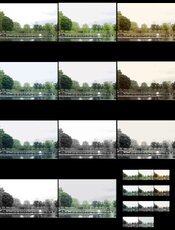
19 cents gets you a workable contact sheet and or an adjusted print, easily replicable. Here’s an example:
Excuse the subject. Trying out shooting water and sky on a gloomy, cloudy day.
 

Attachments

  • IMG_2010.jpeg
    IMG_2010.jpeg
    375.1 KB · Views: 37
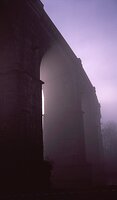
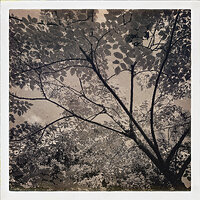
I don't do a lot of colour, but here's a couple of Kodak Gold (thinking about it, the last two here are UltraMax400), I think photos recently that I would describe as having a high key style. I think I had a sort of "James Popsys" look in my mind. These were exposed at box peed, scanned with my EM5 Mk3, and the inverted in Darktable's Negadoctor. They were "graded" purely with the print settings within the Darltable negadoctor plugin. The pastel look comes from up'ing the exposure in the print settings (not the neg exposure), and then increase the contrast/gamma to push the shadows back down.
Just over exposing the neg wont do it, as you'd still need to up the contrast (and over exposing will crush the highlights a bit, neg film does cope with that well, but ideally you just want a good overall exposure that you can then push/pull at the "print" stage.
I suspect you can do OK scanning with your phone, just find a nice jig with a half decent even light. There are lots of kits out there. Once you can get a RAW you'll have a lot more information to work with. I did try the mobile version of lightroom for a while but it didn't support actual negative conversion. You can do it with RGB curves adjustment (I've done that in snapseed), but the results aren't great, though I would probably be better at it nowadays. I've not tried the analogue cafe inversion thing, but the chap that makes it seems like good people so I suspect it isn't garbage.
(I am British, so gloom and clouds are very much my birthright :wink: )

Edit: it might be worth clarifying that what the darktable/negadoctor control I mention presents as "increasing print exposure", in RA4 printing terms would be decreasing the print exposure time, (and increasing contrast in RA4 would generally require chemical adjustment I think).

1778754256326.png
1778754289547.png
1778754774388.png
 
Last edited:
Spectacular, T. These are beautiful. And yes, this is what I’m thinking of.
I’m gonna read and reread the instructions you give now.
Thank you very much for your reply.
Again, nice images.
Kind regards from East Tennessee.
 
Spectacular, T. These are beautiful. And yes, this is what I’m thinking of.
I’m gonna read and reread the instructions you give now.
Thank you very much for your reply.
Again, nice images.
Kind regards from East Tennessee.

Thanks! One thing you could consider (with caution), is a negative scanner that will go straight to an SD card. They are tiny, and usually use a small sensor and cheap optics. They'd aren't good, but might be good enough (be aware that some will claim higher megapixels counts, but that's all digital upscaling). There are lots of cheap and nasty ones. This one is at the upper end of the price range, but I think is probably the best quality for this type of thing (again, I suspect they aren't great).
So far as I can tell none of them support any RAW/DNG output, just JPG, that's not great, especially if you need to invert them yourself later.


You might be able to find one second hand.

I don't know though, you really might be able to get better results with a white light LED panel and a mobile phone (with a macro lens and a stand), and a lot of modern phones will let you get a RAW from that. That would also be the cheapest option, and the least extra stuff to have laying around.
 
if the "popular dreamy look" you're after is what most youtubers share when shooting film, that is mostly some kind of photoshop treatment and not a lab one.
 
The light and airy look is all done in the scanner. Some labs would lift the shadows in Lightroom.

It’s just how the Fuji frontier/Noritsu compensate density changes. You keep pressing the density key and the image retains certain saturation of colors while dropping others, creating pastel colors.

For the trick to work you need shadow details, that’s where overexposing 1 or 2 stops comes into play. If you don’t have detail there then once they go for that light and airy look the scan will look awful.

Try bracketing one roll with different lighting scenarios and then tell the lab you want that light and airy look. If it fails you can send your negatives to a lab that uses a Fuji Frontier, in Tennessee you get Boutique Film Lab. The owner will be happy to explain how to get the look you want and shoot for it. I’ve known him for years.
 
The light and airy look is all done in the scanner. Some labs would lift the shadows in Lightroom.

It’s just how the Fuji frontier/Noritsu compensate density changes. You keep pressing the density key and the image retains certain saturation of colors while dropping others, creating pastel colors.

For the trick to work you need shadow details, that’s where overexposing 1 or 2 stops comes into play. If you don’t have detail there then once they go for that light and airy look the scan will look awful.

Try bracketing one roll with different lighting scenarios and then tell the lab you want that light and airy look. If it fails you can send your negatives to a lab that uses a Fuji Frontier, in Tennessee you get Boutique Film Lab. The owner will be happy to explain how to get the look you want and shoot for it. I’ve known him for years.

Thank you Dani. And it does make sense, detail in the shadows is (high) key. Pun intended.
I’ll keep BF in mind.
 
I just saw this thread and I thought back to when film was king (pre digital) and remembered the Cokin Filter system.

Cokin_CA086_A086_Pastel_1_Resin_1405344934_13967.jpg
 
Photrio.com contains affiliate links to products. We may receive a commission for purchases made through these links.
To read our full affiliate disclosure statement please click Here.

PHOTRIO PARTNERS EQUALLY FUNDING OUR COMMUNITY:


Ilford ADOX Freestyle Photographic Stearman Press Weldon Color Lab Blue Moon Camera & Machine
Top Bottom