• Welcome to Photrio!
    Registration is fast and free. Join today to unlock search, see fewer ads, and access all forum features.
    Click here to sign up

CMS 20 Developing Problem

Refuge

H
Refuge

  • 1
  • 0
  • 60
Solitude

H
Solitude

  • 2
  • 0
  • 52

Recent Classifieds

Forum statistics

Threads
203,614
Messages
2,857,135
Members
101,932
Latest member
Solracsiul
Recent bookmarks
0

Jeremy05

Member
Allowing Ads
Joined
Jan 28, 2019
Messages
3
Location
Melbourne, Australia
Format
35mm
Hi everyone,
Firstly thank you for your presence here - it has been a big help to me over the years. It's my first time posting here. I've been using ADOX film (CHS ART, CMS, Silvermax), paper (MCP is the best I've ever used) and other products over nine years now - it's been cool watching ADOX grow and mature as a company.
CMS 20 is a truly remarkable film - like no other. Its capabilities are remarkable - I remember the first time I printed with it using a rail enlarger to 2 metres wide and how no one believed it came from a 35mm neg when they couldn't see any grain! BUT, it can be a challenge to develop. Recently I shot four rolls at ISO12 and developed using ADOTECH III. I did everything correctly as per the instructions - temperature, dilution, gentle agitation, used a stop bath, fixed for only 60 seconds, washed for 5mins then Photoflo for 30secs. Initially, I was very happy with the results, it is the first time I've been able to achieve good tonal range and proper halftones.

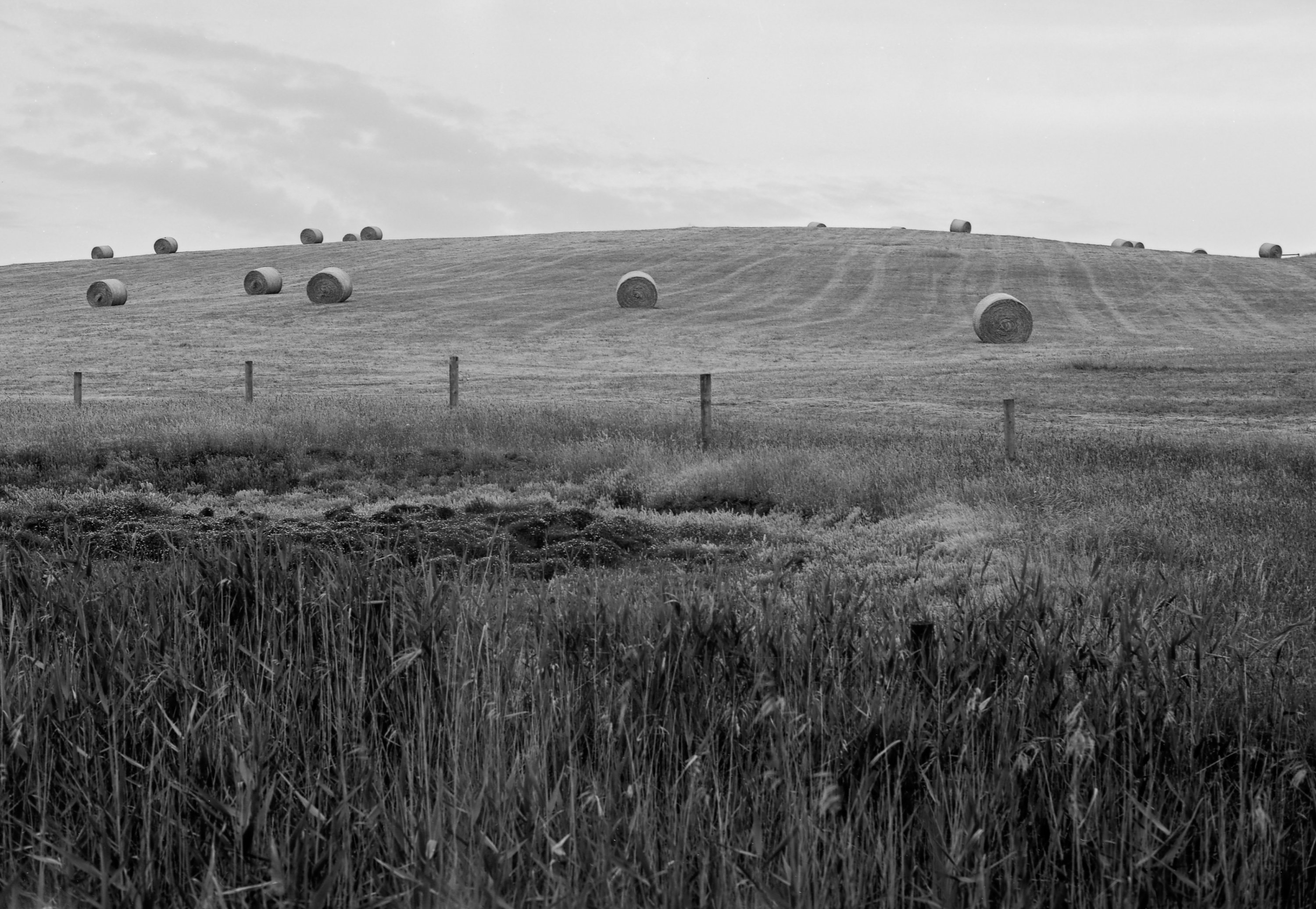
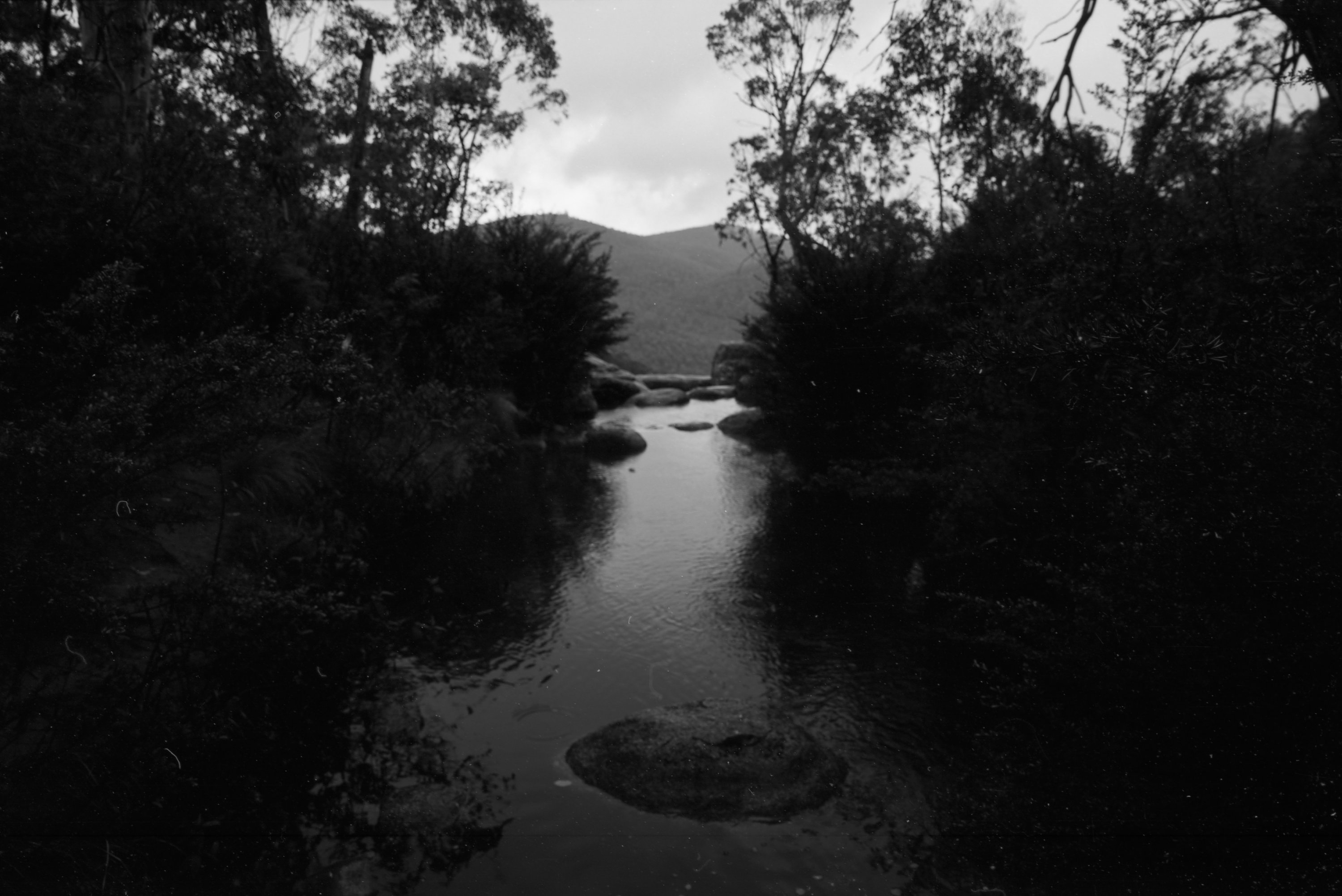
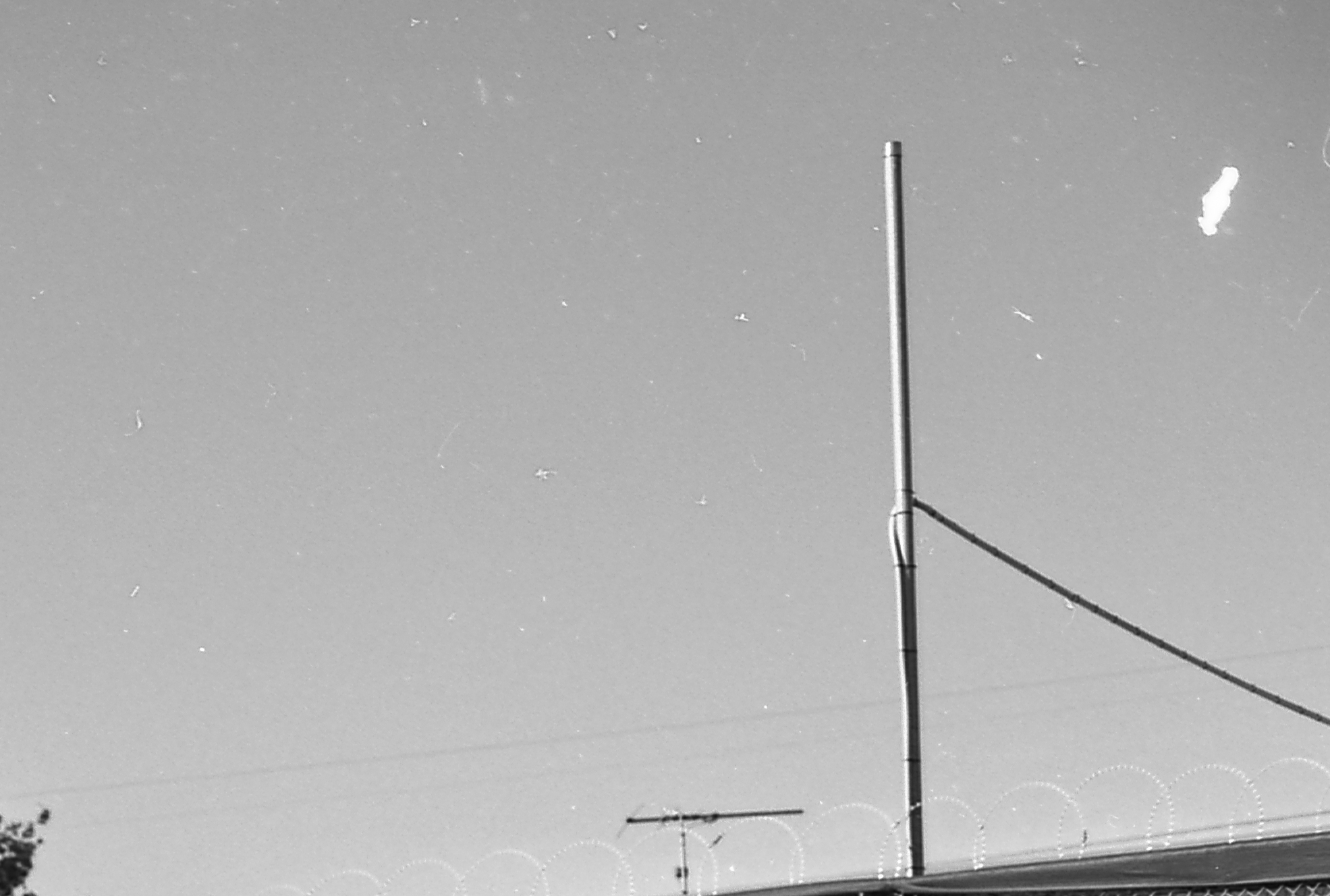
However, once I had scanned all the rolls at 4800dpi and viewed them at 1:1 I was so very disappointed. I have tiny little white dots/specks all over the negs, to the point where some are unusable. I have attached images for reference (the original and 1:1) Some images are worse than others (even on the same roll); the image of the hay bails in the field is quite good, whereas the underexposed one is terrible. I do not understand what the problem is - someone suggested the water could be the issue? I live in Melbourne and use tap water. From my research, apparently, Melbourne has quite soft water compared with international standards (though I also understand this can be affected by old pipes, different water sources etc). The problem looks similar to the images in this forum - https://www.rangefinderforum.com/forums/showthread.php?t=95818
I love this film and its awesome potential and want to continue using it as I'm keen to get back into the darkroom after a few years away, so any help would be greatly appreciated. Many thanks, Jeremy
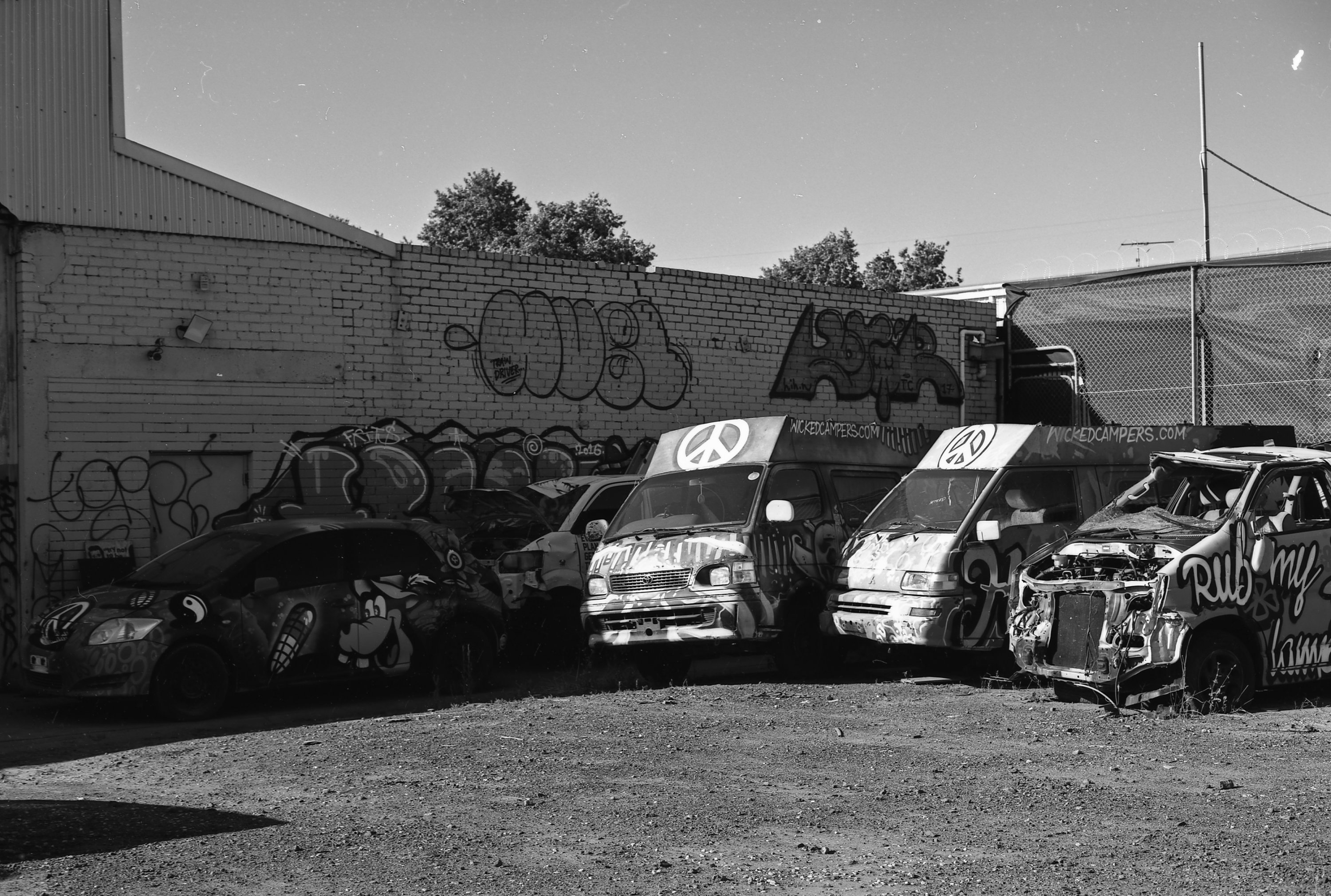
westmelbwalk007.jpg
westmelbwalk007-2.jpg
GilbralterFalls019.jpg
GilbralterFalls019-2.jpg
mornington#1014.jpg
ShannonGilbralterFalls029.jpg
 
I don't think it is a developer problem as Adotech II contains Trilon C , a form of DTPA used to chelate and sequester hard water.Try filtering developer, stop, fix, photoflo to remove any particles.Just pouring through a layer of cotton wool is sometimes sufficient.
 
I don't think it is a developer problem as Adotech II contains Trilon C , a form of DTPA used to chelate and sequester hard water.Try filtering developer, stop, fix, photoflo to remove any particles.Just pouring through a layer of cotton wool is sometimes sufficient.
Hey Alan! Thanks for your message :smile: I'll certainly investigate some sort of filtration, though I wonder how much filtering through cotton would help when the particles are so tiny!
Cheers, Jeremy
 
I had similar problems - while drying dust settles on my film strips. Now I do a final rinse in distilled water and Photoflo. Then I use a Paterson film squeegee.
The film dries in 1/3rd of the time and less dust sticks on the surface.

Edit: Do not use the squeegee dry - I wet it with the distilled water / Photofo
 
Last edited:
Thanks pentaxuser and macfred - I'll see about filtering the dev with a coffee filter before I dilute it. I learnt the hard way not to overly squeegee with CMS20 - I ruined a few rolls a while back by doing that. I think I'm going to start using distilled water to avoid any nasties in the water. Thanks guys!
 
And make sure you hang it to dry in as dust free place as possible. I hang mine in the bathroom from the shower rail over night, keeping the window closed. This along with filtration of the water and chemicals used make a big difference.

It hasn't been mentioned yet (!), but quite often these dots etc are scanner related / introduced, so try giving that all a good clean as well.

Terry S
 
I've used CMS II 20 in 4x5 and have observed the exact same phenomenon in virtually every negative I've shot and developed (using Adotech IV). I can confirm that it's not a scanning problem as some have suggested in other forums. Some of the specks (the larger ones) are actually visible to the naked eye when inspecting the negatives (the smaller ones become apparent after scanning). I'm quite confident that it has nothing to do with your developing technique as you've described it, including the use of tap water. I use distilled water for all of my developing solutions (from developer to final rinse) and the these marks still show up. In my opinion, the marks are the result of physical nicks/damage/imperfections in the film emulsion. In other words, I don't think dust particles that settled on the film *after* exposure (and before development) have anything to do with what's going on here (i.e., said dust should, in theory, just wash off during development and not leave marks). Assuming that the marks are due to emulsion problems, I have two hypotheses as to where they may be coming from:

1) Damage caused while handling the film -- The CMS II 20 emulsion appears to be quite soft and easily damaged, which I've seen anecdotally reported by other users. In addition to the "garden variety" marks seen in your negatives, I've also noticed scratches along the edges of some of my negatives where the film (emulsion side) comes into contact with the guide rails of the sheet film holders during loading and unloading. This is what suggests to me that the emulsion is unusually soft (i.e., this doesn't happen with other films I routinely use). The film base is also quite thin, which makes for difficult handling of 4x5 sheets in a changing tent (not quite as thin and flimsy and Rollei IR 400, but still pretty flimsy). Sweaty hands and a muggy atmosphere inside the changing tent tend to make any sheet film especially sticky, which is only exacerbated by a thin film base, which in turn contributes to settling and adhesion of dust particles on the film during loading and/or unloading. If the dust particles in question are hard enough (e.g., silt particles, salt, fibers of stiff fabrics, etc.), they could damage the film during subsequent handling. Interestingly, you're seeing these marks in 35mm film, which normally experiences much less direct handling than 4x5 film. Loading 35mm film onto a developing reel, of course, might explain where your marks are coming from, but I'm a bit suspicious that there could be more going on here.

2) Imperfections incurred during manufacturing and packaging -- It's possible that the film is being slightly damaged (e.g., by inadvertent marks and/or dust settling) during manufacturing and/or packaging. I really hope this isn't the case, as it would mean there's nothing we can do on our end to avoid it. That said, I'm extremely cautious about how I handle my film (loading and unloading in a cool, dry, dust-free environment), and I still get these marks on my negatives. So, I'm not quite sure where in the chain of custody the problem is occurring.

I'll note that, in terms of resolution and sharpness, this is the most impressive black and white film I've ever used. Tonally it can be a bit tricky (the contrast can get really heavy if you're not careful), but the 4,000-spi scans I've gotten from 4x5 negatives on my drum scanner have shocking amounts of detail -- you just have to do a lot of spot healing in Lightroom to get presentable images. That said, I'm hesitant to continue using it because of the problem with marks/scratches/imperfections. My gut feeling is that the relative "delicateness" of the emulsion is related to its ability to achieve such high resolution, and that as a consequence, there's probably not much that can be done from a manufacturing perspective to address the problem without fundamentally altering the chemistry (and hence, performance) of the film.

Again, if you can tolerate all the spot-healing, it's gratifying film to use.
 
A comparable high-resolution film, Agfa Copex Pan Rapid, has a hardened and fast drying overcoat. Today’s ORWO films also dry relatively quickly and aren’t prone to become dusty. I also have an eye on Adox CMS 20 but haven’t used it, yet. Since ORWO films are coated by InovisCoat as well as Adox’ an improvement might be triggered by pointing things out to Mirko Bödekker.
 
This thread has come to a point Mirko from Adox should chime in.
 
It is very difficult to give any advise on such a problem by looking at the images. If at all a microscope might reveal more about the cause of the problems.

There are a few things which can be said though as they are common knowlegde:

1) On these images I see many different artefakts. Some are dust/fibres some are drying stains and some a small spots. I assume we are only talking about the smaller spots here.

2) Small spots have to be looked for. The main reason why you might not notice them on a different film is that they are smaller than the grains and thus simply "go under".

3) If you use a microfilm you tend to scan in the highest resolution and then you try to enlarge to a maximum. You might see thinghs now for the first time which you would have seen elswehere as well if you had looked.

4) Apart from the fact that artefacts might actually been overlayed/surpressed by a corse grain structure they are also enhanced by the grain free homogenous grey background of CMS 20.

5) We do recomend to use distilled water for ADOTECH so in case of any problems this is what you should try first. You should also use distilled water as a final bath simply because this helps avoiding artefacts in general.

6) CMS 20 does have a topcoat and also a backside coating. The later is also antistatic as it is the case with all modern films. This is all top notch including the hardeners used and the glatines. A higher sensitivity to scratching should not be noticeable. There is a difference though and this is the layeer thickness. Naturally CMS 20 has the thinnest layers of all films else it could not be so sharp.
So theoretically it does take less energy to scrape the emulsion of the base but since this is not discussed here it should not matter.

All the rest is unfortunately speculation and further investigation would involve the use of a microscope in a first step.
 
1) Damage caused while handling the film


That's it (just in short) Scott J. : The film emulsion is damaged.

What we may clearly identify from picture No. 1 here
IMG_20190223_163118_037.jpg

This is no developer problem - it is a mechanical destruction of the film emulsion.

I remember such damage from bw neg. out of 1928 (Agfa bw film) - just a couple of negs.!
I never saw this from todays films (later than 1950).

The next damage is the same (emulsion defect) but I can imagine that it may be caused from
development.
IMG_20190223_163337_106.jpg

To make clear what I meant with mechanical : I is like old paint wich flakes of.

Then we habe next fussles :
IMG_20190223_163533_731.jpg


No Problem to avoid it - I would say. It is decribed how to handle before.

The remaining question is : production (manufacturers) problem or workflow problem ?

As so many of you described simular failures I should have the impression that most of you are real lousers in darkroom - for not stating : That looks much like a manufacturing problem ?

I will not state - but think about.

with regards

PS : Damned - I did some terrible thinks with lots of my bw films over soo many years !
I cooked them (wrong developer temperature) a.s o. I will not remember - but I never reached to destroy the film emulsion....:wondering:??¿
 
It is very difficult to give any advise on such a problem by looking at the images. If at all a microscope might reveal more about the cause of the problems.

There are a few things which can be said though as they are common knowlegde:

1) On these images I see many different artefakts. Some are dust/fibres some are drying stains and some a small spots. I assume we are only talking about the smaller spots here.

2) Small spots have to be looked for. The main reason why you might not notice them on a different film is that they are smaller than the grains and thus simply "go under".

3) If you use a microfilm you tend to scan in the highest resolution and then you try to enlarge to a maximum. You might see thinghs now for the first time which you would have seen elswehere as well if you had looked.

4) Apart from the fact that artefacts might actually been overlayed/surpressed by a corse grain structure they are also enhanced by the grain free homogenous grey background of CMS 20.

5) We do recomend to use distilled water for ADOTECH so in case of any problems this is what you should try first. You should also use distilled water as a final bath simply because this helps avoiding artefacts in general.

6) CMS 20 does have a topcoat and also a backside coating. The later is also antistatic as it is the case with all modern films. This is all top notch including the hardeners used and the glatines. A higher sensitivity to scratching should not be noticeable. There is a difference though and this is the layeer thickness. Naturally CMS 20 has the thinnest layers of all films else it could not be so sharp.
So theoretically it does take less energy to scrape the emulsion of the base but since this is not discussed here it should not matter.

All the rest is unfortunately speculation and further investigation would involve the use of a microscope in a first step.

Mirko that's quite clear what you stated here and I would also say it is ok ( I would do it in the same form if I were you )

But pls. Mirko what is this here :

IMG_20190223_163118_037.jpg


I guess there will be no need for analysis from microscop - hmm ?

I know that microfilm isn't easy to handle - but I also can not imagine that it is caused from the OP
(while he scraped of the emulsion with a srewdriver during development from mistake?)

with regards:wink:

PS :
at what temperaure should we handle CMS 20 during developer baths to flake of parts of the emulsion linke here? What is your recomandation ? I would reccomand a first try at 58degree Celsius to destroy the emulsion:wink:.....guess that isn't enough but if we remember it is microfilm...??
May be enough !

PPS : A manufacturer who would state : perhaps we made a mistake - we will research if there might be a problem from production. That would be nice - but I guess we will not see:sick:?
 
If emulsion were damaged the positive spot would be black. Thankfully these are white spots and print spotting of white spots is a lot easier than black. (Maybe some pictures. Spotting would be a chore with all the sky in these pictures)
 
If emulsion were damaged the positive spot would be black. Thankfully these are white spots and print spotting of white spots is a lot easier than black. (Maybe some pictures. Spotting would be a chore with all the sky in these pictures)
Yes Bill Burk that what you said is the same I thought about a couple oft moments before?
Black spots ----- not white spots.....hmm?
That would mean bigger particles are located onto the film like rests of ram jet after insufficient remove!
Were is that stuff coming from ?

with regards????

PS : I have to think about twice : black spots or white spots what is wrong - complicate issue!
PPS : A scan of the neg. with flaked off part of emulson is looking E X A C T L Y in this way :
IMG_20190223_181503_013.JPG


Hmm ?
 
YES but we have to refer about scanned pictures:sick:!

my failure :pinch:

with regards
 
It is very difficult to give any advise on such a problem by looking at the images. If at all a microscope might reveal more about the cause of the problems.

There are a few things which can be said though as they are common knowlegde:

1) On these images I see many different artefakts. Some are dust/fibres some are drying stains and some a small spots. I assume we are only talking about the smaller spots here.

2) Small spots have to be looked for. The main reason why you might not notice them on a different film is that they are smaller than the grains and thus simply "go under".

3) If you use a microfilm you tend to scan in the highest resolution and then you try to enlarge to a maximum. You might see thinghs now for the first time which you would have seen elswehere as well if you had looked.

4) Apart from the fact that artefacts might actually been overlayed/surpressed by a corse grain structure they are also enhanced by the grain free homogenous grey background of CMS 20.

5) We do recomend to use distilled water for ADOTECH so in case of any problems this is what you should try first. You should also use distilled water as a final bath simply because this helps avoiding artefacts in general.

6) CMS 20 does have a topcoat and also a backside coating. The later is also antistatic as it is the case with all modern films. This is all top notch including the hardeners used and the glatines. A higher sensitivity to scratching should not be noticeable. There is a difference though and this is the layeer thickness. Naturally CMS 20 has the thinnest layers of all films else it could not be so sharp.
So theoretically it does take less energy to scrape the emulsion of the base but since this is not discussed here it should not matter.

All the rest is unfortunately speculation and further investigation would involve the use of a microscope in a first step.


Sorry Mirko - so you are a lucky guy today:D!

It was MY FAILURE ....otherwise you may had some problems (recalibration of production process
due to massive emulsion defects after correct development.)
 
Sorry Mirko - so you are a lucky guy today:D!

It was MY FAILURE ....otherwise you may had some problems (recalibration of production process
due to massive emulsion defects after correct development.)

I did not say this. I said the cause is difficult to find and I gave reasons why artefacts are seen more easily in such a film system.
This is the truth and can be seen as a reason not to get involved in an ultrahighresolution imaging system. Larger formats can give you the same resolution but are for sure more fogiving.
I have not commented abut tear offs. I cannot differ this without a microspcope from particles attaching to the emulsion. I was mainly refering to the small spots.
If the above scanned image is an emulsion tear off (have you cut out and inversed the image part in photoshop?) then it is clear this happened during processing. Coating defects look different (as the web mooves) and in confectioning such tear offs are next to impossile to generate because the film is dry.
This does not mean that coating or confectioning mistakes and artefacts cannot occur. It simply means that they look different. Here we have someone with these problems who made a post in 2009 and then you in 2019. In this timeframe we sold and processsed in house hundreds of thousands of rolls without prolems also in our own quality control.
Next to this millions of sqm were produced, sold and used in the way the film is intended to be used as a microfilm in controled environments with standardized processing. Needless to mention that there were no issues as well.
Therefore you are right. There are little options at this point to investigate on our end in the film´s production. If it was longitudinal, parallel scratches or comet shaped bubbles my reply would have been a different one.
Apart from this we are constantly improving the developer and as a matter of fact your post was forewarded to the chemical engineering team.

The only tip I have left without looking at the negatives under a microspcope is to check on the pH value of the stop bath. It shall not be to strong. There have been reports about flakes of emulsion coming off in very acidic stop baths but we were never capable of simulating this in our lab.
 
Last edited:
I did not say this. I said the cause is difficult to find and I gave reasons why artefacts are seen more easily in such a film system.
This is the truth and can be seen as a reason not to get involved in an ultrahighresolution imaging system. Larger formats can give you the same resolution but are for sure more fogiving.
I have not commented abut tear offs. I cannot differ this without a microspcope from particles attaching to the emulsion. I was mainly refering to the small spots.
If the above scanned image is an emulsion tear off (have you cut out and inversed the image part in photoshop?) then it is clear this happened during processing. Coating defects look different (as the web mooves) and in confectioning such tear offs are next to impossile to generate because the film is dry.
This does not mean that coating or confectioning mistakes and artefacts cannot occur. It simply means that they look different. Here we have someone with these problems who made a post in 2009 and then you in 2019. In this timeframe we sold and processsed in house hundreds of thousands of rolls without prolems also in our own quality control.
Next to this millions of sqm were produced, sold and used in the way the film is intended to be used as a microfilm in controled environments with standardized processing. Needless to mention that there were no issues as well.
Therefore you are right. There are little options at this point to investigate on our end in the film´s production. If it was longitudinal, parallel scratches or comet shaped bubbles my reply would have been a different one.
Apart from this we are constantly improving the developer and as a matter of fact your post was forewarded to the chemical engineering team.

The only tip I have left without looking at the negatives under a microspcope is to check on the pH value of the stop bath. It shall not be to strong. There have been reports about flakes of emulsion coming off in very acidic stop baths but we were never capable of simulating this in our lab.
Excuse me Mirko - I mixed scanned pictures with scanned negatives. And that to be seen in OP's picture No.1 and in picture No.2 (the close up /right side of the antenna) looks for sure 100% like an emulsion wich has peeled in parts totally what would be a very hart damage of the film.
You have to torture a bw film in an extreme way to cause such damage. I never reached this AS I mentioned:sick:.....and from such film failure you perhaps indeed need no microscopic analysis
(to come to the conclusion : THE COMPLETE EMULSION LAYER HAS LEFT THE FILM CARRIER/BASIS ).

But it isn't a scanned film negative (altough it looks like from the close up).

So Mirko "I stand corrected" because I mixed the issue. And from a picture wich is scanned with
that sorts oft failures - it isn't clear from where the damage is caused.
There may be couple oft reasons from developing/film handling AND production issues wich may cause that failures.It could be everything wich is onto the film ( foreign particles ) AND a microscopic analysis should indeed tell much more (as you mentioned).

Will you forgive me :redface::redface::redface:?


By the way from my point "it enobles you" to state it isn't said that it couldn't be a producers problem. But you mentioned you have noticed that failures from cosumer complaints not often.
What should more indicate that it is caused from film handling. Because in the other case you would
have realized :There must be somthing wrong - masses of customers have problems with CMS 20!

And in case of extreme emulsion defects you would have got some problems of cause ....:wink:....
therefore I mentioned : " ....so you are a lucky guy today..." = perhaps a bit misunderstandable but in other words " a lucky guy because the film is a good film with 100% correct characteristics "

My last guess concerning the failures OP has shown us ...is : that his workflow has a little incorectness on a unknown side (perhaps just a small incorectness one will not think about)
AND with all kind of films that never minds - but with microfilms in general and with CMS20 in this case such little failures from workflow is to be seen (and in NO other Films).
Remember Spur developers with Gigabit Film and advices to use a seperate tank for development
to avoid minimalst chemical contaminants:cry:! What in case of Gigabit (Agfa Copex if I remember correct) just an impact to max. resolution would have caused ,(theoretically)!

The lens was there the limiting factor:whistling:.

with regards and wishes to you in Berlin !
 
Gigabit designed and offered an own developer for their GTP film.
Spur designed developers for themselves and for others.
 
Gigabit designed and offered an own developer for their GTP film.
Spur designed developers for themselves and for others.
Yes I remember it (it was some years ago ) but I myself prefered the Spur chem. (from pricing).
AND at last I tryed to find own developers ( contrast difraction ) with Rollei microfilms!
It was a little desaster but I have a lot of notes to proceed ( if I find the time to proceed ).
There is a way to avoid expensive high tech developers (with minimal less resolution) I am quite
sure but one have to find out per try/error via experimental developements.
BTW : D76 (extreme dilution) was one part to come closer to an aceptable first result.
Remarcable from my point. But insuficient at last.

with regards

with regards
 
I thought I'd catch up on the progression of this thread since I last posted and share a few things I've been thinking about this film and my workflow for all films, in general. During the last couple weeks, I shot a roll of CMS II 20 with my Leica M7 (at 20 ISO) and developed in Adotech IV as per the instructions and scanned the negatives with a Nikon LS-50 and Vuescan. While I'm extremely impressed with the resolution and tonality of the film (as has been my experience with the 4x5 version), I again noticed a range of imperfections in the scanned digital positives (e.g., spots). Closer inspection of the negatives under both reflected and transmitted light shows that the imperfections are on the film itself, and not merely artifacts from scanning (e.g., dust). Diagnosing the reasons for their existence got me to thinking pretty seriously about my film development workflow, and I've discovered a few things I thought I'd share, as these might help specifically with CMS II 20 (and other films).

1) Scratches from "archival" plastic film pages -- I've always used transparent plastic film sleeves/pages for my negatives and transparencies. After I got the Nikon scanner and started scanning 35mm film with a bit of regularity, I began to notice that most of my 35mm film had random, longitudinal scratches on the non-emulsion side (i.e., the shiny side). This happened with a range of different 35mm cameras (Leica, Nikon, Contax, etc.), so I was quite sure the scratches weren't due to pressure plate problems (i.e., it's unlikely that so many different cameras would have the same problem). The scratches also appeared on a wide range of films from different manufacturers, so that probably ruled out scratches caused during manufacturing or problems with the film cartridges (i.e., winding and rewinding). I don't squeegee my film after rinsing, so that was ruled out. I checked the transport mechanism on my scanner, and that seemed free of any problematic dirt or rough edges. I then became suspicious of the Print File negative sleeves I use. Several forums threads published here and elsewhere suggested that these plastic sleeves are prone to scratching negatives, primarily owing to their static-charged nature, where microscopic pieces of "dust" become trapped on the surface of the plastic and can scratch film strips as they're being inserted and removed from the individual film slots. Since 35mm film tends to curl in a convex fashion on the non-emulsion side (where my scratches were showing up), there's bound to be more force/friction endured by that side of the film as the film strips are being inserted into the sleeves -- in fact, I'm quite confident this is the case. I think it's possible that at least some of the longitudinal scratches people are experiencing with 35mm CMS II 20 are simply attributable to these film storage pages (provided they're using them). I've since switched to Glassine sleeves and that seems to have mostly solved the problem (there were none on my most recent roll of CMS II 20). Longitudinal scratches can happen any number of ways, so there's no silver bullet to curing them all, but in my case the Print File sleeves were the primary culprit. Curiously, I've not seen these same scratches in my 120 and 4x5 film, despite using Print File sleeves in those sizes. I think the differences are: 1) those film formats don't tend to curl as much (so, less friction when inserting/removing); and 2) the 120 and 4x5 sleeves don't seem to be as tight fighting as the 35mm sleeves (again, less friction when inserting/removing).

2) Post-development rinsing -- I've always used Kodak PhotoFlo as a final rinse for black & white film (color films use a stabilizer, which is more or less comparable). However, I've been noticing that in my dry, low humidity climate (Wyoming), my film tends to dry so fast that I occasionally end up with a dry, foam-like scum on some film strips and sheets. PhotoFlo is essentially just distilled water that contains a surfactant, where the surfactant is designed to reduce the surface tension between the air and any remaining water droplets on the developed, drying film. The reduced surface tension, in theory, allows water droplets to slide cleanly to the bottom of the film strip while it's hang-drying, such that the rest of the film surface is left spot- and streak-free. If, as in the case of low-humidity environments, the film dries too fast, it's possible that some of the residual foam left over from the PhotoFlo doesn't have enough time to slide to the bottom of the film strip, thereby leaving behind the aforementioned residue. That residue can, in turn, show up in scans as spots and haze. I noticed this on several rolls and sheets of film, and I've since switched to doing a distilled water-only final rinse (usually two or three). The distilled water-only rinse on my most recent roll of CMS II 20 seems to have worked well (though, I do still have other, "pinpoint" spotting on my negatives... more on that below).

3) Adequate fixing -- The above two suggestions are applicable to just about any film, but this is the one that I think may be most relevant to CMS II 20. The "spots" on my CMS II 20 negatives are most evident in low density areas of the negative. So, in a scanned positive image, they show up as white spots in dark areas. They may also exist in lighter areas of the positive image, but if so, they're much harder to see (to my eyes, at least). As a previous poster correctly pointed out, white spots in the positive image correlate with dark/opaque spots on the actual film, and I can confirm that these dark spots are visible when viewed under a loupe on a light table. The spots are also "uniformly" distributed in the low density areas of the images, which is to say: they're random (in a statistical sense) but common enough that they don't appear to simply be the result of accidental damage caused to a specific location on the negative by careless handling. In other words: I think the spots are intrinsic to the film -- whether through manufacturing or developing -- and don't have anything to do with rough handling by a user. Keeping that in mind, if you look at the developing instructions for CMS II 20 (in Adotech III ad IV, at least) the step that stands out is the fixing -- i.e., the recommended fixing time is between 30-60 seconds, which is quite short by comparison with most other films (3-6 minutes is typical). The reason given by Adox for this is that the silver grains in the film emulsion are so fine that they can be easily removed during fixing, such that (presumably) over-fixing the film might result in a bleaching effect (where one loses density in the exposed parts of the image that contain reduced metallic silver). I find myself wondering if the short fixing time is maybe not enough time to fully remove all of the unexposed silver halide present in the low density areas, and that the "white spots" that appear in the scanned positives are really just the "shadows" of these residual silver halide particles. I intend to test this by shooting several sheets of CMS II 20 and developing with different fixing times to see if there's a difference, but I'm traveling for work and won't be home for a few weeks.

What Mirko said about checking the acidity of the stop bath also caught my eye, though as he noted, Adox has been unable to replicate any problems with ultra-low pH stop bath in their lab. I seem to recall people saying that Fuji Acros was prone to damage when developed in Rodinal and stopped with an acid stop bath (something to do with the evolution of CO2 during the acid-base reaction), but I never personally noticed it. I'm quite confident Mirko is correct here, such that we can safely assume any commercially available stop bath (e.g., Ilfostop) mixed to the proper working strength will have an acceptable pH and not harm the film.

Again, I love this film, I just want to figure out how to avoid the spotting problem. I'm looking forward to when it's available in 120 again, as I've never used it in that format.
 
Photrio.com contains affiliate links to products. We may receive a commission for purchases made through these links.
To read our full affiliate disclosure statement please click Here.

PHOTRIO PARTNERS EQUALLY FUNDING OUR COMMUNITY:


Ilford ADOX Freestyle Photographic Stearman Press Weldon Color Lab Blue Moon Camera & Machine
Top Bottom