• Welcome to Photrio!
    Registration is fast and free. Join today to unlock search, see fewer ads, and access all forum features.
    Click here to sign up

Changing the f/stop during exposure?

Forum statistics

Threads
203,442
Messages
2,854,781
Members
101,845
Latest member
azak
Recent bookmarks
0

captainwookie

Member
Allowing Ads
Joined
Dec 14, 2004
Messages
47
Location
Ohio
Format
Multi Format
I’ve seen this technique casually mentioned in a book, but the writer did not elaborate on its purpose or use. It was to change the f/stop of the lens during a long exposure. The concept was interesting to me, but I have no idea why I would do this, or what the effect would be. Has anyone ever herd of this before?
 
Assuming the camera was rigid enough to accomplish this without introducing camera shake, I could see the technique being used to create soft edges in some portions of the foreground or background due to the resulting change in DOF - essentially a creative effect to further focus viewer attention within the image. When doing multiple exposures for commercial shots, for example, it's sometimes effective to rack the focus in and out slightly during a secondary exposure while the main lights on the product have been turned off.
 
Well, unfortunately it was in a library book so I can’t look back at it. It was just one of those things I read that made me go, “huh?” and stuck with me. Someday, I'll have to give it a try.
 
Many years ago I tried a simlar process, instead of using a long exposure and changing the fstop I used multiple exposures and changes the fstop several times during the time I made the exposures. The end result was that the image had soft edges as has been suggested by rbarker. I also experimented with moving the point of focus as I changed the fstop. The idea of the experiment was an attempt to introduce a sense of movement into the image. Some of the images looked similar to those produced when a zoom lens is zoomed during the exposure.
 
And just to add to what Ralph and Les have said--if you want to use two different apertures to control diffusion it's easiest usually to do this as a multiple exposure. You could, say, make 25% of the exposure at a wide aperture or with a soft focus or diffusion attachment and 75% of the exposure at a small aperture.

You see this a lot in product advertisements and sometimes with food shots, where the object is sharp but has a kind of a glow, but you could also use it in a landscape or anything where the subject isn't moving (unless you want to record the motion, like Les does with his multiple exposure technique).
 
I've used this technique as Les has described it (multiple exposures using different apertures). It's effective and interesting with the right subject, but every time I've done it the end print has been a little too "gimmicky" for me. I was basically looking for a way to emulate a soft-focus lens in some forest shots...I almost got there but never quite got what I wanted. It's a technique I'll probably re-visit at some date in the future with the hope of perfecting it, but for now I have about a dozen other things that are more important to me to work on.

Having said this, if you shoot roll film with a camera that will allow multiple exposures, give it a shot sometime. You'll only be wasting one frame, and you might find a technique you like in the process.
 
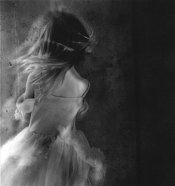
This image was printed while changing both the f-stop and the focus during exposure.
 

Attachments

  • dancess.jpg
    dancess.jpg
    21.5 KB · Views: 549
A nice photograph, though it does kind of remind me of stuff I saw on a web site about photographing ghost. :smile:

Anyway, thanks for all the explanations. At least now I have a better understanding of what changing f/stops will do. I have to give it a try someday.
 
Mongo, I had the same challenge and the technique I used to get the results I was after is to make two exposers on the same frame. Each naturally at 1/2 of the required exposure. One shot would be at a reasonable f-stop for sharpness and the next using a silk stocking or nylon over the lens. Depending on the highlights and SBR the effect can be quite mystical.
 
Eric Rose said:
Mongo, I had the same challenge and the technique I used to get the results I was after is to make two exposers on the same frame. Each naturally at 1/2 of the required exposure. One shot would be at a reasonable f-stop for sharpness and the next using a silk stocking or nylon over the lens. Depending on the highlights and SBR the effect can be quite mystical.


Not unlike the approach that Canon had with one of the early EOS Rebel's the Rebel II/IIS I think..it had a SF mode where it would make one image in focus, the repeat the shot with the AF lens just out of focus. Was quite good, not sure why they dropped the function.
 
Cheryl Jacobs said:
This image was printed while changing both the f-stop and the focus during exposure.

Cheryl,
That is a really amazing shot...How you come up with this stuff is way beyond me.

I'm not worthy!!! :D

Kent
 
ghosting with aperture change

I used the aperture technique while using an 8x20 camera during a 1 1/2 hour shot of a cathedral interior. While I was taking the picture (at f45) a mass started. I opened the aperture to f9 (the largest available) for about 3 or 4 seconds. This gave a ghosted appearance of the people who would have otherwise never showed. This allowed a sense both of the ephemeral as well as te cathedral's greater permanence.
 
Cheryl,
That is a really amazing shot...How you come up with this stuff is way beyond me.

I'm not worthy!!!

Kent

Thanks. :smile: I'm pretty much a mad scientist in the darkroom. Sometimes these things go great, and then there are other times.....
 
Cheryl Jacobs said:
Thanks. :smile: I'm pretty much a mad scientist in the darkroom. Sometimes these things go great, and then there are other times.....

Well, this discussion and your photo have inspired me to give it a whirl this weekend...Thanks very much for having posted the photo, it had never even occured to me that this could be done.

Cheers!
Kent
 
David said:
I used the aperture technique while using an 8x20 camera during a 1 1/2 hour shot of a cathedral interior. While I was taking the picture (at f45) a mass started. I opened the aperture to f9 (the largest available) for about 3 or 4 seconds. This gave a ghosted appearance of the people who would have otherwise never showed. This allowed a sense both of the ephemeral as well as the cathedral's greater permanence.

The whole photograph sounds very intriguing, any chance you have a version of this photo you can post?
 
On the more commercial use of this technique, you might check the Lighting Forum on photo.net. Search on "split diffusion," and there's a good demo. As I recall it describes using diffusion screens rather than varying the aperture, but it's a very similar process.
 
This triggers a memory of something in "Naturalisic Photography" by P.H. Emerson.
The focus was changed during exposure.

Then there was the grain suppressing technique of diffusion induction over several exposures with the enlarger by Merlyn Severn. You used a variable diffuser under the enlarging lens. Your main 2/3 exposure was for sharpness. The remaining 1/3 was divided between half diffusion and full diffusion.
 
I've used this technique when doing long exposure photos with star trails in them. The main exposure at something around f/8 for 10minutes (or however long) and then opened up to f/1.7 (on a 50mm) for about 1 minute. This produces a very skinny star trail we have all seen, but at the end of the trail is a fatter circle, the star.... This makes seeing the constellation easier and also adds something thats a bit more interesting to the common star trail photos.
 
Photrio.com contains affiliate links to products. We may receive a commission for purchases made through these links.
To read our full affiliate disclosure statement please click Here.

PHOTRIO PARTNERS EQUALLY FUNDING OUR COMMUNITY:


Ilford ADOX Freestyle Photographic Stearman Press Weldon Color Lab Blue Moon Camera & Machine
Top Bottom