

• Welcome to Photrio!
    Registration is fast and free. Join today to unlock search, see fewer ads, and access all forum features.
    Click here to sign up

Can someone explain what cause this darker area on my picture

Junk it

A
Junk it

  • 1
  • 1
  • 23
Dawes 2

A
Dawes 2

  • 1
  • 0
  • 24

Recent Classifieds

Forum statistics

Threads
204,342
Messages
2,867,326
Members
102,229
Latest member
chicanorico
Recent bookmarks
0

Kamin123

Member
Joined
Dec 26, 2022
Messages
9
Location
Thailand
Format
Medium Format
Hi, I just registered to post in this forum as I can't seem to find any information about the issue that I have.


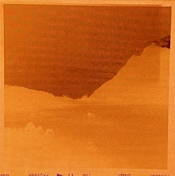
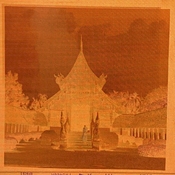
These 2 images above come from different negative , I don't know that it is just a darker line on my picture or it is an overexposed spot. My camera is Mamiya 6 folding, I thought it was light leak on camera bellow but then it's not all the photo that got this problem. I found similar problem in some thread but then I look at my negatives and it look like it have double exposure or something going on as shown below.
IMG-5503.jpgIMG-5501.jpg
 
Welcome to Photrio.
First, I would like to commend you for posting the picture of the negatives themselves, including the edges and the space between the frames.
If they were from a camera with a focal plane camera, I would have suggested it was a problem with the shutter.
But as they are from a folding Mamiya 6, I would wonder if there is something close to the film plane partially blocking the light.
 
Thank you for posting the images of the negatives showing the rebate (outside the image area). These are very useful for diagnosis. In the negative images, we see that the large area leftward of the vertical line is darker (more exposure), and this darker band extends into the rebate at top. This usually means that the darker band is due to a light leak. The lighter band on negative (dark on print) at the right edge of the image is probably the "true" exposure and the middle of the image is light-struck.

I would examine the bellows in particular for light leaks. When the light leak extends beyond the film gate, it often means the leak is not in front of the film gate, but it's possible that the leak is illuminating the film at a different angle than the lens. (With 120 film, it's a little harder to get a leak from behind the film due to the backing paper.)

The first image is very striking BTW and I think if you cropped out the top you might minimize the visual effect of the light-struck area.
 
I saw the small area on one side of the negative as being lighter, and therefore guessed it was something blocking light there. reddesert saw the large area of the majority of the negative as being darker, and therefore guessed it was something leaking light there. Both are possible, but reddesert's guess may be a better one.
 
If there is a light leak in the bellows or some other place on the camera, the longer the time between winding to the next image will determine how much fogging any one image will have. Images taken in quick succession will have less fog than those taken with more time in between them (everything else being equal).

Edit: The darker band is where the film did not get fogged. The light leak is coming from the same side of the camera as the dark band, but at such a steep angle that something is casting a sharp shadow onto the film.
 
Last edited:
Have no clue what is causing the problem, but I think the fact that the top (bottom in camera) edge of the negative has a definite, well-defined dip where the exposure changes should lead someone familiar with the camera to an answer.
 
Light leak with a bellows fold on the left side (right side of image) shading part of the effect. Might even point to the leak being on that side of the bellows? Or at least to the front (lens) of the bellows in order to not leak into the shaded area.

On the negatives, it looks to me as if the 'double exposure' effect at the top and upper left side is halation from overexposure- light goes to the back of the film and is reflected back into the emulsion, including areas away from the lens image.

Go into a dark room such as a closet. Take a flashlight. Wait for five minutes or more for your eyes to adapt. Put the flashlight INSIDE the bellows before turning it on and keep moving it around while you look at the outside of the bellows from all angles. It might jump out at you right away or it might take the right combination of flashlight bulb and your eyeballs and the leak for you to see it. Do what you can to keep from killing your dark vision by pulling the flashlight out or such.

If you do find a leak, take a mental note of its position- inside of fold, outside? Corner? lens board? Then come back and ask for recommendations on repair. There are many ways to seal them up in small cases.
 
but then it's not all the photo that got this problem

That makes me lean toward a light leak, as it would not occur during times when the camera was being held away from the sun or other strong light source. Check that the lens is mounted securely w/ the large nut that holds it to the lens plate too.

As always, start w/ the simplest thing you can check. After first determining that the lens is securely attached, take the camera into a closet or other dark area, open the back, and shine a bright light into the bellows. Move it around to see if there is any light on the outside (it normally shows up at the bellows creases but could be anywhere).

A leaf shutter rarely will exhibit the issue you have, but there's always a first time. Could be an issue w/ light leaking at the viewfinder, or the camera's back. That usually happens at the edge where the back hinge is. But on any folder, the bellows would be my first guess, and it's easy to check.
 
Last edited:
Thank you so much for all the help and diagnosis, I read through all the comment and tested for the light leaks in the bellow and I found 1 spot in the picture below


I also notice the scratch around the edge in the back of the lens not sure if this have nothing to do with the 'double exposure' effect as Daniel mentioned.


and as MattKing mentioned I looked for anything that would block the light and found nothing but maybe there is something that I missed you can look at the image below.


I still not sure if these are all the causes of this problem. Are there anything else I should looking for?
 
Judging from the film markings, the light seems to coming from the left of the camera -- not from above or below. I would look at the light seals between the back and the camera body on both sides, but probably the left side, as that is how the film would be orientated for the fogging I am seeing on the film. The sharpish dark line seems to indicat something very close -- a bellows problem would give a more diffuse fogging.

I would check to see if the back is aligned well when closing it.
 
Last edited:
That makes me lean toward a light leak, as it would not occur during times when the camera was being held away from the sun or other strong light source. Check that the lens is mounted securely w/ the large nut that holds it to the lens plate too.

As always, start w/ the simplest thing you can check. After first determining that the lens is securely attached, take the camera into a closet or other dark area, open the back, and shine a bright light into the bellows. Move it around to see if there is any light on the outside (it normally shows up at the bellows creases but could be anywhere).

A leaf shutter rarely will exhibit the issue you have, but there's always a first time. Could be an issue w/ light leaking at the viewfinder, or the camera's back. That usually happens at the edge where the back hinge is. But on any folder, the bellows would be my first guess, and it's easy to check.

Is there any way to check the light leak in viewfinder? The light seal on the back of the camera is still in good condition. I haven't found any leaks on it.
 
Judging from the film markings, the light seems to coming from the left of the camera -- not from above or below. I would look at the light seals between the back and the camera body on both sides, but probably the left side, as that is how the film would be orientated for the fogging I am seeing on the film. The sharpish dark line seems to indicat something very close -- a bellows problem would give a more diffuse fogging.

Thank you for your suggestion, I checked at the light seal and still can't find any leaks on it. You can take a look at the picture that I commented earlier maybe I missed some spot.
 
Sorry -- I have used up all my knowledge and experience! I have had an issue of a camera back (not Mamiya) needing to be tweaked a little to fit properly and leak-proof. Best of luck solving this issue.!
 
Sorry -- I have used up all my knowledge and experience! I have had an issue of a camera back (not Mamiya) needing to be tweaked a little to fit properly and leak-proof. Best of luck solving this issue.!

Thank you so much sir, I really appreciate your time and effort.
 
My pleasure -- the fogging seems to decrease as one comes down the image which might indicate a twisted camera back.

Though it does appear that it could be come from the bellows-camera body attachment area on that left side, also. That area could fog at a steep angle across the film,
 
With the camera empty, offer the negative up to the film plane with the emulsion towards the lens, The top of the frame will be at the bottom of the camera. Since the darker park of the negative got the light leak this should narrow down the location of the leak, as the less dense part of the negative was shaded.

It might be the seal of the bellows to the body on one side.
 
Looking at the location of the light leak shown in the photo, I think that it is worthwhile to first seal up that leak and do some tests. It looks as if the edge of your negative that is lighter in the negative could very well be shaded by a fold in the bellows. And a small dot leak like that may serve as a 'lens' of sorts, a pinhole camera. Which, since it is pointed to the sky, will project an image of blank sky?

So seal it up and do a test roll. Keep the camera front open for a few shots. Do at least one shot in the middle of this part of the test where you do NOT expose the film- this can show you the 'naked' light leak if the leak is not related to the shutter directly.

There are lots of approaches to sealing a pinhole like yours. I usually use white glue ('Elmers' in the US) with carbon black acrylic paint mixed in. Paint front and bakc of the hole. Then I have a thin black masking tape that gets applied to the hole, and a layer of glue on top. But being at a three-way corner, you might have problems with the tape on your hole. You can go ugly for the testing and in the meantime find assorted suggestions for fixing such a hole before you actually start slathering glue on it or such.

Of course explore the other places people have mentioned. Be slow and methodical and change one variable at a time in tracking down light leaks.

Oh, the light mark of the back of the shutter/lens is a scratch mark from a tool. No effect on your images.
 
No solutions, but ...


Welcome to APUG Photrio!!
 
The old Mamiya 6 cameras have an oddball focusing system. Focus is achieved by moving the film plane forward and backwards, while the lens stays in a fixed position. This also means that the pressure plate is a separate loose component, and slides under those two tabs off the film plane. Bad things happen if the pressure plate is missing.

When checking for light leaks, and/or potential shadowing issues, you should also be adjusting the focus to see if this helps make any issues easier to see.
 
Hi, I just registered to post in this forum as I can't seem to find any information about the issue that I have.


These 2 images above come from different negative , I don't know that it is just a darker line on my picture or it is an overexposed spot. My camera is Mamiya 6 folding, I thought it was light leak on camera bellow but then it's not all the photo that got this problem. I found similar problem in some thread but then I look at my negatives and it look like it have double exposure or something going on as shown below.


View attachment 324903View attachment 324904


My guess is an issue called 'shutter bounce' that requires a camera technician to take a look at the shutter and a possible CLA.
 
My guess is an issue called 'shutter bounce' that requires a camera technician to take a look at the shutter and a possible CLA.

Thank you for your suggestion, I never heard about "shutter bounce" before. So I looked up and that's way more hassle to fix than those mentioned above. As my understanding right now shutter bounce will give an overexposure band. I will try to fix the light leak in the bellow first, if it not working I will have to think about sending it to technician :sad:.
 
It's not shutter bounce. That occurs in focal plane shutters. You have a leaf shutter camera.
 
With all due respect to Ralph, "shutter bounce" is a problem with focal plane shutters, and a Mamiya 6 folder doesn't use a focal plane shutter, so that wouldn't be the source of the problem.
 
The Mamiya 6 has a removable pressure plate, so could this be part of the problem?
 
The Mamiya 6 has a removable pressure plate, so could this be part of the problem?

Thank you for the suggestion. My camera still have a pressure plate with it. But if you meant to say that my pressure plate is faulty I will take a look on it.
 
Photrio.com contains affiliate links to products. We may receive a commission for purchases made through these links.
To read our full affiliate disclosure statement please click Here.

PHOTRIO PARTNERS EQUALLY FUNDING OUR COMMUNITY:


Ilford ADOX Freestyle Photographic Stearman Press Weldon Color Lab Blue Moon Camera & Machine
Top Bottom
