
• Welcome to Photrio!
    Registration is fast and free. Join today to unlock search, see fewer ads, and access all forum features.
    Click here to sign up

Camera failure or processing error?

Forest Light

H
Forest Light

  • 1
  • 0
  • 23
Bacon Fest 2013

A
Bacon Fest 2013

  • 0
  • 5
  • 80

Forum statistics

Threads
203,429
Messages
2,854,451
Members
101,830
Latest member
gussie54
Recent bookmarks
0

sterioma

Member
Joined
Jan 9, 2004
Messages
520
Location
United Kingdom
Format
Medium Format
Hi,

last November I have gone to San Francisco on a business trip and spent on Saturday out with my Leica IIIf loaded with some HP5.

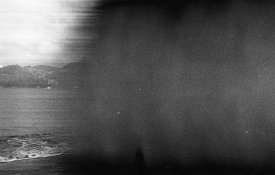
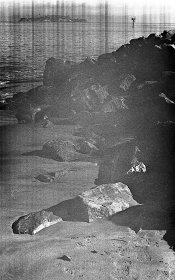
I had not been using the camera for a few years, but I had CLA'd in the late 2000's and had been working fine in the past. Upon developing the film, about half of the frames (especially at the beginning of the roll) had problems, as the attachment show. All the later shots, taken later in the day were ok (mid afternoon).

Not sure if it's a camera issue, or a development problem. I only remember having to struggle a bit to load the film, not sure if this could be related. I have since shot a different roll with same development procedure and did not have any problem. Lighting conditions were different though, I had never had to use high shutter speeds (1/500 and 1/1000).

Developed in Rodinal 1:50 with Paterson tank.
What is your take?
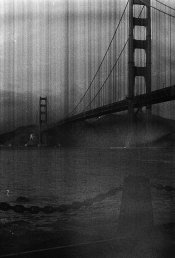

SanFrancisco_LeicaIIIf_ (1 of 1).jpg SanFrancisco_LeicaIIIf_ (1 of 3).jpg SanFrancisco_LeicaIIIf_ (3 of 3).jpg
 
The second image could be shutter capping, the first and third look like bad scans, but it's very difficult to tell for certain.
Can you post images of the negatives themselves rather than scans?
 
the first and third look like bad scans,
The vertical stripes are in the negatives as well.
Other negatives with the same scanner from the same roll haven't got any stripe.

I wouldn't know how to post images of the negatives without scanning, unfortunately I haven't got a light box.
 
Well, it appears that it could be uneven shutter curtain travel, could you hold the negatives against a lampshade and get a photo with a digital camera and post that?
Are the problem images at 1/500 & 1/1000 sec. only? Those would be the first speeds to show this type of problem.
 
I'm not familiar with that tank, but any chance a "bump" in the film not quite threaded right could have contacted a neighboring emulsion surface? Especially the smudge in the middle one resembles the sort of result that can cause.
 
Dear Stefano,

I once used a similar model Leica and did not realize I had to make the elongated cut at the start of the film. It was so long ago that I don't remember the consequences but I did have trouble loading it. Once it got going everything went well. I can imagine that a similar situation could have caused your issue as I would be hard pressed to come up with a way for it to happen during development.

Good luck,

Neal Wydra
 
It looks like a shutter problem. Time for a CLA. If you had occasionally used the camera since 2000, it would probably been OK, but all shutters need to be exercised. The Hasselblad repairman at Samys recommends that all lenses be shot at several or all speeds every three months. I have been doing that for several years and no problems have occurred with those shutters.
 
definitely a shutter problem, the vertical (strictly speaking horizontal) "stripes" you see appear when the edges of the two curtains form only a very narrow slit. I know this because I had exactly the same problem with my IIIf. The edges of the shutter curtains are not perfectly smooth on these old cameras and when the slit is extremely narrow, the unevennes/imperfections along the edge create these stripes and this what you get (typically on the fastet shutter times unless the shutter is completely out of adjustment). I would suggest to exercise the shutter a lot, go through all the shutter times and then shoot another roll checking all the times for even exposure. If the problem persists this is time for a CLA.
 
If you had trouble loading it, there is a chance that the problem is caused by bits & pieces of film in the shutter curtain guides. I've disassembled some of these bottom loaders and found surprising amounts of film debris inside.
 
I just cannot imagine that uneven horizontal focal plane shutter curtain movement causes lines parallel to the long dimension of the frame (which is the direction of curtain motion)! If the curtain slit travelled at inconsistent speeds across the horizontal direction, that would be seen as VERTICAL bands of uneven density on the film.
 
Thank you all for your replies. It seems I might have more than one issue (shutter and debris in the loader). Slower shutter speed seem to have worked fine in another roll, did not test the fastest one. Will test again and report.
 
I just cannot imagine that uneven horizontal focal plane shutter curtain movement causes lines parallel to the long dimension of the frame (which is the direction of curtain motion)! If the curtain slit travelled at inconsistent speeds across the horizontal direction, that would be seen as VERTICAL bands of uneven density on the film.

This is not about inconsistent speed (which would show as vertical bands, as you correctly say). The two curtains travel more or less in synch but they are adjusted too close to each other at 1/1000s and probably also at 1/500s. The result is that the curtain slit is too narrow, in fact so narrow, that the negative is (1) generally underexposed (well demonstrated in the sample above) and (b) any irregularities along the edge of the two curtains (and there are many of them) that form the slit will show as a vertical pattern of areas that let pass more light, less light and possibly no light at all.

Do this: fire the shutter. Wind until you see the curtain edge in the middle of the shutter gate. Carefully insert a piece of white paper between the two curtains. Now take a flashlight and a magnifying glass and have a good look at the edge of the right curtain. You will see that the edge is not a straight, clean line but rather "wavy" there may be even parts of fabric or small fibers standing out.

This vertical "pattern" is what forms the horizontal stripes, just what you see in the sample picture. On a correctly adjusted IIIf the shutter slit width at 1/1000s is only about 1mm (!), but these irregularities are still too small to have impact on the exposure, but as the slit is very narrow already -- even tiny errors (say 0.5mm) that would be completely irrelevant for the wide slit that is formed with slower shutter speeds will have a severe impact at the fastest shutter settings.
 
Last edited:
Yes, the older square shaped bulk film loaders had felt light seals that are dust and junk magnets. The film drags over that felt and also anything that's on that felt. I went to the Alden style loader that has a open/close light trap and no felt or anything to scratch the film. Also, the old Leica's had another thing that can cause your shutter to act up. That is your shutter speed setting dial on the top of the camera. This dial rotates as you release the shutter. If accidently touch it while tripping the shutter you stop the shutter. I have had this problem a few times with my old IIIa. It happened in the winter time when I had gloves on. I would trip the shutter and the tip of the glove would hit the shutter speed dial. I didn't realize I was doing it until I developed my film. Lesson learned. JohnW
 
Photrio.com contains affiliate links to products. We may receive a commission for purchases made through these links.
To read our full affiliate disclosure statement please click Here.

PHOTRIO PARTNERS EQUALLY FUNDING OUR COMMUNITY:


Ilford ADOX Freestyle Photographic Stearman Press Weldon Color Lab Blue Moon Camera & Machine
Top Bottom