



grat
Member
I have to do a small happy dance. My Bronica SQ-A that I bought years ago as a "parts only" turned out to be.... sort of working. That's not true-- it worked great, as long as an AE finder was attached. Without the AE finder, maybe it worked... maybe it fired at 1/500th of a second. Best guess anyone had, including Jimmy Koh, was that the contacts on the AE finder switch inside the camera were dirty. Unfortunately, he had already retired at that point. Well, it worked, mostly, and finding someone to repair it was less than obvious, so it sat for awhile, and then I had some personal issues that stopped me from photography for several years. I've now had my own medical equivalent of a CLA, and dragged out the cameras-- and during testing discovered that the SQ-A will go completely dark if attached to a tripod.
So I finally worked up the gumption to go after the leatherette / vinyl between me and the screws holding the box together.
Long story short, after cleaning one switch and two sets of battery contacts, and adjusting them, the Bronica is now working as designed. In case anyone else has similar issues, here are some of my notes:
So I finally worked up the gumption to go after the leatherette / vinyl between me and the screws holding the box together.
Long story short, after cleaning one switch and two sets of battery contacts, and adjusting them, the Bronica is now working as designed. In case anyone else has similar issues, here are some of my notes:
- Naptha did a nice job of removing the adhesive's adhesion. I used some guitar pick style spudgers.
- Removed the actual adhesive material from the leatherette, cleaned the pieces, and they'll be reattached as soon as I get some adhesive film (since that's how the Bronica was assembled, I thought I'd use the same method).
- Don't forget the four screws holding the shutter speed dial on the camera, under two small half-moon pieces of covering. The shutter release pin for the cable release will probably fall out, and needs to be re-inserted before attaching the side panel.
- JIS screwdrivers. Always, JIS. J00 seemed to work best for me.
- The battery box will come apart-- the release block goes in two ways, but only one is correct, and don't forget the spring. I assembled it by putting the battery compartment together, putting the plate on the table, and lining up the bottom of the camera with the bottom plate. If you've removed both side panels, it should work easily-- if you only removed one, like I did, you'll have to hold the bottom plate in position, flip the whole thing over, and then do some fiddly adjusting until it slots into plate.
- The camera body makes contact with the battery compartment via two flexible bent set of prongs-- mine had corrosion, probably from a prior owner's leaky battery. Used some vinegar and a small foam swab to clean the corrosion, then a quick wipe with some IPA to remove the vinegar. Also bent them VERY slightly to make sure they contacted properly.
- Don't forget to make sure the lens release switch is in the "up" position before reattaching the side plate. Which again, because of the cable release pin, I put the camera onto the plate, rather than the plate onto the camera. Once it was in place, was able to slide the switch into the right position while holding the plate slightly up from the body of the camera.
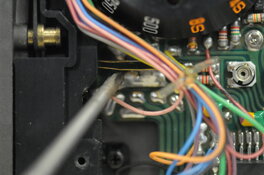
- Used a similar swab with some contact cleaner in the AE finder switch. Image courtesy of Mr. Koh attached. I cleaned the area behind the plastic shroud, as well as both leaves.
