• Welcome to Photrio!
    Registration is fast and free. Join today to unlock search, see fewer ads, and access all forum features.
    Click here to sign up

Borderless Prints

Tied to the dock

D
Tied to the dock

  • 3
  • 0
  • 49
Running in the Snow

H
Running in the Snow

  • 1
  • 1
  • 60

Recent Classifieds

Forum statistics

Threads
203,080
Messages
2,849,578
Members
101,648
Latest member
eionaci3
Recent bookmarks
1

MegoApesNut

Member
Allowing Ads
Joined
Jul 21, 2015
Messages
46
Format
Medium Format
How does everyone achieve borderless prints? WAYYYY back when I was printing, I never found a satisfactory method for this. Does anyone use a vacuum table?

 
  • dasBlute
  • dasBlute
  • Deleted
  • Reason: nonesense response
A vacuum table is a piece of metal or plastic with a large number of channels leading up to tiny holes on the surface. You attach a vacuum pump or vacuum cleaner to it and is holds thin materials fast to the surface via suction. This would hold the paper in position without blades and also assure that it is entirely flat.
 
For 4x6 postcards I use RC paper and set up a 4 blade easel so that the paper just sits in the spot between the blades. I position it by feel.
The paper stays sufficiently flat, especially considering the depth of focus/field at the paper.
It works best with an image that doesn't require absolutely precise framing.
 
I cut the borders off after the print dries.

That would be my method too.

Making a vacuum table is simple, but make sure the suction isn't too strong with alt-photo.
Otherwise the tissue "migrates" (especially if not completely dried) and you'll notice specks where the holes in the table are positioned.
 
Cutting off the borders is what I would do as well. It avoids having to deal with any extra equipment. There used to be special borderless easels available. You could also try putting some strips of double-sided adhesive tape on a standard easel to help keep the paper flat.
 
i print them under a sheet of glass that i use to make contact prints
 
I have 2 vacuum easels, smaller unit for up to 11X14 and a larger unit for up to 16X20. I use both to print boaderless on fiber based paper, for RC I use a borderless easel that uses a couple of rails to hold the paper snug, works ok for RC, but does not hold flat enough for fiber. Others use vacuum easels for printing, just want to hold the paper as flat as possible.
 
i was told that vacuum easels were made for this. I had never heard of them. Anyone have one for sale by any chance?
 
Here is a new-old stock 8x10 borderless easel: http://store.khbphotografix.com/Saunders-Series-18-Adjustable-8x10-Borderless-Easel.html
There were others as well.

I have no experience with that easel - so I don´t know how good it is. But just to make it clear: this is not a vacuum easel.

You can see a vacuum easel here:

http://www.ebay.de/itm/LINHOF-Saugp...487738?hash=item2cbb83083a:g:KR0AAOSwTuJYwGqJ
http://www.ebay.de/itm/Linhof-Saugp...395053?hash=item4d54cfeeed:g:3pMAAOSwmfhX58n~

To operate it, you need connect the vacuum pump and select the correct paper size. If if is a good vacuum easel you can operate it standing, too, and it will keep your paper just in the right position.
 
Thanks, didn't consider checking other eBay country sites.

I have no experience with that easel - so I don´t know how good it is. But just to make it clear: this is not a vacuum easel.

You can see a vacuum easel here:

http://www.ebay.de/itm/LINHOF-Saugp...487738?hash=item2cbb83083a:g:KR0AAOSwTuJYwGqJ
http://www.ebay.de/itm/Linhof-Saugp...395053?hash=item4d54cfeeed:g:3pMAAOSwmfhX58n~

To operate it, you need connect the vacuum pump and select the correct paper size. If if is a good vacuum easel you can operate it standing, too, and it will keep your paper just in the right position.
 
I made an easel for printing borderless prints on fibre paper many years ago for one of my clients who didn't want borders.

It consisted of a 20" x 16" piece of 16mm MDF and all I did was use a large countersink to create shallow indents into the MDF.

Into these I placed Blu-Tack and then laid the paper onto the board and the Blu-Tack held the paper flat.

I had to renew the Blu-Tack once in a while but it did the job well for the 7ish years I printed for this particular photographer.

Bests,

David.
www.dsallen.de
 
Sounds like a good idea. Same principle as double-sided tape, but probably better. Nice and simple.
 
using rc paper you can put a drop or two of water on the enlarger base.

the paper will then stick to it completely flat, similarly to when you put the prints on the toilet walls to dry.

i never tried with fb paper, i suspect that it will not be good.
 
using rc paper you can put a drop or two of water on the enlarger base.

the paper will then stick to it completely flat, similarly to when you put the prints on the toilet walls to dry.

i never tried with fb paper, i suspect that it will not be good.

Hi bobo, welcome to APUG!

"... when you put the prints on the toilet walls to dry ..." ??
I would love to see how you develop and print your negatives :smile:
 
I have no experience with that easel - so I don´t know how good it is.

I have one of the Saunders-type easels. I use it sometimes for postcards. For small, thick stock like Ilford card stock it works fine. I wouldn't use it for larger prints. By its nature, it's not exerting a lot of force on the edge of the paper. But then, I normally wouldn't want a borderless large print, so I haven't really tried.
 
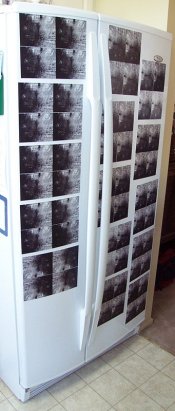
I use the front of a refrigerator to start the drying of a lot of my RC prints. For a Postcard exchange a few years ago:
 

Attachments

  • fridge.JPG
    fridge.JPG
    187.4 KB · Views: 207
I made an easel for printing borderless prints on fibre paper many years ago for one of my clients who didn't want borders.

It consisted of a 20" x 16" piece of 16mm MDF and all I did was use a large countersink to create shallow indents into the MDF.

Into these I placed Blu-Tack and then laid the paper onto the board and the Blu-Tack held the paper flat.

I had to renew the Blu-Tack once in a while but it did the job well for the 7ish years I printed for this particular photographer.

Bests,

David.
www.dsallen.de
david, that sounds like a very good way.in french we say "bonne pratique" .. merci, will try that..
chris
 
I always make borderless prints and use Saunders 8x10 and 11x14 borderless easels with good results. For medium to light-weight paper that has a slight bend, I flex it a little in the opposite direction before placing it in the easel and it lays flat. Besides, using the lens at f11 or f16 provides good depth of field if it's not totally flat and I don't get areas out of focus.
 
Photrio.com contains affiliate links to products. We may receive a commission for purchases made through these links.
To read our full affiliate disclosure statement please click Here.

PHOTRIO PARTNERS EQUALLY FUNDING OUR COMMUNITY:



Ilford ADOX Freestyle Photographic Stearman Press Weldon Color Lab Blue Moon Camera & Machine
Top Bottom