• Welcome to Photrio!
    Registration is fast and free. Join today to unlock search, see fewer ads, and access all forum features.
    Click here to sign up

Blue marks on digitised films

Dump Truck Hat Trick

D
Dump Truck Hat Trick

  • 1
  • 0
  • 61
Street-Lamp

A
Street-Lamp

  • 3
  • 3
  • 99

Recent Classifieds

Forum statistics

Threads
204,309
Messages
2,866,975
Members
102,220
Latest member
iDavidoff
Recent bookmarks
0

ghwilliam1903

Member
Joined
Aug 27, 2024
Messages
19
Location
United Kingdom
Format
35mm
Hi all,

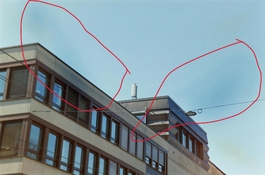
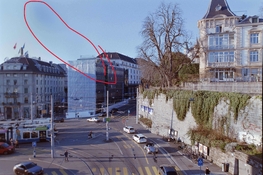
On the C41 films I have developed at home, there has been some blue marks on the digitised pictures images. some time they are consistant across the whole role of film, but at different locations for different rolls of films that are developed under the same run.

The films were developed using Cinestill C41 Kit in Jobo 1520 tank under machine controlled rotary development kit.

Could someone offer some advice on the origin of these marks and how to avoid them?

Thank you!
 

Attachments

  • 20250315-IMG00348_remapped_blue_mks.jpg
    20250315-IMG00348_remapped_blue_mks.jpg
    881.4 KB · Views: 126
  • 20250315-IMG00408_remapped.jpg
    20250315-IMG00408_remapped.jpg
    574.3 KB · Views: 123
It's not just blue marks. You also have yellow streaks going on in the skies.

1742117067928.png


Assuming that the defect is in the negatives and they are not an artifact resulting from digitization (e.g. light source variations/inconsistencies during camera scanning), two possible causes come to mind:
1: Insufficient agitation during development in particular.
2: Incomplete bleaching and/or fixing.
3: Insufficient washing of the negatives after fixing.

Since you used a Jobo processor, agitation shouldn't be a problem, although this kind of defect can arise if you take too much time filling and draining the tank. Especially the fill time of the developer and the subsequent fill time of the stop bath (or bleach if you don't use a stop bath) may have this effect.

Insufficient bleaching and/or fixing tends to be caused by overuse of chemistry and/or lack of adherence to the prescribed process parameters.
You could try running the negatives through bleach and fix again, for a longer time, then thoroughly wash them to see if that changes the situation.

Exclude the possibility of a digital artifact first.
 
The plane of focus is off on your digitizations, evidenced by the left side of the images having blurry grain. From that I assume you using a digital camera and some kind of copy stand setup. You can use a bubble level or the mirror method to get the camera and film carrier into alignment.

Based on that, and the fact that it's C-41 which exhibits this problem more easily, I'd bet that at least some of these effects are from stray light getting into your digitization system. Maybe you can describe or post a picture of how you are digitizing.

Try digitizing a blank frame of film using the same exposure settings, and then layer that over your other images on the same roll with the "Divide" blending mode. See if that eliminates some of these effects.

Koraks also circled something which may be a mineral water spot. You can check if it's that by shining a flashlight on the frame sideways. Adjusting the wetting agent or drying routine would be the cure for that if so.
 
It's not just blue marks. You also have yellow streaks going on in the skies.
Unfortunately, the bottom streak is attributed to the sponge I used, which has resulted in scratches and lines on some of the negatives. Therefore, an alternative sponge or water stain remover will be used next time.
Assuming that the defect is in the negatives and they are not an artifact resulting from digitization (e.g. light source variations/inconsistencies during camera scanning), two possible causes come to mind:
1: Insufficient agitation during development in particular.
2: Incomplete bleaching and/or fixing.
3: Insufficient washing of the negatives after fixing.

Since you used a Jobo processor, agitation shouldn't be a problem, although this kind of defect can arise if you take too much time filling and draining the tank. Especially the fill time of the developer and the subsequent fill time of the stop bath (or bleach if you don't use a stop bath) may have this effect.

Insufficient bleaching and/or fixing tends to be caused by overuse of chemistry and/or lack of adherence to the prescribed process parameters.
You could try running the negatives through bleach and fix again, for a longer time, then thoroughly wash them to see if that changes the situation.
Although a Jobo processor was used, fill time could still be a problem, since I was greedy and extended the tank to fit in 4 rolls of 135 films. This led to a chemical filling time of 10 seconds, which is a large proportion of the 3:30 development time.

However, the stray light in my digitization system can also be a possible source of the blue marks.
Based on that, and the fact that it's C-41 which exhibits this problem more easily, I'd bet that at least some of these effects are from stray light getting into your digitization system. Maybe you can describe or post a picture of how you are digitizing.

Try digitizing a blank frame of film using the same exposure settings, and then layer that over your other images on the same roll with the "Divide" blending mode. See if that eliminates some of these effects.
I have placed the negatives under different light sources, but the marks on the scanned pictures cannot be observed with the naked eye. Based on how prominent they are on a white background, I would assume they can be observed by eyes. However, I could not pick them up. Hence, I will further investigate the light source as well, and also refine the focus light you mentioned.

20250315-IMG00376_remapped.jpg


Thank you very much for your inputs.

On a different note, would you be able to suggest an alternative digitization method? Thank you.
 
Unfortunately, the bottom streak is attributed to the sponge I used

I'm not referring to the scratch. I'm referring to the yellow spot, which I think you're overlooking. I'm pretty sure it's related to the blue anomalies.

I have placed the negatives under different light sources, but the marks on the scanned pictures cannot be observed with the naked eye. Based on how prominent they are on a white background, I would assume they can be observed by eyes. However, I could not pick them up. Hence, I will further investigate the light source as well, and also refine the focus light you mentioned.
Subtle color differences are virtually impossible to spot with the naked eye on C41 negatives.
However, given that the pattern is similar on the white image you've also shown above, but slightly shifted, makes me confident that @loccdor got it right. This is most likely a light source problem during digitization.
 
On a different note, would you be able to suggest an alternative digitization method? Thank you.

Try using lens hoods and black construction paper to stop so much light from bouncing around. C-41 is so low contrast on the negative, that any spilled light gets amplified by the increase in contrast in post. The orange mask also complicates things because any spilled light which doesn't go through that mask will have a different color temperature from what is passing through the negative.
 
Thank you all very much for your great advice. I have found out that the blue marks are a result of the light source. Since the light source contains a piece of glass pushing against plastic, the uneven pressure applied on the plastic (or the glass) or the gap between these layers may have produced some form of diffraction, which resulted in some forms of bubbles coming out of the light source. After inverting the negatives, the unevenness from the light source becomes the blue marks in the pictures.

Thank you all for various advice. I have tried my best to remove the blue marks. However, the best solution would be to look for a better light source.
 
Photrio.com contains affiliate links to products. We may receive a commission for purchases made through these links.
To read our full affiliate disclosure statement please click Here.

PHOTRIO PARTNERS EQUALLY FUNDING OUR COMMUNITY:


Ilford ADOX Freestyle Photographic Stearman Press Weldon Color Lab Blue Moon Camera & Machine
Top Bottom