• Welcome to Photrio!
    Registration is fast and free. Join today to unlock search, see fewer ads, and access all forum features.
    Click here to sign up

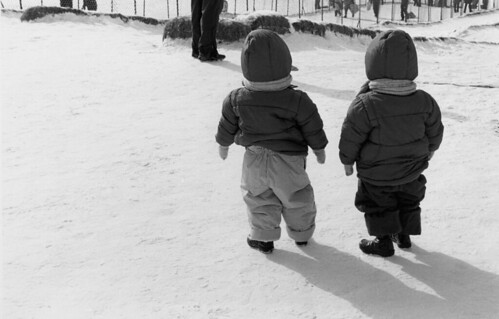
Black & White capture of snow landscape

Forum statistics

Threads
203,279
Messages
2,852,228
Members
101,756
Latest member
rsj1360
Recent bookmarks
0
At this picture (there was a url link here which no longer exists) taken a few weeks back i measured the light at the tire on the car, and placed that in sone III. Then shortended the development too about 2 sones. I also used a red filter.

Kent

Your photo shows the snow in the shadow on the car gray.
But when you stood there did it look gray to you?
That's basically what i am investigating.
 
I always use a filter with snow scenes

The filter colour depends on the lighting

Very flat lighting gets a deep red filter - at the opposite end of the scale - brilliant clear blue skies may only need a pale yellow filter

Do you use the filter only to give the sky some gray tint or is there also a other benefit?
 
Your photo shows the snow in the shadow on the car gray.
But when you stood there did it look gray to you?
That's basically what i am investigating.

Most likely i was white:wink: But that would be impossible to reproduce wouldnt it?
Maybe if i'll convert to digital:rolleyes:

Kent
 
Your photo shows the snow in the shadow on the car gray.

As pointed out by Allen, open shadows in snow are about the color (and brightness) of the sky and are quite a bit darker than sunlit snow. Printing them at medium gray is about right.

The only criteria is "Does it look right to you?"
 
Last edited by a moderator:
I find snow scenes difficult to shoot most times...hands and brain freezing temperatures don't help.
I think I got lucky on this particular day... ;-)

2375821672_a7b3c73908.jpg


Printed with a 2 1/2 filter as I recall.
 
From a technical standpoint, shooting snow with a neg film is straightfoward. You certainly have the range to accomplish it.

What requires thought is where you want the highlight transitions to be, on the characteristic curve. The highlights could be off the edge thus tending to clump a bit, or they could be on the more linear section, giving more texture. I tend to favour the latter, which means 'protecting' the highlights just a bit i.e. putting the highlights a stop or two over neutral grey. Doing this will allow you to get a lot of tonal detail in the snow and it'll be less likely to print as a posterized white blob.

Of course, bracketing is the best way to learn what you prefer. But neg film has oodles of range... plenty of people have done very effective snow scenes with slide film!

N.b. it may also be worthwhile to consider a pyro developer or chromogenic film. I don't think it's really necessary but it may work for you.
 
Do you use the filter only to give the sky some gray tint or is there also a other benefit?

I use the filters primarily to put tone into the snow

Shadows on a patch of snow are not only darker (yes obviously) but also filled with blue light - so a coloured filter gives the shadow more depth in exactly the same way it adds tone to the sky.

The more overcast the sky, the flatter the light, the proportionately less blue in the shadows - hence the need for a stronger filter.

Sadly of course you need a stronger filter with a higher filter factor when there is often less light around in the first place - you quickly get into reciprocity failure territory.

Martin
 
As pointed out by Allen, open shadows in snow are about the color (and brightness) of the sky and are quite a bit darker than sunlit snow. Printing them at medium gray is about right.

The only criteria is "Does it look right to you?"

I agree with this-----personally I don't have much snow exposure/dev/printing experience at all. I have but one example of it in my APUG portfolio on page two.

But Nicholas's comment is along the lines of what AA has said regarding snow and I'm paraphrasing------regardless how black the blacks are, even the whitest part of the snow image needs some tone or the picture will not have any life what so ever.

Snow can be touch to handle.
 
Texture & Shadow Detail in Snow

I was thinking about adding a section on photographing snow on my blog, except I haven't got one yet!

Although opening up 2 - 3 stops will ballpark it in full sun, it will also be a little chancy if you are working towards the conclusion of a fine print. You may have to decide what is most important to your ultimate visualization of the scene - shadows or textured highlights, especially in high contrast situations. The Zone System is the tool which will help you to pin down your visualization of the scene so that it can be interpreted from the negative to the print (in a nutshell). A yellow filter can be effective in resolving texture both, by removing blue in bright light (micro-contrast) and shadows.

Some examples:

Full Sun, Shadow Detail:
SummitMdWinter.jpg


Overcast Shade:
SeedPodsLeidigMdw.jpg


Texture:
TreeciclesBadgerPass.jpg


More Examples, if you need them.
 
After development we found out that the photo looks disappointing if I remember the scene from my memory. My film is exposed/developed correctly.
Playing with contrast does not help a lot.

If the photo looks disappointing, it was likely not exposed and developed in the best way.

When using an in-camera reflected meter in anything other than a scene that averages out to middle grey (metering patterns considered), the meter will not give you the standard "ideal" exposure. Reflected meter readings almost always require adjustment to achieve this.
 
thanks naugastyle...there's been no snow (or sun!) here for weeks. pretty weird for Quebec.
 

I personally find the structure of the snow in the sun to dark of this photo. (Maybe it's due to computerscreens).

It's not crisp and in my eyes does not show up what you saw when you stood there with your frozen fingers. It could be a change of 10% less time when enlarging that makes the difference.

Or maybe indeed a filter.
 
I personally find the structure of the snow in the sun to dark of this photo. (Maybe it's due to computerscreens).

It's not crisp and in my eyes does not show up what you saw when you stood there with your frozen fingers. It could be a change of 10% less time when enlarging that makes the difference.

Or maybe indeed a filter.

Each example is representative of different types of snow under different lighting. This is fresh sugary snow and the actual prints from which scans are taken absolutely reflect what I saw - not what you were not there to not see. A deep yellow filter was used and my fingers were not frozen.

Honestly, I was only trying to add something useful to the thread you started because you seemed to be requesting assistance. The examples were not being offered up for criticism as the that did not seem to be the point of the thread. If it were, I would have had much to say about your effort without offering any examples of my own (that being the case, I have removed them). All in all, I feel you are best off to keep proceeding down your current path.
 
Each example is representative of different types of snow under different lighting.

I think most got your intent with those photographs, I did. I like the first and second one the most. It could be my monitor,though it is calibrated, but the snow highlights seem hot to my eye, but I think they were good examples of snow scenes.

Chuck
 
Each example is representative of different types of snow under different lighting. This is fresh sugary snow and the actual prints from which scans are taken absolutely reflect what I saw - not what you were not there to not see. A deep yellow filter was used and my fingers were not frozen.

Honestly, I was only trying to add something useful to the thread you started because you seemed to be requesting assistance. The examples were not being offered up for criticism as the that did not seem to be the point of the thread. If it were, I would have had much to say about your effort without offering any examples of my own (that being the case, I have removed them). All in all, I feel you are best off to keep proceeding down your current path.

It was not my intension to embarrise you in any way. Sorry for that.
In our local photo community we always talk free about pictures (critics) which is good because you get opinions from different angles which can be used by the maker (or not). I never want to embarrise someone but am writing down my brain waves how i look/feel about a photo.

I hope you are not angry about me now.
 
Nothing says "Winter in Canada" to me more than Kate's shot. Sure sends me a long way back.
 
Not here! We have about six inches, but only because we're up pretty high. 200 m lower, at the lake, they have nothing. This time last year we were up to our armpits in it. Today is a beautiful sunny 0C spring day.
I'm off to Guyana in a couple of days. If it snows while I'm gone I'll never hear the end of it.
 
Not here! We have about six inches, but only because we're up pretty high. 200 m lower, at the lake, they have nothing. This time last year we were up to our armpits in it. Today is a beautiful sunny 0C spring day.
I'm off to Guyana in a couple of days. If it snows while I'm gone I'll never hear the end of it.

And if it snows in Guyana, we will never hear the end of it! Have a good trip.

Steve
 
Photographing snow is something where I found myself doing everything differently than it's suggested.

Winter is the time when I expose most of my N+1 and N+2 negatives. My interpretion of the scene just don't fit to normal or minus developments. Mostly I experience and see the snow as really bright and white so I found often that I have to increase contrast to get negative that (should) reflect my original visualization.

Ofcourse I could always use N or N-1 development and then get the exactly same results by using harder grade, but I am too deep in trying to get negative as close to my visualization as possible...


http://bighugelabs.com/onblack.php?id=4275221748&size=large

http://bighugelabs.com/onblack.php?id=4272512408&size=large
 
Photrio.com contains affiliate links to products. We may receive a commission for purchases made through these links.
To read our full affiliate disclosure statement please click Here.

PHOTRIO PARTNERS EQUALLY FUNDING OUR COMMUNITY:


Ilford ADOX Freestyle Photographic Stearman Press Weldon Color Lab Blue Moon Camera & Machine
Top Bottom