• Welcome to Photrio!
    Registration is fast and free. Join today to unlock search, see fewer ads, and access all forum features.
    Click here to sign up

Black streak on last few frames

Man walking.

A
Man walking.

  • 0
  • 0
  • 6
_Z721713-positive.JPG

H
_Z721713-positive.JPG

  • 3
  • 3
  • 108

Recent Classifieds

Forum statistics

Threads
202,001
Messages
2,833,562
Members
101,064
Latest member
PhilippeB
Recent bookmarks
0

chrishunt

Member
Allowing Ads
Joined
Mar 18, 2013
Messages
3
Location
Portland, Or
Format
Medium Format
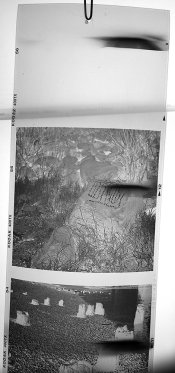
Greetings! I've got a black streak on the last couple frames in a roll of 120. You can see that it's on the film leader as well (not the spool side).

Does anyone know how this might happen? It seems like maybe the film stuck together during processing? If that's the case, what are some methods you use to help avoid this?

Thanks!

negatives.jpg
 

Neal

Subscriber
Allowing Ads
Joined
Dec 3, 2004
Messages
2,030
Location
Chicago, West Suburbs
Format
Multi Format
Hello Chris,

Looks like a light leak. The film might not have been wound tight enough or possibly a nick in the paper at the edge. It doesn't look like it's your camera because it changes position in each frame.

Neal Wydra
 

MattKing

Moderator
Moderator
Joined
Apr 24, 2005
Messages
55,303
Location
Delta, BC Canada
Format
Medium Format
Hello Chris,

Looks like a light leak. The film might not have been wound tight enough or possibly a nick in the paper at the edge. It doesn't look like it's your camera because it changes position in each frame.

Neal Wydra

I agree.

Welcome to APUG.
 
OP
OP
chrishunt

chrishunt

Member
Allowing Ads
Joined
Mar 18, 2013
Messages
3
Location
Portland, Or
Format
Medium Format
Looks like a light leak. The film might not have been wound tight enough or possibly a nick in the paper at the edge. It doesn't look like it's your camera because it changes position in each frame.

Excellent, thank you. I need to find some 120mm film cases or something. Or just get better at taking the film out. :blink:
 

kevs

Member
Allowing Ads
Joined
Aug 21, 2006
Messages
711
Location
North of Pangolin
Format
Multi Format
Hi Chris, and welcome to APUG,

Your problem looks to me like an in-camera light leak. Does this happen on every film? Light leaks can be very elusive, and may only cause a problem if (say) bright sunshine hits the camera at a certain angle.

What camera are you using? It might be useful info because others may have had similar problems with that model or make, and light seals do vary in quality and deteriorate with age and general wear.

If this only appears on the final few frames, check the camera's light seals around the areas where the spools are seated; but check them all anyway! I had a similar problem with my Yashica TLR, which only occurred on the first four frames of a film. As the width of the feed spool decreased, the film was moving away from the light leak. I replaced the seal around the door and it was gone.

You might run another roll through the camera and see if you can replicate the problem if you haven't already done so.

Cheers,
kevs
 

Gerald C Koch

Member
Allowing Ads
Joined
Jul 12, 2010
Messages
8,131
Location
Southern USA
Format
Multi Format
Excellent, thank you. I need to find some 120mm film cases or something. Or just get better at taking the film out. :blink:

A piece of aluminum foil works very well and can be used several times if one is careful.
 
OP
OP
chrishunt

chrishunt

Member
Allowing Ads
Joined
Mar 18, 2013
Messages
3
Location
Portland, Or
Format
Medium Format
Your problem looks to me like an in-camera light leak. Does this happen on every film? Light leaks can be very elusive, and may only cause a problem if (say) bright sunshine hits the camera at a certain angle.

This is only my second roll of film through this camera, but the first roll had no issues. I should be able to finish and develop a third tomorrow, so I'll have a look.

What camera are you using? It might be useful info because others may have had similar problems with that model or make, and light seals do vary in quality and deteriorate with age and general wear.

It's definitely an older camera. I'm using a Rolleiflex 2.8E.

If this only appears on the final few frames, check the camera's light seals around the areas where the spools are seated; but check them all anyway! I had a similar problem with my Yashica TLR, which only occurred on the first four frames of a film. As the width of the feed spool decreased, the film was moving away from the light leak. I replaced the seal around the door and it was gone.

Great, thank you. I only see the problem on the last 3 frames shot (the three furthest from the center of the spool, non-tape side).

I'll see if this next roll has the same issue. It seems like a nice test would be to stick a fresh roll and rotate the camera in the sun?
 

Worker 11811

Member
Allowing Ads
Joined
Jan 18, 2010
Messages
1,719
Location
Pennsylvania
Format
Multi Format
I bet the flap at the tail of the roll wasn't wound tight enough or that there was a wrinkle in the paper backing.

Assuming this is true, the solution is to make sure you wrap the tail nice and tight then fasten it down well.
If the adhesive band doesn't hold the tail tight a piece of tape will help.

If you need a safe place to keep exposed 120 format rolls, save the box they came in.
They're not perfect but better than nothing.
Aside from a little extra protection, they give you a place to write notes.
 

kevs

Member
Allowing Ads
Joined
Aug 21, 2006
Messages
711
Location
North of Pangolin
Format
Multi Format
This is only my second roll of film through this camera, but the first roll had no issues. I should be able to finish and develop a third tomorrow, so I'll have a look.

It's definitely an older camera. I'm using a Rolleiflex 2.8E.

Great, thank you. I only see the problem on the last 3 frames shot (the three furthest from the center of the spool, non-tape side).

I'll see if this next roll has the same issue. It seems like a nice test would be to stick a fresh roll and rotate the camera in the sun?

Yes Chris, that would be a good test of the camera's light seal. You could also shine a bright torch/flashlight around the edges of the door to produce the same result.

I'm sitting here with my Yashica 124G open in my lap!

You can lay the negative strip you scanned in the camera, line up the exposed fames with the imaging area (image upside down, emulsion down of course!), and you should find your light leak about half a frame away from the imaging area. I think your problem lies at the base of the camera, between the imaging area and the unexposed film-feeding spool. The feed spool might account for the straight edge on the fogged area, which would place the leak right against the feed spool. This would explain why it's only occurring at the end of the film; the bulk of the film will block the leak until it's almost used up.

The other thing that could account for the straight line is the roller at the edge of the imaging area, but I don't think the leak is there as it's too far from the edge of the frames.

Update: According to this website, http://www.butkus.org/chinon/rollei/rolleiflex_28_e/rolleiflex_28e.htm , the second image down shows a roller between the feed spool and the imaging area. I now suspect it's this that is causing that straight line on the flare. That roller isn't on my Yashica.

The reason I don't think it's a post-exposure problem is that the pattern is regular, occurring at the same place on each frame and on the unexposed end frame. Processing fogging, or that from loosely-wound film and torn paper backing, usually occurs much more randomly.

I hope you manage to track down the problem. Have fun with your lovely camera. :smile:

Cheers,
kevs
 
Last edited by a moderator:
Photrio.com contains affiliate links to products. We may receive a commission for purchases made through these links.
To read our full affiliate disclosure statement please click Here.

PHOTRIO PARTNERS EQUALLY FUNDING OUR COMMUNITY:


Ilford ADOX Freestyle Photographic Stearman Press Weldon Color Lab Blue Moon Camera & Machine
Top Bottom