

• Welcome to Photrio!
    Registration is fast and free. Join today to unlock search, see fewer ads, and access all forum features.
    Click here to sign up

Black holes showing in scanned negative

Somewhere...

D
Somewhere...

  • 5
  • 2
  • 101
Iriana

H
Iriana

  • 7
  • 1
  • 162

Recent Classifieds

Forum statistics

Threads
202,751
Messages
2,845,057
Members
101,500
Latest member
lightfundove
Recent bookmarks
0

DMJ

Member
Allowing Ads
Joined
Nov 20, 2020
Messages
268
Location
Los Angeles
Format
Multi Format
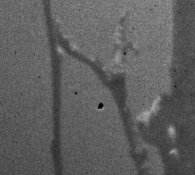
first time seen ever in one of my negatives. They seem to appear at different locations with every scan.
Some background info here:
Film: HP5+ 120
- new camera : holga120wpc
- new developer: Rodinal semi stand with one 15 seconds twiddle

I wanted to blame the camera but the specks move but also look like holes
 

Attachments

  • black_specks.jpg
    black_specks.jpg
    354.5 KB · Views: 177
  • black_specksII.jpg
    black_specksII.jpg
    44.7 KB · Views: 161
If you make multiple scans of the same negative, the spots move? Have you examined the negatives with a loupe or magnifier to verify that the spots are not on the negs?
 
If you make multiple scans of the same negative, the spots move? Have you examined the negatives with a loupe or magnifier to verify that the spots are not on the negs?

On the negative. I think new holes are being created every time I move the negative around?
 
Have you considered it 'might' be dust particles on either surface of your scanner's glass platen?

Ken
 
It's a positive.
 
Do get a magnifying loupe and check to see if the problem is actually on the negative before assuming that it is, indeed a negative defect. If you can't see it with a 10x loupe, it's likely a scanning problem/artifact.

Doremus
 
Do get a magnifying loupe and check to see if the problem is actually on the negative before assuming that it is, indeed a negative defect. If you can't see it with a 10x loupe, it's likely a scanning problem/artifact.

Doremus

I'm not assuming, did you read my post #3? They are in the negative. I'm shooting again this weekend with the same camera/developer and see what happens.
 
The problem we are having is understanding exactly the following:
I think new holes are being created every time I move the negative around?
Are you saying that pieces of the negative are falling off every time you move the negative and, as a result, you are seeing more and more clear spaces on the negative as time goes on?
 
The problem we are having is understanding exactly the following:

Are you saying that pieces of the negative are falling off every time you move the negative and, as a result, you are seeing more and more clear spaces on the negative as time goes on?

Hi Matt,
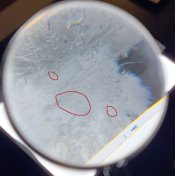
Thank you for replying. Yes, that is what I'm saying. If it wasn't that strange I would not post it here. It took me a while how to take a picture looking through a big magnifier. Tiny pieces are falling from the neg. Here is a picture, I hope it helps. I'm just curious to see what can cause such a thing. They are the ones at the top and the big one at the bottom.
Could these be particles that did adhere to the negative during development?
Is it possible that loose particles from the plastic camera or the backing paper did adhere to the negative during development? Or from the Patterson tank?
 

Attachments

  • 20210605_173318.jpg
    20210605_173318.jpg
    312.5 KB · Views: 102
Those don't look to me like clear spaces in the negatives.
Those look like dust or dirt or some other detritus on the negative.
 
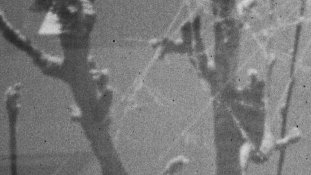
Sorry, it is really hard to see on that picture, I took another one, really hard to focus though. There are both white and black specks and they are part of the negative, not dust.
 

Attachments

  • black_and_white_specks.jpg
    black_and_white_specks.jpg
    865.5 KB · Views: 101
Clear spots on negatives often arise if there is dust in the camera that falls on to the film at or before the time of exposure. That dust blocks the light from getting to the film. When you print or display a scanned positive from that negative, the spot where the dust is is clear on the negative and black on the print or the screen.
Black specks on the negative re often dirt or dust embedded in the emulsion due to the conditions of either processing or, more commonly, drying.
 
Photrio.com contains affiliate links to products. We may receive a commission for purchases made through these links.
To read our full affiliate disclosure statement please click Here.

PHOTRIO PARTNERS EQUALLY FUNDING OUR COMMUNITY:


Ilford ADOX Freestyle Photographic Stearman Press Weldon Color Lab Blue Moon Camera & Machine
Top Bottom