• Welcome to Photrio!
    Registration is fast and free. Join today to unlock search, see fewer ads, and access all forum features.
    Click here to sign up

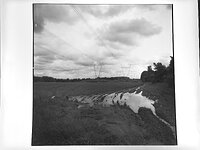
Black borders

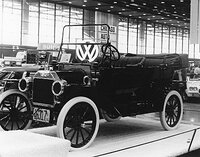
Puddle

Puddle

  • 2
  • 2
  • 54

Recent Classifieds

Forum statistics

Threads
202,721
Messages
2,844,670
Members
101,487
Latest member
Bmattei
Recent bookmarks
0

BetterSense

Member
Allowing Ads
Joined
Aug 16, 2008
Messages
3,151
Location
North Caroli
Format
35mm
I tend to not like leaving plain white borders, especially when a light area of the image (like the sky) runs right to the edge of the print. It seems like solid black borders would be better. Even trickier, would be a thin black border around the image but that goes back to white after it. I've tried to get black borders by laying card on the print and trying to get the edges even, but if it works at all it's always a pain and I haven't managed the thin-black-border yet. I can think of a couple ideas but they wouldn't be practical unless you always printed standard paper sizes. Does anyone have any tricks to making black borders?
 
I couldn't agree more. I spent hours filing my negative carriers to get the full-frame with black border effect. My mentor from years ago explained that this technique "proved" to all that no cropping was employed in making the print.
 
Cut some masks from exposed & developed graphic film (or other) and cut very slightly larger than your negative size. Very simple method, if you are printing the whole neg & not cropping. For accuracy, I measure first on some graph paper, tape this to the opaque film and use very sharp blades, be sure not to overcut.
 
The easiest way to put black borders on a print is to make a mask smaller. Now, instead of trying to put it in the center, do this two step process: Put the mask in the upper left corner right at the print edge, and expose white light. Then slide the mask to the bottom right corner (diagonal), and expose again. Real easy to do and get the borders even.

The easiest way to get black border with a white border outside of it is to do exactly as above, but with the paper held by a four-blade easel. The blades form the outer mask.

Of course, you need one mask for each print size, but you probably only have 8x10 or 5x7.

You could always overmount with black mat and not touch the print.

P.S. Just a comment on Thomas's mentor: What are we, lawyers?
 
My mentor from years ago explained that this technique "proved" to all that no cropping was employed in making the print.

Hey Thomas - your last comment there intrigues me a bit. Is no-cropping considered a photographic virtue. If so - do you know why that is?
 
Hey Thomas - your last comment there intrigues me a bit. Is no-cropping considered a photographic virtue. If so - do you know why that is?

If that is a virtue, then of course we turn in our contact sheets as well, to 'prove' every composition is perfect.
 
I tend to not like leaving plain white borders, especially when a light area of the image (like the sky) runs right to the edge of the print. It seems like solid black borders would be better. Even trickier, would be a thin black border around the image but that goes back to white after it. I've tried to get black borders by laying card on the print and trying to get the edges even, but if it works at all it's always a pain and I haven't managed the thin-black-border yet. I can think of a couple ideas but they wouldn't be practical unless you always printed standard paper sizes. Does anyone have any tricks to making black borders?

The masks described by Dave work well, but better yet, try to find a pen-line easel. They are terribly expensive, but extremely well crafted easels to do just what you want. I can post a picture of one if you like. They are not made anymore, but I'm sure you'll be able to find one somewhere.

That said, I can't resist to offer my opinion on pen-lines in general. In brief, and being very frank: They are an old fashioned way of hiding poor composition or a lack of printing ability. This is not always the case, but it is often the case.

The condition you described is typical, but I would argue: Make sure the white disturbance at the border of the print is not part of your composition, or, print it out, spot it out, and if all fails, let this one go.

In my opinion, the composition and the printing need to hold the image together, not a crutch called pen-line. If I start thinking about a pen-line, chances are, there is something wrong with the image or the printing. Some go to the extreme and use a pen-line with EVERY print. That's a clear sign of a misunderstood technique in my eyes.

There are exceptions:

High-key images often benefit from a pen-line. They contain a lot of white, and mounted on white mount-board, the image might not hold together otherwise. Yes, pen-lines work with some high-key images.

An off-white, even light gray, mounting board can create an automatic framing similar to a pen-line. That's OK in my view, because it is not as obvious and attention-grabbing as a pen-line.

A black frame itself is a pen-line in a way. Yes, but it serves the function of isolation the print from the wall, not to hide a poor composition.

OK, these are just my opinions and not intended as a demand on others. But, do yourself the favor and as soon as an image screams for a pen-line, ask yourself why that really is. Put a pen-line around it if it helps, but don't use it as a general crutch. A good image does not need a pen-line to hold together. That's done by the composition and supported by the printing.

Again, just my opinion.

 
The easiest way to put black borders on a print is to make a mask smaller. Now, instead of trying to put it in the center, do this two step process: Put the mask in the upper left corner right at the print edge, and expose white light. Then slide the mask to the bottom right corner (diagonal), and expose again. Real easy to do and get the borders even.

You know, like all the best ideas, this seems to simple and obvious now, but has never occurred to me before. Thanks.
 
I couldn't agree more. I spent hours filing my negative carriers to get the full-frame with black border effect. My mentor from years ago explained that this technique "proved" to all that no cropping was employed in making the print.

Just to add an annoying note keyline borders (those which occur in full frame printing techniques can be produced on cropped images. its just a second step and a tiny bit of mucking around in the darkroom.
 
Yeah, and I've got lenses in 5mm increments and 15 different-format backs for my camera just so I don't have to crop in the darkroom...

Uh, except when I want format 16 or really love the view between 205mm and 210mm....

I compose my work very carefully, and each image has its own, self-dictated, format and dimensions. Limiting myself to 4x5, 6x6, etc. and printing full-frame would just compromise my careful composing. I crop, and I view it as one of the most useful creative tools in my bag. I print with more image than I need and trim each image with a paper cutter to the precise dimensions.

And (getting back to the original topic), that is one reason why I do not like black borders. I don't want to prove that I composed "in-camera," nor do I want to have it seem so (I, too, think it is pretentious). Nor do I think that the black border is aesthetically pleasing. More important is matching the white of the mount board to the tone of the base of the paper one uses. Black borders, for me, detract from the blacks in the print, making them look washed out. White borders do the same for print whites, but for some reason this seems more manageable by choice of board, printing, and judicious edge burning.

Sorry for being off-topic a bit, but I couldn't resist...

Best,

Doremus Scudder
www.DoremusScudder.com
 
I tend to not like leaving plain white borders, especially when a light area of the image (like the sky) runs right to the edge of the print. QUOTE]

You may be trying to solve the wrong problem. If you burn in your sky more there will be a grey tone that stops at the white border. If it is difficult with the same over all filter, try 0 or 00 for the burn. Search here for Les McLean on split grade printing. If you can't do this you may need to increase your exposure when you shoot the picture or add a filter to darken the sky-clouds. Try bracketing by two stops in this situation and see if it is easier to print the negative.

John Powers
 
Last edited by a moderator:
I couldn't agree more. I spent hours filing my negative carriers to get the full-frame with black border effect. My mentor from years ago explained that this technique "proved" to all that no cropping was employed in making the print.

Years ago is the key here. Today someone on another forum would just put a black border on in Photoshop.

John Powers
 
Another solution is shoot a bigger negative and then contact print. The border is always black and people keep asking why you print it black and what are those funny looking notches at one end?

John
 
You know John, I always meant to ask you about that ... :wink:

Jeff, we are having a remedial workshop on just that question, first thing at the NE Ohio, Bi-Monthly, May 30-31, 2009 Gathering at the Powers’ House

John
 
Jeff, we are having a remedial workshop on just that question, first thing at the NE Ohio, Bi-Monthly, May 30-31, 2009 Gathering at the Powers’ House

John

Excellent! I hope we will cover the Photoshop filters used to create this effect - my Canon point & shoot doesn't seem to have a black border option in the menu ...

:D
 
If you have to have a black border you can always make a film holder for your enlarger that is just slightly larger than the image but still holds the film. That will give a black around the image. I remember, I think, that Bessler had something called a full frame negative holder. As to whether you crop or not, well that is a matter of aesthetics.
my best
Michel
 
If I recall correctly Robert Vonk of Fotohuis used to sell a thing called a Versamask which was a metal easel with very accurate metal masks for 6x4, 5x7 10x8 etc which gave a penline as thin a 1mm on the edge of the print. Not cheap however.

It looked a very easy and convenient way of doing it without any skill required. Such easy and convenient ways always come at a price - usually quite a large one.

Someone with access to a laser cutter, even one only able to do plastic such as schools have could create such an easel or easels

pentaxuser

pentaxuser
 
Ilfochrome will give you black boarders I believe
 
you could use a file to make the negative holder a bit larger. just a bit, it's a precision work.
The Valoy used to have a slightly larger negative holder.
 
Versamask is perfect for printing with black borders. I ordered my Versamask easel the other day from www.versamask.de , so it's still available if anyone is interested.

Regards,
Philipp
 
If I recall correctly Robert Vonk of Fotohuis used to sell a thing called a Versamask which was a metal easel with very accurate metal masks for 6x4, 5x7 10x8

Unfortunately only available directly at the manufacturer in Germany only. By buying a metal insert for the mask you can make in two steps a perfect black border (e.g. fixed 2mm) in the mask. Versamask is not really expensive but all frames are laser cutted.

Otherwise with a 25x37mm carrier from your enlarger you will have a more artistic black line.

Here an example of the Dunco 67 II 25x37mm glasless carrier:

3458926238_d166a695da.jpg


"Ertsgebirge" Germany-Czech Republic on Rollei ATP1.1 - RLC 1+5 (M7 Summicron 2,0/50mm)


3582421724_b540656b50.jpg


Miss Alissa in the Rollei Pan 25 test. Versamask black border (2mm) on Fomabrom Variant FB paper.
Rollei Pan 25, AM50 1+29. M7 + Summicron 2,0/50mm.
 
My method to print black borders is to enlarge with a Leitz enlarger. I believe their negative carriers all print with borders. The cost of these great small format enlargers is modest when you consider their quality.
 
Photrio.com contains affiliate links to products. We may receive a commission for purchases made through these links.
To read our full affiliate disclosure statement please click Here.

PHOTRIO PARTNERS EQUALLY FUNDING OUR COMMUNITY:


Ilford ADOX Freestyle Photographic Stearman Press Weldon Color Lab Blue Moon Camera & Machine
Top Bottom