• Welcome to Photrio!
    Registration is fast and free. Join today to unlock search, see fewer ads, and access all forum features.
    Click here to sign up

Best screen resolution for RAW files

Recent Classifieds

Forum statistics

Threads
202,672
Messages
2,843,908
Members
101,456
Latest member
Ragnarock
Recent bookmarks
0
My next question, pun intended, how would you save my files to TIFF…😳

The answer depends on what file save utility you have available in the image processing/RAW conversion software you use.
As most of my digital image files are scanned from film, I don't do a lot with RAW files, but when I work with RAW files from my wife's Olympus DSLR, I have several choices for the RAW conversions. Mostly I use the quickest and easiest - the RAW converter built into FastStone Image Viewer, but I also have Olympus software and a couple of Corel products to choose from.
 
The answer depends on what file save utility you have available in the image processing/RAW conversion software you use.
As most of my digital image files are scanned from film, I don't do a lot with RAW files, but when I work with RAW files from my wife's Olympus DSLR, I have several choices for the RAW conversions. Mostly I use the quickest and easiest - the RAW converter built into FastStone Image Viewer, but I also have Olympus software and a couple of Corel products to choose from.

I don’t use any software but what originally came with the Mac desktop…📷
 
I might be on to something…📷
 

Attachments

  • IMG_6874.jpeg
    IMG_6874.jpeg
    896.8 KB · Views: 64
I don’t use any software but what originally came with the Mac desktop…📷

You will need to ask those who work in the Mac world.
 
Doesn’t the software you use to view/process RAW files have a “save as” function?
 
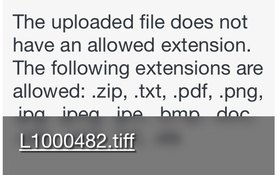
Tried to send image as TIFF…😩
 

Attachments

  • IMG_6877.jpeg
    IMG_6877.jpeg
    47.6 KB · Views: 62
I did manage getting a TIFF file on my Home Screen. How can that be shared…📷
 
Email as an attachment.

Store somewhere and post a link to that external site.

Put on a thumb drive and mail it.
 
It seems I can’t send to TIFF file to the group or my group either…🤨
 
It seems I can’t send to TIFF file to the group or my group either…🤨
If “the group” is this forum, that’s a true statement. You can email them as attachment to trusted friends if you have any.
 
You need some help with file handling in general on your computer.
 
But at least my computer got a calibration…😉
 
Email as an attachment.

Store somewhere and post a link to that external site.

Put on a thumb drive and mail it.

Thanks, but I’m not that computer savvy as yet…😳
 
Last edited:
I measured the width of the image to less than 16”.
Wow, the RAW images look amazing on that screen! Imagine how they would look on a 4K monitor…📷

That RAW file viewed on your 16" horizontal image is analogous to judging the quality of an 135 format image printed to 6" x 4"...there is a lot of hidden detail never appreciated by your eye if viewing the 6" x 4" print from 10" viewing distance...just as your eye cannot see the detail of the mouse on the ground from 6000' while the eagle can see it!
 
That RAW file viewed on your 16" horizontal image is analogous to judging the quality of an 135 format image printed to 6" x 4"...there is a lot of hidden detail never appreciated by your eye if viewing the 6" x 4" print from 10" viewing distance...just as your eye cannot see the detail of the mouse on the ground from 6000' while the eagle can see it!

I see, pun intended…📷
 
If “the group” is this forum, that’s a true statement. You can email them as attachment to trusted friends if you have any.

Got it…📷
 
I don’t use any software but what originally came with the Mac desktop…📷

Then, how are you using RAW files? What's converting them? Given what you've described to date, you ought to just shoot and process JPEGs and leave RAW for when you have more experience, knowledge, and photo editing programs loaded in your computer. Right now you;re trying to drive a racecar (RAW) on a track when you haven;t even learned to drive.

It might be helpful for you to have a friend familiar with photo editing show you how to do it. Complicated issues can't be explained easily with questions and answers on a forum. You can also try one of those simple instruction videos on the web.
 
Then, how are you using RAW files? What's converting them? Given what you've described to date, you ought to just shoot and process JPEGs and leave RAW for when you have more experience, knowledge, and photo editing programs loaded in your computer. Right now you;re trying to drive a racecar (RAW) on a track when you haven;t even learned to drive.

It might be helpful for you to have a friend familiar with photo editing show you how to do it. Complicated issues can't be explained easily with questions and answers on a forum. You can also try one of those simple instruction videos on the web.
You don’t know much about Leica cameras it seems. So your advice is meaningless!
The Leica MD 262 only shoots in RAW…📷
 
Last edited:
You don’t know much about Leica cameras it seems. So your advice is meaningless!
The Leica MD 262 only shoots in RAW…📷

Now I don't know about Leica either but does Leica have a free software for you to convert DNG to JPEG? Other manufacturers do have such a software for their cameras.
 
(I can't get the forum's multi-quote feature to work, so sorry for the copy-and-paste)

@Nikon 2: "I don’t use any software but what originally came with the Mac desktop…📷"

Looking at your screen shots, I believe the photo editing software that came with your computer was an early version of Apple Photos, but I can't be sure. Your iMac is a "late 2015" model, and it was about in 2015 when Apple made the switch from iPhotos to Apple Photos. A lot of Apple users were unhappy that a mature photo application like iPhotos was replaced by the new Photos, which (at first) had fewer features and seemed to be oversimplified. With subsequent updates, more features were added to Photos and the editing tools were improved.

It appears you have not updated the software on your computer since 2015? Is there any particular reason why? [NOTE: Do not attempt to update your operating system unless you have at least one good backup, and preferably two!]

---
@BrianShaw: "Doesn’t the software you use to view/process RAW files have a “save as” function?"
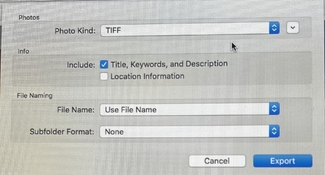
No, Apple Photos is a non-destructive editor, which means it does not "Save" like traditional editors. Rather, all edits are stored as instructions in the Photos Catalog, and the edits are not written to the file until/unless the file is Exported. So instead of "Save as" - Photos has an "Export as" function.
---

@Nikon 2: "My next question, pun intended, how would you save my files to TIFF…😳"
For a person who is using RAW files, there is no reason to convert the edited file to TIFF or JPEG until/unless a person wants to use that image somewhere else -- such as in an email, posting on a forum, sending to a printing service, etc. The Export settings should be chosen according to what, exactly, it is you want to with the exported file.

A photo that is intended for posting on the internet shoud be exported as a JPEG of appropriate dimensions (pixel size) with a sRGB color profile. If you want to do further editing in another software application, then a 16-bit TIFF with an AdobeRGB profile might be appropriate. If you are having the photo printed, the printing service may have specific suggestions about what file format and color profile they prefer to work with.

For storing photos on your computer, leaving photo files in the RAW format is best. However, do be sure you are making regular backups. Are you using Apple's Time Machine software to create backups on an external drive? There is some risk of your Apple Photos catalog becoming corrupted, and loosing all your photos. If that ever happens, you will be very happy to have a backup! (and very sad if you don't)

 
You don’t know much about Leica cameras it seems. So your advice is meaningless!
The Leica MD 262 only shoots in RAW…📷

You've picked the wrong camera then if you don't have programs or know how to properly process RAW. It may be too advanced for you. Maybe start with a camera that shoots jpeg. Even your cellphone does that. Work with the jpeg files first until you become accustomed to editing those. Then move on to RAW. You have to walk before you can run.
 
It isn’t my intention to offend, but it seems like learning the basics of computers, especially the Mac, and digital photography should be the thrust rather than fidgeting with advanced processes like RAW and monitor calibration, etc. unless the goal is to learn through frustration. It’s all good to me… here to help as much as possible.
 
… and seriously consider an upgrade to a newer computer with more RAM. 😀
 
Photrio.com contains affiliate links to products. We may receive a commission for purchases made through these links.
To read our full affiliate disclosure statement please click Here.

PHOTRIO PARTNERS EQUALLY FUNDING OUR COMMUNITY:


Ilford ADOX Freestyle Photographic Stearman Press Weldon Color Lab Blue Moon Camera & Machine
Top Bottom