
• Welcome to Photrio!
    Registration is fast and free. Join today to unlock search, see fewer ads, and access all forum features.
    Click here to sign up

Beseler Enlarger Timer - How to Calibrate?

Shadow play

A
Shadow play

  • 4
  • 1
  • 12

Forum statistics

Threads
201,228
Messages
2,820,841
Members
100,601
Latest member
gamlate
Recent bookmarks
1

gkardmw

Member
Joined
Mar 10, 2008
Messages
193
Location
NE Ohio
Format
Medium Format
I have a Beseler Audible/Repeating Englarging Timer that is slightly off. If I set it to 20 seconds, I check it against a good stop watch and it only runs about 17 seconds. The audible beeps seem to be correct though. In any event, I took the back panel off and there are what look to be 3 variable resistors labeled R7, R10 and R20. I take it that I can adjust this device moving these a bit. Before I just randomly start fiddling with this, does anyone know which one would help my timing problem?

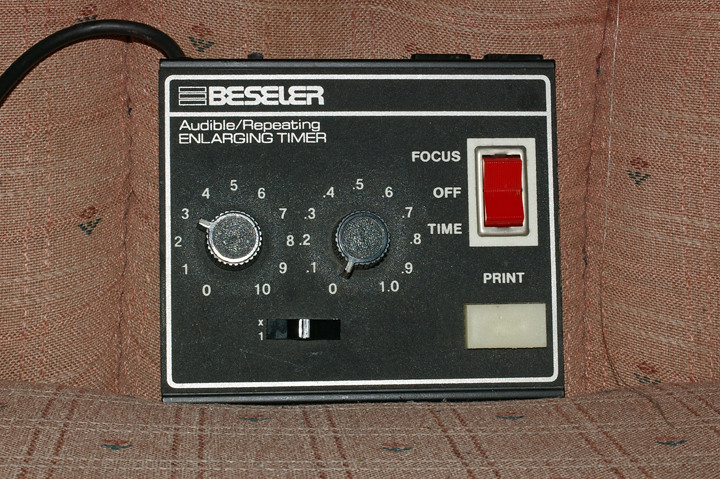
As I don't see a model number on this, I will describe it. It is a basically rectangular black box, about 6.5 x 6 x 2 inches, 2 big dials for seconds and tenths of seconds, a 10x multiplying switch, red focus off time switch and rectangular print button. A pretty standard unit a few years ago.

Thanks

Dave
 
OP
OP

gkardmw

Member
Joined
Mar 10, 2008
Messages
193
Location
NE Ohio
Format
Medium Format
I understand your point, but yes, I suppose it is. I want to be able to record times and be able to use any timer in the future and get it right.
 

Rick A

Subscriber
Allowing Ads
Joined
Mar 31, 2009
Messages
10,006
Location
Laurel Highlands
Format
8x10 Format
If it is consistant, you can still record your times, they will always(unless it goes off-kilter) be what they are. If, when you set it to 20 ceconds, and get the exposure you like, then keep using that setting. It doesn't matter if it is really not exactly 20 seconds. As mpirie states, consistancy is more important. I have several timers, and all are calibrated to each other, and thats all that I care about. I have settings that I know the results of, and are repeatable.
 
OP
OP

gkardmw

Member
Joined
Mar 10, 2008
Messages
193
Location
NE Ohio
Format
Medium Format
Rick, yes, I understand, but the other timers I have seem to be accurate, hence my original question.
 

fschifano

Member
Allowing Ads
Joined
May 12, 2003
Messages
3,196
Location
Valley Strea
Format
Multi Format
Now you know why I'm so enamored of my old GraLab and Time-O-Lite timers. Both are driven by electric clockworks with motors whose speed is controlled by the frequency of the AC current. Voltage may vary, but the frequency is very tightly controlled and these things don't drift. The Time-O-Lite is repeatable, the GraLab is not; but it can accommodate a footswitch.
 

Jim Rice

Member
Allowing Ads
Joined
Jun 7, 2006
Messages
225
Location
Jackson. MS,
Format
Multi Format
There will be a chrystal oscillator in any digital timer. If you have been living right, there will be a trimmer capacitor very near the chrystal itself. If you haven't you will have to add capacitance to the circuit a pico farad or so at the time. Note to slow the oscillator (which you want to do) you must add capacitance.
 

tkamiya

Member
Allowing Ads
Joined
Oct 3, 2009
Messages
4,284
Location
Central Flor
Format
Multi Format
When you took the back cover off, what did you see? Did you see a large number of registers either on the printed circuit board or around switches? Or, did you see just few IC chips and some analog circuitry? Just because it has dials and numbers, I wouldn't automatically assume it's digital in a sense it has a master oscillator for 1 second, and cascaded counter counts up the preset intervals. It could very well be an adjustable timer with registers to set the timing.

I say this because if it was entirely digital, there will be little need for trim pots like OP says.
 

ic-racer

Member
Allowing Ads
Joined
Feb 25, 2007
Messages
16,694
Location
USA
Format
Multi Format
Hard to know without some pictures or a schematic. The good old Omega timer has only resistors and capacitors and a single SCR and a single trimpot.
 
OP
OP

gkardmw

Member
Joined
Mar 10, 2008
Messages
193
Location
NE Ohio
Format
Medium Format
Okay, here are some pictures!

The front:

4728387271_872cf6228f_b.jpg


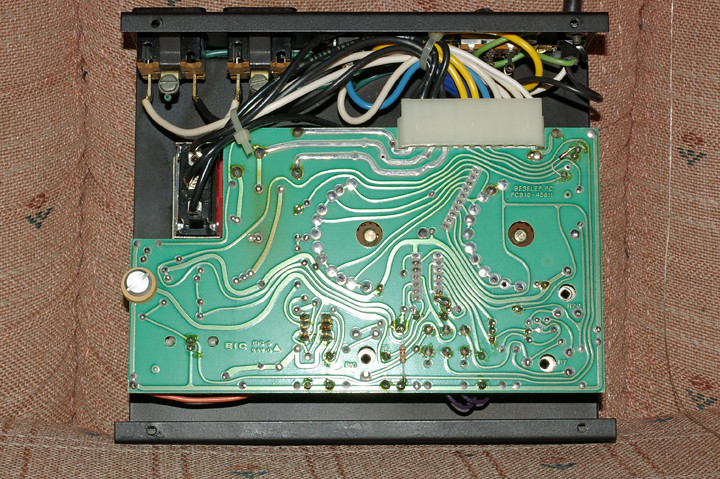
Opening the back where you will notice that they made the circuit board so that these variable resistors (that is what I am calling them, I may be wrong) are easy to access as there is a hole in the board at each of these points. They are located in the lower middle, lower right corner and above that corner:

4728387281_1506d907dd_b.jpg


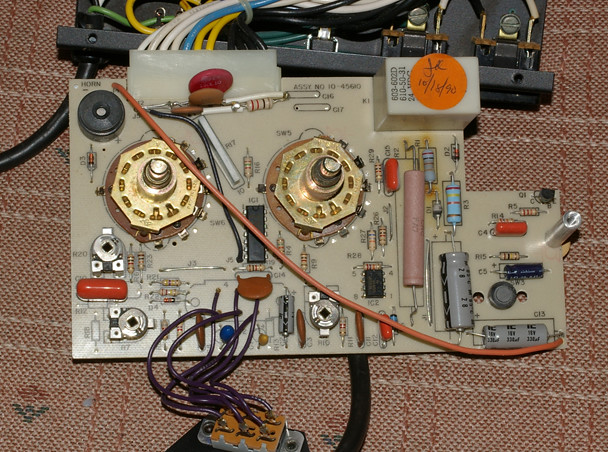
And then finally, the front side of the circuit board (you will notice R20 the mid left side, R7 below that in the lower left corner and R10 in the middle of the bottom edge.

4728387283_b16b1c9e72_b.jpg


Any ideas?

Dave
 
Last edited by a moderator:

tkamiya

Member
Allowing Ads
Joined
Oct 3, 2009
Messages
4,284
Location
Central Flor
Format
Multi Format
Looks like an RC timing circuit to me...

Do you see any numbers on those two IC chips? I'm guessing one of them is 555 or 556.... the other one may be 723. I'd really have to trace the circuit and draw it out before I can be 100% certain.
 

ic-racer

Member
Allowing Ads
Joined
Feb 25, 2007
Messages
16,694
Location
USA
Format
Multi Format
Thanks for the pictures. I see two ICs. Perhaps IC2 is a 555 chip?

WILD, PARTIALLY EDUCATED GUESS: one trimpot each for high and low ranges and a second trimpot to affect linearity.

If it were mine, I'd mark each trimpot as to where it is now and then see what each one does.

Since it is probably not quartz regulated, I'd be happy to be within 5 seconds at one minute.
 

tkamiya

Member
Allowing Ads
Joined
Oct 3, 2009
Messages
4,284
Location
Central Flor
Format
Multi Format
I was guessing, one is for 10x multiplier switch, one is for 0.1 second min, the other is for 11.0 sec max.... As ic-racer says, linearity may be an issue... in which case, it will never be right at all setting.
 
OP
OP

gkardmw

Member
Joined
Mar 10, 2008
Messages
193
Location
NE Ohio
Format
Medium Format
The IC is labled NE556N so you guys know what you are speaking about.

If I trace the circuit board, the one wire from the 10x switch is directly connected to R7, one prong of R20 is directly wired to the 1 second switch, and R10 is well, not connected directly to the .1 second switch, but to some other resistors and capacitors. Would you start with R20 that is connected to the 1 second switch? I am assuming these things rotate without harm, correct?
 

tkamiya

Member
Allowing Ads
Joined
Oct 3, 2009
Messages
4,284
Location
Central Flor
Format
Multi Format
Huh? Both are 555 derivatives? Both 555 and 556 are RC based timer circuit chips. The difference is, 555 has one timer, 556 has two timers both of which are identical to one 555. This is weird.

You *can* rotate them, but it will change the timing and probably for worse. Don't do that yet.

IC-RACER, can you think of a reason why a design like this would use THREE 555s? What the heck?
 

Kirk Keyes

Member
Allowing Ads
Joined
Jun 17, 2004
Messages
3,234
Location
Portland, OR
Format
4x5 Format
IC-RACER, can you think of a reason why a design like this would use THREE 555s? What the heck?

How about this:
One is for counting off the value of the first knob.
The second is for the counting off the value of the second knob.
The third is for the 1x /10x scale switch.

I would guess the scale switch controls the speed of the signal that feeds the other two knobs with a faster or slower count (X/10 speed). That one would be the "scale" that IC Racer is talking about.

Adjust the rate that that signal is clicking away at and you could change the linearity of the timer.
 

Kirk Keyes

Member
Allowing Ads
Joined
Jun 17, 2004
Messages
3,234
Location
Portland, OR
Format
4x5 Format
If you have a volt meter with a freqency counter or an oscilloscope (who has those sitting around - I wish I did) you could use them to see the rate the clock signal is running at. Or you could make a probe out of a mini-phono (1/8th in.) cable and then use a sound card on a computer and a program like Audacity to see the clock signal.

If using your sound card, keep away from 120V/line voltage with it...
 

Nicholas Lindan

Advertiser
Advertiser
Joined
Sep 2, 2006
Messages
4,301
Location
Cleveland, Ohio
Format
Multi Format
The two timing adjustments are R7 and R10: one is for the x1 range and the other for the x10. I can't tell which is which from the photos supplied, but you will see one pot is connected to each side of the range switch. I take it it works OK on x1 but not on x10.

The remaining pot is probably for adjusting the 1 second beep period.

The reason for 3 timers: one is for timing exposure; the second for timing the one second beep period; and the third for generating the beep tone.

The circuit design is a train-wreck. There is no transformer to generate the 12 volts (or so) that the timer circuitry works on. The 120VAC is connected to a large power dropping resistor (you can see where the circuit board has been discolored by heat from the heat of the transistor. As the circuit is directly connected to the AC line you can get a 120V shock from contact with the circuit parts. When you get shocked there is also a very good chance of blowing out the 555/6 timers. If you are going to adjust timing with the timer working then adjust the trimpots with a plastic or wooden tool - something like a Popsicle stick that has been whittled down to a square point.

555's are very linear - adjusting the basic timing will have little to no effect on linearity (assuming the circuitry has been designed properly [possibly a bad assumption]). Linearity is set by the accuracy of the resistors connected to the two time adjustment switches.
 
Last edited by a moderator:
OP
OP

gkardmw

Member
Joined
Mar 10, 2008
Messages
193
Location
NE Ohio
Format
Medium Format
Thanks everyone for your help. To complete this thread I can confirm the following:

R10 adjusts the 1x time (clockwise increases time)
R7 adjusts 10x time (clockwise increases time)
R20 adjusts audio beep increments (clockwise increases time in between the beeps)

You have to be careful, but I am quite satisfied with the accuracy. I just used a phillips head screwdriver for adjustments.

Again, gotta love Apug.
 

mikecnichols

Member
Allowing Ads
Joined
Aug 24, 2010
Messages
345
Location
Marion, VA
Format
Multi Format
This question is not directly related to the original post, but since there is a thread about this timer, I did not want to start a whole new thread. I have this same timer and I believe I do not understand how it works (in how to set times). When I enlarge, I have to manually turn it off. Someone who knows this timer, can someone please explain how to use it properly for me please. I feel like such an idiot not knowing something like this.
 

Rick A

Subscriber
Allowing Ads
Joined
Mar 31, 2009
Messages
10,006
Location
Laurel Highlands
Format
8x10 Format
There are two recepts on the back of the timer, one marked safelight, the other is for enlarger. Make certain you are plugged into the correct outlet. You should then use the focus mode to set up for enlarging. Set the rocker switch to time and set the desired time, then push the print button. The timer should then stop and turn off the enlarger at the preset interval. If you are already following this procedure and it isn't working, there is a problem with the timer.
 

nolindan

Member
Allowing Ads
Joined
Mar 6, 2004
Messages
15
Repair is going to cost more than the timer is worth.

The first point of failure is the switch contacts. Try spritzing some 'contact cleaner' into all the the switches and then exercising them - although not ideal, WD-40 can be used in a pinch.

The second point of failure are the electrolytic condensers - especially for equipment made in the early '90s. Often wholesale replacement of the electrolytics will restore a bit of broken electronics. Replacements are available through Digikey.
 
Photrio.com contains affiliate links to products. We may receive a commission for purchases made through these links.
To read our full affiliate disclosure statement please click Here.

PHOTRIO PARTNERS EQUALLY FUNDING OUR COMMUNITY:


Ilford ADOX Freestyle Photographic Stearman Press Weldon Color Lab Blue Moon Camera & Machine
Top Bottom