
• Welcome to Photrio!
    Registration is fast and free. Join today to unlock search, see fewer ads, and access all forum features.
    Click here to sign up

Backing Paper Bleed Through on Expired Film??

PenStocks

A
PenStocks

  • 1
  • 0
  • 34
Landed Here

H
Landed Here

  • 4
  • 3
  • 49

Recent Classifieds

Forum statistics

Threads
201,833
Messages
2,830,882
Members
100,976
Latest member
Gorrunyo
Recent bookmarks
0

Pioneer

Member
Joined
May 29, 2010
Messages
3,993
Location
Elko, Nevada
Format
Multi Format
Out of curiosity -

I have been using up some Ilford FP4 Plus that expired back in 1996. Since I know that it is 20 years old I have been playing around with the film and not using it for anything that I would consider serious.

The film is developing quite well but I have definite backing paper marks coming through on the developed film. Numbers, leading dots, and other markings are coming through quite clearly.

I have no idea how the film was stored as I purchased it already quite expired. The film is boxed and still enclosed in the wrapping. If I develop it within a day of exposing it the marks are much lighter but still visible.

I am using HC110 dil B to develop the film at the recommended time.

It isn't the end of the world, I am just curious what is happening.
 

Sirius Glass

Subscriber
Joined
Jan 18, 2007
Messages
50,814
Location
Southern California
Format
Multi Format
And we just had a thread where someone was cursing Kodak for the same thing.
 

AgX

Member
Allowing Ads
Joined
Apr 5, 2007
Messages
29,972
Location
Germany
Format
Multi Format
The latter was fresh film.

But yes, in that other thread I wrote:

I got hundreds of sample film-artefacts collected by two major manufacturers. Ranging over decades.
Not one sample shows such "wrapper offset".

Though in case there had been reported cases they would typically been films processed within time.
But nevertheless I'm surprised by this case. Especially with the film (to my understanding) having been sealed all the time.
 
Last edited by a moderator:
OP
OP
Pioneer

Pioneer

Member
Joined
May 29, 2010
Messages
3,993
Location
Elko, Nevada
Format
Multi Format
I have exposed three rolls, all with the same result. I have about 20 more rolls from the same batch. Not only are they sealed and in a box, some of them are still wrapped up in a brick of 10 rolls.

I am personally wondering if the effect has been caused by some form of radiation, maybe during shipping at some point. The film also shows some fogging, particularly noticeable in areas where there is no, or very minimal, exposure.
 

Rick A

Subscriber
Allowing Ads
Joined
Mar 31, 2009
Messages
10,031
Location
Laurel Highlands
Format
8x10 Format
I've shot Tri-X 120 and 220 from the mid 80's not long ago, no print through of numbers. The current paper Kodak is using is not light tight(I've read), and prints through.
 

JW PHOTO

Member
Allowing Ads
Joined
May 15, 2006
Messages
1,148
Location
Lake, Michig
Format
Medium Format
I've shot Tri-X 120 and 220 from the mid 80's not long ago, no print through of numbers. The current paper Kodak is using is not light tight(I've read), and prints through.

Hmmm! As much as I am not a worshiper of the big yellow God I cannot believe for one minute that Kodak would switch to a new backing paper that was not 100% opaque. Chemical bleed/osmosis from number ink/dye? Very likely! Light leaking through the backing paper? No way can I believe that! Rick where did you read that?
 

Rick A

Subscriber
Allowing Ads
Joined
Mar 31, 2009
Messages
10,031
Location
Laurel Highlands
Format
8x10 Format
(there was a url link here which no longer exists)

Why, here of course.
 

Xmas

Member
Allowing Ads
Joined
Sep 4, 2006
Messages
6,398
Location
UK
Format
35mm RF
Out of curiosity -

I have been using up some Ilford FP4 Plus that expired back in 1996. Since I know that it is 20 years old I have been playing around with the film and not using it for anything that I would consider serious.

The film is developing quite well but I have definite backing paper marks coming through on the developed film. Numbers, leading dots, and other markings are coming through quite clearly.

I have no idea how the film was stored as I purchased it already quite expired. The film is boxed and still enclosed in the wrapping. If I develop it within a day of exposing it the marks are much lighter but still visible.

I am using HC110 dil B to develop the film at the recommended time.

It isn't the end of the world, I am just curious what is happening.
Hi Dan

I've not had much fog from any 100ISO film except when it was stored warm ie hot. What maximum temperature has it been stored at?

Noel
 

AgX

Member
Allowing Ads
Joined
Apr 5, 2007
Messages
29,972
Location
Germany
Format
Multi Format
Rick, in that case there was no indication at all that the backing paper was translucent.
 

Rick A

Subscriber
Allowing Ads
Joined
Mar 31, 2009
Messages
10,031
Location
Laurel Highlands
Format
8x10 Format
Rick, in that case there was no indication at all that the backing paper was translucent.

You're correct, but at my advanced age I claim "oldtimers" disease. It does however bring to light an issue with the new backing paper Alaris is using.
 

aoresteen

Member
Allowing Ads
Joined
Jun 8, 2004
Messages
677
Location
Newnan, GA,
Format
Multi Format
Can you post a photo of what the bleed through looks like?
 
OP
OP
Pioneer

Pioneer

Member
Joined
May 29, 2010
Messages
3,993
Location
Elko, Nevada
Format
Multi Format
Here is a sample.


As for storage temperature I can't give an answer.Since I have owned it the tep has been 65F or below, sometimes a lot below. It was part of a bulk purchase a couple of years ago. The rest of the film does not show this bleed through although none of the rest is quite this old.
 

Chris Livsey

Member
Allowing Ads
Joined
Aug 10, 2008
Messages
635
Format
Medium Format
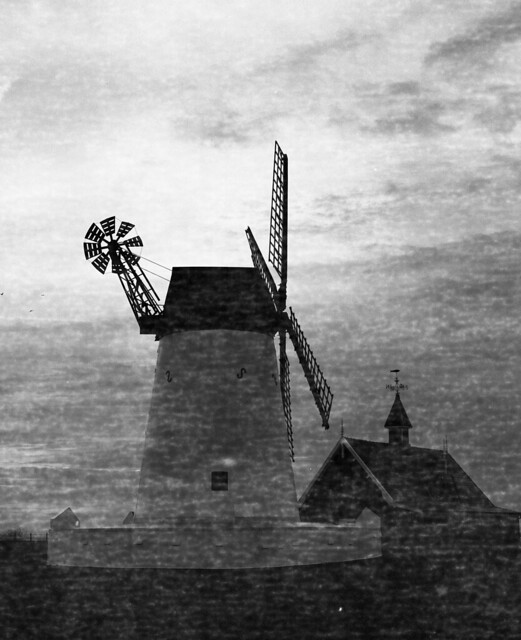
15888751382_5a02878ac4_z.jpg


A bad case indeed: HP5+ dated Expiry 2001
Harvey 777 Lytham Windmill Lancashire UK
Strangely it made Explore on Flickr with 9,000 plus views !!
 

Old-N-Feeble

Member
Allowing Ads
Joined
Feb 22, 2012
Messages
6,805
Location
South Texas
Format
Multi Format
Hmm... interesting and worrisome. I thought the Kodak situation was an isolated event. I guess not...
 

JW PHOTO

Member
Allowing Ads
Joined
May 15, 2006
Messages
1,148
Location
Lake, Michig
Format
Medium Format
15888751382_5a02878ac4_z.jpg


A bad case indeed: HP5+ dated Expiry 2001
Harvey 777 Lytham Windmill Lancashire UK
Strangely it made Explore on Flickr with 9,000 plus views !!

I don't think you would have gotten such a nice picture with good film. I like it just the way it is. Very nice!
 

Sirius Glass

Subscriber
Joined
Jan 18, 2007
Messages
50,814
Location
Southern California
Format
Multi Format
Hmmm! As much as I am not a worshiper of the big yellow God I cannot believe for one minute that Kodak would switch to a new backing paper that was not 100% opaque. Chemical bleed/osmosis from number ink/dye? Very likely! Light leaking through the backing paper? No way can I believe that! Rick where did you read that?

I agree. The film was probably in a hot location for a very long period of time. That is one of the best ways to get wrapper print through.
 

piu58

Member
Allowing Ads
Joined
May 29, 2006
Messages
1,545
Location
Leipzig, Germany
Format
Medium Format
It would be of interest whether the direct contact between the paper and the film lead to the markings. Or the markings came from light which the film caught in the course of years, causing some kind of flashing.. The markings could have absorbed some of the stray light.
 

MattKing

Moderator
Moderator
Allowing Ads
Joined
Apr 24, 2005
Messages
55,191
Location
Delta, BC Canada
Format
Medium Format
It would be of interest whether the direct contact between the paper and the film lead to the markings. Or the markings came from light which the film caught in the course of years, causing some kind of flashing.. The markings could have absorbed some of the stray light.

But only on the outside layer.
 

JW PHOTO

Member
Allowing Ads
Joined
May 15, 2006
Messages
1,148
Location
Lake, Michig
Format
Medium Format
Thank you that seemed to be the consensus, I have some more rolls to shoot just needs the right subject, speed was fine.

Yes, like old boats, old buildings and the like. Not so hot for a family portrait, but you never know? Rules are made to be broken! :wink:
 

Patrick Robert James

Member
Allowing Ads
Joined
Jul 31, 2012
Messages
3,419
Format
35mm RF
Pioneer, I have had the same problem but with the last of the 120 Agfa APX 400 I have which expired in '07 I think. I took quite a few good images with it before I realized it was happening which was a bummer.

Old film.
 
OP
OP
Pioneer

Pioneer

Member
Joined
May 29, 2010
Messages
3,993
Location
Elko, Nevada
Format
Multi Format
Fortunately I wasn't too bummed. I was shooting up some of it in my Brownie just fiddling around with focus distances and exposures. On mine it is very obvious, even when I am looking over the negatives. It is still useful for that type of work so I'll hold onto it. But I can see it would be a real pain in the rear if you were doing some serious work when discovered it.
 
Photrio.com contains affiliate links to products. We may receive a commission for purchases made through these links.
To read our full affiliate disclosure statement please click Here.

PHOTRIO PARTNERS EQUALLY FUNDING OUR COMMUNITY:


Ilford ADOX Freestyle Photographic Stearman Press Weldon Color Lab Blue Moon Camera & Machine
Top Bottom