• Welcome to Photrio!
    Registration is fast and free. Join today to unlock search, see fewer ads, and access all forum features.
    Click here to sign up

Adding Filter Capability to the Pinhole Resource Leonardo (3") Model

Hooters gonna hoot

H
Hooters gonna hoot

  • 1
  • 0
  • 0
Barry at Elwood

A
Barry at Elwood

  • 0
  • 0
  • 0

Recent Classifieds

Forum statistics

Threads
202,483
Messages
2,841,403
Members
101,351
Latest member
pavdee
Recent bookmarks
0

murdockhendrix

Subscriber
Joined
Jan 10, 2021
Messages
238
Location
Northeast Florida
Format
Multi Format
I received a Leonardo 3" pinhole camera today. I would like to add filter capability to it. It seems I might be able to add (hot glue gun) 4 small washers (painted black) inside the body over the pinhole itself. Then use Cokin filters with small black magnets to hold it in place. Anyone see any potential problems that I'm overlooking?

After Helena passes and the skies clear I plan a test using blu-tack to hold the filter.

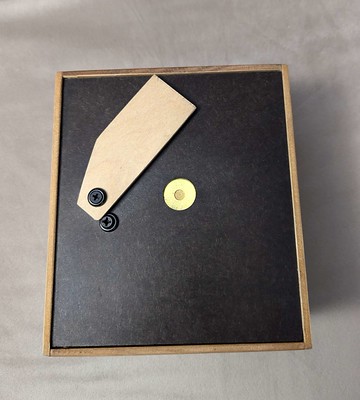
The red square represents the filter and the white circles are the magnets with small washers under them but glued to the camera.
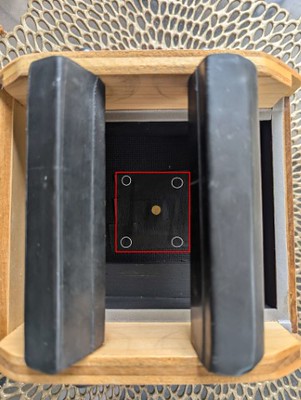


Leonardo filter diagram (Small) by Richard Hendrix, on Flickr


Thanks for your help,
 
Anything on the surface of a filter will be prone to being visible in the result.
Pinhole cameras offer extra-ordinary depth of field!
 
I'm not familiar with that camera, but I attach filters on my pinhole on the front -- just like normal filter use. I use a 4x5 camera and screw-in my pinholes to a 39mm EMPTY filter ring that is epoxied to a standard lens board -- without a lens, of course. It's similar to what you are doing, but on the front, not the rear.

http://www.subclub.org/fujinon/pinhole.htm
 
@MattKing Thanks for the info about the DOF and the filter. I guess I'll clean the filter extra well each time I use one.

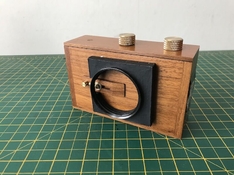
Hi @xkaes the Leonardo 3" pinhole has the shutter on the front of the camera. I'm not sure there is even enough room for a gel type filter to fit under this type shutter.


front of Leonardo by Richard Hendrix, on Flickr
 
You're right. Putting it on the back will work just as well, but it probably won't be as convenient.
 
On that model, you have 3" (or close enough to 3") from pinhole aperture to film plane correct? What about sourcing a lens retaining ring that would either accept a filter size you already have or a lens retaining ring + a step-up ring to get you to a normal size or one you already have?

You would likely need tiny screws as I doubt the lens board on the Leonardo is very thick.
 
This is what I did for my DIY pinhole: a 49/49mm "step-none" ring (don't ask, I just found it) epoxied to a small metal plate, itself fastened to the front plate (wood) with very short screws. Yellow filter helps taming the contrast of multigrade paper and/or enhance clouds with regular sheet film.
IMG_3180_M.JPG
 
That's exactly what I did -- but on the front. I used a my standard 77mm filter ring -- which allows me to add a lens shade when appropriate.

pinhole2.jpg


One thought. Having been through this, I'd epoxy the filter ring BACKWARDS, so that you can screw in the filter "normally", instead of backwards. I find that more difficult.
 
Hi, thanks everyone for the ideas. I like the idea from @bernard_L with the mounted filter inside the body. Matt mentioned earlier that with the "extra-ordinary depth of field!" would the back mounted filter potentially show dust too. Wouldn't that still be the case?

Here's what I have done with a Cokin filter so far. I'm making sure the blu-tack stays stuck to the back. I've had it secured for 3 days. I might just stay with the idea of blu-tack, no screws or hot glue. I hope to shoot a few negatives this week to test it out.


Testing Cokin A filter with Leonardo 3 inch 4x5 pinhole camera by Richard Hendrix, on Flickr
 
So the filter sticks to the blu-tack, not a Cokin filter holder? I can see that working if you don't plan on removing the filter, but...
 
One could also mount a plate -- plywood or metal -- across part of the front exterior. Place it on spacers in a way that leaves room for the shutter motion. That plate could then be drilled to mount a filter centered over the pinhole. Either a lens mounting retainer or a suitable step-up ring could be installed to provide a standard fitting for filters and/or a shade.
 
Hi @David Lingham that is very nice. Thanks.

As a test I placed the blu-tack/filter inside so I could mainly see how much dust would get picked up on the film since the filter would be so close to the pinhole. Not sure I will use the magnets and washers as in my original post if this works I'll probably use the blu-tack. It's time to shoot a couple of sheets of film the camera.
 
since the filter would be so close to the pinhole.

You want it as close as possible. It is when the filter is a bit distant from the pinhole that the dust will start to have a big effect.
 
@MattKing Thank you, that's my plan.

But I'm an idiot! So today I was checking out the camera and took notice of the distance from the pinhole to the film holder. I realized that I have the 1.5" model not the 3" model. It was advertised as the 3" model.

I think it is known as the "super wide angle" model. So the specs of the 1.5" would be a 38mm focal length with an aperture of f/150. I am glad I found this out before running some film though it. Still waiting on the weather to clear up. I am happy that it is the wider angle camera I plan on landscapes mostly.

Thanks everyone, I appreciate your ideas and help,
 
Is the diameter of your pinhole about 0.22? How do you adjust the distance from the pinhole to the film -- I'm not familiar with this brand of camera.
 
Hi xkaes, I found an archived website of the maker. The site lists 3 4x5 cameras, 1.5", 3.0" & 6". It list the pinhole as approximately 0.010" (0.254mm).

screenshot.jpg


Here's the screenshot from the Wayback Machine. There is no way to adjust the distance of the pinhole from the film plane. I was confused between the 1.5" model and the 6" model.
 
Finally got a chance to shoot (4) 4x5 sheets of Ilford HP5 Plus. It was all I had in 4x5. I may order some Foma 200 4x5 when I need more film.

WOW this camera is super wide! 38mm f/150. Epson Scan 2 does not recognize my Epson V600. I'm learning how to use Vuescan with my ancient Epson 2450 scanner. It has the capability to scan 4x5 negatives, my Epson V600 doesn't do 4x5 unless I stitch it.

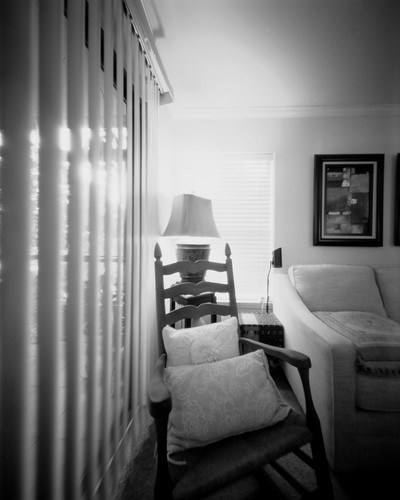
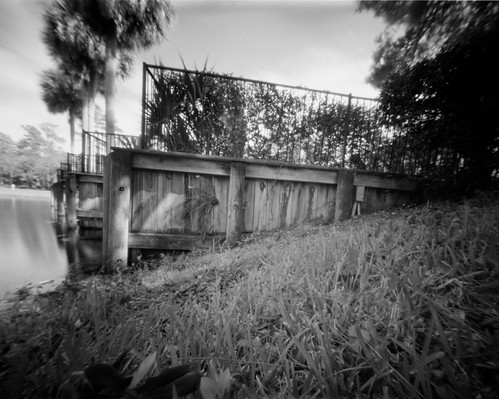
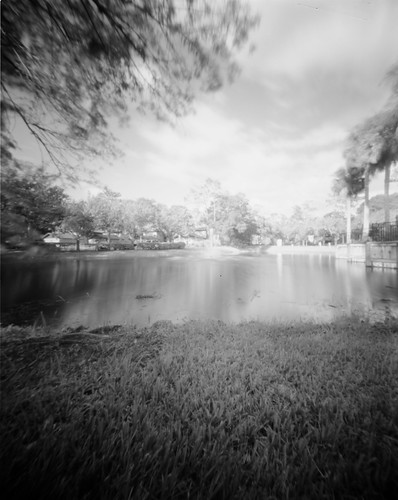
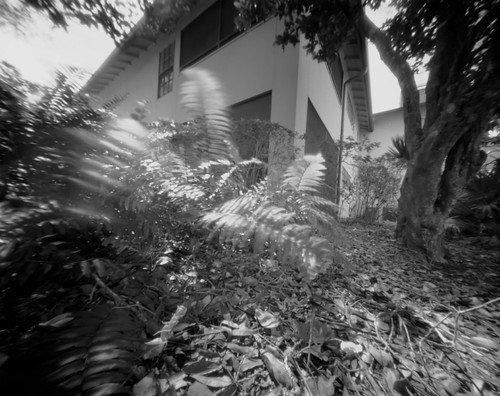
Test Images 4x5


Rocking Chair by Richard Hendrix, on Flickr


Pool Bulkhead by Richard Hendrix, on Flickr


Fountain by Richard Hendrix, on Flickr


Ferns in the Wind by Richard Hendrix, on Flickr
 
Photrio.com contains affiliate links to products. We may receive a commission for purchases made through these links.
To read our full affiliate disclosure statement please click Here.

PHOTRIO PARTNERS EQUALLY FUNDING OUR COMMUNITY:


Ilford ADOX Freestyle Photographic Stearman Press Weldon Color Lab Blue Moon Camera & Machine
Top Bottom