• Welcome to Photrio!
    Registration is fast and free. Join today to unlock search, see fewer ads, and access all forum features.
    Click here to sign up

35mm Ilford HP5 has strange lines

Tractor & Tulips

A
Tractor & Tulips

  • 0
  • 0
  • 12
Tree with Big Shadows

Tree with Big Shadows

  • 2
  • 0
  • 71

Forum statistics

Threads
203,456
Messages
2,855,031
Members
101,853
Latest member
Expert Graphics Int.
Recent bookmarks
0

LifeIn35mm

Subscriber
Allowing Ads
Joined
Apr 5, 2014
Messages
122
Location
Boulder, Co
Format
35mm
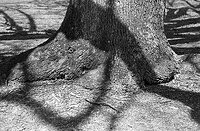
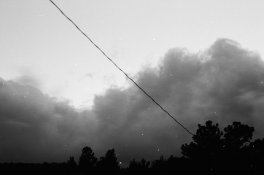
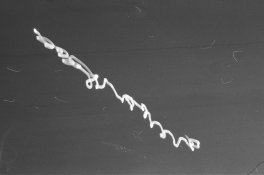
I just got a roll of 35mm HP5 processed from a local shop. When I reviewed the scanned images I noticed strange dark lines on them. They are not scratches. The film is not expired and has not been heated up so I thought I would post on here to see if anyone knows what happened. Not all of the exposures had the lines however. Here are some of the photos:
 

Attachments

  • 01740004.JPG
    01740004.JPG
    556.9 KB · Views: 262
  • 01740001.JPG
    01740001.JPG
    653.3 KB · Views: 245
  • 01740023.JPG
    01740023.JPG
    896.7 KB · Views: 243
  • 01740021.JPG
    01740021.JPG
    650.9 KB · Views: 256
  • 01740027.JPG
    01740027.JPG
    773.4 KB · Views: 249
  • 01740019.JPG
    01740019.JPG
    547.1 KB · Views: 230
Are they present as a white line on the film on a light table under a loupe? That might indicate an error in processing where the developer didn't evenly contact the roll. The other thought is your scanner if the white line is not present
 
Black fibers on your negatives or your scanner.
 
looks like the world's worst scanning job? how do the negatives look under a loupe?
 
For a start, there's dust all over them. If you paid for shop scans I'd be asking for some money back. Or if you scanned them yourself then it might be time to invest in some pecpads.
#1 - is the black line diagonally across the whole thing what you're talking about, or a powerline? Nothing else wrong there but what looks like dust, same with #3 #4, and #6. Could also be emulsion scratches, look at them closely in good light to see.
#2 looks like a long eposure of a point light source, and moved around a lot. There are also darkish lines horizontally across, is that the problem? I see a similar thing on #5. I've had that happen on my v750 with the betterscanning wetmount holder, if the holder is not aligned properly the light gets confused and you can scan weird dark/bright lines into it. Or they could also be dev issues, not agitated properly and/or insufficient developer.

 
For a start, there's dust all over them. If you paid for shop scans I'd be asking for some money back. Or if you scanned them yourself then it might be time to invest in some pecpads.
#1 - is the black line diagonally across the whole thing what you're talking about, or a powerline? Nothing else wrong there but what looks like dust, same with #3 #4, and #6. Could also be emulsion scratches, look at them closely in good light to see.
#2 looks like a long eposure of a point light source, and moved around a lot. There are also darkish lines horizontally across, is that the problem? I see a similar thing on #5. I've had that happen on my v750 with the betterscanning wetmount holder, if the holder is not aligned properly the light gets confused and you can scan weird dark/bright lines into it. Or they could also be dev issues, not agitated properly and/or insufficient developer.


The dark lines all the way across the image are power lines. I did pay for them to get scanned (and developed, since school has been out I have had no were to develop my B&W photos). The lines seem to be on the negative. I would be pissed if this happened because they developed it wrong. Thanks for the help!
 
Last edited by a moderator:
You need to look at the film surface front and back with a magnifying lens and with glancing illumination.

Might be helpful to know what camera you used as well.
 
You need to look at the film surface front and back with a magnifying lens and with glancing illumination.

Might be helpful to know what camera you used as well.

Yes, the lines are on the film. I used a canon ae-1 with its original 50mm lens. The lens is flawless. I have used this camera for about 5 and a half months now and have never had this problem.
 
Last edited by a moderator:
Yes, the lines are on the film. I used a canon ae-1 with its original 50mm lens. The lens is flawless. I have used this camera for about 5 and a half months now and have never had this problem.
Thanks

Some of the problem may be physical damage and show on film surface web conjecture is risky. You need to look at negative surface it needs to be marr free.

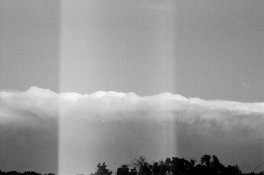
My phone is small and real difficult to view thumbnails with but the one from bottom thumbnail with the top to bottom lighter column could be a shutter problem.

Please review cause if you have other frames with similar symptoms it is look at camera time.
 
Thanks

Some of the problem may be physical damage and show on film surface web conjecture is risky. You need to look at negative surface it needs to be marr free.

My phone is small and real difficult to view thumbnails with but the one from bottom thumbnail with the top to bottom lighter column could be a shutter problem.

Please review cause if you have other frames with similar symptoms it is look at camera time.

The light column is actually just a light leak. I replaced the seals but didn't in a spot so every so often I will get an image like so. Thanks for the concern though, it's appreciated.
 
Please confirm the column extends into the sprocket holes.
 
The lines are on the film. And if you look at image 2 and 5 they both have the same line in the bottom right.

All your images have that dark line on them, you just don't see it in the ones with a dark lower right corner. It is a hair or fibre in your camera in front of the shutter, or just behind it in front of the film plane. Should be easy to remove. The random white lines are debris - the scans were obviously done by a beatnik who knows nothing about dust blowers.
 
Hopefully your film is not in as bad condition as your scans.

The black line at bottom right is indeed a hair in the gate.

I would honestly take the film back to where you had it scanned and ask them to re-do the scans.

Also if you have a light leak I would have your camera serviced and repaired, its only ever the great photograph that you always wanted to take that will have the light leak.

Simon ILFORD Photo / HARMAN technology Limited :
 
The lines are on the film. And if you look at image 2 and 5 they both have the same line in the bottom right.

Its likely a fiber or a hair caught in the shutter gate. Remove the film from the camera and open the shutter on bulb and clean the gate. This is common, although yours is quite large. Take a close look at the edge of Cartier-Bressons photographs sometime, he had plenty.
 
Hopefully your film is not in as bad condition as your scans.

The black line at bottom right is indeed a hair in the gate.

I would honestly take the film back to where you had it scanned and ask them to re-do the scans.

Also if you have a light leak I would have your camera serviced and repaired, its only ever the great photograph that you always wanted to take that will have the light leak.

Simon ILFORD Photo / HARMAN technology Limited :

This and the post just before.

I do my own developing and scans and have four dogs and never get this much dust on them.
 
Photrio.com contains affiliate links to products. We may receive a commission for purchases made through these links.
To read our full affiliate disclosure statement please click Here.

PHOTRIO PARTNERS EQUALLY FUNDING OUR COMMUNITY:


Ilford ADOX Freestyle Photographic Stearman Press Weldon Color Lab Blue Moon Camera & Machine
Top Bottom