
• Welcome to Photrio!
    Registration is fast and free. Join today to unlock search, see fewer ads, and access all forum features.
    Click here to sign up

1st try with Ultrafine Xtreme B&W 400ASA film

PenStocks

A
PenStocks

  • 7
  • 2
  • 100
Landed Here

H
Landed Here

  • 4
  • 6
  • 87

Recent Classifieds

Forum statistics

Threads
201,844
Messages
2,831,033
Members
100,982
Latest member
RivenDell99
Recent bookmarks
0

OptiKen

Member
Allowing Ads
Joined
Oct 31, 2013
Messages
1,055
Location
Orange County
Format
Medium Format
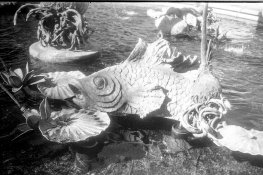
Doing a little testing this past week and these are from a roll of Ultrafine Xtreme B&W 400ASA 35mm film. I'm kind of regretting buying a 100' reel now.
The inside shot of the two girls is ok....'just' ok....but outdoor shots in bright sun display a level of grain that I do not find appealing at all. They also look a bit fogged to me.
attachment.php
attachment.php

I'll shoot another roll this week but right now, it doesn't look like I'll be using this film for anything I'm hoping to keep

 

Attachments

  • girls.jpg
    girls.jpg
    920.2 KB · Views: 347
  • fish.jpg
    fish.jpg
    846.1 KB · Views: 350

Paul Howell

Subscriber
Allowing Ads
Joined
Dec 23, 2004
Messages
10,111
Location
Scottsdale Az
Format
Multi Format
what ISO, developer and time did you use? If you think your roll may be fogged snip a few frames and develop normal time to see if the film is clear of fogged.
 

markbarendt

Member
Allowing Ads
Joined
May 18, 2008
Messages
9,422
Location
Beaverton, OR
Format
Multi Format
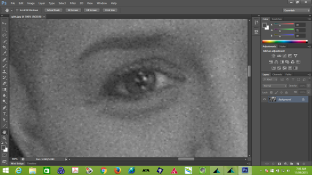
In the examples provided I don't see grain, not saying there isn't any, in fact I'd be surprised if there wasn't some, but what I do see is lots of digital noise when enlarged. The square cornered spots are a dead giveaway.

You may want to do some digital trouble shooting before you write off the film.
 

gone

Member
Allowing Ads
Joined
Jun 14, 2009
Messages
5,504
Location
gone
Format
Medium Format
I've had nothing but trouble from Ultrafine films. The trouble seems to be quality control, as some people have no problems, while others have nothing but. Fogging was the least of my issues.

I'm assuming you're posting scans of negs. I find a grainy scan often doesn't look that bad when wet printed. I'm wondering if it could be your developer? Rodinol will give me that sort of overall grain w/ Tri-X, but I like it. W/ other developers like D76 there's little grain.
 

Pioneer

Member
Joined
May 29, 2010
Messages
3,993
Location
Elko, Nevada
Format
Multi Format
At the price it may be worth the time to get a handle on how to get the best out of it. You do have several rolls in that 100' to work with. It is almost certainly worth a little time to go out and shoot at various exposure setting and then develop at different times.

Roll up four 12 exposure rolls and then go find a likely subject. Overexpose in steps up to 5 stops, then shoot on normal, then underexpose in steps up to 5 stops. I make a little sign on a white board and shoot the 12th exposure of the sign that describes which roll it is.

Do that with all 4 rolls.

Now take one roll and develop the entire thing at the recommended developing time, ie; 8 minutes (I'm just guessing here.)
Take the second roll and under develop by 1/2, ie; 4 minutes instead of 8.
Take the third roll and over develop by twice as much, ie; 16 minutes instead of 8.

Have prints made on standard Grade 2 paper and see what you come up with.
 
OP
OP
OptiKen

OptiKen

Member
Allowing Ads
Joined
Oct 31, 2013
Messages
1,055
Location
Orange County
Format
Medium Format
At the price it may be worth the time to get a handle on how to get the best out of it. You do have several rolls in that 100' to work with. It is almost certainly worth a little time to go out and shoot at various exposure setting and then develop at different times.

.

Thank you. Great advice spelled out step-by-step
 

Fixcinater

Member
Allowing Ads
Joined
Dec 11, 2008
Messages
2,500
Location
San Diego, CA
Format
Medium Format
That fish photo almost looks like a fogged/damaged lens was used during taking.
 
OP
OP
OptiKen

OptiKen

Member
Allowing Ads
Joined
Oct 31, 2013
Messages
1,055
Location
Orange County
Format
Medium Format
Ok
Fine
Blame me!
The comment about digital noise makes a lot of sense...I need to test out some scanner programs, maybe. My scanner is an Epson V550 Photo.
To be fairer (fair-er?) MORE fair, the lighting was extremely harsh...I didn't use any filters....they were overexposed around 2 stops...and the lens I was using may have some haze to it...It doesn't look all sparkly anymore (Industar 22)

Re-load camera.....re-shoot tomorrow
 

ritternathan

Member
Allowing Ads
Joined
Sep 10, 2010
Messages
193
Location
Jersey City,
Format
4x5 Format
I've gotten decent results after testing with Xtreme 400 in 35mm. it's not a bad film, just temperamental. I shoot it around 400 and use DS-10 and I can get good looking 8x10s, which is about as much as I can expect. It is grainy though if you are not using a xtol/ds-10 developer. I tested it with some other developers and got grain out of control.
 

Athiril

Subscriber
Allowing Ads
Joined
Feb 6, 2009
Messages
3,062
Location
Tokyo
Format
Medium Format
Ok
Fine
Blame me!
The comment about digital noise makes a lot of sense...I need to test out some scanner programs, maybe. My scanner is an Epson V550 Photo.
To be fairer (fair-er?) MORE fair, the lighting was extremely harsh...I didn't use any filters....they were overexposed around 2 stops...and the lens I was using may have some haze to it...It doesn't look all sparkly anymore (Industar 22)

Re-load camera.....re-shoot tomorrow

It doesn't look like scanner noise to me at all. I would disregard that.

Those scanners are not high resolving, so you're just seeing the large grains that are otherwise a lot softer than normal.
 

Richard S. (rich815)

Member
Allowing Ads
Joined
Jan 14, 2003
Messages
4,924
Location
San Francisco
Format
Multi Format
What was the reason for over exposing by 2 stops? Overexposure can cause grainy results too, and also way too contrasty negs which are a death knell for scanning. If ever given the choice for scanning I'd rather have a slightly underexposed neg than over exposed one.
 

Pioneer

Member
Joined
May 29, 2010
Messages
3,993
Location
Elko, Nevada
Format
Multi Format
What was the reason for over exposing by 2 stops? Overexposure can cause grainy results too, and also way too contrasty negs which are a death knell for scanning. If ever given the choice for scanning I'd rather have a slightly underexposed neg than over exposed one.

I have read this a couple of times now and I am still confused. Over exposure is commonly recommended by lots of photographers. Exposing an ISO400 film at EI200 is over exposing by a stop. While I do agree that over exposing may increase grain it usually reduces contrast and, from my limited experience, doesn't affect grain terribly much.

I must be misreading something in your response. :confused:

Actually, my read on both scans, particularly the second one, is that they were overdeveloped. Over exposed negatives that are also over developed will show high level of contrast.
 

summicron1

Subscriber
Allowing Ads
Joined
Jul 28, 2010
Messages
2,920
Location
Ogden, Utah
Format
Multi Format
Ok
Fine
Blame me!
The comment about digital noise makes a lot of sense...I need to test out some scanner programs, maybe. My scanner is an Epson V550 Photo.
To be fairer (fair-er?) MORE fair, the lighting was extremely harsh...I didn't use any filters....they were overexposed around 2 stops...and the lens I was using may have some haze to it...It doesn't look all sparkly anymore (Industar 22)

Re-load camera.....re-shoot tomorrow

maybe it's just my years talking, but i'm at a point where I want good results without worrying about quirky film, so I stick to tri-x and ilford products, good leica and rollei lenses -- they cost more up front, but the results never cease to please and if there's an issue I know it is with me, not the equipment.

The buck or so a roll I save when I buy cheap film is more than spent worrying about the results.

Just my two cents.
 

Richard S. (rich815)

Member
Allowing Ads
Joined
Jan 14, 2003
Messages
4,924
Location
San Francisco
Format
Multi Format
I have read this a couple of times now and I am still confused. Over exposure is commonly recommended by lots of photographers. Exposing an ISO400 film at EI200 is over exposing by a stop. While I do agree that over exposing may increase grain it usually reduces contrast and, from my limited experience, doesn't affect grain terribly much.

I must be misreading something in your response. :confused:

Actually, my read on both scans, particularly the second one, is that they were overdeveloped. Over exposed negatives that are also over developed will show high level of contrast.

I often over-expose too but I compensate by pulling back on the development time otherwise I get negs that are way too contrasty. This is how I often shoot in bright contrasty summer sunlight. Keeps the highlights from blowing out but gives good shadow details too.
 

Arctic amateur

Member
Allowing Ads
Joined
Oct 24, 2011
Messages
325
Location
Ringerike, Norway
Format
35mm
The second image has lots of black dots in gray shadows. This looks like a clipping issue to me, but could be IR dust removal artifacts. Make sure to scan without IR dust removal. It doesn't work on BW film.
 

MattKrull

Member
Allowing Ads
Joined
Sep 2, 2013
Messages
311
Location
Ottawa, Onta
Format
Multi Format
OkFineBlame me!The comment about digital noise makes a lot of sense...I need to test out some scanner programs, maybe. My scanner is an Epson V550 Photo.To be fairer (fair-er?) MORE fair, the lighting was extremely harsh...I didn't use any filters....they were overexposed around 2 stops...and the lens I was using may have some haze to it...It doesn't look all sparkly anymore (Industar 22)Re-load camera.....re-shoot tomorrow
Yea, looking at the scans (first one in particular), my first thought was that what you are seeing is the product of the scanner more than the film. I have the V600 and I get very similar scans. It's largely turned me off scanning. Some films are worse than others (Plus-X and Kentmere scan like crap but print wonderfully). If you don't have access to a darkroom for your printing needs, I recommend scanning at 2400DPI, making your contrast/levels adjustments in your program of choice, and then exporting the jpgs at 1800x1200 for prints (big enough for a 4x6 @ 300 DPI) and 1200x800 for screen (this depends on your screen resolution, but that's a good number for most 1080p monitors). Whatever you do, don't look at the scan at 100% - it lies. I hated kentmere until I enlarged it in my darkroom, now I love it - I just don't let it anywhere near a scanner until I'd got a final 8x10 print in my hand.
 

markbarendt

Member
Allowing Ads
Joined
May 18, 2008
Messages
9,422
Location
Beaverton, OR
Format
Multi Format
It doesn't look like scanner noise to me at all. I would disregard that.

Those scanners are not high resolving, so you're just seeing the large grains that are otherwise a lot softer than normal.

:blink:

Parallels Picture.png
 

Richard S. (rich815)

Member
Allowing Ads
Joined
Jan 14, 2003
Messages
4,924
Location
San Francisco
Format
Multi Format
OP
OP
OptiKen

OptiKen

Member
Allowing Ads
Joined
Oct 31, 2013
Messages
1,055
Location
Orange County
Format
Medium Format
That fish photo almost looks like a fogged/damaged lens was used during taking.
The lens is an Industar 22 which has seen better days.
I was looking at it before I developed this roll and was not happy with what I saw. I've switched it out with another lens for future shots with this camera
 
OP
OP
OptiKen

OptiKen

Member
Allowing Ads
Joined
Oct 31, 2013
Messages
1,055
Location
Orange County
Format
Medium Format
What was the reason for over exposing by 2 stops?


The reason was not being extra careful (read: stupidity). The lens has two marks on the iris ring....one real and the other a nick taken out of the metal ring at some point.
I realized after this shoot that what I thought was f16 was actually f5.6
 

MattKrull

Member
Allowing Ads
Joined
Sep 2, 2013
Messages
311
Location
Ottawa, Onta
Format
Multi Format
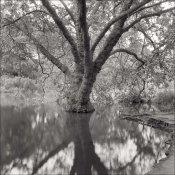
Um, yeah, I'm gonna have to go ahead and disagree with you there. Plus-X scans beautifully:View attachment 119517https://flic.kr/p/caitdb
First: Awesome photo, and a great scan. Very nice.
Second: Going solely by my experience there is no way that's from a 35mm negative. I've never gotten that level of detail out of Plus-X in 35mm. I'm guessing 6x6 but I'll feel better about my own shitty scanning technique if you tell me that was from sheet film.
The problem I have with Plus-X and Kentmere with my V600 is that (even at the highest dpi) it doesn't seem to average the values for each sub-pixel nicely, but rather skews twoards high and low values, so you get a lot of high contrast noise where on the film it is actually a mostly smooth tone with some grain. It makes the film appear grainy-er than it is, and makes it look like it holds less detail than it does. That's the look I see in the OP's photos. If you resize a large-ish scan down to small print or screen size, the software aliases that noise out pretty nicely. Since this is just a function of original scan size vs final file size, if a 35mm give you a good 4x6, then a 6x6 negative should net a good 8x10, and a 4x5 will get you an equally nice looking 16x20 (never mind that the V600 can't do 4x5 negatives, and the epson scanners that can seem to be better quality to begin with).
Now, if that was shot on 35mm and scanned on a mid-range Epson scanner, I'm going to need to learn your process, because it is way better than mine.
 

MattKing

Moderator
Moderator
Allowing Ads
Joined
Apr 24, 2005
Messages
55,196
Location
Delta, BC Canada
Format
Medium Format
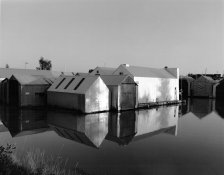
This was scanned from Plus-X 35mm, but may very well have been done with a dedicated scanner:
 

Attachments

  • reflections 1b.jpg
    reflections 1b.jpg
    625.8 KB · Views: 157

markbarendt

Member
Allowing Ads
Joined
May 18, 2008
Messages
9,422
Location
Beaverton, OR
Format
Multi Format
I see what you mean, Mark.
Square dots = digital noise.
Very obvious in the enlargement you made

Knowing what to look for always helps.
 
Photrio.com contains affiliate links to products. We may receive a commission for purchases made through these links.
To read our full affiliate disclosure statement please click Here.

PHOTRIO PARTNERS EQUALLY FUNDING OUR COMMUNITY:


Ilford ADOX Freestyle Photographic Stearman Press Weldon Color Lab Blue Moon Camera & Machine
Top Bottom