



• Welcome to Photrio!
    Registration is fast and free. Join today to unlock search, see fewer ads, and access all forum features.
    Click here to sign up

Scanning revelation after 20 years scanning

Dump Truck Hat Trick

D
Dump Truck Hat Trick

  • 0
  • 0
  • 3
Street-Lamp

A
Street-Lamp

  • 2
  • 2
  • 66

Recent Classifieds

Forum statistics

Threads
204,298
Messages
2,866,854
Members
102,218
Latest member
333Ford
Recent bookmarks
0

ScandiPhoto

Subscriber
Joined
Nov 8, 2025
Messages
70
Location
Sweden
Format
4x5 Format
Hi,
I just wanted to share an enlightenment I just had. I’ve been scanning 4x5s for 20 years (roughly 800 sheets per year), first on Epson flatbeds, then various Imacon units. For dust control, I’ve used an oil-free airbrush compressor (20–23 L/min, 125 W, 3 L tank) with a fine nozzle airbrush gun and sometimes a Kinetronics brush (not very efficient). Since I am now in-between studios, I work from home. Normally, though, I’ve always scanned in a regular office space. Dust has always taken a lot of time in the workflow.

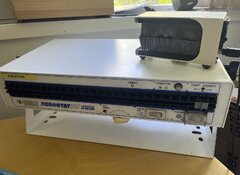
Now, on to the enlightenment. I bought a used Simco Aerostat XC ionizing air blower. It's a tabletop unit, and I put it in the direction of the light table and scanner’s loading bay. It blows ionized particles, and voilà! Way less dust. I think it’s about 1/3 to 1/5 the amount of dust specks on the film now. And this is in an uncleaned, quite dusty basement full of stuff.

My next studio (that I’m building) will have a dedicated scanner room with a HEPA recirculating unit, an overpressure ventilation system, and an ionizing unit hanging above the desk.
 

Attachments

  • Screenshot 2026-05-22 at 09.30.05.jpg
    Screenshot 2026-05-22 at 09.30.05.jpg
    281.8 KB · Views: 71
Hi,
I just wanted to share an enlightenment I just had. I’ve been scanning 4x5s for 20 years (roughly 800 sheets per year), first on Epson flatbeds, then various Imacon units. For dust control, I’ve used an oil-free airbrush compressor (20–23 L/min, 125 W, 3 L tank) with a fine nozzle airbrush gun and sometimes a Kinetronics brush (not very efficient). Since I am now in-between studios, I work from home. Normally, though, I’ve always scanned in a regular office space. Dust has always taken a lot of time in the workflow.

Now, on to the enlightenment. I bought a used Simco Aerostat XC ionizing air blower. It's a tabletop unit, and I put it in the direction of the light table and scanner’s loading bay. It blows ionized particles, and voilà! Way less dust. I think it’s about 1/3 to 1/5 the amount of dust specks on the film now. And this is in an uncleaned, quite dusty basement full of stuff.

My next studio (that I’m building) will have a dedicated scanner room with a HEPA recirculating unit, an overpressure ventilation system, and an ionizing unit hanging above the desk.

Good luck with your new darkrooms. I scan 35mm, 120 an 4x5 at home with a V850. Dust drives me crazy. The V850 is worse than my older V600 becasue the V850 has those extra layers of glass in the film holders to keep the film flat. I use a hand blower and a Kinetronic brush. Not much help. Any recommendation besides the ionizer? Has anyone tried removing the glass layers in the holders?
 
Alan - I too use a V850 for 35mm, 6x6, and 4x5, using Silverfast. My thing with cleaning -
If it is an old neg, I'll clean thoroughly with a liquid cleaner, then as follows.
If new film, just developed, I take down from the drying cabinet (in the darkroom, in the basement, not much air moving around) and cut the strips of 6, putting them into Printfile sheets.
When I take a strip out to scan with the holders, I pull the strip gently and slowly through an orange (Ilford?) anti-static cloth.
I then wipe the holder surface onto which I will lay the first strip.
Then I blow thoroughly onto to the base side of the film, and the holder surface just before laying down the film onto it.
I don't blow off the emulsion side until I'm about to put the holder onto the scanner to scan.
Basically, each side of everything (film, holder, and both sides of the scanner glass) are wiped and air blown, just before laying down, so to speak.
I have very little dust, many images have none.
I scan the short side of 35mm to 16" (x24"), my standard, scale down for smaller prints. I scan to Tiff, run the file through RAW for basic adjustment and sharpening, then open in PShop. The first thing is to magnify 4 bumps or so, and add a curve adjustment layer with a dark curve adjustment, to make it easier to see dust. I go from there. Very little dust.
I don't know why, the basement maybe, just being careful. In school, during the 70s I worked in a shared darkroom, not much dust then either.
 
Well. I clean all scans at 120% magnification. There is a nice set of shortcuts in photoshop for jumping one full screen in every direction. step right, step down, step left, step up. That way I can check the whole image methodically without having to scroll, or move by hand and rik missing something.

the ionizer was quite reasonably priced on eBay, and it helped. I never try to touch the film with anything except air if possible. Even when receiving clean film from the lab, tehy tended to attract dust just from being loaded and pulled in to the scanner..

For Epson I think there was a wet mount system.. but I've never tried it. The built in filters for dust removals never works good enough for professional work. I always do it by hand.
 
First work print is scrutinized for dust lol. I clean negs with pec12, print, look, pull clean repeat. I cant spot to save my skin, lol. Blowers and static brushes suck and will always suck.
 
Good luck with your new darkrooms. I scan 35mm, 120 an 4x5 at home with a V850. Dust drives me crazy. The V850 is worse than my older V600 becasue the V850 has those extra layers of glass in the film holders to keep the film flat. I use a hand blower and a Kinetronic brush. Not much help. Any recommendation besides the ionizer? Has anyone tried removing the glass layers in the holders?

I have by and large given up on the holders, they are just too dusty! Instead I 3D printed a small shim that lifts my Omega D negative holders at the exact focal distance of the scanner. For something like 4x5 or even 6x9 this it isn't too bad going one by one, for 35mm it’s unacceptable. For something like that I’ll do the normal holders and then scan the good ones in my contraption.
 
I used to spend hours on dust removal. The secret to alleviating my pain was quite simple.

Switch from a flatbed to camera scanning.

My workspace is not sterile by any means (pets, open windows etc) and I only need to remove one speck on each negative, if at all. I realize this may not be helpful for the flatbed diehards, but if dust is a constant hassle driving you crazy then I guarantee this will resolve the tedious dust removal steps and let you focus on other things.
 
Photrio.com contains affiliate links to products. We may receive a commission for purchases made through these links.
To read our full affiliate disclosure statement please click Here.

PHOTRIO PARTNERS EQUALLY FUNDING OUR COMMUNITY:


Ilford ADOX Freestyle Photographic Stearman Press Weldon Color Lab Blue Moon Camera & Machine
Top Bottom
