
IpseLux
Member
A bit of a backstory…. Took some color negs to develop, negs came back fine. Prints were garbage.
The shop does not do contact prints.
I know there are apps and services that do what I’m about to ask, but I’m not interested in those at the moment.
I’m using two phones to digitize the negs, one is a light table, the other captures the rough image.
Phone will reverse colors…. But the orange mask comes out light blue.
Back in my college days, developing and printing color, we’d use filters to correct shifts.
How can I correct for this? What filter would I use?
Not that I have a selection of color filters. But I’m hoping by tweaking the image on an iPhone I can approximate a more realistic rendition.
I don’t need perfect. Close is fine.
Any ideas.
Again, I’m aware programs and apps will do this. Just want to use my iPhone alone if possible.
It may not be. And that’s fine too.
Thanks in advance.
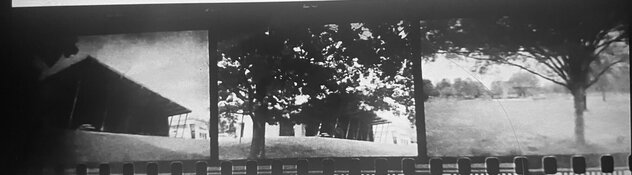
Here’s as far as I could get….
Just B&W.
The shop does not do contact prints.
I know there are apps and services that do what I’m about to ask, but I’m not interested in those at the moment.
I’m using two phones to digitize the negs, one is a light table, the other captures the rough image.
Phone will reverse colors…. But the orange mask comes out light blue.
Back in my college days, developing and printing color, we’d use filters to correct shifts.
How can I correct for this? What filter would I use?
Not that I have a selection of color filters. But I’m hoping by tweaking the image on an iPhone I can approximate a more realistic rendition.
I don’t need perfect. Close is fine.
Any ideas.
Again, I’m aware programs and apps will do this. Just want to use my iPhone alone if possible.
It may not be. And that’s fine too.
Thanks in advance.
Here’s as far as I could get….
Just B&W.