
-
Welcome to Photrio!Registration is fast and free. Join today to unlock search, see fewer ads, and access all forum features.Click here to sign up
You are using an out of date browser. It may not display this or other websites correctly.
You should upgrade or use an alternative browser.
You should upgrade or use an alternative browser.
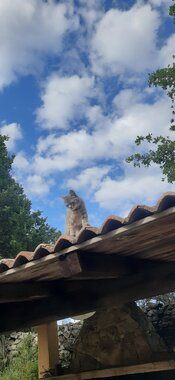
My first analog photos, what are my impressions? Regarding metering and exposure, what can I improve? Any honest comments are welcome.
-
A
- Thread starter Pedroga
- Start date


Recent Classifieds
-
For Sale Testrite CS-1 Copy Stand with Original Box
- Started by davela
-
For Sale Pentax branded camera straps (1 black w/ viewfinder cap, 1 grey)
- Started by Disconnekt
-
For Sale Tamron 177D AF Aspherical 28-80mm f3.5-5.6
- Started by Disconnekt
-
Want to Buy 8x10 LED Head for 4x5 Beseler Enlarger
- Started by andrewherrick
-
For Sale FS: Canon 1984 Olympic (new) F1 w/ AE Finder motodrive and 50mm f/1.2
- Started by dirkfletcher
Forum statistics

The exposures and the contrast look fine. Who did the processing, and how were these images created? They appear to have a reddish cast -- which might not be in the negatives. What film was used at what ISO?
BrianShaw
Member
I'm quite lost on your abbreviations...
Photos look good; color balance is off. Quite probably not a problem in the creation so much as in the scanning.
Photos look good; color balance is off. Quite probably not a problem in the creation so much as in the scanning.
I'm quite lost on your abbreviations...
Photos look good; color balance is off. Quite probably not a problem in the creation so much as in the scanning.
The exposures and the contrast look fine. Who did the processing, and how were these images created? They appear to have a reddish cast -- which might not be in the negatives. What film was used at what ISO?
Scan: Noritsu LS-600
High Resolution: 51.2 x 34cm – 300dpi
Film: Lucky 200c (I photograph using ISO 160.)

Kino
Subscriber
I would assume the lab/scanner does not have a custom color profile specific to Lucky 200C, so they pressed into service a "similar" color profile for a Kodak film stock and it doesn't quite match. If you have a scanner, you might try to scan one or two and see if you get less magenta in the image, as it seems quite biased toward warm colors. Did you intend this?
Depending on the "look" you are going for, I would suggest you shoot a roll of Lucky at box speed to see if anything improves for you.
Depending on the "look" you are going for, I would suggest you shoot a roll of Lucky at box speed to see if anything improves for you.

OK, you've got images.
Exposure looks OK to me for the most part.
There's a lot to be gained in post-processing/editing, especially color balance and contrast.
The most important areas I would recommend focusing on are:
1: Subject matter & composition: look carefully at what it is you're photographing and decide how it will best work in the image frame.
2: Select/curate. E.g. I see 5 images of pines along a road. Pick the best. Decide why that one is the best and the others are of lesser impact. Observe the best one critically and decide whether it really conveys what you want it to convey - is it really that good? How could it be improved?
1 & 2 form a reinforcing loop that will allow you to grow.
Exposure looks OK to me for the most part.
There's a lot to be gained in post-processing/editing, especially color balance and contrast.
The most important areas I would recommend focusing on are:
1: Subject matter & composition: look carefully at what it is you're photographing and decide how it will best work in the image frame.
2: Select/curate. E.g. I see 5 images of pines along a road. Pick the best. Decide why that one is the best and the others are of lesser impact. Observe the best one critically and decide whether it really conveys what you want it to convey - is it really that good? How could it be improved?
1 & 2 form a reinforcing loop that will allow you to grow.

Alan Edward Klein
Member
Nice experiment.
The colors are off, and the exposures appear too dark. There's no contrast in the second set, not much in the first set either. Hard to determine whether you exposed correctly with negative color film, if the development was wrong, or if you scanned and edited improperly. Try a roll of chrome positive color film and look directly at the film to see if you're exposing correctly.
Also, was the film expired? Always use current film, especially if you're testing. Otherwise, you're adding in unknown and unpredictable film problems to other issues like developing, scanning, and editing.
Edit out dust, hair, and other marks on the film.
The colors are off, and the exposures appear too dark. There's no contrast in the second set, not much in the first set either. Hard to determine whether you exposed correctly with negative color film, if the development was wrong, or if you scanned and edited improperly. Try a roll of chrome positive color film and look directly at the film to see if you're exposing correctly.
Also, was the film expired? Always use current film, especially if you're testing. Otherwise, you're adding in unknown and unpredictable film problems to other issues like developing, scanning, and editing.
Edit out dust, hair, and other marks on the film.

quigs
Member
@Pedroga before you invert your negative, are you setting the white point to the transparent base of the film (for example the space between frames) so that the white balance corrects the color mask? The colors in the sky and clouds in my scans looked similar to yours until I learned that "trick". Let me know if that doesn't make sense and I'll show you some visual examples.
@Pedroga before you invert your negative, are you setting the white point to the transparent base of the film (for example the space between frames) so that the white balance corrects the color mask? The colors in the sky and clouds in my scans looked similar to yours until I learned that "trick". Let me know if that doesn't make sense and I'll show you some visual examples.
So, this is my complaint to the lab, a matter I explicitly wrote to requesting that they send me the scans without the color inversion, which unfortunately did not happen.
quigs
Member
So, this is my complaint to the lab, a matter I explicitly wrote to requesting that they send me the scans without the color inversion, which unfortunately did not happen.
Oh! I didn't realize this was a lab scan. That makes sense then that they may not have a profile for Lucky film (my lab's scans of Harman Phoenix are terrible too). If you enjoy the film photography process I highly recommend buying the equipment to scan it yourself so you can control these things! Some labs are better than others, but ultimately with a lab scan you are no longer the editor of your photo.

So, this is my complaint to the lab, a matter I explicitly wrote to requesting that they send me the scans without the color inversion, which unfortunately did not happen.
Tell them you want them scanned as if they were slides - that might work better.

wiltw
Subscriber
Photos look good; color balance is off. Quite probably not a problem in the creation so much as in the scanning.
I agree with color balance being off. I took the liberty of altering a photo to look more 'neutral' in color balance. Having an 18% gray card visible in an image to judge neutrality and brightness would permit accuracy of reproduction after correction during postprocessing, rather than relying upon my 'guess'.


Last edited:
Tell them you want them scanned as if they were slides - that might work better.
With the Orwo NC500 I'll do exactly that, or specify that I want the images without inversion (make it very clear on the film roll).
Oh! I didn't realize this was a lab scan. That makes sense then that they may not have a profile for Lucky film (my lab's scans of Harman Phoenix are terrible too). If you enjoy the film photography process I highly recommend buying the equipment to scan it yourself so you can control these things! Some labs are better than others, but ultimately with a lab scan you are no longer the editor of your photo.
I'm too new to this hobby to invest in a scanner right away... My first roll of film was those photos you saw.
I agree with color balance being off. I took the liberty of altering a photo to look more 'neutral' in color balance. Having an 18% gray card visible in an image to judge neutrality and brightness would permit accuracy of reproduction after correction during postprocessing, rather than relying upon my 'guess'.
If I can get the photos without them being inverted or in "flat" scan mode, I'll want to learn how to do what you did, it turned out amazing.
That day the sky was super cloudy at sunset... I think that's why it came out purple in the lab photo.
wiltw
Subscriber
If I can get the photos without them being inverted or in "flat" scan mode, I'll want to learn how to do what you did, it turned out amazing.
That day the sky was super cloudy at sunset... I think that's why it came out purple in the lab photo.
You might simply ask the lab to 'balance all photos for daylight color balance rather that Auto balance, then the inherent color (be it warm or cool) is what is presented; then that gives YOU the decision to 'balance colors to neutral'...if/when YOU wish. That way sunsets come out 'warm' as our minds see them, and cloudy days come out a bit 'cool' (as they truly are) and you can later decide which ones should present neutral color balance.
It is how I normally set my digial camera, to Daylight, and I choose during postprocessing how I want to balance each shot...some are left as recorded (and how my eye and brain saw it) while others are chosen to render colors neutrally, so that other eyes see a white shirt as 'white'.
'As shot' would present 'warmth' in your sunset shot, and not present purplish unless the sunset sky actually presented purplish tones (which they sometimes do)
BTW, shooting negs with orange masked acetate can be very difficult to color correct well, often unless you have specialized software designed to have automated settings for reverting color neg film.
Last edited:
| Photrio.com contains affiliate links to products. We may receive a commission for purchases made through these links. To read our full affiliate disclosure statement please click Here. |
PHOTRIO PARTNERS EQUALLY FUNDING OUR COMMUNITY:  |