
• Welcome to Photrio!
    Registration is fast and free. Join today to unlock search, see fewer ads, and access all forum features.
    Click here to sign up

Scanning B&W 8x10 Film on Epson V850- Help!

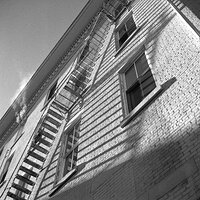
Fire escape.

H
Fire escape.

  • 2
  • 1
  • 10
22886.jpg

A
22886.jpg

  • 2
  • 0
  • 23

Recent Classifieds

Forum statistics

Threads
204,343
Messages
2,867,389
Members
102,231
Latest member
kimlee2027
Recent bookmarks
0

braxus

Subscriber
Joined
Oct 19, 2005
Messages
1,941
Location
Fraser Valley B.C. Canada
Format
Hybrid
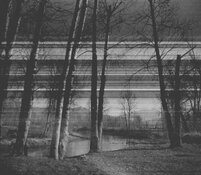
So I found my 8x10 negs from 2021, and I went ahead today to try and scan them on my Epson V850. I selected Epson Scan and selected the "Film With Film Area Guide" for document type, since it doesnt work any other way. Should I be scanning it on "Reflective", but then there is no light going on the neg?

Anyway I had issues with the scan, and my brothers girlfriend who also tried scanning this neg on a V850 of hers, also had issues with it. What do I need to do to get a good scan off the negative? I put the negative emulsion side down (reversed image of course) on the glass and nothing on top. I do not have any special glass to put on the negative to diffuse the light. What am I doing wrong?

Andy - maybe you can chime in here since you have a V750.
 

Attachments

  • img058small.jpg
    img058small.jpg
    510.8 KB · Views: 73
The black mask film guide helps only to centre the negative on the platen. I often scan without it especially when wet scanning. To me, it looks like something is dirty. Can you upload the entire scanned negative?
 
Even if you are not using the mask film guide, make sure you are in professional mode, and that the scanner document is set to "Film (with film area guide)".
 
Matt's suggestion is what it needed. Andy- it was the full negative on those bad scans. I looked in my bag of attachments for the V850 and sure enough the plastic separator was in there. So I set it up like it said in Matt's link. I already had the scanner in Pro mode and "Film (with film area guide)". I just needed that plastic part, as the neg was covering the clear area at the top of the scanner initially.

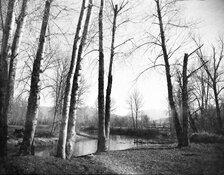
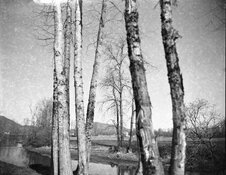
So I was able to get good scans this time, but now a new issue has cropped up. I wonder if my developing technique is at fault here, as Im getting mottling in the sky in the image. Its very noticeable in the one scan (see second picture). Which in this case is fine, as I dont perticularly like that image much. First image has an almost 3D look to it. 8x10 baby.
 

Attachments

  • img059small.jpg
    img059small.jpg
    654.2 KB · Views: 79
  • img060small.jpg
    img060small.jpg
    510.9 KB · Views: 82
There's mottling in both images, did you ...

Use expired film?
Thaw the film after retrieving it from the freezer?
Use old processing chemicals?
 
If you do not have the negative set correctly it won't scan. The top right corner of the neg has to line up with the white triangle.
 
There's mottling in both images, did you ...

Use expired film?
Thaw the film after retrieving it from the freezer?
Use old processing chemicals?
I may have not let it thaw out as much as needed once from the freezer. It was also early in the year when I shot these. Chemicals were fresh. I believe I used HC-110 on these ones. And yes the film was expired, though not fogged according to the scans I got.
Maybe forget about those old negatives, and concentrate on the new ones you'll be making...
I get that, but I do need to learn my mistakes before messing up any new $40 per sheet film. Im hoping to not repeat that again. But that said I dont need anything further from those 2 old negs, as scanning was all they needed.
 
Last edited:
The mottling looks very much similar to the Ilford problem of the 120 backing paper attacking the film. It's since been sorted but there was a batch of film 2018-2021(?) where if it was stored for any length of time you could get white spots and vague swirly patterns on the negs.
 
I've had mottling issues in old boxes of sheet film where the emulsion side of a sheet was touching the cardboard inside the packaging. That's usually just a single sheet though and the rest is fine
 
Take a look at Ben Horne's YT channel, if you haven't already. He scans 8x10 on, I believe, an Epson V850.
 
But sheet film doesn't have backing paper.

I did say 'similar', which means not necessarily the same as something. More specifically however, and this was a long time ago, my last box of 8x10 film (Ilford) was interleaved with paper sheets to separate the film. If it now doesn't come with interleaved paper sheets it still may be the contact between film and envelope or card stiffener.
 
Could also be degradation of the (apparently old, see post #1) negative. My guess it's that. And yes, it can be a similar mechanism to backing paper offset, or at least the same contributing factors. Anyway, it's unrelated to the question of how to scan an 8x10 neg.
 
Photrio.com contains affiliate links to products. We may receive a commission for purchases made through these links.
To read our full affiliate disclosure statement please click Here.

PHOTRIO PARTNERS EQUALLY FUNDING OUR COMMUNITY:


Ilford ADOX Freestyle Photographic Stearman Press Weldon Color Lab Blue Moon Camera & Machine
Top Bottom