
• Welcome to Photrio!
    Registration is fast and free. Join today to unlock search, see fewer ads, and access all forum features.
    Click here to sign up

Young enthusiast looking for a digital back for my Hasselblad 500 C

Recent Classifieds

Forum statistics

Threads
204,274
Messages
2,866,508
Members
102,207
Latest member
gustavocf
Recent bookmarks
1
Thanks a lot for all the information, this is really interesting!!!

I’d definitely be tempted to take on a project like converting a back—partly to save money, but honestly also because I find the technical challenge appealing. The problem is the risk: spending around €1300 on a Mamiya back and then modifying it step by step feels a bit too risky for me.

I actually think the mechanical side—like adapting the mount or frame—might not be that difficult. In the end, everything is assembled somehow and can be taken apart again, especially older gear which isn’t glued together like modern devices. And even those can be opened if needed. The real question for me is how to handle the electronic contacts and triggering of the back.

That’s the part where I’m not confident enough, mainly because I don’t want to potentially lose that amount of money. On the other hand, I guess I could always resell it if things don’t work out.

If you have any ideas or advice on that, I’d really appreciate it.
 
I would love to revive my V-system collection into digital as well, but prices put that out of reach; got to be patient. On the othr hand,I feel well covered digitally with my Nikon equipment.

It depends on what you mean by “out of reach.” The price range for digital backs goes from €300 (Eyelike M22) to €4,000 for a used 907x camera.

The Hasselblad Zeiss is legendary for its contrast and colour accuracy.
 
300€ is very optimistic, i found nothing under 1200€ on my 4 weeks research in nearly all platforms
 
300€ is very optimistic, i found nothing under 1200€ on my 4 weeks research in nearly all platforms
Don't forget that your requirements exclude the backs below €1,200.
I bought my Eyelike M22 including all original parts together with the alluminium case for €300.
 
Affordability is relative. Backs that require a tethered computer are available under €1000. But if you want to be mobile, untethered backs that will natively fit a Hasselblad V are, as stated, more expensive. Just keep in mind that these were 10x more when new. The least expensive stand alone Hasselblad V back is probably the Kodak DCS Pro. You have to compare this to Film prices, which in my pond is running around $25/roll (processed and scanned, not printed). It makes that CF39 back only ~100 rolls of film, which is not that hard to burn through in a few years.

And you have to be comfortable with the costs when modifying..

Phase One backs from that era use a double trigger when used on a view camera, 1st trigger wakes up the back, the second captures the image. It's done with the shutter sync cord, or through the milti-pin connector. I'm not as certain with the H backs, but I have friend that use them on view cameras with the same process.
 
Yes, I feel the same. It’s something everyone has to decide for themselves, but a back that only works tethered is really just for studio use and not for general shooting.

Oh, I hadn’t even considered the Kodak DCS Pro. What kind of specs does it have?

And one more question: where did you get the other one for 300? On which platform?
 
@12557 I actually have a Phase One P45+ digital back available that could be of interest for a Hasselblad V setup.
 
Got a Phase One P45!!!!! Thank you all for your help and expertice!!!!
 
Oof, now I need some help with the setup 😅
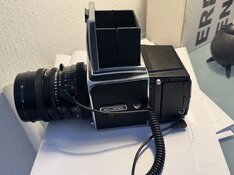
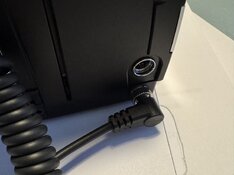
I connected it like this for now because no cables were included! Does anyone know how I need to connect everything and how the whole procedure works?

IMG_9193.JPG
 

Attachments

  • IMG_9194.JPG
    IMG_9194.JPG
    250.2 KB · Views: 35
Nice!

That connector you have on the back goes to your flash to trigger it when it's on a view camera. It's not for syncing the back.

You need a 2.5mm to PC cable that goes from the connector on the same side, but towards the sensor (it looks like a headphone jack) to connect to your lens.

I see you have a 500C with a barn-door sync on the body, if it's still connected, you can connect the cable to that instead of the one on the lens, then you can change lenses without having to disconnect and reconnect the sync cable. Many 500C's have had that sync disconnected, as you have to un-solder it every time you service the camera, and since most people don't use it, it makes life easier on the technician if you disconnect it.

The manual is available from Phase One on line (and a few other sources), and it shows how to connect it to a Hasselblad, and what timing settings you need to set. And what the cables look like.
 
Hey Guys, i am still testing and i am very happy!

I just have Problems with WB, normaly i set my WB to 5500K but i think that is not possible on my P45 back, there are 3 custom storages i think you can make a foto from a grey card right?

I tried daylight to but everything's comes out ugly green on iso 100 F11 and T1/8

I dont want to work always with greycards. What is the perfect workflow which is not to complicated?

Thank you so much guys!
 
Hey Guys, i am still testing and i am very happy!

I just have Problems with WB, normaly i set my WB to 5500K but i think that is not possible on my P45 back, there are 3 custom storages i think you can make a foto from a grey card right?

I tried daylight to but everything's comes out ugly green on iso 100 F11 and T1/8

I dont want to work always with greycards. What is the perfect workflow which is not to complicated?

Thank you so much guys!

Are you working with RAW/DNG files? Although not the most elegant solution, white balance/color temperature can usually be corrected easily in post.
 
The P45 only spits out a raw file, the colour balance is for reference, which would typically be the Kodak Teal hue. You adjust colour balance in your raw processor.

The back is also elderly, and the CFA may have some colour shift (they are organic dyes that will fade).

I take a small aperture LCC, apply it to the image, adjust the colour to be warmer or cooler, depending on your preference, and save it as a profile in the raw processor. Then I have it automatically applied to every image I import from that back into the processor.

Conversely, if you can find the calibration software and hardware that works, you can re-calibrate your back's default white balance with the LCC. I find doing it in the raw processor is fine.
 
Thanks for the information — that’s really fascinating.


I did a quick test and created a custom white balance by photographing a grey card, and surprisingly the colours already look much more natural and accurate. Of course I understand that final colour adjustments can still be done later in post.


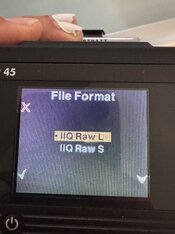
What confuses me a bit though is that my back seems to output TIFF files rather than a classic RAW format, which is what I had expected. Is that normal behaviour for the P45, or am I missing a setting somewhere?
 
I think you can set the output file format in the menu, probably to TIF or IIQ.
 
Boy, this is fascinating to read. I'm not sure if I would be up for the challenge. Stick to it you'll figure it out!
 
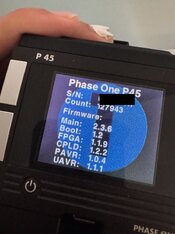
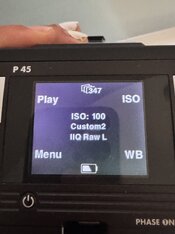
That are my settings and the firmware, and i can see there is a newer one, i also dont understand that its set to IIQ but spits always TIF
I already downloaded the firmware, now i need firewire computer right?

IMG_9378.JPGIMG_9376.JPGIMG_9377.JPG
 
That's just Phase One being... well, Phase One.

The output is IIQ. Phase One just put a TIF extension on the file. If your Raw processor reads it, that's fine. If not, you can rename the extension to .IIQ, and then all raw processors that handle Phase One files will read them. Turns out I've been doing that with some old Phase One backs, I just forgot that the script I run to download my images dose that automatically. They stopped doing this sometime around the end of the P45 back's timeline.
 
Ahhh ok
got it!

I am still testing the camera and i am so sorry but i have new questions 🙈 now about cromatic aberation and sharpness i testet first my CF 50:
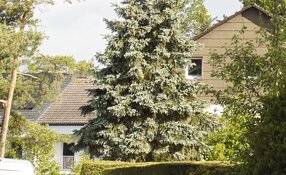
IMG_9440.jpeg

then my 80 c

DD5E15AB-96A8-46A5-9FD0-E73952905496.jpeg

a lot lot better both iso 50 f 11 t15

is that nominal or is something wrong, or do
we now see thing with the sensor with 39mpx which where impossible to see on film?
 
Photrio.com contains affiliate links to products. We may receive a commission for purchases made through these links.
To read our full affiliate disclosure statement please click Here.

PHOTRIO PARTNERS EQUALLY FUNDING OUR COMMUNITY:


Ilford ADOX Freestyle Photographic Stearman Press Weldon Color Lab Blue Moon Camera & Machine
Top Bottom