

• Welcome to Photrio!
    Registration is fast and free. Join today to unlock search, see fewer ads, and access all forum features.
    Click here to sign up

White spots on prints

Recent Classifieds

Forum statistics

Threads
201,722
Messages
2,829,088
Members
100,910
Latest member
SuninPisces
Recent bookmarks
0

wobsy

Member
Allowing Ads
Joined
Dec 13, 2007
Messages
33
Location
Coastal S.E
Format
Med. Format RF
I have recently moved home, lost my darkroom and am now only able to produce an inkjet print, so please bear with me - this is a film question.
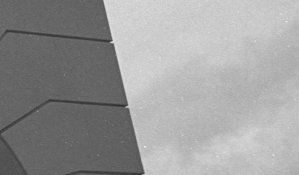
When I scan a B&W neg I am finding the resulting image 'pitted' with a number of white spots. They are irregular and almost look as if very small areas of grain has been overdeveloped (ie making them black on the neg). I have only noticed them since scanning (I use either a V700 or Nikon 4000ED) and on checking my negs made prior to moving home see they are on them also.
I am not a highly skilled B&W-er although have been dabbling for a number of years.
I am still trying to tie myself down to a particular film and dev combo so have tried a number of alternatives. I would say its there on most films.
I have tried using de-ionied water for mixing/washing and today filtered all water using a household filter. Still no success. I never suffer with hairs on the negs so suspect it is not a drying problem.
Help would be appreciated.
Thanks
 

Attachments
  • White spots.jpg
    White spots.jpg
    34.4 KB · Views: 162
Last edited by a moderator:

edtbjon

Member
Allowing Ads
Joined
Jun 8, 2004
Messages
391
Format
Medium Format
As you have already have a scan, go ahead and post it (or a part of it). "A picture says more..."

//Björn
 

Blighty

Member
Allowing Ads
Joined
Oct 11, 2004
Messages
914
Location
Lancaster, N
Format
Multi Format
Maybe it's your neg files. During your move, they mave have 'ingested' some dust or similar. A few years back, I bought some neg files from Jessops (I couldn't get my usual Kenro files). After making a couple of prints, I noticed that there was a rash of small white marks on them. Any and every print that had been stored in these files produced the same result. A thorough rewash eliminated the problem completely. Obviously, they were contaminated with some crud or powder. I took the neg files back to Jessops, got a grovelling apology and got my money back. I stick with Kenro or Panodia files these days and have never had a repeat of the problem
 

Blighty

Member
Allowing Ads
Joined
Oct 11, 2004
Messages
914
Location
Lancaster, N
Format
Multi Format
BTW, welcome to APUG. Always nice to meet a new member :smile:
 

winger

Subscriber
Allowing Ads
Joined
Jan 13, 2005
Messages
3,980
Location
southwest PA
Format
Multi Format
Negatives that are spotless seem to acquire dust the instant they're put on the scanner bed. I'm not familiar with either of your scanners, but the dust spots I get with the Epson 4870 look just like that. The negs will be spotless when I close the lid and will have visible dust on them when I open it after scanning. Unless you can see spots on the negs themselves with a loupe, I'd look at the scanner first (especially if it's dry where you do this).
 

white.elephant

Member
Allowing Ads
Joined
Apr 5, 2008
Messages
197
Location
Pittsburgh,
Format
35mm RF
Indeed, as the others have mentioned this is dust. It seems like it's a never-ending battle, believe me. I use distilled water and hang the negs in the shower. I run the shower first to let the steam filter the air a bit and I still get the dust. As Brian said, you end up using Photoshop to fix these spots. I zoom to 125%. It isn't a question of whether you have dust, but how much.
 
Last edited by a moderator:

wogster

Member
Allowing Ads
Joined
Nov 10, 2008
Messages
1,272
Location
Bruce Penins
Format
35mm
Indeed, as the others have mentioned this is dust. It seems like it's a never-ending battle, believe me. I use distilled water and hang the negs in the shower. I run the shower first to let the steam filter the air a bit and I still get the dust. As Brian said, you end up using Photoshop to fix these spots. I zoom to 125%. It isn't a question of whether you have dust, but how much.

What can help is to keep a humidifier in the room where your using your negatives, the darkroom for traditional processing and the computer room if scanning. Places that have central heating (probably NOT Phoenix) tend to get very dry air, dry air means a lot of static build up, and that means objects (likr negatives) attract any dust in the air. Places that are warm and dry, might also have this problem, but humidifiers might be harder to find.

You might also consider a film drying cabinet, this would consist of a small fan and a heating coil (from a hair dryer would probably be the right size) at the bottom and a vent opening space at the top, put a HEPA filter over each opening, and a small closet rail bear the top. Don't mount the heating coil and fan at the very bottom, but in one side about 5cm up the wall, so that any water that drips off the negs can pool at the bottom. All joints should be sealed with caulk, and the door should be fully weatherstripped.
 
OP
OP

wobsy

Member
Allowing Ads
Joined
Dec 13, 2007
Messages
33
Location
Coastal S.E
Format
Med. Format RF
Thanks to everyone for your suggestions and help. I have found that scanning the negs on the Nikon 4000ED scanner is too unforgiving, whereas the V700, although giving a very good scan, is softer and loses most of the spots. It may be due to the type of illumination - condenser v diffuser enlarger? For colour, neg or trannie, the 4000ED is superior. many thanks again, progress has been achieved.

Colin
 
Photrio.com contains affiliate links to products. We may receive a commission for purchases made through these links.
To read our full affiliate disclosure statement please click Here.

PHOTRIO PARTNERS EQUALLY FUNDING OUR COMMUNITY:


Ilford ADOX Freestyle Photographic Stearman Press Weldon Color Lab Blue Moon Camera & Machine
Top Bottom
