
• Welcome to Photrio!
    Registration is fast and free. Join today to unlock search, see fewer ads, and access all forum features.
    Click here to sign up

White Dots on Film

Three Pears

A
Three Pears

  • sly
  • Mar 17, 2026
  • 0
  • 0
  • 0
Windows - Valencia

A
Windows - Valencia

  • 0
  • 0
  • 6

Recent Classifieds

Forum statistics

Threads
202,810
Messages
2,845,777
Members
101,542
Latest member
sshhane
Recent bookmarks
0

RattyMouse

Member
Allowing Ads
Joined
Oct 18, 2011
Messages
6,045
Location
Ann Arbor, Mi
Format
Multi Format
Please have a look at this shot below, focusing on the upper right side, in the sky. There you'll see a series of white dots all over that section of the scene, forming a sort of loop shape. I want to know what caused this to appear on the film that I developed today. The details: Kodak TMAX400, 35mm, HC-110, dil B 5.5min at 20 C, developed in a Paterson tank. These dots are all over nearly every frame on the film. They are never sporadic or random; they always form a line of some kind that meanders across the frame.

Is it possible that old fixer could have caused this problem? Fixer that had some sort of precipitate in it? I dont know if there is precipitate, but my fixer is pretty old. That's the only thing I can think of that would possibly lead to something like this but it does not explain the non random pattern.
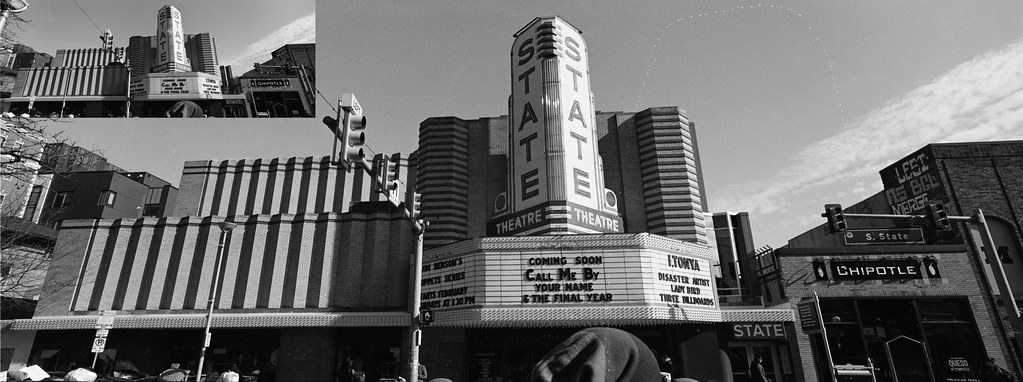
39057310835_e26cac1080_b.jpg
 
Last edited:
On second thought, I dont think fixer can cause this problem. These dots are just too organized for the problem to be caused by loose floating material in a fixer.
 
Drying mark, almost certainly. Try a rewash & final rinse in distilled water with some wetting agent.
 
Seems chemical/processing related, maybe in the drying step. What is your wash-rinse-dry workflow?

I wash the film like this:

1. Add water, invert 10 times, dump.
2. Add water, invert 15 times, dump.
3. Add water, invert 20 times, dump.
4. Add water, invert 20 times, dump.
5. Add water, invert 20 times, dump.
6. remove film, add water, then add approximately 0.5% Photoflo to the water via pipette.
7. Return film reels to the water and then gently spin for 3 seconds.
8. Remove film and then shake hard to remove as much water as possible.
9. Hang to air dry. This film was scanned about after about 4 hours of drying.
 
As noted looks like water spots. They wouldn’t show up in a darkroom print probably. I take a 1 inch square of 100% cotton soft cloth and lightly dampen with distilled water and lightly wipe.
 
Water spot. Soak five minutes in Photoflo solution. While still wet, very gently rub the area with a cotton swab (wet with same PF solution). Dunk one more time and gently squeegee before hanging to dry.
 
Last edited:
Consider using a surfactant like PhotoFlo.
 
Use distilled water for your photoflo rinse - god knows what minerals are in your water. Mine's so full of rust, I have to bleach the bath tub every month.
 
I take film off the reels then draw them through a tray of filtered water with Photo Flo. I don’t like unreeling film wet with Photo Flo, feel it may introduce bubbles.
 
Are you that your stainless reels are really clean before you started the process in the first place?

Since those bubbles are plus density, and cleaning the film doesn't fix it, I bet on something on the reel that came off in development and caused increased development. I've seen it before. Contamination.
 
I'd agree with a possible drying mark......could it have been a hair or a bit of fine fibre sticking to the film, or blown onto the film, while drying ?
 
I take film off the reels then draw them through a tray of filtered water with Photo Flo. I don’t like unreeling film wet with Photo Flo, feel it may introduce bubbles.

Interesting. Thank you for the suggestion.
 
Are you that your stainless reels are really clean before you started the process in the first place?

Since those bubbles are plus density, and cleaning the film doesn't fix it, I bet on something on the reel that came off in development and caused increased development. I've seen it before. Contamination.

I'm using plastic reels, but your idea may still point to a source of contamination.
 
Can you show us a pic of the negative, showing the entire frame and maybe some more negatives from the film? You write you have it on almost all the frames. Is it always the same shape?
Did you develop this film alone, or souped together with others? How do the other films look like, if any?
Is it possible that the film was sprayed with some developer / alkali before you filled the chemistry into the tank?
 
I had a very similar problem many years ago.

I finally sorted it when I stopped shaking the reels with the film in them.

I now and have done for many years done the following.

I half fill a large jug with water and wetting agent and drop the reel with film into the jug after the final rinse. Give it a swish round for a minute or so then split the reel and drop the film into the jug, puling one end from the jug and fixing a clip then pulling the film up from the jug and fixing the clip to the hook and then putting clip on the bottom, or just grab the end of the film while it is on the reel, fix a clip and hang that one on the hook and unroll the film grabbing the end and fixing a clip and letting it hang.

I then decant some of the fluid from the jug into a wash bottle and give the front and back of the film a good squirt at the top on both sides so it runs all the way down taking bubbles or suds, if any, off the film.

The row of dots looks like a large drop of water breaking into smaller drops on the film as it is shaken, well that was my conclusion and whether it is correct or not the method I use above causes me no problems with drying marks.

Regards...W
 
Consider using a surfactant like PhotoFlo.
N
Ditto. A quick dip in Photoflow after wash will eliminate these problems. Also, I usually let film (especially movie film) dry overnight to gallow emulsion to harden completely before handling.
 
a lot of people use too much photo flo, and use it wrong .. no clue if this is the case or not but
i was always taught after the film was thoroughly washed fill the film tank up with water almost to the top
put a couple of DROPS of photo flo in the tank
raise and lower the film in the photo flow then bang the tank ( as you would in the beginning of the development cycle to get rid of bubbles )
then gently pour water on top of one edge of the tank to have the foam wash away .. then pull the film out and hang it ...

sometimes misuse of photo flo or other wetting agents, lead to weird stuff being left on the film ...

i'd put the film in water ..
let the emulsion get nice and swollen and see if the white stuff washes off ..
then fill a tray with clean water and a few drops of photo flo and holding the film by a corner .. run it through and hang it someplace dust free
 
If it is in the same location on each frame perhaps it could be something associated contamination before such as when removing the film from the cassette or placing the film on the reels. You can usually see water marks looking at the film on an angle. Besides the suggestions already given have you tried an emulsion cleaner on one of the negatives?

http://www.jeffreyglasser.com/
 
Photrio.com contains affiliate links to products. We may receive a commission for purchases made through these links.
To read our full affiliate disclosure statement please click Here.

PHOTRIO PARTNERS EQUALLY FUNDING OUR COMMUNITY:


Ilford ADOX Freestyle Photographic Stearman Press Weldon Color Lab Blue Moon Camera & Machine
Top Bottom
