• Welcome to Photrio!
    Registration is fast and free. Join today to unlock search, see fewer ads, and access all forum features.
    Click here to sign up

what causes this lens problem?

Forum statistics

Threads
203,465
Messages
2,855,170
Members
101,855
Latest member
Minoltalan
Recent bookmarks
0

asp.artist

Member
Allowing Ads
Joined
Jun 17, 2008
Messages
144
Location
Philadelphia
Format
Pinhole
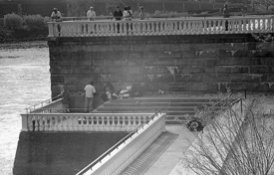
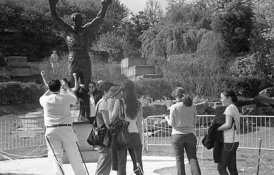
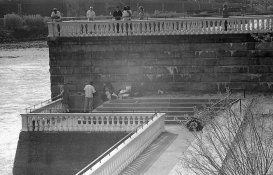
Hi, I've been getting these light spots in the center of the image while using a 90mm lens. The lens looks clear and the mechanics work well. The camera is an Agfa Ambi silette. 90mm lens with shade and medium yellow filter. 2 different rolls of film. Images shot with the 50mm are fine.

Any idea what caused this?
 

Attachments

  • waterworks.jpg
    waterworks.jpg
    22.1 KB · Views: 244
  • Rocky.jpg
    Rocky.jpg
    58 KB · Views: 229
I have the same camera and lenses. I can only guess it's the filter but you
didn't say if you used the same filter on the 50mm lens.

Is it a vintage filter?
 
It's a vintage filter. And that day I was using 2 bodies, one with the 50 and one with the 90, and separate filters on each.
If a filter looks clear will it still affect the image?
 
Looks like internal reflections, as if there were a fine layer of fungus or oil on the inner surfaces.
 
Looks like internal reflections, as if there were a fine layer of fungus or oil on the inner surfaces.

I agree. Same lens same problem on two different bodies.
It should be able to be Identified if you open up your
lens and look threw it at a bright light source and spin the
forward end slowly in a figure eight motion.

you should see a problem if there is one.

Long shot, but if your lens coating is worn bad in the center of your element.......
 
I tried your suggestion about looking through the lens at a light. It looks pretty good. Might be a small "smudge" type mark in there. And the filters look fine, too. The filter size is 35.5, or 37 push-on, and I've been unable to find these new. So, I'll take it out again today, and try again.
Thanks for your suggestions.
Anne
 
The degree of the problem looks like it could be within the "normal" behaviour of a flare-prone lens.
Different lenses also interact differently with filters, so maybe without the filter the problem will be reduced (however well it behaves with the 50mm).
 
could you post a larger version of the photos, it'd be easier to see the problem,thanks.
 
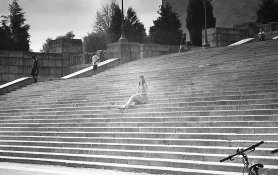
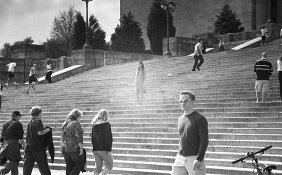
Here are more images. It was a bright day at about 4 -5 Pm. So the sun going down was starting to be a factor (sunset is 7:30pm). The third shot the sun would not have been a factor. (Just a bad photo.)
 

Attachments

  • art-museum-problem.jpg
    art-museum-problem.jpg
    1,010.9 KB · Views: 130
  • Art-museum-problem-2.jpg
    Art-museum-problem-2.jpg
    1 MB · Views: 149
  • Art-museum-problem-3.jpg
    Art-museum-problem-3.jpg
    1,017.9 KB · Views: 141
thanks, much better. first blush would be flare but wouldn't rule out lens issue either. don't suppose you have a shot looking through the lens do you :wink: have you tried with and without the filter as well ?

 
The weather has not cooperated. I'll try it with out the filter when the sun comes back out.

Thank you very much for your help. I never knew flare could look like this. Or that a filter could be such a factor.
Anne
 
Photrio.com contains affiliate links to products. We may receive a commission for purchases made through these links.
To read our full affiliate disclosure statement please click Here.

PHOTRIO PARTNERS EQUALLY FUNDING OUR COMMUNITY:


Ilford ADOX Freestyle Photographic Stearman Press Weldon Color Lab Blue Moon Camera & Machine
Top Bottom