• Welcome to Photrio!
    Registration is fast and free. Join today to unlock search, see fewer ads, and access all forum features.
    Click here to sign up

What caused this to happen?

Recent Classifieds

Forum statistics

Threads
203,204
Messages
2,851,300
Members
101,721
Latest member
rptn
Recent bookmarks
0

Katie

Subscriber
Allowing Ads
Joined
Nov 8, 2006
Messages
765
Location
Texas, USA
Format
Multi Format
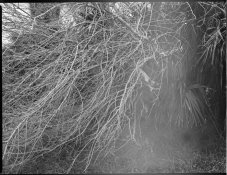
I scanned a roll of 120 that I developed last night and SOME of the negs have what seems to be a light streak on the bottom middle section of the frame. Not all, but some. The first shot on the roll (I remember it being first) doesn't have it, but some in the middle and some at the end do (shot with a Bronica, so I had 15 exposures).

Granted, there are several variables here - the film was expired -and- I am starting to question if my fixer is exhausted.

SO - short of a light leak (last roll was fine in this camera with the only back I have for it); what do you think this is? Crappy loading on the reel, developing blunder, bad fixer, or just wonky expired film. I don't know what to look for - so I am hoping someone can clue me in so I can spot this next time (plus I would like to know how to tell if fixer is bad as this is my first batch of it).

Excuse the scan - it's untouched and craptastic. See the light area at the trunk of the tree?

 

Attachments

  • img295.jpg
    img295.jpg
    265.4 KB · Views: 228
I'd guess it to be light struck. It would be easier to tell if we could see the whole roll. Do all affected frames have the same light area or are they different? That might tell if it was in the camera or handling. I've never seen bad fixer leave an area like this, but then, I certainly haven't seen everything.
Let's see what others think.
 
Looks like a light leak to me as well. It looks like the excess density extends into the rebate though it's hard to tell in the scan you've posted. If it were under fixed, the film would have a whitish look in the suspect area.
Underfixing is easy to remedy, just put it in some fresh fix for a few minutes then re-wash.
If it really is underfixing the fogging will disapear.

If that area is where the dark slide fits that would be the most likely cause. It doesn't look severe, so it may be a factor of how long the fogged frames were in position.
 
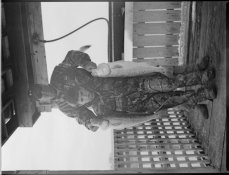
I think they are different... here are two more. One has a wider affected area and the other it seems to be more to the left and center (I didn't rotate it so you could compare WHERE the affected areas might line up). Then, finally, a completely unaffected area...

So do we think this is just what I am going to expect with this batch of expired film? I have shot another roll with NO issues whatsoever... I thought it might be fine. It was in my Hasselblad, though. I have run many a roll through my Bronica with no problems before, though.
 

Attachments

  • fogtest2.jpg
    fogtest2.jpg
    281.4 KB · Views: 142
  • fogtest.jpg
    fogtest.jpg
    177.5 KB · Views: 158
  • img293.jpg
    img293.jpg
    187.9 KB · Views: 145
Oh crap. So you think there might be a light leak? And that's why the first shot wouldn't have been affected (because it sat there the shortest?). I can't recall when I loaded this film - when I got there or before. Would a light leak always be the same size and in the same place?
 
You might want to ask around APUG to find out how to replace the light seals and where to get the replacements. This is usually an inexpensive way to attack light leaks.

Steve
 
There's always the possibility of a light leak with handling. I've had a couple of rolls of 120 that were not, or did not stay, closely furled at all times during loading or unloading. They showed irregular fogged areas similar to what you have.
 
Unlikely to be a fixer problem. Looks more like an intermittent light leak. The effect depends, variably, on the ambient light conditions and the amount of time each film frame is left waiting in the gate.

It could be that your film magazine is a loose fit or the light trap around the dark slide is damaged.

Regards
Jerry
 
Stainless steel reels and tank.

I don't know if this matters ... but my fixer was toast. I developed a roll the next night and it was TOTALLY fogged. Mixed up some new fixer and voila! They were perfect. Could that have caused this? I think I might try to refix the one of my husband and son at least to see if it can be salvaged. That camera has NEVER given me problems before.
 
Katie,
It's very likely the film got out of place in the reel and all the chemicals got exhausted in that area. That's the reason I don't use SS reels. It just impossible for me to get it right every single time.
 
Katie,
It's very likely the film got out of place in the reel and all the chemicals got exhausted in that area. That's the reason I don't use SS reels. It just impossible for me to get it right every single time.

I have used stainless steel reels for years and I never had anything like that.
 
I have used stainless steel reels for years and I never had anything like that.

Have to agree I've used both stainless steel & Paterson reels for years with no issues like that.

If the film spiral does get lodged out of place then you'd get a more definite line where the films not been process properly.

Ian
 
First, look at the film and see if you can see the light patches. At their worst they are pretty obvious, so you should be able to see them on the negative. It you can't, you probably have scanner problems. It you can, I agree that they look like light leaks. But they also could be flare. (That could be a scanner problem, if the problem is there.) I notice that they seem to be less with shaded subjects, so that is a definite possibility. If they are camera flare, a lens hood may help.
 
Katie,

All the info you need is already above, but I'll summarize in an attempt to be helpful...

First, visually examine your negatives to determine if the problem is inadequate fixing or a light-struck negative. The former will appear as an opaque, light colored "fog" on the negative. A light-strike will show up just like regular exposure, i.e., made up of black silver image.

If there is any reason to suspect inadequate fixing, a quick refix in fresh fixer will tell the tale. The areas in question should clear quite quickly in fresh fix if that is indeed the problem.

If the film is light struck, I would first suspect film handling. Loosely-wound rolls of 120 film do this all the time. Having even a little light present when loading reels can result in the same thing. Before you start in with camera repairs, shoot some more film, being careful to load and unload in subdued light, making sure the roll stays tightly wound both when loading and unloading, and making sure you store exposed film away from direct light. Then, make sure your changing/reel loading area (or changing bag) is really dark. Develop a few more rolls. If the problem does not appear, you've solved your problem.

If the problem persists and is consistent, you may indeed have camera problems. Now would be the time to borrow a camera and see if film shot in it was better. If so, then start in on the camera, but only then.

Finally, I highly doubt that expired film would exhibit fog in the manner you have on your negatives. I think you can practically eliminate that concern.

Hope this helps,

Doremus Scudder
www.DoremusScudder.com
 
... Loosely-wound rolls of 120 film do this all the time... refers to after the roll has been exposed, the roll was not tightly wound before taping closed.
 
... Loosely-wound rolls of 120 film do this all the time... refers to after the roll has been exposed, the roll was not tightly wound before taping closed.

I've found some brands worse than others in this respect, I get the least problems with Foma 120 films, I think because the back of the paper is black as well as the side in contact with the film.

Ian
 
... Loosely-wound rolls of 120 film do this all the time... refers to after the roll has been exposed, the roll was not tightly wound before taping closed.
Oh! I see. Sorry. Totally misrread it. That makes a lot of sense. In the manual cameras I have is controlled either by a piece of SS, sort of a spring, with or without a roller and they lose tension with time. Pulling to the center a little should be enough. Being careful during extraction and wrapping the roll with a piece of aluminium foil after being exposed may also help.
 
Last edited by a moderator:
Katie,

It certainly does look like it has been light-struck, but it appears to be a film handling problem. If it were a camera leak, the pattern should be the same in every frame. However, the pattern varies and shifts, like the film was "struck" before exposure or after exposure, in the roll. Such a problem might be from a crooked wind onto the spool or carelessly placing the exposed spool in strong sunlight for a time. Try more film, being more careful: it is a cheap enough test.
 
Photrio.com contains affiliate links to products. We may receive a commission for purchases made through these links.
To read our full affiliate disclosure statement please click Here.

PHOTRIO PARTNERS EQUALLY FUNDING OUR COMMUNITY:


Ilford ADOX Freestyle Photographic Stearman Press Weldon Color Lab Blue Moon Camera & Machine
Top Bottom