
-
Welcome to Photrio!Registration is fast and free. Join today to unlock search, see fewer ads, and access all forum features.Click here to sign up
You are using an out of date browser. It may not display this or other websites correctly.
You should upgrade or use an alternative browser.
You should upgrade or use an alternative browser.
Watermark on Kodak 400TX 120 film?
-
A
- Thread starter Sincurves
- Start date


Recent Classifieds
-
For Sale Really Right Stuff RRS BH-55 Ball Head
- Started by samuelphoto
-
For Sale Gitzo GT3532LS Systematic Series 3 Carbon Fiber Tripod
- Started by samuelphoto
-
For Sale SUMMILUX M 35MM F;1.4
- Started by Guillaume Zuili
-
For Sale (NOS) Fuji Slide Processing Mailers
- Started by UsedFilmCameras
-
Want to Buy Arca swiss plate for Mamiya RZ67
- Started by blee1996
Forum statistics

- DeletedAcct1
- Deleted
- Reason: Error
- DeletedAcct1
- Deleted
- Reason: heavy censorship


Backing paper offset. As said above, one particular batch of Kodak film was affected; this was if memory serves some 7-8 years ago. I recall TMX was affected; not sure if any TX was also in that batch. Other than that, it can occur also on any film under unfavorable conditions. Try to use 120 film before it expires. Keep shielded from bright light while loading the film. Don't store film for extended periods of time once the foil wrapper has been opened, and when doing so, prevent moisture, heat and bright light from getting to it.
- DeletedAcct1
- Deleted
- Reason: Argumentative

That film was either expired, or stored too long at warm temperatures (or both). This is known as wrapper offset - a known problem with modern 120 format films. The inks in the backing paper interact with the film to leave marks, like what you see on your film.
The fix? Don't let film expire before using it, and keep it stored cool, as recommended by the manufacturer.
The fix? Don't let film expire before using it, and keep it stored cool, as recommended by the manufacturer.

- Joined
- Feb 9, 2010
- Messages
- 9,545
- Format
- 4x5 Format
Thanks, makes sense. It sat in room temperature for a long time after use, and I can see the imprint is from the backing paper. Learning something every day.
In the edge you will find embossed batch numbers. Let us know what those numbers are for your film.
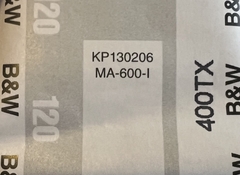
Kodak had a few years of problems with 120 backing paper. There is a list of batch numbers. My batch was TMY2 0149, I still have a few rolls. There is nothing you can do to avoid the watermark effect.
The watermark happened because Kodak used an electrostatic print process to print the black numbers and Kodak branding, Obviously a photoreactive difference between the ink and paper occurred such that when the emulsion of the film wrapped over it sat in contact areas in contact with the ink developed faster than areas in contact with the paper.
This could have been at the atomic level, for example the electrostatic ink allowed fewer photons to escape the latent image, by bouncing them back. Or it could have been electrostatic charge remaining after print giving a sort of pre-flash when the static charge dissipated into the emulsion. Whatever the scientific explanation could be was never revealed to the public. I did some amateur tests but they were inconclusive. I found the ink to be hydrophobic while the paper was hydrophilic, (You could essentially use the backing paper as a litho paper plate if you wanted).
Only find thisIn the edge you will find embossed batch numbers. Let us know what those numbers are for your film.
Kodak had a few years of problems with 120 backing paper. There is a list of batch numbers. My batch was TMY2 0149, I still have a few rolls. There is nothing you can do to avoid the watermark effect.
The watermark happened because Kodak used an electrostatic print process to print the black numbers and Kodak branding, Obviously a photoreactive difference between the ink and paper occurred such that when the emulsion of the film wrapped over it sat in contact areas in contact with the ink developed faster than areas in contact with the paper.
This could have been at the atomic level, for example the electrostatic ink allowed fewer photons to escape the latent image, by bouncing them back. Or it could have been electrostatic charge remaining after print giving a sort of pre-flash when the static charge dissipated into the emulsion. Whatever the scientific explanation could be was never revealed to the public. I did some amateur tests but they were inconclusive. I found the ink to be hydrophobic while the paper was hydrophilic, (You could essentially use the backing paper as a litho paper plate if you wanted).
Attachments

John Sexton wrote about this in his newsletter of May 2016. The problem could actually affect more 120-type films, but since then I believe Kodak has solved the problem with a new type of backing paper..
newsletter05-2016.html
Karl-Gustaf
newsletter05-2016.html
Karl-Gustaf

Only find this
It is on the negatives themselves, in the very edge, in the tiniest of characters - usually between the frame numbers 11 and 12.
abruzzi
Member
It is on the negatives themselves, in the very edge, in the tiniest of characters - usually between the frame numbers 11 and 12.
only if you're shooting 6x6.

only if you're shooting 6x6.
Actually, no matter what you are shooting
.Because it is in between the Kodak printed frame numbers 11 and 12!
abruzzi
Member
Actually, no matter what you are shooting
Because it is in between the Kodak printed frame numbers 11 and 12!
I never even noticed there are frame numbers on the film (mostly shoot 6x9 so I don't even have a frame 11 and 12)
Thanks, I will try the email in the link.
Still got good images. Kodak has fixed this with a clear coating over the ink, problem solved. Now that you have developing skills have fun!
I never even noticed there are frame numbers on the film (mostly shoot 6x9 so I don't even have a frame 11 and 12)
But you do have 41, 43, 45, 47, 49, 51, 53 and 55 on the edge opposite to 11 and 12
Those are the numbers I use for organizing my 6x9 shots.
It is on the negatives themselves, in the very edge, in the tiniest of characters - usually between the frame numbers 11 and 12.
Would not have found it without knowing it was between 11 and 12. Had a light leak on part of it, but here is my best effort to bring it out:
Attachments

John Sexton wrote about this in his newsletter of May 2016. The problem could actually affect more 120-type films, but since then I believe Kodak has solved the problem with a new type of backing paper..
newsletter05-2016.html
Karl-Gustaf
I contacted Kodak Alaris and got a very quick response with the possible reason. They are sending me replacement films as well - fantastic customer service!
That’s fantastic! I, too, have had good responses from KA when I asked questions in the past. But what possible reason did they state?
Thanks!
I contacted Kodak Alaris and got a very quick response with the possible reason. They are sending me replacement films as well - fantastic customer service!
Good to hear that Kodak Alaris take customer problems seriously.
Karl-Gustaf
As mentioned above, backing paper can have a drastic impact on the performance of the film. Numbers, mottling, and random spots and splotches have all happened. Fona has had seemingly regular issues with this, most recently with 80S being heavily mottled. This is why I no longer use Fona backing paper of any brand for 120.
This particular issue seems to be common, as I understand it Kodak started outsourcing their backing paper manufacturer, and had numerous issues like this while they went through “teething pain”, although the glossy stuff is pretty good as I understand it, and so is older stuff, just sone batches in 2014-2016 seem to have been affected.
Shanghai backing paper was supposedly REALLY bad, as in, it the numbers overpowered any image that was made on the film. They might have fixed that? But I’m not sure.
This particular issue seems to be common, as I understand it Kodak started outsourcing their backing paper manufacturer, and had numerous issues like this while they went through “teething pain”, although the glossy stuff is pretty good as I understand it, and so is older stuff, just sone batches in 2014-2016 seem to have been affected.
Shanghai backing paper was supposedly REALLY bad, as in, it the numbers overpowered any image that was made on the film. They might have fixed that? But I’m not sure.
As mentioned above, backing paper can have a drastic impact on the performance of the film. Numbers, mottling, and random spots and splotches have all happened. Fona has had seemingly regular issues with this, most recently with 80S being heavily mottled. This is why I no longer use Fona backing paper of any brand for 120.
This particular issue seems to be common, as I understand it Kodak started outsourcing their backing paper manufacturer, and had numerous issues like this while they went through “teething pain”, although the glossy stuff is pretty good as I understand it, and so is older stuff, just sone batches in 2014-2016 seem to have been affected.
Shanghai backing paper was supposedly REALLY bad, as in, it the numbers overpowered any image that was made on the film. They might have fixed that? But I’m not sure.
The latest Shanghai GP3 is much better than the old "red wrapper" stuff was, for sure. I haven't used much of it because it's more expensive than it used to be, and I can buy Ilford film for just a tad bit more. I'll stick with Ilford myself when it comes to rollfilm. 4X5 and 8X10 film is where Shanghai GP3 really shines cost wise, and I do use their sheet film with no problems so far.

I developed my first roll of film yesterday and it turned out great. Except for subtle markings on the film with the word KODAK and a running number. Appreciate any info on purpose of this.
Thank you for sharing this. I had a similar issue with Kodak 100TMX 120 rolls a couple years ago. I'll have to check the batch number and so some research.
| Photrio.com contains affiliate links to products. We may receive a commission for purchases made through these links. To read our full affiliate disclosure statement please click Here. |
PHOTRIO PARTNERS EQUALLY FUNDING OUR COMMUNITY:  |