
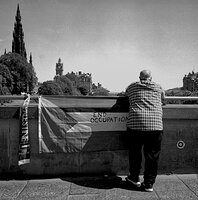


• Welcome to Photrio!
    Registration is fast and free. Join today to unlock search, see fewer ads, and access all forum features.
    Click here to sign up

Warmtone by bleaching

Somewhere...

D
Somewhere...

  • 5
  • 2
  • 97
Iriana

H
Iriana

  • 7
  • 1
  • 160

Recent Classifieds

Forum statistics

Threads
202,751
Messages
2,845,054
Members
101,500
Latest member
lightfundove
Recent bookmarks
0

ericdan

Member
Allowing Ads
Joined
Feb 28, 2014
Messages
1,359
Location
Tokyo
Format
35mm RF
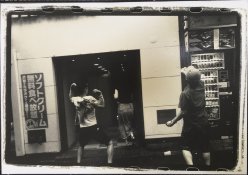
I recently tried to rescue a print that turned out too dark. I was bleaching Lith prints for Sepia toning anyways and thought why not try to make this non-Lith print a bit brighter with bleach.
The paper was MCC110 and it turned really warm as it brightened up in the bleach. Does this degrade archivability at all?
55F13162-BD98-498D-B640-B7DAD6A23744.jpeg
 
Refix and re-wash the print and it will be fine.
 
When you bleach a print in rehalogenating bleach, the bleach acts more quickly on grains of a certain size, removing them from the mix, so to speak. The bleach affects the size and surface characteristics of the remaining silver grains in the print. The result with extensive bleaching is often a marked shift in image tone. MCC-110 seems to show this quite readily; I have to be really careful not to overbleach when doing localized bleaching with this paper, or the bleached area will change tone too much.

The bleached image, which is no longer visible, has been changed to silver bromide (a light-sensitive silver compound that is now fully exposed since you bleached with the lights on, but still undeveloped) and can be fixed away just like any other undeveloped silver halide compound. Refix and rewash and you'll have a permanent print.

Doremus
 
It also looks good if you tone in selenium first. You get a better two toned effect. You can also redevelop if you go a little too far. I sometimes put a print in a bleach bath and rub the highlights to get better whites, just got to pull out and wash before losing highlight detail, in which case you can redevelop.
Always fun to experiment.
 
Awesome. Thanks guys! I have notes and will make another print and bleach to same effect. I’ll fix the original one and try Selenium toning the other.
 
Awesome. Thanks guys! I have notes and will make another print and bleach to same effect. I’ll fix the original one and try Selenium toning the other.
No - you need to fix both of them.
But feel free to selenium tone one of them as well.
 
If you take an overexposed print, you should get similar results whether you underdevelop (sort of lith print) or whether you fully develop and then bleach. There will be many very small silver grains which appear yellow/orange/brown. In my experience Selenium toner will turn this into gray/black.
 
You will get different effects using selenium depending on duration/strength and whether you do it before or after bleaching. Another nice effect is to selenium tone first then bleach then sepia, Generally the selenium holds the shadows and the sepia in the highlights, again will vary greatly on duration and strength.
 
Nevermind archival. This warming due to bleach becomes a real problem when you want to do selective bleaching on a print as some spots will end up being warmer than where you didn't bleach

There is a solution but it's an extra added step... annoying
 
Photrio.com contains affiliate links to products. We may receive a commission for purchases made through these links.
To read our full affiliate disclosure statement please click Here.

PHOTRIO PARTNERS EQUALLY FUNDING OUR COMMUNITY:


Ilford ADOX Freestyle Photographic Stearman Press Weldon Color Lab Blue Moon Camera & Machine
Top Bottom
