• Welcome to Photrio!
    Registration is fast and free. Join today to unlock search, see fewer ads, and access all forum features.
    Click here to sign up

Vivitar Zoom Thyristor 250

Forum statistics

Threads
203,313
Messages
2,852,832
Members
101,777
Latest member
fizzplop
Recent bookmarks
0

WetMogwai

Member
Allowing Ads
Joined
Oct 29, 2009
Messages
152
Format
Multi Format
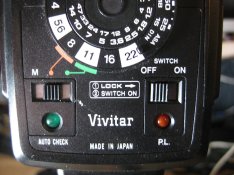
I have a Vivitar Zoom Thyristor 250 that has a switch I don't understand. I've looked for a manual, but I can only find other models. The switch has three positions, M, orange, and green. I assume it has something to do with flash intensity. I attached an image. How do I use this switch?
 

Attachments

  • IMG_0584.JPG
    IMG_0584.JPG
    121 KB · Views: 171
M - flash is in manual mode. It will dump all charge and so set f stop of camera to match the distance of the subject you are intersted in pointing this thing at.

Red - set camera aperture to f/8 and the flash will automatically quench part way though it's discharge when it senses enough light has been emitted. Function good to as far away as the distance is on it opposite the calculator dal.

Green - same as red, but f/11, but less effective automatic lighting distance. You gain a bit more depth of field with the red, versus the green.

You have to set the dial to match the speed of film in the camera, and set the shutter seed of the camera no faster than it's synch speed (usually marked in red, or with an X etc on the shutter speed dial of focal plane shutter cameras.

If you have an old rangefinder, etc with the shutter in the lens, the thing will synch at any spped.

Take care to use on X contact; olderish cameras sometimes have an M and X contact. M is for flashbulbs, and will fire the almost intantaneous lighting electronic flash too early. Flashbulbs neded time to reach thier peak light emitting intensity.

Good shooting.

If it works on olne a hot shoe socket then that socket will be an x synch one.

 
Thanks. I'll try it next time I need a flash, though I hope it doesn't happen soon. I try to avoid flash as much as I can. I like having the option if I really need it, though.
 
What Mike said, with one refinement.

You will note that there is an ASA/DIN scale. In the picture, you cannot quite see what it is set to, but I assume it is something like ASA 200.

As Mike said, you have to set the ASA/DIN dial to match the film in the camera. When you do, the dial with the F8 and F11 that Mike referred to will also move, and you will see that the red and green markers will line up with new f/stops. With the new film, you use those new f/stops.

Matt
 
Photrio.com contains affiliate links to products. We may receive a commission for purchases made through these links.
To read our full affiliate disclosure statement please click Here.

PHOTRIO PARTNERS EQUALLY FUNDING OUR COMMUNITY:


Ilford ADOX Freestyle Photographic Stearman Press Weldon Color Lab Blue Moon Camera & Machine
Top Bottom