• Welcome to Photrio!
    Registration is fast and free. Join today to unlock search, see fewer ads, and access all forum features.
    Click here to sign up

Vignetting issue with Beseler 67 condenser enlarger

Sunk

H
Sunk

  • 0
  • 0
  • 11
Sentry

A
Sentry

  • sly
  • Dec 16, 2025
  • 1
  • 1
  • 25

Forum statistics

Threads
201,224
Messages
2,820,720
Members
100,597
Latest member
Filmzgerald
Recent bookmarks
0

mjbovee

Member
Allowing Ads
Joined
Nov 21, 2020
Messages
36
Location
Denver, CO
Format
Analog
I'm currently experiencing some serious (asymmetric) vignetting when making prints my Beseler Printmaker 67; one edge and corner in particular seem to be affected. I'm primarily using a 50mm lens to enlarge 35mm negs to 8 x 10 in. Stopping the lens down seems to make the issue worse, or at least more noticeable to the naked eye.

I know that this is not being caused by a camera/negative issue. The condensers, lens stage, negative stage, and negative carrier appear to all be aligned properly as well, which leads me to believe this issue is being caused by the position of the bulb. Unfortunately, I haven't been able to find any info in the manual or online regarding how I can adjust the bulb position. Any thoughts on how I can fix this?
 
OP
OP
mjbovee

mjbovee

Member
Allowing Ads
Joined
Nov 21, 2020
Messages
36
Location
Denver, CO
Format
Analog
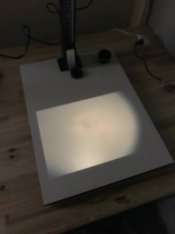
Here's a photo of light being projected onto the baseboard for reference
IMG_0583.jpg
 

MattKing

Moderator
Moderator
Joined
Apr 24, 2005
Messages
54,718
Location
Delta, BC Canada
Format
Medium Format
Last edited by a moderator:

ic-racer

Member
Allowing Ads
Joined
Feb 25, 2007
Messages
16,694
Location
USA
Format
Multi Format
Like Matt posted, check condensers. A picture of the condenser setup can be helpful.
 
OP
OP
mjbovee

mjbovee

Member
Allowing Ads
Joined
Nov 21, 2020
Messages
36
Location
Denver, CO
Format
Analog
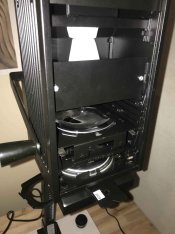
Yeah, both condensers are installed and are placed correctly as far as I know.
IMG_0586.jpg
 

MattKing

Moderator
Moderator
Joined
Apr 24, 2005
Messages
54,718
Location
Delta, BC Canada
Format
Medium Format
I think that top condenser is upside down.
The parts diagram has the curved side pointing down.
Assuming, of course, that they aren't switched as well.
This is one of those things that are infinitely easier to deal with in person!
 
OP
OP
mjbovee

mjbovee

Member
Allowing Ads
Joined
Nov 21, 2020
Messages
36
Location
Denver, CO
Format
Analog
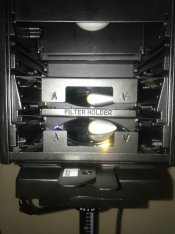
Yeah, I totally get it, definitely easier to deal with in person. I appreciate the tips. It's hard to tell from that pic I just posted, but the curved side is indeed facing down / flat side is on the top (for the top condenser). The flat side is obviously facing down for the bottom condenser.


Here's a better photo:
IMG_0588.jpg
 
Last edited:

pentaxuser

Member
Joined
May 9, 2005
Messages
20,253
Location
Daventry, No
Format
35mm
Matt it may just be my computer but I cannot open any of your links. Can all of the rest of you open Matt's links

Thanks

pentaxuser
 

MattKing

Moderator
Moderator
Joined
Apr 24, 2005
Messages
54,718
Location
Delta, BC Canada
Format
Medium Format
Matt it may just be my computer but I cannot open any of your links. Can all of the rest of you open Matt's links

Thanks

pentaxuser
Try it now - the previous link was to the uploaded pdf, rather than the link on the Beseler site.
 

MattKing

Moderator
Moderator
Joined
Apr 24, 2005
Messages
54,718
Location
Delta, BC Canada
Format
Medium Format
Yeah, I totally get it, definitely easier to deal with in person. I appreciate the tips. It's hard to tell from that pic I just posted, but the curved side is indeed facing down / flat side is on the top (for the top condenser). The flat side is obviously facing down for the bottom condenser.


Here's a better photo:
View attachment 302436
Can you try swapping the two condenser elements?
How about taking out the filter holder?
In case there is any uncertainty, this is the link I have for a manual: http://www.jollinger.com/photo/cam-coll/manuals/enlargers/beseler/Beseler_67CP.pdf
 

ic-racer

Member
Allowing Ads
Joined
Feb 25, 2007
Messages
16,694
Location
USA
Format
Multi Format
Here's a photo of light being projected onto the baseboard for reference
View attachment 302430
Good job posting the photos. As Matt points out , looks ok . Also your lamp looks the correct type based on what I can see of the lamp's stem.

Two things come to mind from this picture. First, the aspect ratio of the negative carrier does not appear to be 35mm, nor does the projected image appear 10" across (14" baseboard)
Second, per figure 9 in the manual, is there some side to side play that you can loosen the two thumb screws and slide the head to the left to recenter the lamp head.
 
OP
OP
mjbovee

mjbovee

Member
Allowing Ads
Joined
Nov 21, 2020
Messages
36
Location
Denver, CO
Format
Analog
OP
OP
mjbovee

mjbovee

Member
Allowing Ads
Joined
Nov 21, 2020
Messages
36
Location
Denver, CO
Format
Analog
Good job posting the photos. As Matt points out , looks ok . Also your lamp looks the correct type based on what I can see of the lamp's stem.

Two things come to mind from this picture. First, the aspect ratio of the negative carrier does not appear to be 35mm, nor does the projected image appear 10" across (14" baseboard)
Second, per figure 9 in the manual, is there some side to side play that you can loosen the two thumb screws and slide the head to the left to recenter the lamp head.

The projected image is for sure bigger than 10" in the image I shared, but I typically use an easel that's a little higher up and also may have adjusted the height of the enlarger head since I last made prints. Either way, I've had this same issue when printing as small as 5 x 7 in. The aspect ratio may look a little off, but I know that the carrier is in fact for 35mm and came with the enlarger. Also, I tried adjusting the lamp head using the method you describe, but it seems to have little effect. :sad:

I may try taking apart the head and adjusting the bulb position if I have some time this evening. If I don't have any luck with that I may try to reach out to Beseler for advice.
 

MattKing

Moderator
Moderator
Joined
Apr 24, 2005
Messages
54,718
Location
Delta, BC Canada
Format
Medium Format
I wonder if the lens stage has been moved from the appropriate location - perhaps due to an impact.
Page 7 of that manual explains how to adjust the lens stage laterally.
Check as well that the lens is flat on the lensboard, that the lensboard isn't warped, and that it is inserted correctly.
Do you have another lens that you can check it with?
 

Erik L

Member
Allowing Ads
Joined
May 9, 2007
Messages
837
Location
Grand Junction CO
Format
8x10 Format
I think Matt maybe on to something. It sure looks like it’s mechanical vignetting or shading and not from uneven light? Is the neg holder and lens board seated correctly? Just a guess…
 
OP
OP
mjbovee

mjbovee

Member
Allowing Ads
Joined
Nov 21, 2020
Messages
36
Location
Denver, CO
Format
Analog
I've tinkered around with the enlarger a bit more and have come to believe that the issue, as Matt stated above, has to do with the position of the lens stage. It's getting a little late for me to try and make that adjustment now (I don't want to make a clumsy mistake), but plan on taking a stab at it tomorrow. Thank you all for your help with this!
 
OP
OP
mjbovee

mjbovee

Member
Allowing Ads
Joined
Nov 21, 2020
Messages
36
Location
Denver, CO
Format
Analog
An update: I tried adjusting the lens stage and the negative stage and neither seemed to help much. I did notice that moving my negative carrier a couple centimeters towards me seems to resolve the issue, but this seems like a very stop-gap / temporary solution
 

MattKing

Moderator
Moderator
Joined
Apr 24, 2005
Messages
54,718
Location
Delta, BC Canada
Format
Medium Format
Do you, by chance, have a lens board that is either not mounting correctly or has an off-centre hole for the lens?
 
OP
OP
mjbovee

mjbovee

Member
Allowing Ads
Joined
Nov 21, 2020
Messages
36
Location
Denver, CO
Format
Analog
Do you, by chance, have a lens board that is either not mounting correctly or has an off-centre hole for the lens?
I don't believe so, I just have the lens board that came with the enlarger (it was new when I purchased it, btw). It could be that it's not mounting correctly, but I don't think that's the case.

I tried mounting an 85mm lens and didn't see any vignetting, but I don't believe the enlarger head can be raised high enough to print 8 x 10s (onto the baseboard, at least) from a 35mm neg at that focal length.
 

ic-racer

Member
Allowing Ads
Joined
Feb 25, 2007
Messages
16,694
Location
USA
Format
Multi Format
At least you can clearly see that it is off center.
In the1980 I adapted a Beseler lens board to my Minolta diffusion enlarger. I used the enlarger for my thesis show. Years later, setting up the same enlarger for my kids I noticed that the lens board was not centered. Because it is a diffusion enlarger, the uneven illumination was too subtle to see on the baseboard, but looking back at all my prints from that era, all are too light on one side.:sad:
 

ridax

Member
Allowing Ads
Joined
Feb 4, 2007
Messages
29
Format
Large Format
I'm currently experiencing some serious (asymmetric) vignetting when making prints; one edge and corner in particular seem to be affected. <...> Stopping the lens down seems to make the issue worse, or at least more noticeable to the naked eye.

That's normal. And the smaller the lamp's light emitting spiral, the more prominent the effect is. And yes the effect is also the more prominent the smaller the enlarging lens's f-stop is.

Adjust the lamp position along the VERTICAL axis, moving it up and down. The lamp position must ensure the condensor projects the image of the lamp spiral accurately into the lens' entrance pupil. Generally, the lamp has to be readjusted with every considerable change in the printing magnification.

With an opaque lamp which is a large light source, the effect is negligible to the extent of never being noticed. With a 1x1mm point light source, I had to readjust my enlarger lamp constantly. That made me change my habit of printing one negative in all the sizes I wanted and then printing another negative in all the different sizes to the habit of printing all the negatives with one particular magnification before readjusting my enlarger to another magnification and printing all the negatives that needed that particular magnification in one batch.
 
OP
OP
mjbovee

mjbovee

Member
Allowing Ads
Joined
Nov 21, 2020
Messages
36
Location
Denver, CO
Format
Analog
For any of you interested, I ended up getting a 60mm enlarger lens and have not had any noticeable vignetting issues since
 
Photrio.com contains affiliate links to products. We may receive a commission for purchases made through these links.
To read our full affiliate disclosure statement please click Here.

PHOTRIO PARTNERS EQUALLY FUNDING OUR COMMUNITY:


Ilford ADOX Freestyle Photographic Stearman Press Weldon Color Lab Blue Moon Camera & Machine
Top Bottom