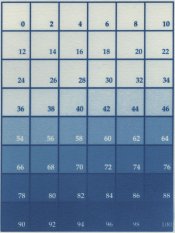
Hello all! This is my first post on this site. I have for a while loved the concept of digital negatives but have only recently taken the plunge when a secondhand epson 2200 came into my grubby little hands. For the last couple of weeks I have been trying to set myself up for printing cyanotypes. I have been working with Ron reeder's book but seem to be stumbling at the first hurdle when trying to get a decent step image printed. My first attempts were far too dark and after emailing Ron (who supplied me with a Curve for the OHP material) for the QTR print-tool I managed to get a decent step image printed...or so I thought. Attached is my best result...this was exposed for 1 and half hours (6 UV bulb bank) and Im still not getting a nice even spread.
Currently my print settings are set to 2885 DPi, Uni-directional, no colour management. The material used was Pictorico Pro Ultra Premium
Should exposure be this long? Or is there a way to make a less dense negative?
Cheers
Steve
Currently my print settings are set to 2885 DPi, Uni-directional, no colour management. The material used was Pictorico Pro Ultra Premium
Should exposure be this long? Or is there a way to make a less dense negative?
Cheers
Steve