

• Welcome to Photrio!
    Registration is fast and free. Join today to unlock search, see fewer ads, and access all forum features.
    Click here to sign up

tricky dodge to do - advice needed

Tied to the dock

D
Tied to the dock

  • 4
  • 0
  • 59
Running in the Snow

H
Running in the Snow

  • 1
  • 2
  • 72

Recent Classifieds

Forum statistics

Threads
203,082
Messages
2,849,605
Members
101,650
Latest member
FakeGold
Recent bookmarks
0

wilfbiffherb

Member
Allowing Ads
Joined
Nov 3, 2010
Messages
331
Format
Medium Format
ok so im working on a print at the moment and i have got everything exactly how i want it to look apart form one bit. unfortunately its the most critical bit. basically i have a short s shaped bent tree surrounded by landscape. unfortunately the tree is a little dull and i need to dodge it. but i cant think how to do it without effecting the rest of the shot. heres a very rough sketch as im currently at work and cant scan my print:
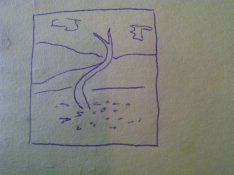
IMG-20120724-00567.jpg


so basically - how can i get my tree to have a higher value without the dodge/burn tools effecting the other areas of my shot?
 
I would make a full size print without the dodge, on cheap RC paper, use scissors or a razor blade to cut out the tree, and use the cut outs as a guide to cut some mat board or thin cardboard to use as a mask you can hold. feather it during exposure so you don't get a harsh outline, obviously.

poor man's mask.
 
Make a custom dodge tool shaped like your tree. Take a test print, cut out the tree, tape it to a piece of cardboard, and cut out your tool. Attach some coat hanger wire or thinner wire and tape it to the tool. Wiggle it over the tree in the print while you're exposing your paper.

Edit: Chris beat me too it!
 
great idea. never occurred to me to cut the tree out and use it to dodge - genius. im used to using dodge and burn toold but this one had my mind melting a little. thanks a lot for your help!
 
An unsharp mask would be the ideal tool.

But if you aren't set up for that, the suggestions above are what I would try.

In addition, I sometimes find it easier to burn the rest of the print instead of dodging the tree.
 
but if im burning the rest of the print im still going to have to cover the tree somehow. only problem i can see now is that as ill be holding the cut out tree so close to the print the wire i attach to it may effect the outlying areas of the print.
 
but if im burning the rest of the print im still going to have to cover the tree somehow. only problem i can see now is that as ill be holding the cut out tree so close to the print the wire i attach to it may effect the outlying areas of the print.

With respect to the custom dodging tool, it can help if you create it using a smaller print than the one you are trying to make.

For example, if your goal is to make an 8x10 print, use the tree from a 4x5 print to make your dodging tool. You then use the tool about half way between the lens and the paper.

And with respect to burning vs. dodging, I find it useful to try to blend in several small burns along the edge of the detail you are trying to hold back (the tree) rather than trying to do single burns. In essence I build the exposure outside the tree out of several layers.

It is more complex, takes longer and requires some practice, but it gives you great control.
 
I agree with Michael, cut-out dodgers often aren't worth the bother.

But, if you are going to do it:

You should dodge 'inside' the tree. The dodger needs to be cut down from the tree so that the wiggled dodger doesn't go outside of the tree boundaries - think 'thick snake'. A dark inside edge to the tree will look far more natural than a halo. It is, of course, impossible to make an exact dodge with a cardboard cut-out.

If you really need an exact dodge then the best method is to use photoshop.

In the old days this problem was solved by making two prints at very large size - one for the tree and one for the background. The tree is then cut out from it's print and glued onto the background print. Retouch fluid and gesso are used to hide the cut & paste line. A copy negative is then made for producing the final print. See "Lootens on Enlarging and Print Quality". (Gee, it does sound like a photoshop procedure, doesn't it?)
 
Last edited by a moderator:
If the tree actually contains some different tones in the 'straight'-ish print but is too dark, then can you reduce density of the trunk with reducing fluid? - the infamous liquid-sunlight approach . . .
 
Photrio.com contains affiliate links to products. We may receive a commission for purchases made through these links.
To read our full affiliate disclosure statement please click Here.

PHOTRIO PARTNERS EQUALLY FUNDING OUR COMMUNITY:


Ilford ADOX Freestyle Photographic Stearman Press Weldon Color Lab Blue Moon Camera & Machine
Top Bottom
