
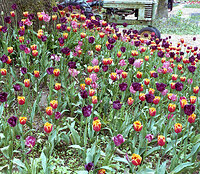
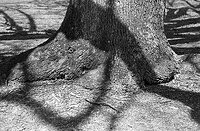

I'm been having some pink blotches on my c41 film (and now recently a white-ish blotch on a black and white 8x10 photo, HP5+ in XTOL 1:1 for 11 mins) for my 8x10 negatives using the expert 3005 jobo drum and Jobo CPA-2. And now recently some of my 4x5 negatives it has happened, using a 3010 drum. It has even happened with black and white lately, so something is super wrong!
Here's what I'm doing for the c41 8x10 film in the 3005 Expert drums (the most recent batch used two films):
Load the film in darkness, with the emulsion side facing inward so the chemicals will hit it. I haven't really payed attention to how the film sits in the tubes of the 3005 drum with respect to the two little ridges inside, whether the film starts at the ridges or spans them. It doesn't look like it should matter based on the design. Obviously I put the long edge of the film down the tube and the short edge is what curls around the inside of the tube.
**My Jobo only runs one direction now for some reason, so all processes are just going in one direction, but I've read online that that's fine***
Here is my process:
1 min Presoak 400ml of distilled water at 104f , in Jobo running on P setting (per arista c41 kit instructions. The 3005 says 330ml of chemistry and I only have two 8x10 films in, so that is enough developer per the Arista instrucions)
3.5 min developer using 400ml of developer at 104f (on P setting)
6.5 min blix using 400ml of developer at 104f (on P setting)
7 30-second rinses using 400ml of distilled water heated to 104f (in Jobo, with speed set to P)
1 min stabilizer in Jobo 400ml on the slowest speed setting at 104f (so as to not create too many bubbles I use the slow speed setting. I know it says room temp for the stabilizer, but in order to only use 400ml of stabilizer and have it hit all of the surface area of the film, I just do it in the drum, otherwise it wastes tons of stabilizer to have to fill up the whole drum and agitate by hand. But I have tried that as well. I just filled up the drum with stabilzer out of the jobo and slowly turned it by hand as well, and still had the pink spots, so I'm not sure that the stabilizer is what's causing it.)
** One thing to note, when I took the 8x10's out of the Jobo drum this last time, One of them had navy blue liquid still dripping off of it. I don't know what that is, but that is basically the same color of the spots on the negative that turn into pink spots when scanned. I wonder if I'm not washing well enough, or if I need to wash with more than just 400ml of water?
I'm doing the same process with 4x5 and getting the same problem. And now I even did a black and white batch of 2 8x10 photos in the jobo, (HP5+ in 400ml of XTOL 1:1 for 11 mins, 1 min stop bath, 5 mins fix, and 7-8 30 sec washes of distilled water, then rinse in LFN all of this at 20 deg C) and 1 of the two photos had a white blotch similar to the ones on the color. (The other photo in this batch turned out fine)
See attached photos. Just want to see if you know anyone else who has had this problem?
I have a shoot coming up next week and I'm terrified if this happens again I'll be screwed!
(In the meantime, if you can recommend anyone you trust implicitly to process c41 8x10 negatives, I would appreciate the recommendation!)
Thanks!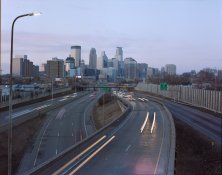
Here's what I'm doing for the c41 8x10 film in the 3005 Expert drums (the most recent batch used two films):
Load the film in darkness, with the emulsion side facing inward so the chemicals will hit it. I haven't really payed attention to how the film sits in the tubes of the 3005 drum with respect to the two little ridges inside, whether the film starts at the ridges or spans them. It doesn't look like it should matter based on the design. Obviously I put the long edge of the film down the tube and the short edge is what curls around the inside of the tube.
**My Jobo only runs one direction now for some reason, so all processes are just going in one direction, but I've read online that that's fine***
Here is my process:
1 min Presoak 400ml of distilled water at 104f , in Jobo running on P setting (per arista c41 kit instructions. The 3005 says 330ml of chemistry and I only have two 8x10 films in, so that is enough developer per the Arista instrucions)
3.5 min developer using 400ml of developer at 104f (on P setting)
6.5 min blix using 400ml of developer at 104f (on P setting)
7 30-second rinses using 400ml of distilled water heated to 104f (in Jobo, with speed set to P)
1 min stabilizer in Jobo 400ml on the slowest speed setting at 104f (so as to not create too many bubbles I use the slow speed setting. I know it says room temp for the stabilizer, but in order to only use 400ml of stabilizer and have it hit all of the surface area of the film, I just do it in the drum, otherwise it wastes tons of stabilizer to have to fill up the whole drum and agitate by hand. But I have tried that as well. I just filled up the drum with stabilzer out of the jobo and slowly turned it by hand as well, and still had the pink spots, so I'm not sure that the stabilizer is what's causing it.)
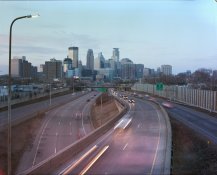
** One thing to note, when I took the 8x10's out of the Jobo drum this last time, One of them had navy blue liquid still dripping off of it. I don't know what that is, but that is basically the same color of the spots on the negative that turn into pink spots when scanned. I wonder if I'm not washing well enough, or if I need to wash with more than just 400ml of water?
I'm doing the same process with 4x5 and getting the same problem. And now I even did a black and white batch of 2 8x10 photos in the jobo, (HP5+ in 400ml of XTOL 1:1 for 11 mins, 1 min stop bath, 5 mins fix, and 7-8 30 sec washes of distilled water, then rinse in LFN all of this at 20 deg C) and 1 of the two photos had a white blotch similar to the ones on the color. (The other photo in this batch turned out fine)
See attached photos. Just want to see if you know anyone else who has had this problem?
I have a shoot coming up next week and I'm terrified if this happens again I'll be screwed!
(In the meantime, if you can recommend anyone you trust implicitly to process c41 8x10 negatives, I would appreciate the recommendation!)
Thanks!


