

• Welcome to Photrio!
    Registration is fast and free. Join today to unlock search, see fewer ads, and access all forum features.
    Click here to sign up

Strange marks in sprocket holes, ONLY on HP5??

PenStocks

A
PenStocks

  • 7
  • 2
  • 100
Landed Here

H
Landed Here

  • 4
  • 6
  • 87

Recent Classifieds

Forum statistics

Threads
201,844
Messages
2,831,030
Members
100,982
Latest member
RivenDell99
Recent bookmarks
0

Nikanon

Member
Allowing Ads
Joined
Jul 11, 2009
Messages
433
Location
Chugwater, Wyoming
Format
35mm RF
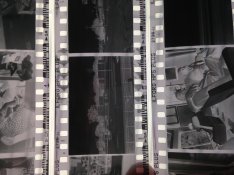
Ive posted about getting strange marks before, but this time im getting some that have almost no explanation. The marks are very odd, have somewhat of a pattern, a very defined density, and occur at random intervals that do not line up when the film is spooled on the reel or in the spool or in the camera. The batches of film are different. It will occur one a single roll of film but not others in the same tank. It ONLY occurs on HP5 if it does. Sometimes it leaks into the frame but is localized mostly to the sprocket holes. Definitely does not occur in the camera (Leica MP, very new, and no other film is ever affected, and sometimes the HP5 will be totally clean as well. If I can remember anything else, i've exhausted almost everything I can. The films it will occur on were not shot anywhere near each other. I would like to think its something I'm doing so i can eliminate it. attached are some samples of the problems
 

Attachments

  • image1.jpg
    image1.jpg
    456.6 KB · Views: 319
  • image2.jpg
    image2.jpg
    400.2 KB · Views: 243
OP
OP
Nikanon

Nikanon

Member
Allowing Ads
Joined
Jul 11, 2009
Messages
433
Location
Chugwater, Wyoming
Format
35mm RF
Heres a scanned image of a later roll (this roll was shot almost exactly one year after the other one posted above) with a worse example of the problem.
 

Attachments

  • Madison010.jpg
    Madison010.jpg
    935.4 KB · Views: 236

Sirius Glass

Subscriber
Joined
Jan 18, 2007
Messages
50,835
Location
Southern California
Format
Multi Format
It looks like bromide drag which looks like this:https://images.search.yahoo.com/yhs...=yhs-mozilla-004&hspart=mozilla&hsimp=yhs-004

From Dead Link Removed
[h=3]Bromide Drag[/h] Bromide is a by-product of the reduction of silver bromide to metallic silver by the developer. The issue is that the bromide reduces the reaction rate (it is part of the Dead Link Removed mechanism) but it is usually denser than the developer and will therefore (if given sufficient time) run down the face of the negative while it sits in the tank.
The effect will cause darkened (thin, underdeveloped) streaks below very strong highlights, e.g. street lights in a night scene. The direction of the streaks depends on the orientation of the film in the development tank because the effect is caused by gravity.
More frequent agitation will mix the bromide in with the developer and prevent streaking. It shouldn't occur unless the film has been sitting in dilute developer for significant time (20 minutes?) with no agitation, the time required being dependent on the specific gravity and concentration of the developer and the strength of the highlights.
 
OP
OP
Nikanon

Nikanon

Member
Allowing Ads
Joined
Jul 11, 2009
Messages
433
Location
Chugwater, Wyoming
Format
35mm RF

Truzi

Member
Joined
Mar 18, 2012
Messages
2,685
Format
Multi Format
Could it have something to do with the reels?
 

poppaneedsap

Member
Allowing Ads
Joined
Nov 9, 2015
Messages
1
Format
35mm
What developer and process do you use?
I have gotten similar marks on my sporcket holes with HP5 and occasionallly with Tri-X but it was almost always a result of using Rodinal (Blazinol), Stand or semi-stand developing in Paterson tanks!

It was suggested on another forum that I try Stainless steel tanks which don't impeded the chemical flow esp during stand dev.
So far it has worked for me.

This may not be of help as it doesn't exactly pinpoint the problem. I assumed it was developer pooling around some of the sprocket holes due to lack of agitation
 
OP
OP
Nikanon

Nikanon

Member
Allowing Ads
Joined
Jul 11, 2009
Messages
433
Location
Chugwater, Wyoming
Format
35mm RF
I doubt it because ive been using the same reels for years and this problem has never occurred before. I have never seen this on anything but HP5 either
 
OP
OP
Nikanon

Nikanon

Member
Allowing Ads
Joined
Jul 11, 2009
Messages
433
Location
Chugwater, Wyoming
Format
35mm RF
Many different developers go through my tanks, theyre metal, metal reels, the lines are incredibly sharp and the patterns in the "exposed area" is so very precise...

Its way too detailed to be a pooling around the sprocket holes from what I can see.. im totally stumped
 

kreeger

Member
Allowing Ads
Joined
Jun 21, 2009
Messages
207
Location
Missouri
Format
Multi Format
Do you presoak your film?
I have seen something similar, with static electricity build up in the camera.
 
OP
OP
Nikanon

Nikanon

Member
Allowing Ads
Joined
Jul 11, 2009
Messages
433
Location
Chugwater, Wyoming
Format
35mm RF
Do you presoak your film?
I have seen something similar, with static electricity build up in the camera.

Sometimes I do and sometimes I don't, it seems to be irrelevant to when this occurs, it has occurred both when I have or havent
 

FritsM

Member
Allowing Ads
Joined
Oct 18, 2012
Messages
25
Location
Pasadena, MD
Format
Multi Format
Judging by the sharpness and exactness of those repeating shapes on the top edge, I won't rule out a manufacturer's defect. I've seen a few "aberrations" in film over the years, even kept a small collection of them. I may have come across something similar, simply chalking it up as a fluke.

It's definitely not Bromide drag. Yet, it still ruins the day, and the frames where it extends inside the image area.
 

MattKing

Moderator
Moderator
Allowing Ads
Joined
Apr 24, 2005
Messages
55,196
Location
Delta, BC Canada
Format
Medium Format
It looks like a result of light exposure through the sprockets.
 
OP
OP
Nikanon

Nikanon

Member
Allowing Ads
Joined
Jul 11, 2009
Messages
433
Location
Chugwater, Wyoming
Format
35mm RF
Judging by the sharpness and exactness of those repeating shapes on the top edge, I won't rule out a manufacturer's defect. I've seen a few "aberrations" in film over the years, even kept a small collection of them. I may have come across something similar, simply chalking it up as a fluke.

It's definitely not Bromide drag. Yet, it still ruins the day, and the frames where it extends inside the image area.

Definitely. This is absolutely killing me, I typically can figure out what went wrong, but this occurs with absolutely no consistency, no alignment, that I'm almost afraid it's a manufacturing issue, in which case I'm losing trust in Ilford, and too bad for them if that's so because I buy hundreds of rolls a year. I haven't seen it before, at least not in this level of severity where it actually hurts the image, I wouldn't care if it didn't. It's happened enough now that I'm fretting
 
OP
OP
Nikanon

Nikanon

Member
Allowing Ads
Joined
Jul 11, 2009
Messages
433
Location
Chugwater, Wyoming
Format
35mm RF
It looks like a result of light exposure through the sprockets.

I don't think it's this either. It's way to sharp and precise, any kind of exposure issue that results in this is if two pieces of film were directly overlaid, but that doesn't explain that precise and strange patterns in the exposed area either. I've seen exposure through the sprockets in the tank and typically you get images of sprockets. This gives me weird triangular shapes and a whole bunch of other random crap
 

AgX

Member
Allowing Ads
Joined
Apr 5, 2007
Messages
29,972
Location
Germany
Format
Multi Format
Flakes of exposed emulsion transferred to your film.
 

Kirks518

Member
Allowing Ads
Joined
Oct 5, 2013
Messages
1,494
Location
Flori-DUH
Format
Multi Format
I'll take a SWAG at this.

I'll assume (yes, I know) the rolls are from the same batch.

My guess is the perforating cutter at the factory is causing something to happen to the film layers at the perforation, and the developing process either traps something in between the layers, or something like that. It's a total wild guess, but I do think it's a manufacturing defect. Could be silver getting caught in between the layers during the fix? The sharp edging could just be a result of the flaw in the perf cutter.

You may want to send a sample to Ilford, and see if they can figure it out.
 

Xmas

Member
Allowing Ads
Joined
Sep 4, 2006
Messages
6,398
Location
UK
Format
35mm RF
If it was manufacturing other people would have seen it and should report like seems to be happening with Kodaks new 120 backing paper, where we have two users.

I use a lot of HP5+ in bulk and 135.

If it were finishing machine it should be on all Ilford rebate printing, except eg if you were using 24 exp - but again others would be seeing this.

I've never had bromide drag and I do have problems occasionally but not remotely like this.

Id be inclined to inspect the camera more closely unless you also use other fast films like Tx, Delta 400, etc. with the same frequency as HP5+. This has indications of a faint sprocket shaft leak so would be difficult to see visually.

Leicas can have problems if you have a passport I'd drop off negative file and camera to dealer.

It is simpler to switch to Delta 400 or Tx. If the fault repeats...
 

AgX

Member
Allowing Ads
Joined
Apr 5, 2007
Messages
29,972
Location
Germany
Format
Multi Format
A clarification


Bromide drag:

-) is a processing error originating from parts where silverhalide has been reduced
-) is only in effect where silverhalide is reduced

At the photos we see artefacts at the edge. A location where typically, and clearly visible in this case, there is no exposed and thus reducible silverhalide.


And of course there are several other hints that exclude Bromide drag...
 

Xmas

Member
Allowing Ads
Joined
Sep 4, 2006
Messages
6,398
Location
UK
Format
35mm RF
It looks like bromide drag which looks like this:https://images.search.yahoo.com/yhs...=yhs-mozilla-004&hspart=mozilla&hsimp=yhs-004

From Dead Link Removed

The examples in the link are examples of camera problems or under fixing.
If you fix by time and temperature you need to inspect negatives immediately upon removal from tank if you have artifice like in this link you need to refix and rewash.

If you get repeats of the syndrome you need to be more careful.
 
OP
OP
Nikanon

Nikanon

Member
Allowing Ads
Joined
Jul 11, 2009
Messages
433
Location
Chugwater, Wyoming
Format
35mm RF
Flakes of exposed emulsion transferred to your film.

But from where? They occur in spurts as if it were from the outside in or inside out of a spooled roll, but they dont align when the roll was spooled on the developing reel at all, they are worse on one side of the film than the other, occuring evey 5-6 frames or so, staggered as I mentioned and localized and centralized to the sprockets, they always have at least the strange triangular shapes
 
OP
OP
Nikanon

Nikanon

Member
Allowing Ads
Joined
Jul 11, 2009
Messages
433
Location
Chugwater, Wyoming
Format
35mm RF
I'll take a SWAG at this.

I'll assume (yes, I know) the rolls are from the same batch.

My guess is the perforating cutter at the factory is causing something to happen to the film layers at the perforation, and the developing process either traps something in between the layers, or something like that. It's a total wild guess, but I do think it's a manufacturing defect. Could be silver getting caught in between the layers during the fix? The sharp edging could just be a result of the flaw in the perf cutter.

You may want to send a sample to Ilford, and see if they can figure it out.

I have narrowed this down to some kind of processing error that has nothing to do with an error in the tank itself, and maybe just the metal reels im using in some special way I hold it or tap it or something, or a manufacturing defect, but they arent the same batch as I mentioned, not even close, BUT they onyl seem to occur on films at least a couple months old (exposed a couple months to a year ago)
 
OP
OP
Nikanon

Nikanon

Member
Allowing Ads
Joined
Jul 11, 2009
Messages
433
Location
Chugwater, Wyoming
Format
35mm RF
If it was manufacturing other people would have seen it and should report like seems to be happening with Kodaks new 120 backing paper, where we have two users.

I use a lot of HP5+ in bulk and 135.

If it were finishing machine it should be on all Ilford rebate printing, except eg if you were using 24 exp - but again others would be seeing this.

I've never had bromide drag and I do have problems occasionally but not remotely like this.

Id be inclined to inspect the camera more closely unless you also use other fast films like Tx, Delta 400, etc. with the same frequency as HP5+. This has indications of a faint sprocket shaft leak so would be difficult to see visually.

Leicas can have problems if you have a passport I'd drop off negative file and camera to dealer.

It is simpler to switch to Delta 400 or Tx. If the fault repeats...

This is what gets me about the defect problem, someone else would have mentioned this, because it IS ruining some images and its clearly visible as some kind of problem. It isnt the camera, it never occurs on any other film, I have three leicas I put film through and it dosent even occur consistently on the HP5 as it is. Some films shot in total dark have it, some shot in broad daylight in the same camera do not have it. Theres no consistency to the camera being the problem
 

David Allen

Member
Allowing Ads
Joined
Nov 6, 2008
Messages
991
Location
Berlin
Format
Med. Format RF
Well there seems to be several things going on.

Firstly, the images of the negatives display varying degrees of purple stains which would indicate uneven/insufficient fixing.

Secondly, the darker marks only seem to appear adjacent to the very dense negatives. Perhaps this might indicate spread of light from the densely exposed area of the film?

Thirdly, the marks travel along the rebate rather than from the sprockets downwards into the image. The only time I have seen something anywhere similar was back when a friend of mine used to bulk load film in reusable cassettes. After some time, the felt light trap became worn and, when changing films outdoors, he experienced marks on his negatives where light had leaked into the cassette.

Finally, you mention that it only happens on films that have been exposed months before. How do you store your films during this period?

Bests,

David.
www.dsallen.de
 

Xmas

Member
Allowing Ads
Joined
Sep 4, 2006
Messages
6,398
Location
UK
Format
35mm RF
Ive posted about getting strange marks before, but this time im getting some that have almost no explanation. The marks are very odd, have somewhat of a pattern, a very defined density, and occur at random intervals that do not line up when the film is spooled on the reel or in the spool or in the camera. The batches of film are different. It will occur one a single roll of film but not others in the same tank. It ONLY occurs on HP5 if it does. Sometimes it leaks into the frame but is localized mostly to the sprocket holes. Definitely does not occur in the camera (Leica MP, very new, and no other film is ever affected, and sometimes the HP5 will be totally clean as well. If I can remember anything else, i've exhausted almost everything I can. The films it will occur on were not shot anywhere near each other. I would like to think its something I'm doing so i can eliminate it. attached are some samples of the problems


You have not linked your previous posts?

This is what gets me about the defect problem, someone else would have mentioned this, because it IS ruining some images and its clearly visible as some kind of problem. It isnt the camera, it never occurs on any other film, I have three leicas I put film through and it dosent even occur consistently on the HP5 as it is. Some films shot in total dark have it, some shot in broad daylight in the same camera do not have it. Theres no consistency to the camera being the problem

Your first post says one MP your second three Leicas,

Can you confirm that the problem has occurred on more than one Leica?

Do you always use ilford factory loaded cassettes?

Use Tx until you get the fault again attribute each Tx cassette to camera by taking a shot of a plaque-card with digits of serial number of camera on frame 1.

If the fault does not re-occur don't worry.

I'm impressed you can load a Leica in the dark though I've only got Barnacks and M2s.
 

winger

Subscriber
Allowing Ads
Joined
Jan 13, 2005
Messages
3,980
Location
southwest PA
Format
Multi Format
The look of the marks, to me, looks like the edge of how liquids can adhere to the reel and to the film due to surface tension and cohesion/adhesion. If the reels are not perfectly, absolutely, completely dry, a very small amount of liquid could be blocking the developer action as it starts in those areas. The film may be slightly pulling away from the reel due to agitation and that would leave the sharp edges and odd patterns (edges of bubbles, sorta).
 
Photrio.com contains affiliate links to products. We may receive a commission for purchases made through these links.
To read our full affiliate disclosure statement please click Here.

PHOTRIO PARTNERS EQUALLY FUNDING OUR COMMUNITY:


Ilford ADOX Freestyle Photographic Stearman Press Weldon Color Lab Blue Moon Camera & Machine
Top Bottom