• Welcome to Photrio!
    Registration is fast and free. Join today to unlock search, see fewer ads, and access all forum features.
    Click here to sign up

Strange look to my photos - reticulation?

Vertical WPC

A
Vertical WPC

  • sly
  • Jan 30, 2026
  • 3
  • 1
  • 38
Conversations.

A
Conversations.

  • 8
  • 4
  • 82

Recent Classifieds

Forum statistics

Threads
202,051
Messages
2,834,444
Members
101,093
Latest member
Photorjp
Recent bookmarks
0

altair

Member
Allowing Ads
Joined
Mar 5, 2009
Messages
392
Location
Kuala Lumpur
Format
Multi Format
Hi all. Has anyone seen anything like this?
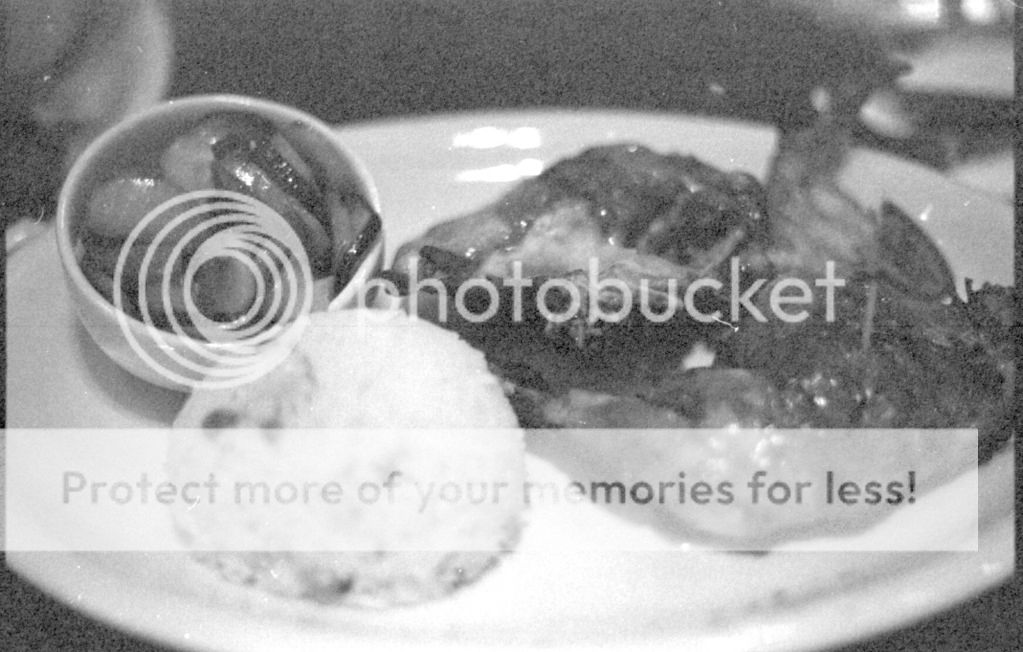
14-2.jpg


1.jpg


I'm getting this type of effect (?) a lot on my photos nowadays. I haven't seen anything like it before. At first I thought it's because of less-than-fresh developer & fixer..so I made sure to mix up new working solutions when I wanted to some developing. Same thing, they still show up. Even with different film types & different developers.

The 1st photo was when it first showed up. That's Arista II in Rodinal 1:49, while the 2nd photo is more recent..that was Ilford Delta 3200 developed in Tetenal Ultrafin 1:10.

They show up mostly in the dark/shadow areas of the photo. Funny thing is, what I noticed is that when this happens, the whole roll will have this defect. But then, when I develop another roll a few days later using the same developer & fixer (same type, but freshly-mixed working solutions), that roll will turn out just fine.

The only films that I have that I haven't seen this happen to yet is Kodak TMax 400, Arista Edu Ultra 100 in 4x5 sheets.

What's wrong? What's causing this? It's driving me nuts! Is this reticulation?
 

hoshisato

Member
Allowing Ads
Joined
Nov 12, 2009
Messages
46
Location
Luxembourg
Format
Multi Format
I had some weird effects quite similar to this when I used a scanner to scan the negatives and forgot to switch off the digital ICE for my black and white negatives. Can you see the effect in the negatives?
 

Dave in Kansas

Member
Allowing Ads
Joined
Jan 8, 2009
Messages
302
Location
Eastern Kans
Format
Multi Format
I've seen similar problems on negatives that were much underexposed. One in particular, was the shadow detail of a white house on a winter day. I realized it was underexposed right after I took the picture, and took a subsequent shot with proper exposure and that one had no such problem. I was only looking a scan of the negative, and never bothered to print the shot that was underexposed, so I don't know how it would look on paper. If I recall, I was using FP-4 developed in Rodinal 1:100.

Dave
 

Jim Noel

Member
Allowing Ads
Joined
Mar 6, 2005
Messages
2,261
Format
Large Format
You are seeing clumps of grain. Are you keeping your processing solutions within a couple of degrees of each other? Is your temperature too high?
Do you use an acidic stop bath? It could be too strong.
 

Gerald C Koch

Member
Allowing Ads
Joined
Jul 12, 2010
Messages
8,131
Location
Southern USA
Format
Multi Format
Some people worry about reticulation but it is very hard to produce even when you want it. There is an exfellent example of it in Haist's Monobath Manual. Many, many years ago it was quite common when emulsions were very soft. But with today's harder emulsions it seldom happens unless something like a high pH monobath is used. It can be produced by subjecting film to a vary large and sudden change in solution temperature or osmotic pressure.

It is hard to tell from your photos without a higher magnification but I would say that you are not experiencing reticulation. Reticulation produces a very distinctive pattern which is not evident in your examples.
 

Worker 11811

Member
Allowing Ads
Joined
Jan 18, 2010
Messages
1,719
Location
Pennsylvania
Format
Multi Format
Some people worry about reticulation but it is very hard to produce even when you want it.

About a year ago, I was acting as darkroom monitor at the college where I work. I decided to soup a couple of rolls of film to pass the time.

I got the water temperature all set up the way I wanted it and let it run into a bucket in the sink. (No thermostatic faucet in this darkroom.)
I was almost done with my batch. All I had to do was rinse and use Photo-Flo but, unbeknownst to me, somebody came along to washed his hands and messed up the water temperature. Not realizing, I filled my tank with HOT water from the faucet. "Oh, S#IT!" I quickly dumped the water out and filled it from the water in the bucket.

I thought I was screwed, for certain, but everything came out all right.

Since then, I have stopped worrying about reticulation so much. I figure the development temperature is still critical (±1ºC) but if my wash temperature varies by a couple of degrees in either direction, it won't hurt.

Thus, I don't think your problem is from reticulation. I think it's over-emphasized grain or clumps of grain that occur during development.

First, regardless of how you develop, the faster the film speed, the more visible grain will be. With 3200 speed film, you will see a lot more grain than you will with 100 or 400.

Also, if you push your film you will likely see more grain, as well.

Development time and temperature will affect grain. Higher temperatures, even if you compensate the developing time, will show increased grain.
Different types/brands of developer can also affect the appearance of grain.

Question: What temperature did you develop at? Was it 20ºC ±1ºC? Did you develop at a higher temperature in order to shorten development time?
It is my understanding that Rodinal is a more aggressive developer, especially when used at higher temperatures. (Correct me if I am wrong.)

Enlarging the image will also enlarge the grain, regardless of how well the film was developed.

My guess is this: 3200 speed film processed in an aggressive developer at a higher than usual temperature then enlarging the image is showing more emphasized grain.

P.S. -- Some photographers do things like this on purpose just to achieve a grainy image. In fact, some digitographers use Photoshop to simulate the effect you are achieveing naturally.

Bottom Line: Call it art. :wink: :wink: :wink:
(Then double check your process temps to be sure.)
 
Last edited by a moderator:

dmschnute

Member
Allowing Ads
Joined
Mar 9, 2009
Messages
23
Format
Large Format
T_W_Image_unk-012.jpg

I would tend to agree with the consensus; this would appear to be grain, rather than reticulation as I see it.

Attached is an image with a rather interesting (and stylish) pattern.

The original is a glass plate dated circa 1914. The pattern seems to follow preferentially specific areas of the image -- dark garment, light garment, the grass, the vine on the corner of the house, the chair back. (Almost looks like a contour map!)

The leech-like streaks at the top are emulsion that has separated from the glass. They appear maximum-black.

I would dearly love to reproduce this; probably not possible with modern materials. I assume that this occurred during development. The leeches probably went to D-max because they were exposed to developer on both sides of the emulsion.

The pattern is distinctly visible in the emulsion. (Quasi Kodachrome) I attempted to scan it, but I can't make it show.

This is part of a collection, some of which also show reticulation. In all other instances, the pattern is the usual regular and uniform.

Someone was having a bad day. Gotta wonder why .....
 

jeffreyg

Subscriber
Allowing Ads
Joined
Jun 12, 2008
Messages
2,770
Location
florida
Format
Medium Format
Have you tried mixing the same chemistry with distilled water? That way you could eliminate the possibility of your water being the cause (or not) of the problem. I don't use any of the products you mentioned but that would be the easiest thing to change first. I have never had reticulation but I use only water as a stop and generally have about a 5 or 6 degree difference between dev and fix.

http://www.jeffreyglasser.com/
 

hrst

Member
Allowing Ads
Joined
May 10, 2007
Messages
1,293
Location
Finland
Format
Multi Format
This is discussed many times, but there is a completely different phenomenon called "microreticulation" or "grain clumping" that looks exactly like grain, without the typical reticulation pattern. Also, it is stated it happens more easily than traditional reticulation, even with modern films.

Some people always deny its existence, but I believe in it because I've seen it myself.

It came with Neopan 400, a film reported to more prone to both traditional reticulation and microreticulation by many, at least when compared to the current range of Kodak and Ilford products. I didn't control the temperatures very well and used a hairdryer to quickly dry the film.

The resulting negs did not have any kind of special pattern. Densities were fine and it looked good and normal EXCEPT THAT those 6x6 frames developed in XTOL, printed at 24cm x 24 cm (10" x 10") looked as grainy as I would normally expect from 35mm frames developed in Rodinal. For a properly exposed 400 speed film in XTOL with a magnification of 4, the grain should not be practically visible, but it was pronounced. Later, I read about microreticulation and decided it has to be the cause.

I'm not claiming this is a case of microreticulation, but it is a possibility.

But to me, those images posted look underexposed, too. There might be two problems going on here at the same time, underexposure being first of them.
 

Denverdad

Member
Allowing Ads
Joined
Apr 20, 2009
Messages
316
Location
Superior, Co
Format
Medium Format
Do the negatives look thin? My first reaction was that this looks like underexposure. But perhaps underdevelopment would look something like this too. Either way, I would expect the negatives to look obviously thin if either of these was going on.

Jeff
 

Newt_on_Swings

Member
Allowing Ads
Joined
Mar 30, 2011
Messages
2,147
Location
NYC
Format
Multi Format
View attachment 52190

I would tend to agree with the consensus; this would appear to be grain, rather than reticulation as I see it.

Attached is an image with a rather interesting (and stylish) pattern.

The original is a glass plate dated circa 1914. The pattern seems to follow preferentially specific areas of the image -- dark garment, light garment, the grass, the vine on the corner of the house, the chair back. (Almost looks like a contour map!)

The leech-like streaks at the top are emulsion that has separated from the glass. They appear maximum-black.

I would dearly love to reproduce this; probably not possible with modern materials. I assume that this occurred during development. The leeches probably went to D-max because they were exposed to developer on both sides of the emulsion.

The pattern is distinctly visible in the emulsion. (Quasi Kodachrome) I attempted to scan it, but I can't make it show.

This is part of a collection, some of which also show reticulation. In all other instances, the pattern is the usual regular and uniform.

Someone was having a bad day. Gotta wonder why .....

That photo is awesome. It's incredibly trippy the longer you look at it. The pattern, the undulations of the wrinkled emulsion, the distortions it causes as it lifts from the glass. I want to try and replicate this.
 
OP
OP

altair

Member
Allowing Ads
Joined
Mar 5, 2009
Messages
392
Location
Kuala Lumpur
Format
Multi Format
Sorry for the late reply everyone, had a real busy day today. Thank you very much for all the replies & inputs. I'll reply to all pertinent questions & comments individually...

I had some weird effects quite similar to this when I used a scanner to scan the negatives and forgot to switch off the digital ICE for my black and white negatives. Can you see the effect in the negatives?

I've checked my scanner (Canon 8800f) and I'm pretty sure I've turned off the ICE all this while. Never used it before & not about to now. I'm using Vuescan to scan my negatives. In Vuescan, I've turned off the 'Infrared Clean' option & 'Grain Reduction' option. I think that pretty much covers it. Thanks anyway for pointing that out!
 
OP
OP

altair

Member
Allowing Ads
Joined
Mar 5, 2009
Messages
392
Location
Kuala Lumpur
Format
Multi Format
I've seen similar problems on negatives that were much underexposed. One in particular, was the shadow detail of a white house on a winter day. I realized it was underexposed right after I took the picture, and took a subsequent shot with proper exposure and that one had no such problem. I was only looking a scan of the negative, and never bothered to print the shot that was underexposed, so I don't know how it would look on paper. If I recall, I was using FP-4 developed in Rodinal 1:100.

Dave

You could be on to something here, Dave. I haven't printed any of the photos that have this type of effect using my enlarger, either...but I'm pretty sure the negatives themselves will be quite hard to print.
 
OP
OP

altair

Member
Allowing Ads
Joined
Mar 5, 2009
Messages
392
Location
Kuala Lumpur
Format
Multi Format
You are seeing clumps of grain. Are you keeping your processing solutions within a couple of degrees of each other? Is your temperature too high?
Do you use an acidic stop bath? It could be too strong.

Clumps of grain...I see. I like grain in the right situation...but why are they clumping?

I'm sorry, I should have been clearer on my development procedure earlier. Here's the deal: I live in Malaysia, right near the equator. It's hot & humid here all year round. So, I process my film at 27-28 degrees Celcius. And that's at night, when it's cooler :smile: I don't bother to store the developer & fixer that I use in the fridge, so both of these working solutions are at room temp (ca. 28C). For process water, I use tap water (at night, this will also be 28C). I don't use a stop bath, I use a water stop (again, tap water). I mix my working solutions from stock chemicals using the same tap water.
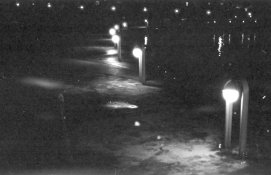
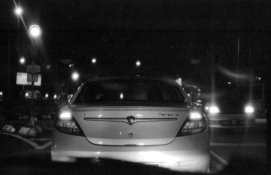
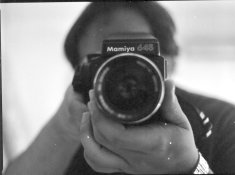
I can't be 100% sure that my tap water isn't 'hard' and I know that processing at such high temperatures is less than ideal, but I've been processing my own film for almost 4 years now (yup, a newbie) and so far things have been working out for me quite well :smile:
 
OP
OP

altair

Member
Allowing Ads
Joined
Mar 5, 2009
Messages
392
Location
Kuala Lumpur
Format
Multi Format
Some people worry about reticulation but it is very hard to produce even when you want it. There is an exfellent example of it in Haist's Monobath Manual. Many, many years ago it was quite common when emulsions were very soft. But with today's harder emulsions it seldom happens unless something like a high pH monobath is used. It can be produced by subjecting film to a vary large and sudden change in solution temperature or osmotic pressure.

It is hard to tell from your photos without a higher magnification but I would say that you are not experiencing reticulation. Reticulation produces a very distinctive pattern which is not evident in your examples.

Thanks for the info, Gerald. After looking at a photo that Ian C showed me last night & also the 'trippy' photo that's attached here in a subsequent post, I agree with you that what I'm getting isn't reticulation either. Clumps of grain or excessive grain is more likely.
 
OP
OP

altair

Member
Allowing Ads
Joined
Mar 5, 2009
Messages
392
Location
Kuala Lumpur
Format
Multi Format
I figure the development temperature is still critical (±1ºC) but if my wash temperature varies by a couple of degrees in either direction, it won't hurt.

Thus, I don't think your problem is from reticulation. I think it's over-emphasized grain or clumps of grain that occur during development.

First, regardless of how you develop, the faster the film speed, the more visible grain will be. With 3200 speed film, you will see a lot more grain than you will with 100 or 400.

Also, if you push your film you will likely see more grain, as well.

Development time and temperature will affect grain. Higher temperatures, even if you compensate the developing time, will show increased grain.
Different types/brands of developer can also affect the appearance of grain.

Question: What temperature did you develop at? Was it 20ºC ±1ºC? Did you develop at a higher temperature in order to shorten development time?
It is my understanding that Rodinal is a more aggressive developer, especially when used at higher temperatures. (Correct me if I am wrong.)

Enlarging the image will also enlarge the grain, regardless of how well the film was developed.

My guess is this: 3200 speed film processed in an aggressive developer at a higher than usual temperature then enlarging the image is showing more emphasized grain.

P.S. -- Some photographers do things like this on purpose just to achieve a grainy image. In fact, some digitographers use Photoshop to simulate the effect you are achieveing naturally.

Bottom Line: Call it art. :wink: :wink: :wink:
(Then double check your process temps to be sure.)

Haha, thank you for the informative yet very entertaining reply, Randy. I'm just an idiot with a camera, hence I wouldn't/couldn't call any of my 'work' as 'art' :smile:

Anyway, for info on my development conditions, see my reply to Jim Noel above. At 27C or 28C, with Tetenal Ultrafin 1:10, I developed that roll of Delta 3200 for 5 minutes, as per the massive dev chart & also Ilford's very own temp-time compensation table. I'd like to add that in addition to not using a 'proper' stop bath, I also don't use Photoflo or any other wetting agent.

The photos I attached earlier weren't pushed. They were exposed at box speed. I know that faster films has more grain, but isn't what I'm getting a bit too excessive even for Delta 3200? Looking at other photos taken with Delta 3200 on Flickr, they're grainy yes..but not as grainy as what I'm getting.

Anyway, below are more photos that has the same 'mottled' effect. This was taken on Ilford Pan 100..a slow film & developed in Ultrafin 1:10. The 2nd photo is also from that same roll of film, but this one appears to be fine. Both were taken in dim light conditions. Puzzling?

33.jpg

29-2.jpg
 
Last edited by a moderator:
OP
OP

altair

Member
Allowing Ads
Joined
Mar 5, 2009
Messages
392
Location
Kuala Lumpur
Format
Multi Format
View attachment 52190

I would tend to agree with the consensus; this would appear to be grain, rather than reticulation as I see it.

Attached is an image with a rather interesting (and stylish) pattern.

The original is a glass plate dated circa 1914. The pattern seems to follow preferentially specific areas of the image -- dark garment, light garment, the grass, the vine on the corner of the house, the chair back. (Almost looks like a contour map!)

The leech-like streaks at the top are emulsion that has separated from the glass. They appear maximum-black.

I would dearly love to reproduce this; probably not possible with modern materials. I assume that this occurred during development. The leeches probably went to D-max because they were exposed to developer on both sides of the emulsion.

The pattern is distinctly visible in the emulsion. (Quasi Kodachrome) I attempted to scan it, but I can't make it show.

This is part of a collection, some of which also show reticulation. In all other instances, the pattern is the usual regular and uniform.

Someone was having a bad day. Gotta wonder why .....

Thanks for showing us this photo. I agree, this pattern is extreme & very very interesting. It's kinda trippy as well :smile:
 
OP
OP

altair

Member
Allowing Ads
Joined
Mar 5, 2009
Messages
392
Location
Kuala Lumpur
Format
Multi Format
Have you tried mixing the same chemistry with distilled water? That way you could eliminate the possibility of your water being the cause (or not) of the problem. I don't use any of the products you mentioned but that would be the easiest thing to change first. I have never had reticulation but I use only water as a stop and generally have about a 5 or 6 degree difference between dev and fix.

http://www.jeffreyglasser.com/

Hi Jeff. Yes, after some time of getting this 'mottled' look to my photos periodically, I decided to do a test. I mixed my working solutions using bottled drinking water I bought at a store. While it's not the same as distilled water, it's the next best thing to it. As I recall, the roll that I developed using that working solution had the 'mottled' effect as well. So, I think we can cancel out my tap water as the culprit, although I can't be 100% sure.
 
OP
OP

altair

Member
Allowing Ads
Joined
Mar 5, 2009
Messages
392
Location
Kuala Lumpur
Format
Multi Format
This is discussed many times, but there is a completely different phenomenon called "microreticulation" or "grain clumping" that looks exactly like grain, without the typical reticulation pattern. Also, it is stated it happens more easily than traditional reticulation, even with modern films.

Some people always deny its existence, but I believe in it because I've seen it myself.

It came with Neopan 400, a film reported to more prone to both traditional reticulation and microreticulation by many, at least when compared to the current range of Kodak and Ilford products. I didn't control the temperatures very well and used a hairdryer to quickly dry the film.

The resulting negs did not have any kind of special pattern. Densities were fine and it looked good and normal EXCEPT THAT those 6x6 frames developed in XTOL, printed at 24cm x 24 cm (10" x 10") looked as grainy as I would normally expect from 35mm frames developed in Rodinal. For a properly exposed 400 speed film in XTOL with a magnification of 4, the grain should not be practically visible, but it was pronounced. Later, I read about microreticulation and decided it has to be the cause.

I'm not claiming this is a case of microreticulation, but it is a possibility.

But to me, those images posted look underexposed, too. There might be two problems going on here at the same time, underexposure being first of them.

Thank you for the information on microreticulation. Although I haven't heard of it myself, it is a probable cause. You mentioned that you didn't control the temperature very well...how far a temp difference was it? And at 10"x10", the grain looked very pronounce, you said. Did you scan those negatives? If you did, how did they look then? Or did you make a smaller enlargement?

Below are 2 photos that I took using Neopan 400 that exhibits the same effect. It is more evident in the 1st photo. In the 2nd photo, even though the effect is still present, it is less pronounced. These two were from the same roll of Neopan 400, souped in Ultrafin 1:10.

5.jpg

7.jpg
 
OP
OP

altair

Member
Allowing Ads
Joined
Mar 5, 2009
Messages
392
Location
Kuala Lumpur
Format
Multi Format
Do the negatives look thin? My first reaction was that this looks like underexposure. But perhaps underdevelopment would look something like this too. Either way, I would expect the negatives to look obviously thin if either of these was going on.

Jeff

Jeff, looking back at the negatives that had this effect, all of them look rather thin. Not dense at all. However, the film rebate markings are pretty clear & distinct. I have developed several rolls of the same type of film (Neopan, Ilford Pan 100, LegacyPro 400) using the same developer under the same conditions for the same amount of time, and yet they look fine. Can this effect be attributed to underdevelopment then?

Underexposure is a bit more tricky to be certain of. I use a multitude of cameras, and although some of them has had a CLA & some haven't, and I haven't taken a shutter tester to any of them, judging by ear I'd say their shutter speeds sound pretty much right. As for metering, I use the camera meter sometimes, but I tend to use a handheld Gossen/Minolta light meter a lot more, and although I don't claim to be a master at it, I can say with some degree of certainty that my exposure readings & subsequent settings are in the ballpark.

I do tend to take a lot of photos under poor lighting, but more than a few are taken outdoors under very bright sun. Below is an example, taken on Arista II under sunny 16 conditions. I'd be hard pressed to say that I underexposed this shot.

4.jpg

Another example, taken in a room but next to a window that was streaming in midday sun. The effect is still there, but less pronounced. Also from the same roll of Arista II.

35.jpg

That being said, two things are for sure though. The negatives that exhibit this mottled look are thinner than what is considered normal. So the question now is, why are the negatives thin? Either underdevelopment or underexposure, correct?

And..we've pretty much established that this isn't reticulation. It could be microreticulation. It could be excessive grain or grain-clumping. Why does this happen?

This has got me baffled & flustered.
 

Ian Grant

Subscriber
Allowing Ads
Joined
Aug 2, 2004
Messages
23,418
Location
West Midland
Format
Multi Format
This is discussed many times, but there is a completely different phenomenon called "microreticulation" or "grain clumping" that looks exactly like grain, without the typical reticulation pattern. Also, it is stated it happens more easily than traditional reticulation, even with modern films.

Some people always deny its existence, but I believe in it because I've seen it myself.

It's the term micro reticlation they won't accept :D

There's no doubt of the existance of micro/surface reticulation, it's why Ctein wet mounts his negatives against glass for printing and why high end scans are wet mounted as well, something that was first done in the 1920's to reduce the grain in enlargements from 35mm film. It's not "Grain clumping" in the film though it's the effect of irregularities on the surface of the filmcausing increased ggraininess in prints and particularly scans where it shows up more.

Gerald Koch is right that true reticulation is almost impossible to induce with most modern films and newer hardening techniques have made micro/surface reticulation a thing of the past with many films. Neopan 400 and the older Tmax 400 can suffer this surface effect which became a problen with the advent of the firts digital minilabs prints made with the films of the time were grainier than optical prints. Kodak improved many of their films and the new datasheets & press releases state the films have been improved for scanning.

However there are other exceptions and films from some smaller manufaturers like Foma and particularly EFKE have less hardening. EFKE films will reticulate and even slide off the base.

Rodinal in particular can increase the likelyhood of micro/surface reticulation because of the free hydroxide it contains, most cases with Neopna 400 that people have reorted have been with Rodinal.

It's not the film/developer combination itself that's the cause it's poor temperature control throughout the entire process cycle.

Ian
 

jeffreyg

Subscriber
Allowing Ads
Joined
Jun 12, 2008
Messages
2,770
Location
florida
Format
Medium Format
For what it is worth and if it is any help... I once accidentally mixed a stock solution of ID11 as if it had come a package for 5 liters but was actually for 1 liter and then developed a roll of 120 Delta 400 at 1:1. Needlessly to say it was grossly under developed. I chose to first scan and see what might be salvageable and what I might have to do in the darkroom to get some kind of decent print but none of the negatives exhibited what you are discussing. (they didn't exhibit too much of anything else either)

My best advice is to use what works and avoid the film/developer combination that caused the problem.

http://www.jeffreyglasser.com/
 

ath

Member
Allowing Ads
Joined
Aug 29, 2006
Messages
844
Location
Germany
Format
35mm
To me the pictures look simply underexposed. The hightlights fooled the meter and the scanner tries to extract shadow detail where no detail is, hence the grey blacks and the exaggerated "grain".
Are the shadows blank on the neg? How's the contrast? Have you done wet prints?
 
OP
OP

altair

Member
Allowing Ads
Joined
Mar 5, 2009
Messages
392
Location
Kuala Lumpur
Format
Multi Format
Ian Grant: Thanks for the helpful reply & information there, Ian. For what it's worth, I have used Rodinal quite a lot in the past year and even with the poor temperature control that I apply throughout my processing steps, I haven't been able to produce any reticulation. I even developed a roll of Efke R25 once, in Rodinal at 28C. It came out pretty decent. Although I have heard that Efke & Foma are more prone to scratching...I can definitely verify that for 4x5 Fomapan 100. Would hate to see my film emulsion sliding off the base!

jeffreyg: I get what you're saying. Looking back at my archives, I have shot many many underexposed photos before. I must have underdeveloped some as well. Were the negatives thin? Yes. But none of them exhibited the mottling effects that I showed in the pictures here. Citing your example, that roll of Delta 400 must have been grossly underdeveloped. I am becoming more & more convinced that this isn't a matter of underexposure. Probably underdevelopment or film/developer combinations. Thanks for the advice.

ath: Thank you for your input. I've scanned underexposed photos on the same scanner before this, and none of them had the grey blacks & the exaggerated grain. That's what's puzzling me. the shadows on the neg are almost or completely blank, from what I can see. The contrast is very low throughout the entire roll that had this effect. I haven't done any wet prints from the rolls of film that has this problem.
 

ath

Member
Allowing Ads
Joined
Aug 29, 2006
Messages
844
Location
Germany
Format
35mm
If the blank part of the film is rendered grey or black is a matter of setting up your scan correct. Your problem is underexposure and underdevelopment.
Expose the next film one stop more and develop more.
 
Photrio.com contains affiliate links to products. We may receive a commission for purchases made through these links.
To read our full affiliate disclosure statement please click Here.

PHOTRIO PARTNERS EQUALLY FUNDING OUR COMMUNITY:


Ilford ADOX Freestyle Photographic Stearman Press Weldon Color Lab Blue Moon Camera & Machine
Top Bottom