• Welcome to Photrio!
    Registration is fast and free. Join today to unlock search, see fewer ads, and access all forum features.
    Click here to sign up

Some darkroom questions

Amour - Paris

A
Amour - Paris

  • 0
  • 0
  • 37
Bend in the river

H
Bend in the river

  • 2
  • 0
  • 55

Recent Classifieds

Forum statistics

Threads
203,235
Messages
2,851,836
Members
101,738
Latest member
parkeradam
Recent bookmarks
2

Krzys

Member
Allowing Ads
Joined
May 28, 2009
Messages
505
Location
Brisbane, QL
Format
35mm
I am starting to get into active darkroom printing with the goal of abandoning the crutch of scanning negatives all together. So far I have only gone by small snippets of information and how-to articles on printing so some questions are springing up.

I am using Multigrade RC paper.

How long can prints sit in stop? I often see videos of two trays, one developer the other stopbath and many developed prints sitting in the second tray together.

Should I use running water to wash the paper, or submerge it and change the water often? How long should they be washed for?

Can I use photoflo and a squeegee to avoid watermarks?

How can I avoid uneven development in the first few seconds the print enters the developer? I seem to have some troubles getting it to slide in there evenly and quickly.
 
Last edited by a moderator:
For RC paper:

60 seconds continuous agitation in the fixer, diluted 1+9. then out and into the wash.

running water wash for 90 to 120 seconds.

For RC I haven't found the need for a squeegee.

A tray slightly bigger than the print size (e.g. 8x10 paper in 10x12 tray) can help with consistency issues.

Try:

60 seconds development, 30 seconds stop (you can use less, 15 is probably fine), 60 seconds fix, 120 seconds wash.
 
  • Deleted member 2924
  • Deleted
How long can prints sit in stop? I often see videos of two trays, one developer the other stopbath and many developed prints sitting in the second tray together.

That is one thing, I've never tested. I can only assume that it is no harm, but consider the maximum wet time for RC prints of about 10 minutes after which the edges start to curl up and delaminate from the paper base.

Should I use running water to wash the paper, or submerge it and change the water often? How long should they be washed for?

I wash my RC prints for about 3 minutes in running water. I would not wash for less than 2 minutes. Frequent water exchanges work but are a hassle in my eyes, because they need constant attention.

Can I use photoflo and a squeegee to avoid watermarks?

No need for photoflo. A clean squeegee works great! Don't try that on film though.

How can I avoid uneven development in the first few seconds the print enters the developer? I seem to have some troubles getting it to slide in there evenly and quickly.

Don't slide the paper into the developing tray! This is the main cause of print damage. Just put it gently on top the liquid surface and rock the tray (also gently) until the paper is submerged. Develop in the rocking tray for 90 seconds and (gently again) pick the print up at one corner to lift it (yes, very slowly and very gently, there is no need to rush this) to let the developer drip off for a bout 15 seconds.
 
When fixing a print at 20 degrees Celsius*, 60 seconds is what it takes to fix them (RC paper). It won't hurt if they're left a bit more, but there's absolutely no reason to leave them there. Put them in a "holding" tray filled with water. When you have accumulated enough prints you can wash them together. I usually do a vigorous but short wash at the beginning to remove most of the fixer and then set a low flow and shuffle the prints/agitate for 2 minutes. That should be enough for RC. Actually, since they were in a water bath, my method is probably a bit too much.

Yes, you can use Photoflo, but I have never experienced any watermarks. My tap water must be hardish. I just hang them with clothespins.

Don't worry about uneven development. At about 10 seconds the image will start to appear. It will look uneven but keep rocking the tray and soon it will be even.

* You need less time for higher temperatures, although I can't tell what's safe.
 
I always hang my print after washing at one side so that the water moves to one point. I never saw any form of visible leftovers.

After washing the print softly move your hand in the water over the print to move any left thingies on both side of the print.
 
Don't worry about uneven development. At about 10 seconds the image will start to appear. It will look uneven but keep rocking the tray and soon it will be even.

I do not agree (sorry) with you about this.
When a print has been inserted into the developer and it takes to long before it is whole under water there is a difference in development afterwards. It is possible that you do not see it immediately, but if you put the dry print onto a lightbox which allows to look a little bit through the print, you will see a difference between the primary and whole development area. Even in the darkest area you will se a difference.
 
I do not agree (sorry) with you about this.
When a print has been inserted into the developer and it takes to long before it is whole under water there is a difference in development afterwards. It is possible that you do not see it immediately, but if you put the dry print onto a lightbox which allows to look a little bit through the print, you will see a difference between the primary and whole development area. Even in the darkest area you will se a difference.

FWIW, I use Ralph's method. I just place the print on top of the liquid and agitate gently. I doesn't take long to be submerged, but inevitably, the edges will be the first to soak in developer. Consequently, the edges start developing first, but if paper is left long enough in the developer the print is evenly developed. I haven't seen any uneven development yet, regardless of the paper type.

Just my 2c.
 
FWIW, I use Ralph's method. I just place the print on top of the liquid and agitate gently. I doesn't take long to be submerged, but inevitably, the edges will be the first to soak in developer. Consequently, the edges start developing first, but if paper is left long enough in the developer the print is evenly developed. I haven't seen any uneven development yet, regardless of the paper type.

Just my 2c.

Mostly the edges are cut off anyway. so this would not be a problem. But if there is more developer towards the center and you start moving the tray after 5 seconds it is visible with a light box afterwards.
 
Willie, I haven't gone as far as inspecting prints on a light box, but even test strips made with clear film base don't show kind of uneven development. If it's there, I surely can't see it. In any case, it's not meant to be viewed that way, so why worry that much?

One last thing: When I start agitating the dev tray, I lift one side quite high and then lower it quickly (and carefully). This sends a wave across the paper, submerging it almost immediately. I do so 2-3 times and then continue gently.
 
Surely if a print is developed to completion, it doesn't matter about an un-even start in the developer.


Steve.
 
As far as developing, stop, and fixing times, since you are just starting out, I'd follow the instructions on the bottle. I use Ilford Multigrade developer, stop, and rapid fixer. They tell you how long to keep things in. I leave them to wash in a tray with a siphon attached for about 3 mins, then hang them up by one corner. You should have no problems with water marks or drying with Ilford RC papers. Sometimes it helps to take a paper towel and touch the corner where the water collects a couple minutes after you hung them up.

Anonymous's technique for initial print insertion is what I do.
 
Slide the print into the developer, lightly tap corners down with soft-tipped tongs agitate so developer is flowing back and forth over the print. * The trays should be the next size larger than the paper. Drain the developer off the print before placing in the acid stop - 30seconds for fiber based paper (I don't use RC). Two fix baths (three minutes each). Selenium toner mixed with hypo-clear until desired tone is achieved - I look for a slight shift in the middle grays. Then 3 to 4 minutes in hypo-clear with no toner and then wash for at least 30 minutes, preferably more - I have a compartmented print washer so water is flowing over the prints. Squeegee with a print squeegee with print on a sheet of acrylic and then let air dry face up on screens.
*If you are doing a lot of prints in one session remember that the developer becomes gradually weaker and more time or fresh developer may be needed.
 
I do not agree (sorry) with you about this.
When a print has been inserted into the developer and it takes to long before it is whole under water there is a difference in development afterwards. It is possible that you do not see it immediately, but if you put the dry print onto a lightbox which allows to look a little bit through the print, you will see a difference between the primary and whole development area. Even in the darkest area you will se a difference.

True, and it proves that there is no such thing as 'developing to completion'.
 
Surely if a print is developed to completion, it doesn't matter about an un-even start in the developer.


Steve.

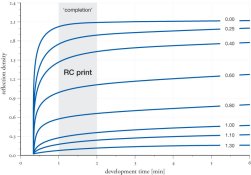
There is no such thing as developing to completion. The development continues in the midtones and highlights beyond the 90 to 120 seconds which are usually quoted as the limit for RC development. Please see the attached graph. Shadows develop to completion, the rest does not for a long time.
 

Attachments

  • FactorialDev_AMCP-RC.jpg
    FactorialDev_AMCP-RC.jpg
    61.8 KB · Views: 129
Willie, I haven't gone as far as inspecting prints on a light box, but even test strips made with clear film base don't show kind of uneven development. If it's there, I surely can't see it. In any case, it's not meant to be viewed that way, so why worry that much?

One last thing: When I start agitating the dev tray, I lift one side quite high and then lower it quickly (and carefully). This sends a wave across the paper, submerging it almost immediately. I do so 2-3 times and then continue gently.

That's my experience too. A couple of seconds in development make no visible difference.
 
[
I am using Multigrade RC paper.

How long can prints sit in stop?
Should I use running water to wash the paper, or submerge it and change the water often? How long should they be washed for?
*******
When I printed for a studio doing convention photography, we agitated the prints well when going in the stop bath; then left them until we fixed them. Sometimes they would be in the stop for several hours, since we fixed prints usually before stopping for lunch. That, however, was fiber-based paper, not the plastic-coated stuff.

Can I use photoflo and a squeegee to avoid watermarks?
********
Photoflo can help with that wretched plastic stuff; hang them by one corner with a closepin from a line.

How can I avoid uneven development in the first few seconds the print enters the developer? I seem to have some troubles getting it to slide in there evenly and quickly.[/QUOTE]
*******
Keep practicing. Like loading ss reels, once you get the knack, there will be no trouble doing it reflexively. And ignore advice about just plunking the prints in and pushing them under, especially with developer-incorporated emulsions. A smooth slide is the way to go.
 
Slide the print into the developer, lightly tap corners down with soft-tipped tongs agitate so developer is flowing back and forth over the print. * The trays should be the next size larger than the paper. Drain the developer off the print before placing in the acid stop - 30seconds for fiber based paper (I don't use RC). Two fix baths (three minutes each). Selenium toner mixed with hypo-clear until desired tone is achieved - I look for a slight shift in the middle grays. Then 3 to 4 minutes in hypo-clear with no toner and then wash for at least 30 minutes, preferably more - I have a compartmented print washer so water is flowing over the prints. Squeegee with a print squeegee with print on a sheet of acrylic and then let air dry face up on screens.
*If you are doing a lot of prints in one session remember that the developer becomes gradually weaker and more time or fresh developer may be needed.


There are a couple of things, I like to add to this::

1. Do not tap on the print with anything. It is unnecessary and only causes print damage. Rocking the tray with submerge the print within seconds, and there is no gentler method.

2. Do not drain the print for too long. 30 seconds might be just OK, but I'd say, 10-15 seconds is a safer bet. The reason is uneven development. As stated already above, more than a few seconds make a visible difference and a 30-second drain can show a clear drain track of developer from the top corner to the bottom.

3. The two-bath fixing method is a good recommendation, but 3 minutes each is too long, even with FB. It's more like 1 and 2 minutes each with RC and FB, respectively. It's better to use film-strength fixer short, than paper-strength fixer for long.

4. Your washing time is perfect for FB, RC needs much less washing and actually suffers from overwashing. 2 to 4 minutes is usually enough.

I'm not sure about mixing selenium toner with hypo-clear. Selenium toner has hypo in it, but if you use hypo-clear afterwards anyway? Also, it prevents you from sequential toning (selenium followed by sulfite) because the hypo-clear conflicts with the sulfide toner, acting as a toner stop bath.

If only one toner can be used, sulfide is preferred over selenium if archival toning is more important than aesthetic toning.
 
I can tell you that I've had RC prints obviously bleached by being lazy and letting them sit in fixer or in rinse tray that had too much residual fixer in it. Nowadays I usually just let it sit 1 minute in fixer, move to a holding tray, then dump them in a bucket full of water when they stack up in the holding tray.

They usually dry easily within 20-30 minutes in my film drying cabinet - but if just air, it's only a few hours. RC prints are pretty durable - perhaps too durable.

That is one thing, I've never tested. I can only assume that it is no harm, but consider the maximum wet time for RC prints of about 10 minutes after which the edges start to curl up and delaminate from the paper base.

Ralph, I can tell you that I've never seen this happen - even with letting RC prints sit in water for hours. Perhaps it's the paper I'm using (mainly Ilford and Agfa MCP).
 
I can tell you that I've had RC prints obviously bleached by being lazy and letting them sit in fixer or in rinse tray that had too much residual fixer in it. Nowadays I usually just let it sit 1 minute in fixer, move to a holding tray, then dump them in a bucket full of water when they stack up in the holding tray.

They usually dry easily within 20-30 minutes in my film drying cabinet - but if just air, it's only a few hours. RC prints are pretty durable - perhaps too durable.


Ralph, I can tell you that I've never seen this happen - even with letting RC prints sit in water for hours. Perhaps it's the paper I'm using (mainly Ilford and Agfa MCP).


Oh yes, happens with all RC papers I've ever used. I think it's pretty well documented too. There is a maximum wet time for RC papers because of it. It's not the the PE layer totally delaminates from the paper base, but the edges curl up and the print needs to be trimmed.

Steve Anchell also mentions it in his well-written book:

The variable contrast printing manual - Google Books Result
by Stephen G. Anchell - 1997 - Photography - 193 pages
The result of edge penetration is delamination of the resin coating. ... have reduced the wet time of RC paper. However, delamination will still occur if ...
http://books.google.com/books?id=Pb...=onepage&q=RC paper edge delamination&f=false
 
Surely if a print is developed to completion,
it doesn't matter about an un-even
start in the developer. Steve.

Surely. Most prints though are pull processed.
Completion is the subjectively determined point
at which the print has been in the developer
long enough. Dan
 
...

How long can prints sit in stop? I often see videos of two trays, one developer the other stopbath and many developed prints sitting in the second tray together.

Should I use running water to wash the paper, or submerge it and change the water often? How long should they be washed for?

Can I use photoflo and a squeegee to avoid watermarks?

How can I avoid uneven development in the first few seconds the print enters the developer? I seem to have some troubles getting it to slide in there evenly and quickly.

1. Prints can sit in the stop for a very long time. The stuff is only weakly acid and mostly water. You only need a few seconds in the stop to stop development and rinse the developer off, but it will not harm the print if it sits for five minutes or so.

2. There are a lot of ways to wash prints. Running water is usually the most convenient, but a series of rinses, allowing the paper to soak a minute or so in each one, also works just fine. RC paper washes out quite quickly. Most texts recommend 20 minutes in running water for batches, but it depends a bit on temperature, water flow, agitation, and a bunch of other things. I use an archival print washer, and I generally wash the prints for a half an hour in summer and up to an hour in the winter when the water is cold. This is condiered to be a bit long for RC paper, but I haven't had any problem with the paper coming apart at the edges. Color paper is similar to RC black and white, although less critical about residual hypo. Typical instructions for it are six 30 second rinses at 100F. I've used eight for black and white without a problem. If in doubt, treating the prints in hypo clearing agent before washing helps to ensure that they are washed well.

3. Uneven development is usually not a problem. Print development goes pretty well to completion, and minor changes will usually be wiped out during the process. The main things are to immerse the print in the developer quickly and evenly and to provide constant agitation during development.
 
Photrio.com contains affiliate links to products. We may receive a commission for purchases made through these links.
To read our full affiliate disclosure statement please click Here.

PHOTRIO PARTNERS EQUALLY FUNDING OUR COMMUNITY:


Ilford ADOX Freestyle Photographic Stearman Press Weldon Color Lab Blue Moon Camera & Machine
Top Bottom